

Today, I am sharing how to perform CRUD operations using React, Nodejs, Express, and MongoDB. it's really interesting to create applications using React, Node.js, and MongoDB. This article goes step by step.
Introduction
In this article, we will create a demo project using React for Front-end, Node.js and Express for middle-end, and MongoDB for the back-end. Below is information in brief about React, Nodejs, Express, and MongoDB.
- React is a front-end library developed by Facebook. It's used for handling front end for web and mobile apps. ReactJS allows us to create reusable UI components.
- Node is an open-source server framework.It is used to develop I/O intensive web applications like video streaming sites, single-page applications, and other web applications.
- Express is a web framework for Node.js. It is fast, robust, and asynchronous in nature.
- MongoDB is a No SQL database. It is an open-source, cross-platform, document-oriented database written in C++.
Prerequisites
- Basic Knowledge of Nodejs API’S.
- Basic Knowledge of Mongodb Query and mongoose.
- Basic Knowledge of Ajax, JSON.
Requirement
Node,Mongodb,React js,Any IDE for mongodb,VScode ,Any command prompt (i suggest Git Bash) etc.
Here is the Step by Step write code.
Step 1
Create New Folder, ReactCRUD, if you use git then right-click folder then GIT Bash runs command npm init. If you use cmd you navigate to your folder after running this command.
- npm init
Step 2
One by one put answers by cmd: your project name, keyword, entry point etc. After creating your package.json file code like this.
- {
- "name": "reactcrud",
- "version": "1.0.0",
- "description": "reactCrud",
- "main": "server.js",
- "scripts": {
- "test": "react"
- },
- "keywords": [
- "React"
- ],
- "author": "puneet kankar",
- "license": "MIT"
- }
Step 3
Add manual dependencies or one by one in our package.json express,mongoose,morgan,body-parser etc.
- {
- "name": "reactcrud",
- "version": "1.0.0",
- "description": "reactCrud",
- "main": "server.js",
- "scripts": {
- "test": "react"
- },
- "keywords": [
- "React"
- ],
- "author": "puneet kankar",
- "license": "MIT",
- "dependencies": {
- "body-parser": "^1.17.2",
- "express": "^4.15.3",
- "mongoose": "^4.10.2",
- "morgan": "^1.8.2"
- }
- }
Step 4
Run npm install command . If you went one by one add dependencies run these commands one by one.
- // when you add manual dependencies in package.json
- npm init
- //or
- // when you not add dependencies in package.json
- npm install body-parser
- npm install express
- npm install mongoose
- npm install morgan
Step 5
We Create config.js file on root directory for Mongodb database connection.We write code like this. In this code we require mongoose driver for connection to database.
- var mongo = require("mongoose");
- var db =
- mongo.connect("mongodb://192.168.1.71:27017/reactcrud", function(err, response){
- if(err){ console.log('Failed to connect to ' + db); }
- else{ console.log('Connected to ' + db, ' + ', response); }
- });
- module.exports =db;
- // reactcrud is database name
- // 192.168.1.71:27017 is your mongo server name
Step 6
We Create server.js file on root directory for writing nodejs apis for our Create ,Insert,Delete,Update. Give port number for application and run on server. In this file we write the code for all required dependancies and create schema of our database collection document and write code for api's for performing operation.
- var express = require("express");
- var path = require("path");
- var mongo = require("mongoose");
- var bodyParser = require('body-parser');
- var morgan = require("morgan");
- var db = require("./config.js");
- var app = express();
- var port = process.env.port || 7777;
- var srcpath =path.join(__dirname,'/public') ;
- app.use(express.static('public'));
- app.use(bodyParser.json({limit:'5mb'}));
- app.use(bodyParser.urlencoded({extended:true, limit:'5mb'}));
- var mongoose = require('mongoose');
- var Schema = mongoose.Schema;
- var studentSchema = new Schema({
- name: { type: String },
- address: { type: String },
- email: { type: String },
- contact: { type: String },
- },{ versionKey: false });
- var model = mongoose.model('student', studentSchema, 'student');
- //api for get data from database
- app.get("/api/getdata",function(req,res){
- model.find({},function(err,data){
- if(err){
- res.send(err);
- }
- else{
- res.send(data);
- }
- });
- })
- //api for Delete data from database
- app.post("/api/Removedata",function(req,res){
- model.remove({ _id: req.body.id }, function(err) {
- if(err){
- res.send(err);
- }
- else{
- res.send({data:"Record has been Deleted..!!"});
- }
- });
- })
- //api for Update data from database
- app.post("/api/Updatedata",function(req,res){
- model.findByIdAndUpdate(req.body.id, { name: req.body.name, address: req.body.address, contact: req.body.contact,email:req.body.email },
- function(err) {
- if (err) {
- res.send(err);
- return;
- }
- res.send({data:"Record has been Updated..!!"});
- });
- })
- //api for Insert data from database
- app.post("/api/savedata",function(req,res){
- var mod = new model(req.body);
- mod.save(function(err,data){
- if(err){
- res.send(err);
- }
- else{
- res.send({data:"Record has been Inserted..!!"});
- }
- });
- })
- // call by default index.html page
- app.get("*",function(req,res){
- res.sendFile(srcpath +'/index.html');
- })
- //server stat on given port
- app.listen(port,function(){
- console.log("server start on port"+ port);
- })
Step 7
We create new public folder. Inside this folder create new HTML file with name index.html. We include react js ,react-dom ,babel,bootstrap CSS,jquery link as we require in our application.
- <!DOCTYPE HTML>
- <html>
- <head>
- <meta charset="utf-8">
- <title>React CRUD</title>
- <script src="https://fb.me/react-15.0.1.js"></script>
- <script src="https://fb.me/react-dom-15.0.1.js"></script>
- <script src="https://cdnjs.cloudflare.com/ajax/libs/babel-core/5.8.23/browser.min.js"></script>
- <link rel="stylesheet" href="https://maxcdn.bootstrapcdn.com/bootstrap/3.3.7/css/bootstrap.min.css">
- <script src="https://ajax.googleapis.com/ajax/libs/jquery/3.2.1/jquery.min.js"></script>
- </head>
- <body>
- <div id='root'></div>
- <script type="text/babel" src="./ReactCrud.jsx" >
- </script>
- </body>
- </html>
Step 8
We create ReactCrud.jsx file for create component with the name StudentAll. Here we write code for insert , select, update, delete operation API calling code.
- var StudentAll = React.createClass({
- getInitialState: function () {
- return { name: '' ,address: '',email:'',contact:'',id:'',Buttontxt:'Save', data1: []};
- },
- handleChange: function(e) {
- this.setState({[e.target.name]: e.target.value});
- },
- componentDidMount() {
- $.ajax({
- url: "api/getdata",
- type: "GET",
- dataType: 'json',
- ContentType: 'application/json',
- success: function(data) {
- this.setState({data1: data});
- }.bind(this),
- error: function(jqXHR) {
- console.log(jqXHR);
- }.bind(this)
- });
- },
- DeleteData(id){
- var studentDelete = {
- 'id': id
- };
- $.ajax({
- url: "/api/Removedata/",
- dataType: 'json',
- type: 'POST',
- data: studentDelete,
- success: function(data) {
- alert(data.data);
- this.componentDidMount();
- }.bind(this),
- error: function(xhr, status, err) {
- alert(err);
- }.bind(this),
- });
- },
- EditData(item){
- this.setState({name: item.name,address:item.address,contact:item.contact,email:item.email,id:item._id,Buttontxt:'Update'});
- },
- handleClick: function() {
- var Url="";
- if(this.state.Buttontxt=="Save"){
- Url="/api/savedata";
- }
- else{
- Url="/api/Updatedata";
- }
- var studentdata = {
- 'name': this.state.name,
- 'address':this.state.address,
- 'email':this.state.email,
- 'contact':this.state.contact,
- 'id':this.state.id,
- }
- $.ajax({
- url: Url,
- dataType: 'json',
- type: 'POST',
- data: studentdata,
- success: function(data) {
- alert(data.data);
- this.setState(this.getInitialState());
- this.componentDidMount();
- }.bind(this),
- error: function(xhr, status, err) {
- alert(err);
- }.bind(this)
- });
- },
- render: function() {
- return (
- <div className="container" style={{marginTop:'50px'}}>
- <p className="text-center" style={{fontSize:'25px'}}><b> CRUD Opration Using React,Nodejs,Express,MongoDB</b></p>
- <form>
- <div className="col-sm-12 col-md-12" style={{marginLeft:'400px'}}>
- <table className="table-bordered">
- <tbody>
- <tr>
- <td><b>Name</b></td>
- <td>
- <input className="form-control" type="text" value={this.state.name} name="name" onChange={ this.handleChange } />
- <input type="hidden" value={this.state.id} name="id" />
- </td>
- </tr>
- <tr>
- <td><b>Address</b></td>
- <td>
- <input type="text" className="form-control" value={this.state.address} name="address" onChange={ this.handleChange } />
- </td>
- </tr>
- <tr>
- <td><b>Email</b></td>
- <td>
- <input type="text" className="form-control" value={this.state.email} name="email" onChange={ this.handleChange } />
- </td>
- </tr>
- <tr>
- <td><b>Contact</b></td>
- <td>
- <input type="text" className="form-control" value={this.state.contact} name="contact" onChange={ this.handleChange } />
- </td>
- </tr>
- <tr>
- <td></td>
- <td>
- <input className="btn btn-primary" type="button" value={this.state.Buttontxt} onClick={this.handleClick} />
- </td>
- </tr>
- </tbody>
- </table>
- </div>
- <div className="col-sm-12 col-md-12 " style={{marginTop:'50px',marginLeft:'300px'}} >
- <table className="table-bordered"><tbody>
- <tr><th><b>S.No</b></th><th><b>NAME</b></th><th><b>ADDRESS</b></th><th><b>EMAIL</b></th><th><b>CONTACT</b></th><th><b>Edit</b></th><th><b>Delete</b></th></tr>
- {this.state.data1.map((item, index) => (
- <tr key={index}>
- <td>{index+1}</td>
- <td>{item.name}</td>
- <td>{item.address}</td>
- <td>{item.email}</td>
- <td>{item.contact}</td>
- <td>
- <button type="button" className="btn btn-success" onClick={(e) => {this.EditData(item)}}>Edit</button>
- </td>
- <td>
- <button type="button" className="btn btn-info" onClick={(e) => {this.DeleteData(item._id)}}>Delete</button>
- </td>
- </tr>
- ))}
- </tbody>
- </table>
- </div>
- </form>
- </div>
- );
- }
- });
- ReactDOM.render(<StudentAll />, document.getElementById('root'))
Step 9
We are almost finished with all the required tasks. We are going to command prompt run node server.js or if you are installing morgan then use nodemon server.
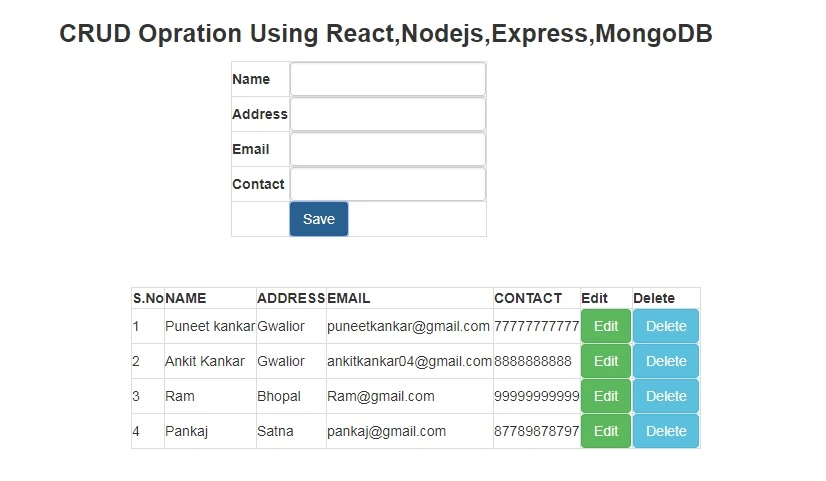
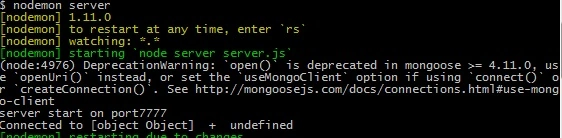 We will go and browse our application on given port number 7777 in our server.js file so we run this URL http://localhost:7777/ our output display looks like below image.
Step 10
Shahroz KhanPosted Jul 17, 2020, 1:44 PM
Hi puneet i have been connected with mongodb in azure after that run with npm and insert the data in the fields when i click on submit button "Not Found" alert is showing. I am not able to find the root cause. could you please help me?
Alejandro Santibañez ArmijoPosted Apr 13, 2020, 11:07 AM
Thank you brothers i am learn react js and It is all step by step
bharath kumarPosted Feb 18, 2019, 7:24 AM
hi puneet i get this error when i start npm plz help me out to fix this error : TypeError: studentSchema is not a constructor at Object.<anonymous> (D:\React\ReactCRUD\server.js:20:19) at Module._compile (internal/modules/cjs/loader.js:689:30) at Object.Module._extensions..js (internal/modules/cjs/loader.js:700:10) at Module.load (internal/modules/cjs/loader.js:599:32) at tryModuleLoad (internal/modules/cjs/loader.js:538:12) at Function.Module._load (internal/modules/cjs/loader.js:530:3) at Function.Module.runMain (internal/modules/cjs/loader.js:742:12) at startup (internal/bootstrap/node.js:283:19) at bootstrapNodeJSCore (internal/bootstrap/node.js:743:3) npm ERR! code ELIFECYCLE npm ERR! errno 1 npm ERR! [email protected] start: `node server.js` npm ERR! Exit status 1 npm ERR! npm ERR! Failed at the [email protected] start script. npm ERR! This is probably not a problem with npm. There is likely additional logging output above. npm ERR! A complete log of this run can be found in:
midhun raj vk rajPosted Jan 7, 2019, 6:23 AM
How to validate email and null insert
suma SSPosted Aug 22, 2018, 1:11 AM
Hi got exception in excecution time. Failed to load resource: net::ERR_EMPTY_RESPONSE and POST http://localhost:7777/api/savedata 0 ().
Mansi ModiPosted Mar 16, 2018, 1:12 AM
Not able to get form on the screen.. my screen is coming blank
nithincm ncmPosted Mar 8, 2018, 4:29 AM
I got error in config file: MongoNetworkError: failed to connect to server [192.168.1.71:27017] on first connect [MongoNetworkError: connect ETIMEDOUT 192.168.1.71:27017]
Sagar Pandurang KapPosted Feb 26, 2018, 11:27 PM
Awesome stuff.Keep sharing.....
Midhunraj VKPosted Jan 17, 2018, 6:40 AM
I am not getting inserted
Ramdutt PathakPosted Jan 13, 2018, 12:22 PM
Well done keep it up
akram khanPosted Jan 5, 2018, 5:56 AM
Hi Puneet, I have setup and run project and also installed mongodb on local machine but not able to insert data to mongodb. getting following error in browser:POST http://localhost:7777/api/savedata net::ERR_EMPTY_RESPONSE
Nairit MondalPosted Nov 23, 2017, 12:52 AM
Hi punnet what command should I use if I want to use derby database?
somanath zadbukePosted Nov 11, 2017, 2:14 AM
Hi Puneet, I am beginner with react and node. i have try to run this code , but getting error at ReactCrud.jsx file Error is :- Uncaught ReferenceError: React is not defined , React.createclass......
Naveen BishtPosted Sep 19, 2017, 12:26 AM
Good one bro..........
Hamid KhanPosted Sep 4, 2017, 6:03 AM
Very good article.....
Ramdutt PathakPosted Aug 25, 2017, 7:22 AM
Superb .. for sharing..
Imtiyaz AnsariPosted Aug 7, 2017, 6:11 AM
Nice Puneet Kankar .keep it up. :)
Sundaram SubramanianPosted Aug 6, 2017, 9:23 PM
Its Cool. Thanks For Sharing..........
Pankaj PandeyPosted Aug 6, 2017, 9:24 AM
Nice one , thank you for sharing...