
Introduction
In this article, I will demonstrate how we can perform simple CRUD (Create, Read, Update, Delete) operations using ASP.NET Web API 2 and Knockout.js library. Here, the purpose is to give you an idea of how to use knockout.js with Web API 2. I hope you will like this.
Prerequisites
As I said before, to achieve our requirement, you must have Visual Studio 2015 (.NET Framework 4.5.2) and SQL Server.
In this post, we are going to
- Create MVC application.
- Configuring Entity framework ORM to connect to database.
- Implementing all http Services needed.
- Calling Services using Knockout.js library.
So, let’s understand a bit about knockout.js
What’s Knockout.js?
Knockout is a JavaScript library that helps you to create a rich, responsive display and editor user interfaces with a clean underlying data model. Any time you have sections of UI that update dynamically (e.g., changing depending on the user’s actions or when an external data source changes), KO can help you implement it more simply and maintainably.
Headline features,
- Elegant dependency tracking - automatically updates the right parts of your UI whenever your data model changes.
- Declarative bindings - a simple and obvious way to connect parts of your UI to your data model. You can construct complex dynamic UIs easily using arbitrarily nested binding contexts.
- Trivially extensible - implement custom behaviors as new declarative bindings for easy reuse in just a few lines of code.
SQL Database part
Here, find the script to create database and table.
- Create Database
- USE [master]
- GO
- /****** Object Database [DBCustomer] Script Date 3/4/2017 32357 PM ******/
- CREATE DATABASE [DBCustomer]
- CONTAINMENT = NONE
- ON PRIMARY
- ( NAME = N'DBCustomer', FILENAME = N'c\Program Files (x86)\Microsoft SQL Server\MSSQL11.MSSQLSERVER\MSSQL\DATA\DBCustomer.mdf' , SIZE = 3072KB , MAXSIZE = UNLIMITED, FILEGROWTH = 1024KB )
- LOG ON
- ( NAME = N'DBCustomer_log', FILENAME = N'c\Program Files (x86)\Microsoft SQL Server\MSSQL11.MSSQLSERVER\MSSQL\DATA\DBCustomer_log.ldf' , SIZE = 1024KB , MAXSIZE = 2048GB , FILEGROWTH = 10%)
- GO
- ALTER DATABASE [DBCustomer] SET COMPATIBILITY_LEVEL = 110
- GO
- IF (1 = FULLTEXTSERVICEPROPERTY('IsFullTextInstalled'))
- begin
- EXEC [DBCustomer].[dbo].[sp_fulltext_database] @action = 'enable'
- end
- GO
- ALTER DATABASE [DBCustomer] SET ANSI_NULL_DEFAULT OFF
- GO
- ALTER DATABASE [DBCustomer] SET ANSI_NULLS OFF
- GO
- ALTER DATABASE [DBCustomer] SET ANSI_PADDING OFF
- GO
- ALTER DATABASE [DBCustomer] SET ANSI_WARNINGS OFF
- GO
- ALTER DATABASE [DBCustomer] SET ARITHABORT OFF
- GO
- ALTER DATABASE [DBCustomer] SET AUTO_CLOSE OFF
- GO
- ALTER DATABASE [DBCustomer] SET AUTO_CREATE_STATISTICS ON
- GO
- ALTER DATABASE [DBCustomer] SET AUTO_SHRINK OFF
- GO
- ALTER DATABASE [DBCustomer] SET AUTO_UPDATE_STATISTICS ON
- GO
- ALTER DATABASE [DBCustomer] SET CURSOR_CLOSE_ON_COMMIT OFF
- GO
- ALTER DATABASE [DBCustomer] SET CURSOR_DEFAULT GLOBAL
- GO
- ALTER DATABASE [DBCustomer] SET CONCAT_NULL_YIELDS_NULL OFF
- GO
- ALTER DATABASE [DBCustomer] SET NUMERIC_ROUNDABORT OFF
- GO
- ALTER DATABASE [DBCustomer] SET QUOTED_IDENTIFIER OFF
- GO
- ALTER DATABASE [DBCustomer] SET RECURSIVE_TRIGGERS OFF
- GO
- ALTER DATABASE [DBCustomer] SET DISABLE_BROKER
- GO
- ALTER DATABASE [DBCustomer] SET AUTO_UPDATE_STATISTICS_ASYNC OFF
- GO
- ALTER DATABASE [DBCustomer] SET DATE_CORRELATION_OPTIMIZATION OFF
- GO
- ALTER DATABASE [DBCustomer] SET TRUSTWORTHY OFF
- GO
- ALTER DATABASE [DBCustomer] SET ALLOW_SNAPSHOT_ISOLATION OFF
- GO
- ALTER DATABASE [DBCustomer] SET PARAMETERIZATION SIMPLE
- GO
- ALTER DATABASE [DBCustomer] SET READ_COMMITTED_SNAPSHOT OFF
- GO
- ALTER DATABASE [DBCustomer] SET HONOR_BROKER_PRIORITY OFF
- GO
- ALTER DATABASE [DBCustomer] SET RECOVERY SIMPLE
- GO
- ALTER DATABASE [DBCustomer] SET MULTI_USER
- GO
- ALTER DATABASE [DBCustomer] SET PAGE_VERIFY CHECKSUM
- GO
- ALTER DATABASE [DBCustomer] SET DB_CHAINING OFF
- GO
- ALTER DATABASE [DBCustomer] SET FILESTREAM( NON_TRANSACTED_ACCESS = OFF )
- GO
- ALTER DATABASE [DBCustomer] SET TARGET_RECOVERY_TIME = 0 SECONDS
- GO
- ALTER DATABASE [DBCustomer] SET READ_WRITE
- GO
- Create Table
- USE [DBCustomer]
- GO
- /****** Object Table [dbo].[Customer] Script Date 3/4/2017 32449 PM ******/
- SET ANSI_NULLS ON
- GO
- SET QUOTED_IDENTIFIER ON
- GO
- SET ANSI_PADDING ON
- GO
- CREATE TABLE [dbo].[Customer](
- [CustID] [int] IDENTITY(1,1) NOT NULL,
- [FirstName] [varchar](50) NULL,
- [LastName] [varchar](50) NULL,
- [Email] [varchar](50) NULL,
- [Country] [varchar](50) NULL,
- CONSTRAINT [PK_Customer] PRIMARY KEY CLUSTERED
- (
- [CustID] ASC
- )WITH (PAD_INDEX = OFF, STATISTICS_NORECOMPUTE = OFF, IGNORE_DUP_KEY = OFF, ALLOW_ROW_LOCKS = ON, ALLOW_PAGE_LOCKS = ON) ON [PRIMARY]
- ) ON [PRIMARY]
- GO
- SET ANSI_PADDING OFF
- GO
Create your MVC application
Open Visual Studio and select File >> New Project.
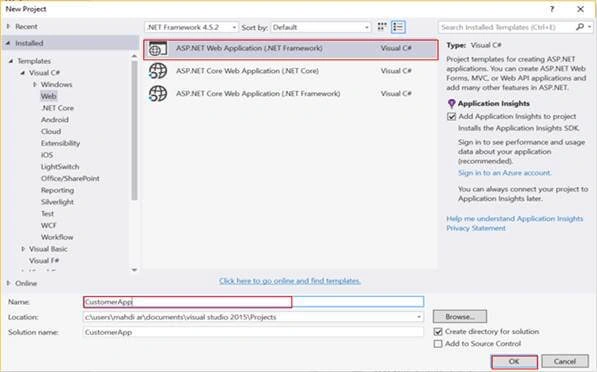
The "New Project" window will pop up. Select ASP.NET Web Application (.NET Framework), name your project, and click OK.
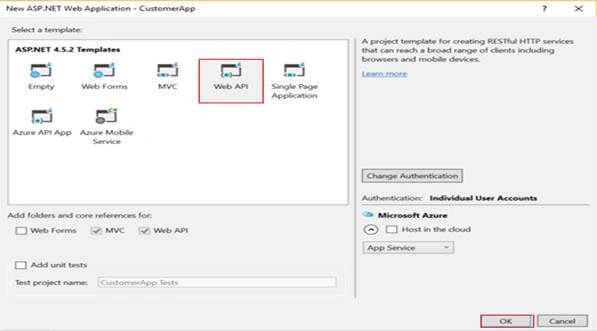
Next, new dialog will pop up for selecting the template. We are going choose Web API template and click Ok button.
After creating our project, we are going to add ADO.NET Entity Data Model.
Adding ADO.NET Entity Data Model
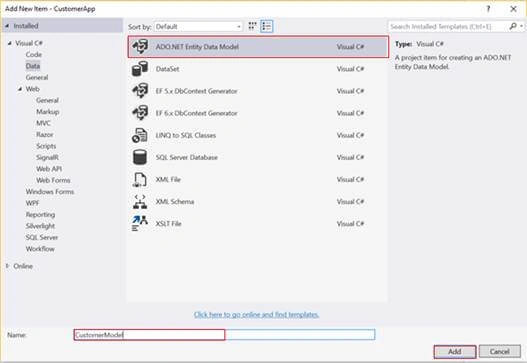
For adding ADO.NET Entity Framework, right click on the project name, click Add > Add New Item. Dialog box will pop up. Inside Visual C#, select Data >> ADO.NET Entity Data Model, and enter a name for your Dbcontext model as CustomerModel.
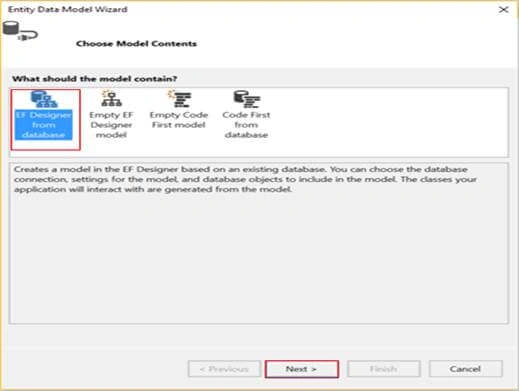
Next, we need to choose EF Designer from database as model container.
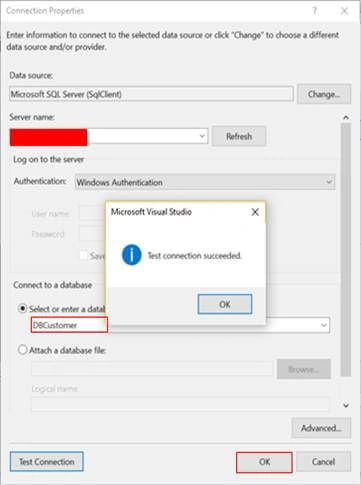
As you can see below, we need to select Server name, then via drop down list, connect to a database panel. You should choose your database name. Finally, click OK.
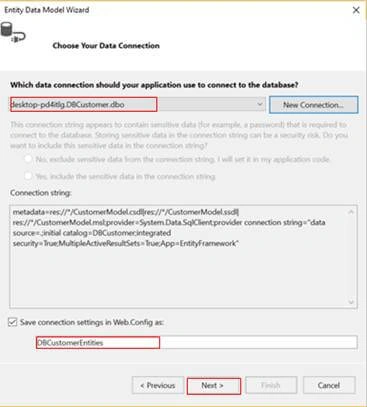
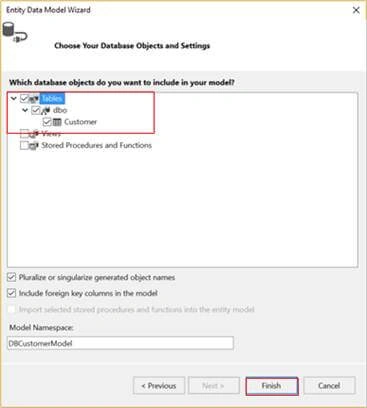
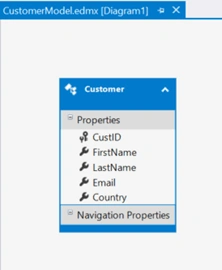
Now, the dialog Entity Data Model Wizard will pop up for choosing the object which we need to use. In our case, we are going to choose Customers table and click "Finish" button.
Create a Controller
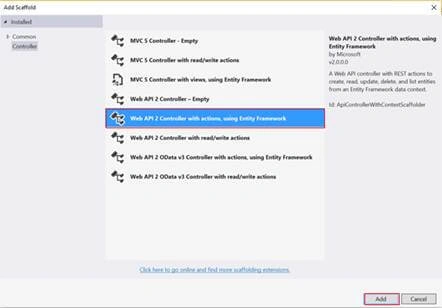
Now, we are going to create a Controller. Right click on the Controllers folder and go to Add > Controller> selecting Web API 2 Controller with actions using Entity Framework > click Add.
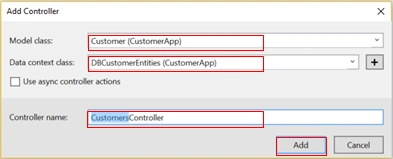
In the snapshot given below, we are providing three important parameters
- Model class Customer represents the entity that should be used for CRUD operations.
- Data context class used to establish connection with database.
- Finally, we need to name our Controller (in this case Customers Controller).
As we already know, Web API is a framework that makes it easy to build HTTP services that reach a broad range of clients including browsers and mobile devices.
It has four methods where
- Get is used to select data.
- Post is used to create or insert data.
- Put is used to update data.
- Delete is used to delete data.
CustomersController.cs
- using System;
- using System.Collections.Generic;
- using System.Data;
- using System.Data.Entity;
- using System.Data.Entity.Infrastructure;
- using System.Linq;
- using System.Net;
- using System.Net.Http;
- using System.Web.Http;
- using System.Web.Http.Description;
- using CustomerApp;
- using CustomerApp.Models;
- namespace CustomerApp.Controllers
- {
- public class CustomersController ApiController
- {
- //DbContext
- private DBCustomerEntities db = new DBCustomerEntities();
- // GET api/Customers
- public IQueryable<Customer> GetCustomers()
- {
- return db.Customers;
- }
- // PUT api/Customers/5
- [ResponseType(typeof(void))]
- public IHttpActionResult PutCustomer(int id, Customer customer)
- {
- if (!ModelState.IsValid)
- {
- return BadRequest(ModelState);
- }
- if (id != customer.CustID)
- {
- return BadRequest();
- }
- db.Entry(customer).State = EntityState.Modified;
- try
- {
- db.SaveChanges();
- }
- catch (DbUpdateConcurrencyException)
- {
- if (!CustomerExists(id))
- {
- return NotFound();
- }
- else
- {
- throw;
- }
- }
- return StatusCode(HttpStatusCode.NoContent);
- }
- // POST api/Customers
- [ResponseType(typeof(Customer))]
- public IHttpActionResult PostCustomer(Customer customer)
- {
- if (!ModelState.IsValid)
- {
- return BadRequest(ModelState);
- }
- db.Customers.Add(customer);
- db.SaveChanges();
- return CreatedAtRoute("DefaultApi", new { id = customer.CustID }, customer);
- }
- // DELETE api/Customers/5
- [ResponseType(typeof(Customer))]
- public IHttpActionResult DeleteCustomer(int id)
- {
- Customer customer = db.Customers.Find(id);
- if (customer == null)
- {
- return NotFound();
- }
- db.Customers.Remove(customer);
- db.SaveChanges();
- return Ok(customer);
- }
- //GetCustomerByCountry returns list of nb customers by country
- [Route("Customers/GetCustomerByCountry")]
- public IList<CustomerData> GetCustomerByCountry()
- {
- List<string> countryList = new List<string>() { "Morocco", "India", "USA", "Spain" };
- IEnumerable<Customer> customerList = db.Customers;
- List <CustomerData> result = new List<CustomerData>();
- foreach (var item in countryList)
- {
- int nbCustomer = customerList.Where(c => c.Country == item).Count();
- result.Add(new CustomerData()
- {
- CountryName = item,
- value = nbCustomer
- });
- }
- if(result != null)
- {
- return result;
- }
- return null;
- }
- protected override void Dispose(bool disposing)
- {
- if (disposing)
- {
- db.Dispose();
- }
- base.Dispose(disposing);
- }
- private bool CustomerExists(int id)
- {
- return db.Customers.Count(e => e.CustID == id) > 0;
- }
- }
- }
Calling Services using Knockout.js library
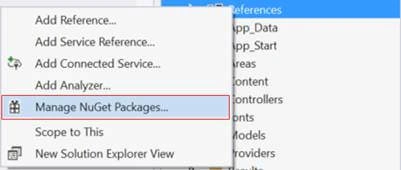
First of all, we are installing knockout.js library. From solution explorer panel, right click on references > Manage NuGet Packages…
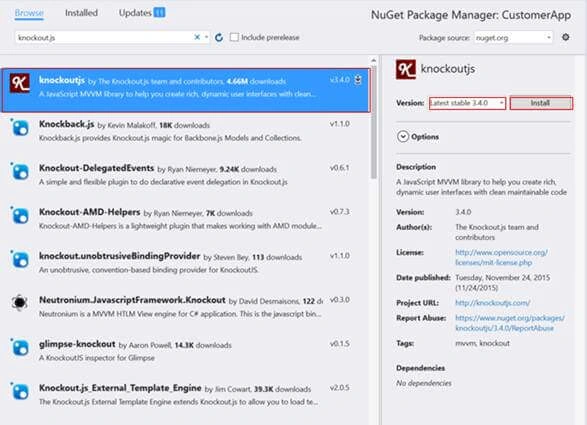
Next, type Knockout.js in search text box, select the first line as below, and click on Install button.
Now, we need to add new js file. Right click on scripts folder > Add > JavaScript File.
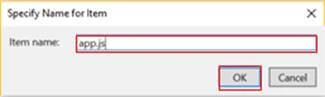
App.js
Here, we create our View Model that contains all the business logic, and then, we bind it with ko.applyBindings(new viewModel()) which is enabled to activate knockout for the current HTML document.
As you can see in the below code, ko provides observables to bind to the Model.
- observable() is used to define Model properties which can notify the changes and update the Model automatically.
- observableArray([]) is used to bind list of elements.
- var ViewModel = function () {
- var self = this;
- self.CustID = ko.observable();
- self.FirstName = ko.observable();
- self.LastName = ko.observable();
- self.Email = ko.observable();
- self.CountryList = ko.observableArray(['Morocco', 'India', 'USA', 'Spain']);
- self.Country = ko.observable();
- self.customerList = ko.observableArray([]);
- var CustomerUri = '/api/Customers/';
- function ajaxFunction(uri, method, data) {
- //self.errorMessage('');
- return $.ajax({
- type method,
- url uri,
- dataType 'json',
- contentType 'application/json',
- data data ? JSON.stringify(data) null
- }).fail(function (jqXHR, textStatus, errorThrown) {
- alert('Error ' + errorThrown);
- });
- }
- // Clear Fields
- self.clearFields = function clearFields() {
- self.FirstName('');
- self.LastName('');
- self.Email('');
- self.Country('');
- }
- //Add new Customer
- self.addNewCustomer = function addNewCustomer(newCustomer) {
- var CustObject = {
- CustID self.CustID(),
- FirstName: self.FirstName(),
- LastName self.LastName(),
- Email self.Email(),
- Country self.Country()
- };
- ajaxFunction(CustomerUri, 'POST', CustObject).done(function () {
- self.clearFields();
- alert('Customer Added Successfully !');
- getCustomerList()
- });
- }
- //Get Customer List
- function getCustomerList() {
- $("div.loadingZone").show();
- ajaxFunction(CustomerUri, 'GET').done(function (data) {
- $("div.loadingZone").hide();
- self.customerList(data);
- });
- }
- //Get Detail Customer
- self.detailCustomer = function (selectedCustomer) {
- self.CustID(selectedCustomer.CustID);
- self.FirstName(selectedCustomer.FirstName);
- self.LastName(selectedCustomer.LastName);
- self.Email(selectedCustomer.Email);
- self.Country(selectedCustomer.Country);
- $('#Save').hide();
- $('#Clear').hide();
- $('#Update').show();
- $('#Cancel').show();
- };
- self.cancel = function () {
- self.clearFields();
- $('#Save').show();
- $('#Clear').show();
- $('#Update').hide();
- $('#Cancel').hide();
- }
- //Update Customer
- self.updateCustomer = function () {
- var CustObject = {
- CustID self.CustID(),
- FirstName self.FirstName(),
- LastName self.LastName(),
- Email self.Email(),
- Country self.Country()
- };
- ajaxFunction(CustomerUri + self.CustID(), 'PUT', CustObject).done(function () {
- alert('Customer Updated Successfully !');
- getCustomerList();
- self.cancel();
- });
- }
- //Delete Customer
- self.deleteCustomer = function (customer) {
- ajaxFunction(CustomerUri + customer.CustID, 'DELETE').done(function () {
- alert('Customer Deleted Successfully');
- getCustomerList();
- })
- }
- //Chart Line function used to display a chart which represents nb of customers by country
- function chartLine() {
- ajaxFunction('http//localhost50706/Customers/GetCustomerByCountry', 'GET').done(function (result) {
- console.log(result);
- Morris.Line({
- element 'line-chart',
- data result,
- xkey 'CountryName',
- // A list of names of data record attributes that contain y-values.
- ykeys ['value'],
- // Labels for the ykeys -- will be displayed when you hover over the
- // chart.
- labels ['Value'],
- parseTime false
- });
- });
- };
- chartLine();
- getCustomerList();
- };
- ko.applyBindings(new ViewModel());
Now, from Solution Explorer panel, we are going to add index.html file as shown below.
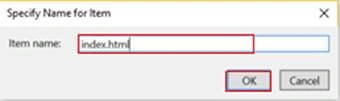
Index.html
- <!DOCTYPE html>
- <html>
- <head>
- <meta charset="utf-8">
- <meta http-equiv="X-UA-Compatible" content="IE=edge">
- <meta name="viewport" content="width=device-width, initial-scale=1">
- <title>. Customer App . Web API2 Á KnockOutJS</title>
- <meta charset="utf-8" />
- <!-- CSS -->
- <link href="Content/bootstrap.min.css" rel="stylesheet" />
- <link href="https//cdn.oesmith.co.uk/morris-0.5.1.css" rel="stylesheet" />
- </head>
- <body>
- <nav class="navbar navbar-default navbar-fixed-top">
- <div class="container-fluid">
- <div class="navbar-header">
- <button type="button" class="navbar-toggle collapsed" data-toggle="collapse" data-target="#bs-example-navbar-collapse-1" aria-expanded="false">
- <span class="sr-only">Toggle navigation</span>
- <span class="icon-bar"></span>
- <span class="icon-bar"></span>
- <span class="icon-bar"></span>
- </button>
- <a class="navbar-brand" href="#">WEB API2 - KnockOutJS</a>
- </div> <!-- END HEADER NAV -->
- </div> <!-- END CONTAINER -->
- </nav><!-- END NAV-->
- <div class="container" style="margin-top 7%;">
- <div class="row">
- <div class="col-md-4">
- <!-- FORM -->
- <div class="panel panel-default">
- <div class="panel-heading"> <span class="glyphicon glyphicon glyphicon-tag" aria-hidden="true"></span> <b>Add New Customer</b></div>
- <div class="panel-body">
- <form>
- <div class="form-group" style="displaynone;">
- <label for="CustomerID">Customer ID</label>
- <input type="text" id="CustomerID" class="form-control" data-bind="valueCustID" placeholder="Customer ID" />
- </div><!-- END CUSTOMER ID -->
- <div class="form-group">
- <label for="FirstName">First Name</label>
- <input type="text" id="FirstName" class="form-control" data-bind="valueFirstName" placeholder="First Name" />
- </div><!-- END FIRST NAME -->
- <div class="form-group">
- <label for="LastName">Last Name</label>
- <input type="text" id="LastName" class="form-control" data-bind="value LastName" placeholder="Last Name" />
- </div><!-- END LAST NAME -->
- <div class="form-group">
- <label for="Email">Email</label>
- <input type="email" id="Email" class="form-control" data-bind="value Email" placeholder="Email" />
- </div> <!-- END EMAIL -->
- <div class="form-group">
- <label for="Country">Country</label>
- <select class="form-control" data-bind="options CountryList, value Country, optionsCaption 'Select your Country ...' " ></select>
- </div> <!-- END COUNTRY -->
- <button type="button" class="btn btn-success" data-bind="click addNewCustomer" id="Save">
- <span class="glyphicon glyphicon glyphicon-floppy-disk" aria-hidden="true"></span> Save
- </button>
- <button type="button" class="btn btn-info" data-bind="click clearFields" id="Clear">
- <span class="glyphicon glyphicon glyphicon-refresh" aria-hidden="true"></span> Clear
- </button>
- <button type="button" class="btn btn-warning" data-bind="clickupdateCustomer " style="display:none;" id="Update">
- <span class="glyphicon glyphicon glyphicon-pencil" aria-hidden="true"></span> Update Customer
- </button>
- <button type="button" class="btn btn-default" data-bind="clickcancel " style="displaynone;" id="Cancel">
- <span class="glyphicon glyphicon glyphicon-remove" aria-hidden="true"></span> Cancel
- </button>
- </form> <!-- END FORM -->
- </div> <!-- END PANEL BODY-->
- </div><!-- END PANEL-->
- </div> <!-- END col-md-4 -->
- <div class="col-md-8">
- <div class="panel panel-default">
- <div class="panel-heading"><span class="glyphicon glyphicon glyphicon-stats" aria-hidden="true"></span><b> Charting Customer</b> </div>
- <div class="panel-body">
- <!-- <img src="images/Chart.png" style="width60%; margin6px 70px;" /> -->
- <div id="line-chart" style="height 300px;"></div><br/><br/>
- </div> <!-- END PANEL-BODY-->
- </div> <!-- END PANEL-->
- </div> <!-- END col-md-8-->
- </div>
- <div class="row">
- <div class="col-md-12">
- <div class="panel panel-default">
- <div class="panel-heading">
- <span class="glyphicon glyphicon glyphicon-zoom-in" aria-hidden="true"></span> <b>Customer List </b>
- <div class="loadingZone" style="color #000; displayblock; floatright; displaynone;"> <img src="images/ajax-loader.gif" /> Refresh Data ...</div>
- </div>
- <div class="panel-body">
- <table class="table table-hover">
- <thead>
- <tr>
- <th><span class="glyphicon glyphicon glyphicon-eye-open" aria-hidden="true"></span></th>
- <th>#</th>
- <th>First Name</th>
- <th>Last Name</th>
- <th>Email</th>
- <th>Country</th>
- <th></th>
- </tr>
- </thead> <!-- END THEAD -->
- <tbody data-bind="foreach customerList">
- <tr>
- <td> <button type="button" class="btn btn-default btn-xs" data-bind="click $root.detailCustomer"> <span class="glyphicon glyphicon glyphicon-eye-open" aria-hidden="true"></span></button> </td>
- <td> <span data-bind="text CustID"></span> </td>
- <td> <span data-bind="text FirstName"></span></td>
- <td> <span data-bind="text LastName"></span></td>
- <td> <span data-bind="text Email"></span> </td>
- <td> <span data-bind="text Country"></span> </td>
- <td>
- <button type="button" class="btn btn-danger btn-xs">
- <span class="glyphicon glyphicon glyphicon-trash" aria-hidden="true" data-bind="click $root.deleteCustomer"></span>
- </button>
- </td>
- </tr>
- </tbody> <!-- END TBODY -->
- </table> <!-- END TABLE -->
- </div>
- </div>
- </div>
- </div>
- </div> <!-- END CONTAINER-->
- <!-- JS -->
- <!-- jQuery (necessary for Bootstrap's JavaScript plugins) -->
- <script src="Scripts/jquery-1.10.2.min.js"></script>
- <!-- Include all compiled plugins (below), or include individual files as needed -->
- <script src="Scripts/bootstrap.min.js"></script>
- <script src="Scripts/knockout-3.4.0.js"></script>
- <script src="https//cdnjs.cloudflare.com/ajax/libs/raphael/2.1.0/raphael-min.js"></script>
- <script src="https//cdnjs.cloudflare.com/ajax/libs/morris.js/0.5.1/morris.min.js"></script>
- <!-- app.js-->
- <script src="Scripts/app.js"></script>
- </body>
- </html>
In order to exchange the data between HTML page and JavaScript file, knockout.js offers various types of bindings that should be used within data-bind attribute.
- Click represents a click event handler to call JavaScript function.
- Value represents the value binding with UI element’s to the property defined into view Model.
- Text represents the text value to the UI element.
- Foreach used to fetch an array.
Now, you can run your application. Don’t forget to change the URL address as below.
http//localhost55192/index.html
Let’s see the output.
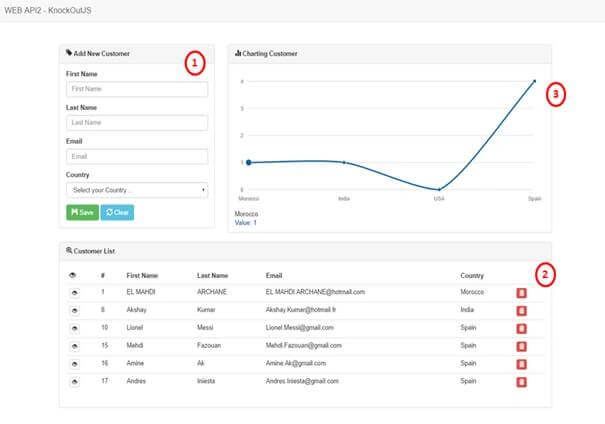
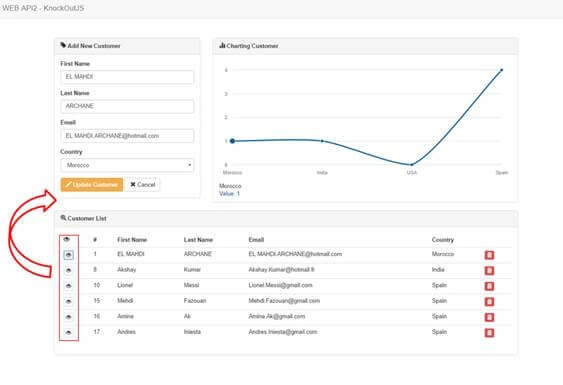
That’s all, Please send your feedback and queries in comments box.
Ravi KandelPosted Mar 8, 2017, 8:24 AM
Awesome Thanks for sharing
richard griffithsPosted Mar 8, 2017, 6:45 AM
Excellent article - are you able to supply sample code/app - thanks