

- When selecting the latest technologies, several factors come into play, including how these technologies will be integrated with our project.
- This article solves the problem for beginners who start working with AngularJS and MVC.
- Here I have toldyou each and every aspect of the AngularJS to use with what, why, and how.
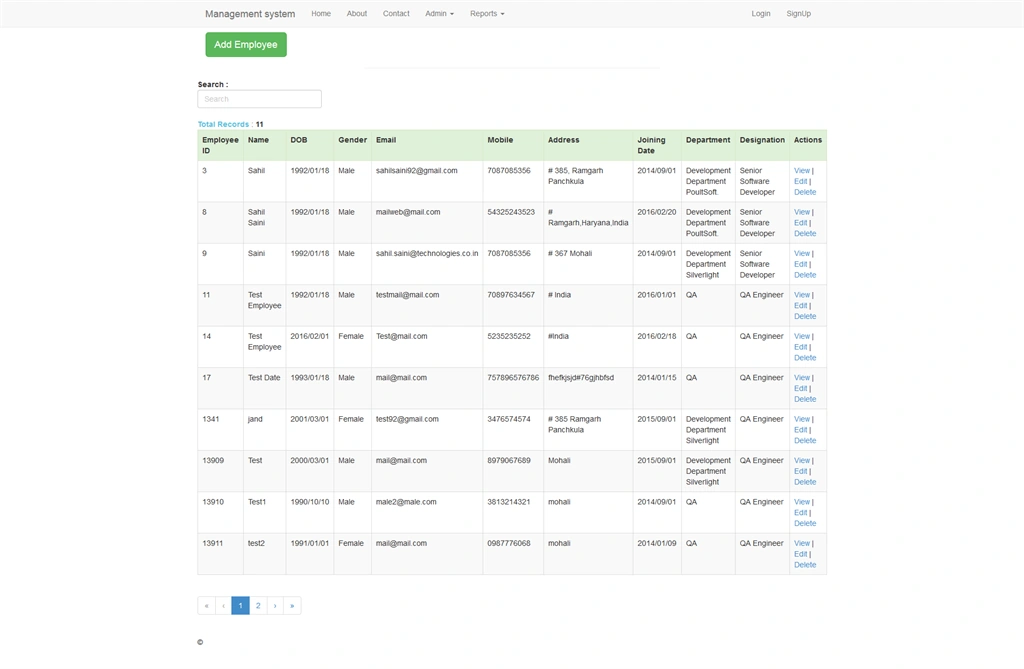
- Firstly Create database named TestData.
- After creating the database create a table with the name Employee, Designation, and Department.
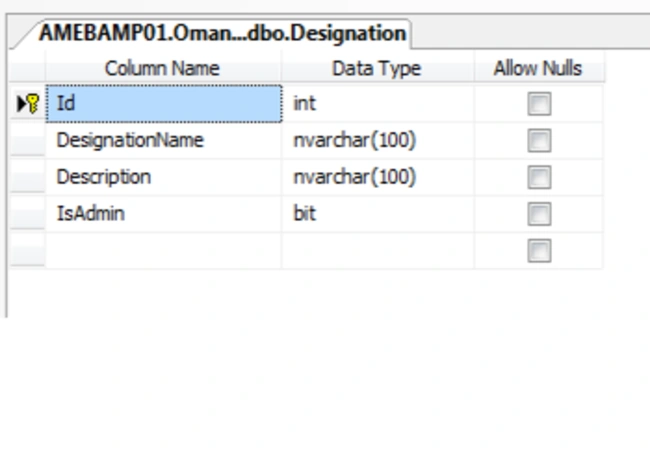
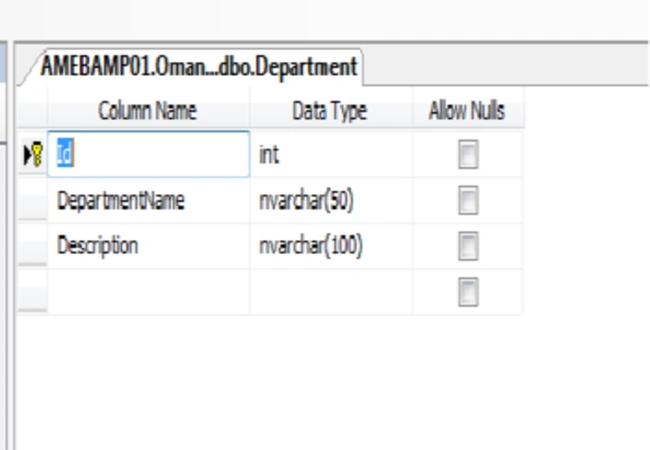
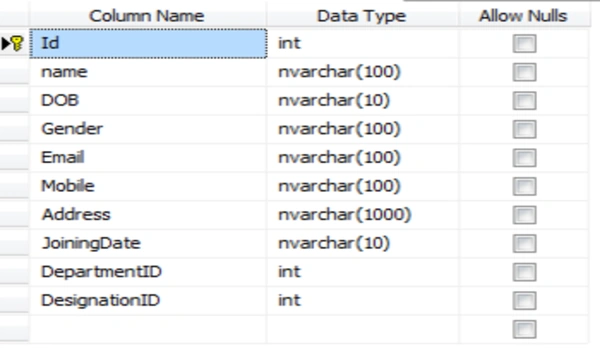
- Set the Id column as primary key and auto increment id in every table.
- Database work is done here.
- Download AngularJs min file from here.
- Download Bootstrap css and js from here.
- Download Bootstrap.theme.min.css from here.
- Modules are used to separate the logics for application.
- var app = angular.module("myApp", ['angularUtils.directives.dirPagination']);
- Here in the code we declare the application myApp module using angular.module, And in the array we pass the dependent modules, like in this we pass the dependent module for paging.
- We use the module using ng-app directive in the html page.
- AngularJS mainly depedent on controllers to control the data and its flow.
- When the page loads each time the Controller.js file also loads and methods called on load will be executed.
- The controller contains the objects of javascript containing functions,method and properties.
- Each controller accepts $scope as a parameter which refers to the application.
- We use the controller using ng-controller in the html page.
- Services are the javascript functions that does the certain tasks told by the controller.AngularJs has many inbuilt services like $http,$location,$route,$window.Each service will does specific task.For example : $http is used for ajax call to the server.
- Service deals with the server code and call the action results specified in the ajax url and response back to the service.
- The service then returns response to the controller.js and controller.js deals with the views and displays the data on page.
- Open the VS2012, Create New ASP.Net MVC4 Web Application, and give the Name BootstrapAngularMvc.
- Go to Models Folder in the solution explorer of visual studio.
- Right click the Models folder and find ADD >>> ADO.NET Entity Data Model. Select ADO.NET Entity Data Model.
- Provide the name DBModel. After that pop up will appear .
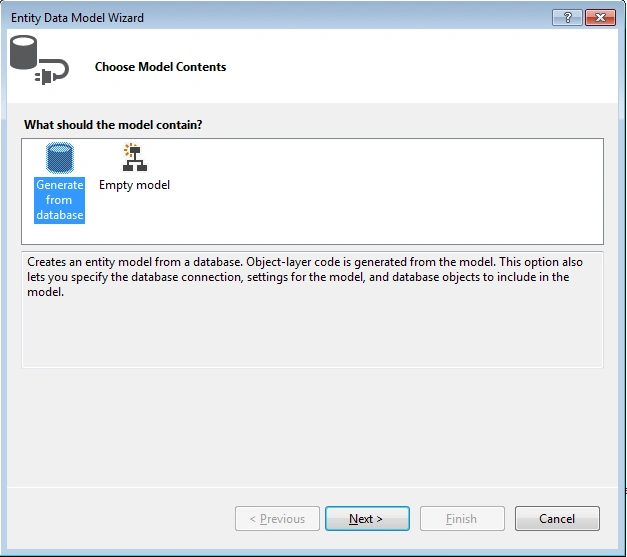
- Select generate from database and click next.
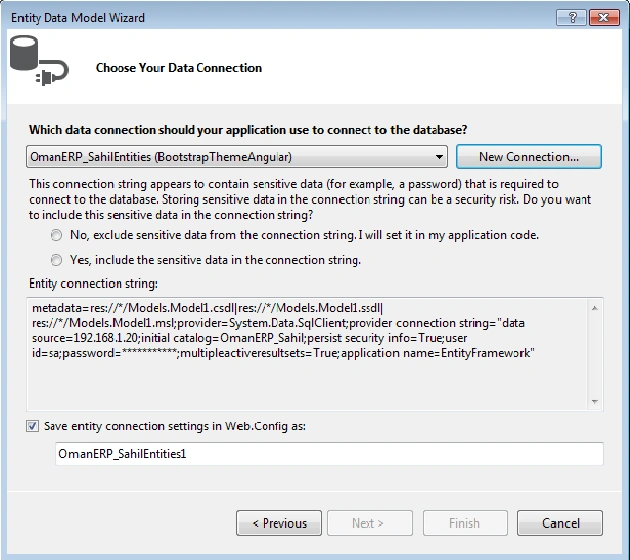
- In the below given box type entity name as SahilEntities and After that click New connection.
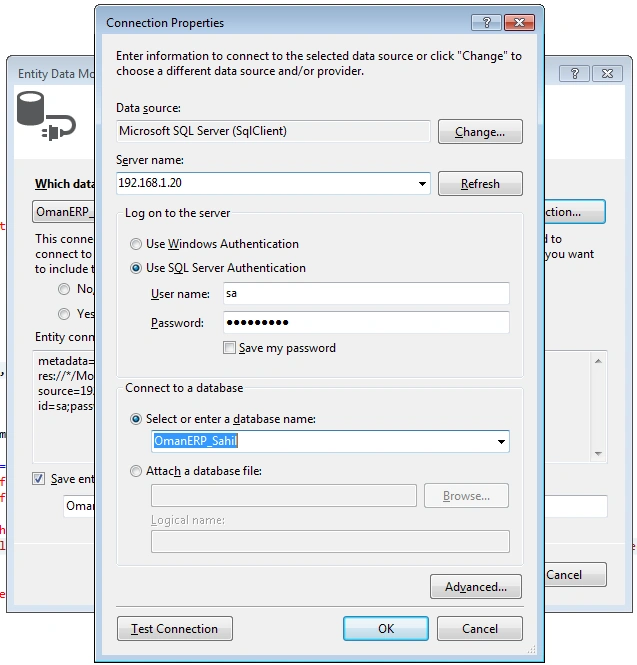
- Select Sql server authentication and fill the credentials like server name, user name, password, and then select your database from the database list.
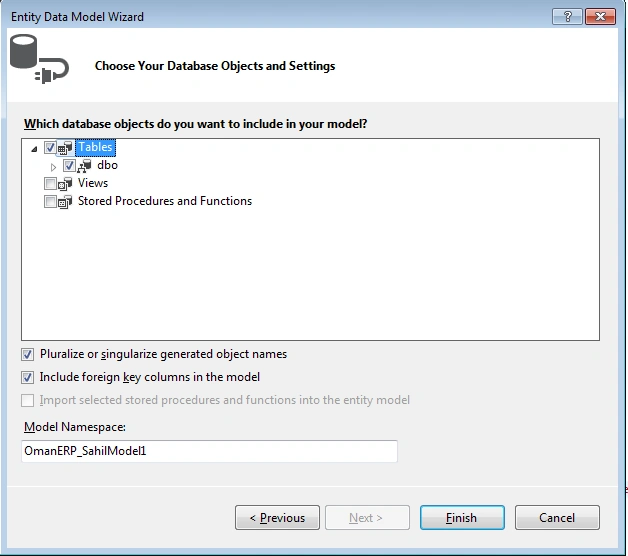
- Check the checkboxes of tables and click on finish.
- In the Controller first replace ActionResult Index with Employee that returns employee view.
- After that getAll Method called when page is loaded it gets the data from database and returns to service in JSON format.
- using System;
- using System.Collections.Generic;
- using System.Linq;
- using System.Web;
- using System.Web.Mvc;
- using BootstrapAngularMvc.Models;
- namespace BootstrapAngularMvc.Controllers
- {
- public class EmployeeController : Controller
- {
- public ActionResult Employee()
- {
- return View();
- }
- //For getting the all records from database.
- public JsonResult getAll()
- {
- using (SahilEntities dataContext = new SahilEntities())
- {
- var employeeList = (from E in dataContext.Employees
- join dep in dataContext.Departments on E.DepartmentID equals dep.Id
- join dsg in dataContext.Designations on E.DesignationID equals dsg.Id
- orderby E.Id
- select new
- {
- E.Id,
- E.name,
- E.DOB,
- E.Gender,
- E.Email,
- E.Mobile,
- E.Address,
- E.JoiningDate,
- dep.DepartmentName,
- E.DepartmentID,
- dsg.DesignationName,
- E.DesignationID
- }).ToList();
- var JsonResult = Json(employeeList, JsonRequestBehavior.AllowGet);
- JsonResult.MaxJsonLength = int.MaxValue;
- return JsonResult;
- }
- }
- }
- }
Change application startup controller and action
- Find RouteConfig.cs in App_Start folder and change the code.
- In this code we change the action and controller path.
- Here those action and controller names are defined which loaded first time when the application was started.
- using System;
- using System.Collections.Generic;
- using System.Linq;
- using System.Web;
- using System.Web.Mvc;
- using System.Web.Routing;
- namespace BootstrapAngularMvc
- {
- public class RouteConfig
- {
- public static void RegisterRoutes(RouteCollection routes)
- {
- routes.IgnoreRoute("{resource}.axd/{*pathInfo}");
- routes.MapRoute(
- name: "Default",
- url: "{controller}/{action}/{id}",
- defaults: new { controller = "Employee", action = "Employee", id = UrlParameter.Optional }
- );
- }
- }
- }
- Here we register the module with the application.
- Here myApp is the module name that we used with ng-app directive in HTML view.
- In Module.js write the given code.
- var app = angular.module("myApp", []);
- In Controller.js write the given code.
- myCntrl is the controller name that is registered with the myApp module and used in HTML view with ng-controller directive.
- $scope is used to refers to the application.Data passed to $scope in controller is accessible in view.
- myService is the name of service that is used with controller to call the functions from server.
- Here sort function serves the purpose of sorting according to the columns like sort by name,id,address etc.
- keyName is passed to the sort function from grid placed in view by clicking on the header of grid.
- GetAllEmployees function calls the getEmployees function from service.Service returns the response to controller.
- Data returned from service is in json format and that data is stored in $scope and $scope is accessed in view.
- app.controller("myCntrl", function ($scope, myService) {
- GetAllEmployees();
- //For sorting according to columns
- $scope.sort = function (keyname) {
- $scope.sortKey = keyname;
- $scope.reverse = !$scope.reverse;
- }
- //To Get All Records
- function GetAllEmployees() {
- var getData = myService.getEmployees();
- getData.then(function (emp) {
- $scope.employees = emp.data;
- }, function (emp) {
- alert("Records gathering failed!");
- });
- }
- });
- In Service.js write the given code.
- myService is the name of the service registers with the myApp module.
- $http is passed as parameter. $http serves the purpose for ajax call to the server.
- In this service getEmployees function is used to call the getAll server method by providing url.
- This method returns the response to the controller.
- app.service("myService", function ($http) {
- //get All Employee
- this.getEmployees = function () {
- return $http.get("/Employee/getAll");
- };
- });
- Right click the Employee action of the EmployeeController and select add view option.
- Write the code in Employee.cshtml.
- In View HTML tag is used with the directive ng-app. ng-app calls the myApp module to initialize with this view.
- After that all the css and script files are dropped in head tag.
- ng-controller directive is used with the div tag to initialize with the controller we created.
- <div class="container" ng-controller="myCntrl"> . Here ng-controller is a directive and myCntrl is the name of controller we specify in the controller.js file.
- ng-click directive is used with the input button to call the method from controller. ng-click="AddEmployeeDiv();". Here ng-click is directive and AddEmployeeDiv() is a function.
- ng-model directive binds an form control to the property on $scope using ng-model controller.
- In ng-model we pass search that performs search operation automatically.
- After that on table th click we pass the sort funtion with the column name as key to sort with.
- Span class is used here for showing glyphicons based on increasing and decreasing orders. ng-show is used with the sort key.
- ng-show is used to hide or show the html element based on given expression.
- <tr dir-paginate="employee in employees|orderBy:sortKey:reverse|filter:search|itemsPerPage:10" ng-model="search">.
- Here is the line of code that is responsible for data binding,sorting,searching,paging.
- dir-paginate is used to get the data from the $scope.In the $scope employess the data is passed and that data is accessed here with the employee instance name.
- orderBy is used with the $scope sortKey and sort the records accordingly.
- filter is used to provide the search keyword that is define in the input tag written above.
- itemsPerPage solves the problem of displaying item on a page.
- ng-model search is used to show pages according to search.
- Data Binding is resolved with this {{employee.Id}}. This binds the Id column.Column name should be same as in the database.
- ng-click is used with the button to call the editEmployee function in the controller.Instance employee is passed in the editEmployee function.
- <dir-pagination-controls
- max-size="10"
- direction-links="true"
- boundary-links="true">
- </dir-pagination-controls>
- This tag serves the purpose of paging, use of this tag is mandatory.
- max-size is used to specify the no of records on a page.
- directionlinks are used to give the next and previous buttons.
- boundaryLinks are used to give the first and last button.
- After that bootstrap modal is created for showing up fields that is used for inserting and updating the employee data.
- In the footer of modal AddUpdateEmployee() function is called to save or update the data on click of Save.
- And the last is alert modal for displaying any alert messages on save or update.
- @{
- ViewBag.Title = "Employee";
- }
- <html ng-app="myApp">
- <head>
- <title></title>
- <script src="~/Content/angular1.2.18.min.js"></script>
- <link href="~/Content/bootstrap.min.css" rel="stylesheet" />
- <script src="~/Content/bootstrap.min.js"></script>
- <script src="~/Content/Module.js"></script>
- <script src="~/Content/Controller.js"></script>
- <script src="~/Content/Service.js"></script>
- <script src="~/Content/dirPagination.js"></script>
- <style>
- table {
- border-collapse: collapse;
- border-spacing: 0;
- width: 100%;
- border: 1px solid #ddd;
- }
- th, td {
- border: none;
- text-align: left;
- padding: 8px;
- }
- </style>
- </head>
- <body>
- <div class="container" ng-controller="myCntrl">
- <input type="button" class="btn btn-success btn-lg" ng-click="AddEmployeeDiv();" value=" Add Employee" style="margin-left: 15px;" data-toggle="modal" data-target="#myModal" />
- <hr style="width: 550px;" />
- <form class="form-inline">
- <div class="form-group">
- <b>Search : </b>
- <input type="text" placeholder="Search" class="form-control" ng-model="search" />
- </div>
- </form>
- <br />
- <table cellpadding="12" class="table table-bordered table-hover table-striped">
- <tr class="success">
- <th style="cursor: pointer;" ng-click="sort('id')"><b>Employee ID</b> <span class="glyphicon sort-icon" ng-show="sortKey=='id'" ng-class="{'glyphicon-chevron-up':reverse,'glyphicon-chevron-down':!reverse}"></span></th>
- <th style="cursor: pointer;" ng-click="sort('Name')"><b>Name</b> <span class="glyphicon sort-icon" ng-show="sortKey=='Name'" ng-class="{'glyphicon-chevron-up':reverse,'glyphicon-chevron-down':!reverse}"></span></th>
- <th style="cursor: pointer; width: 100px;" ng-click="sort('DOB')"><b>DOB</b> <span class="glyphicon sort-icon" ng-show="sortKey=='DOB'" ng-class="{'glyphicon-chevron-up':reverse,'glyphicon-chevron-down':!reverse}"></span></th>
- <th style="cursor: pointer;" ng-click="sort('Gender')"><b>Gender</b> <span class="glyphicon sort-icon" ng-show="sortKey=='Gender'" ng-class="{'glyphicon-chevron-up':reverse,'glyphicon-chevron-down':!reverse}"></span></th>
- <th style="cursor: pointer;" ng-click="sort('Email')"><b>Email</b> <span class="glyphicon sort-icon" ng-show="sortKey=='Email'" ng-class="{'glyphicon-chevron-up':reverse,'glyphicon-chevron-down':!reverse}"></span></th>
- <th style="cursor: pointer;" ng-click="sort('Mobile')"><b>Mobile</b> <span class="glyphicon sort-icon" ng-show="sortKey=='Mobile'" ng-class="{'glyphicon-chevron-up':reverse,'glyphicon-chevron-down':!reverse}"></span></th>
- <th style="cursor: pointer;" ng-click="sort('Address')"><b>Address</b> <span class="glyphicon sort-icon" ng-show="sortKey=='Address'" ng-class="{'glyphicon-chevron-up':reverse,'glyphicon-chevron-down':!reverse}"></span></th>
- <th style="cursor: pointer; width: 100px;" ng-click="sort('JoiningDate')"><b>Joining Date</b> <span class="glyphicon sort-icon" ng-show="sortKey=='JoiningDate'" ng-class="{'glyphicon-chevron-up':reverse,'glyphicon-chevron-down':!reverse}"></span></th>
- <th style="cursor: pointer;" ng-click="sort('Department')"><b>Department</b> <span class="glyphicon sort-icon" ng-show="sortKey=='Department'" ng-class="{'glyphicon-chevron-up':reverse,'glyphicon-chevron-down':!reverse}"></span></th>
- <th style="cursor: pointer;" ng-click="sort('Designation')"><b>Designation</b> <span class="glyphicon sort-icon" ng-show="sortKey=='Designation'" ng-class="{'glyphicon-chevron-up':reverse,'glyphicon-chevron-down':!reverse}"></span></th>
- <th><b>Actions</b></th>
- </tr>
- <tr dir-paginate="employee in employees|orderBy:sortKey:reverse|filter:search|itemsPerPage:10" ng-model="search">
- <td>{{employee.Id}}
- </td>
- <td>{{employee.name}}
- </td>
- <td style="width: 100px;">{{employee.DOB |date:'dd-MM-yyyy'}}
- </td>
- <td>{{employee.Gender}}
- </td>
- <td>{{employee.Email}}
- </td>
- <td>{{employee.Mobile}}
- </td>
- <td>{{employee.Address}}
- </td>
- <td style="width: 100px;">{{employee.JoiningDate}}
- </td>
- <td>{{employee.DepartmentName}}
- </td>
- <td>{{employee.DesignationName}}
- </td>
- <td>
- <a class="btn btn-Primary btn-sm" ng-click="editEmployee(employee)" href="">Edit</a>
- </td>
- </tr>
- <b style="color: #5bc0de;">Total Records </b>: <b>{{employees.length}} </b>
- </table>
- <dir-pagination-controls
- max-size="10"
- direction-links="true"
- boundary-links="true">
- </dir-pagination-controls>
- <div id="myModal" class="modal fade" role="dialog">
- <div class="modal-dialog">
- <!-- Modal content-->
- <div class="modal-content">
- <div class="modal-header">
- <button type="button" class="close" data-dismiss="modal">×</button>
- <h4 class="modal-title">{{Action}} Employee Details</h4>
- </div>
- <div class="modal-body">
- <div class="form-horizontal">
- <div class="form-group">
- <div class="row">
- <div class="col-md-2 col-sm-2" style="margin-left: 20px; color: #5bc0de;">
- <b>Name :</b>
- </div>
- <div class="col-md-8 col-sm-8">
- <input type="text" class="form-control" data-modal="modal" ng-model="employeeName" placeholder="Employee's Name" ng-required="true" />
- </div>
- </div>
- </div>
- <div class="form-group">
- <div class="row">
- <div class="col-md-2 col-sm-2" style="margin-left: 20px; color: #5bc0de;">
- <b>DOB :</b>
- </div>
- <div class="col-md-8 col-sm-8">
- <div class="input-group date">
- <input class="form-control" type="text" id="datetimepicker" value="1990/01/01">
- <span class="input-group-addon"><span class="glyphicon glyphicon-calendar"></span></span>
- </div>
- </div>
- </div>
- </div>
- <div class="form-group">
- <div class="row">
- <div class="col-md-2 col-sm-2" style="margin-left: 20px; color: #5bc0de;">
- <b>Gender:</b>
- </div>
- <div class="col-md-8 col-sm-8" ng-required="true">
- <input type="radio" title="Male" data-modal="modal" ng-model="employeeGender" value="Male" />
- Male
- <input type="radio" title="Female" data-modal="modal" ng-model="employeeGender" value="Female" />
- Female
- </div> f
- </div>
- </div>
- <div class="form-group">
- <div class="row">
- <div class="col-md-2 col-sm-2" style="margin-left: 20px; color: #5bc0de;">
- <b>Email:</b>
- </div>
- <div class="col-md-8 col-sm-8">
- <input type="email" class="form-control" data-modal="modal" ng-model="employeeEmail" placeholder="Employee's Email" ng-required="true" />
- </div>
- </div>
- </div>
- <div class="form-group">
- <div class="row">
- <div class="col-md-2 col-sm-2" style="margin-left: 20px; color: #5bc0de;">
- <b>Mobile:</b>
- </div>
- <div class="col-md-8 col-sm-8">
- <input type="text" class="form-control" data-modal="modal" ng-model="employeeMobile" placeholder="Employee's Mobile" ng-required="true" />
- </div>
- </div>
- </div>
- <div class="form-group">
- <div class="row">
- <div class="col-md-2 col-sm-2" style="margin-left: 20px; color: #5bc0de;">
- <b>Address:</b>
- </div>
- <div class="col-md-8 col-sm-8">
- <input type="text" class="form-control" data-modal="modal" ng-model="employeeAddress" placeholder="Employee's Address" ng-required="true" />
- </div>
- </div>
- </div>
- <div class="form-group">
- <div class="row">
- <div class="col-md-2 col-sm-2" style="margin-left: 20px; color: #5bc0de;">
- <b>Joining Date:</b>
- </div>
- <div class="col-md-8 col-sm-8">
- <input type="date" class="form-control" data-modal="modal" ng-model="employeeJoiningDate" ng-required="true" />
- </div>
- </div>
- </div>
- <div class="form-group">
- <div class="row">
- <div class="col-md-2 col-sm-2" style="margin-left: 20px; color: #5bc0de;">
- <b>Department:</b>
- </div>
- <div class="col-md-8 col-sm-8">
- <select id="ddlDepartment" class="form-control" data-modal="modal" ng-model="employeeDepartment" ng-options="dep.Id as dep.DepartmentName for dep in departments" ng-required="true">
- <option value="" disabled>--Select Department--</option>
- @* <option data-ng-repeat="dep in departments" value="{{dep.Id}}">{{dep.DepartmentName}}</option>*@
- </select>
- </div>
- </div>
- </div>
- <div class="form-group">
- <div class="row">
- <div class="col-md-2 col-sm-2" style="margin-left: 20px; color: #5bc0de;">
- <b>Designation:</b>
- </div>
- <div class="col-md-8 col-sm-8">
- <select id="ddlDesignation" class="form-control" data-modal="modal" ng-model="employeeDesignation" ng-options="dsg.Id as dsg.DesignationName for dsg in designations" ng-required="true">
- <option value="" disabled>--Select Designation--</option> f/span>
- </select>
- </div>
- </div>
- </div>
- <div class="form-group">
- <div class="row">
- <div class="col-md-2 col-sm-2" style="margin-left: 20px; color: #5bc0de;"></div>
- <div class="col-md-8 col-sm-8">
- </div>
- </div>
- </div>
- </div>
- <div class="modal-footer">
- <input type="button" class="btnAdd btn btn-success" value="Save" ng-click="AddUpdateEmployee()" data-dismiss="modal" />
- <button type="button" class="btn btn-default" data-dismiss="modal">Close</button>
- </div>
- </div>
- </div>
- </div>
- </div>
- <div id="alertModal" class="modal fade">
- <div class="modal-dialog">
- <div class="modal-content">
- <!-- dialog body -->
- <div class="modal-body">
- <button type="button" class="close" data-dismiss="modal">×</button>
- {{msg}}
- </div>
- <!-- dialog buttons -->
- <div class="modal-footer">
- <button type="button" ng-click="alertmsg()" class="btn btn-primary">OK</button>
- </div>
- </div>
- </div>
- </div>
- </div>
- </body>
- </html>
Kishore MadanapaliPosted Jul 4, 2017, 12:27 AM
Can u pls post an example on ng-grid for crud operations
hardik patelPosted Jan 14, 2017, 3:44 AM
Thanks sir. your article is really helpful for beginners
Mohamed AbdoPosted May 16, 2016, 9:24 AM
Thanks a lot very useful article
Kuppurasu NagarajPosted Apr 30, 2016, 2:39 PM
Nice Sharing..