

Introduction
Disconnected DataSet means we do not require a continuous connection with the data source for accessing data. In this scenario, Dataset Class holds the data in the client machines. DataSet class comes under “System.Data” namespace. It is also capable of holding multiple tables. In Disconnected Architecture “DataAdapter” class is used for communication between a DataSource and DataSet.
There are two Methods DataAdapter uses,
- Fill(DataSet ds, string TableName)
- Update(DataSet ds, string TableName)
What is DataSet?
DataSet is a collection of tables where each table is represented as a DataTable class. DataTable is a collection of tables. Every DataTable is again a collection of Rows and Columns where each Row is represented as a DataRow class and each Column is represented as a DataColumn class, both are identified by index position or name.
Prerequisites
You have to have visual studio 2019 or 2022 and Microsoft SQL Server Management Studio for DataSource.
Let’s Start with Creating a Table
- Open Microsoft SQL Server Management Studio, you will see a Dialog box like figure 1,
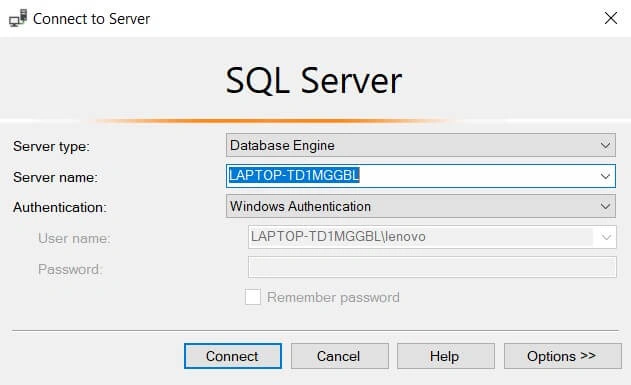
Figure 1
- Click on Connect or you can choose options you like to change then click on Connect.
- Remember your Server name we need it later to get table from Database.
Note - if you have a table created inside a database you can skip this step.
Step 1
In object explorer Right Click on Databases -> New Database
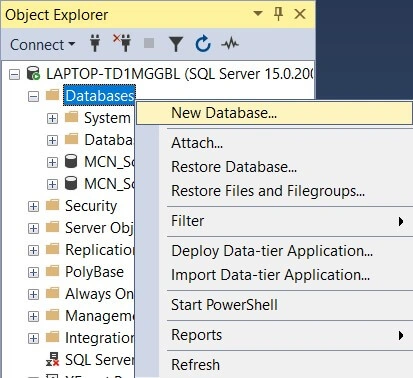
Figure 2
Step 2
Database Name – Company, Click on "Ok".
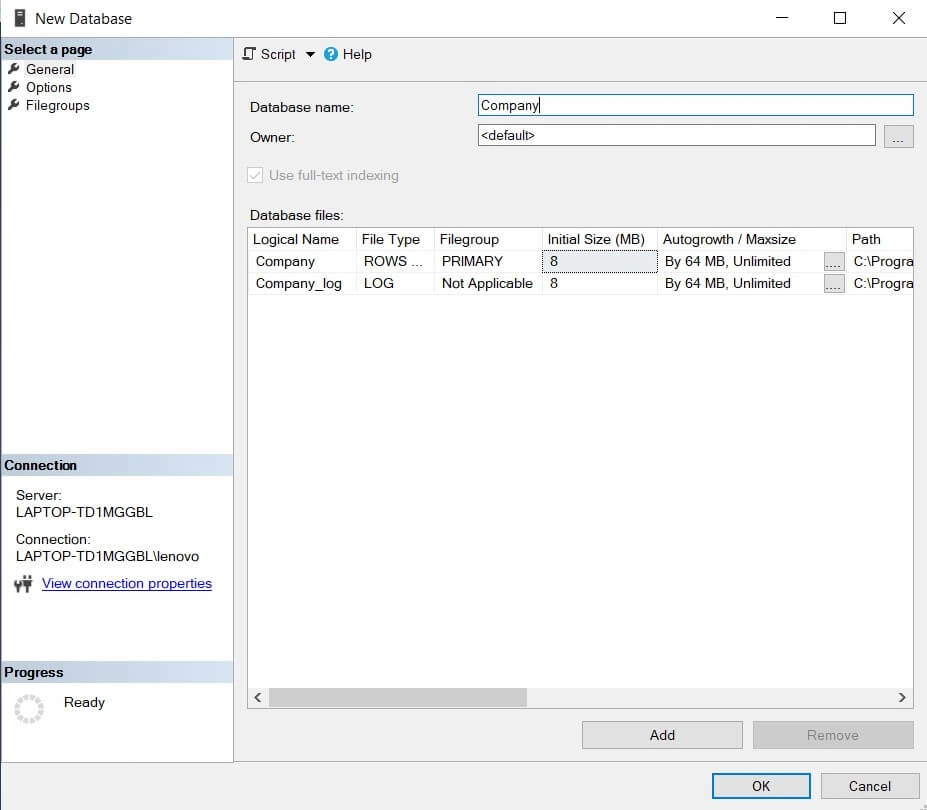
Figure 3
Step 3
Expand Company Database -> Right Click on Tables -> New -> Table.
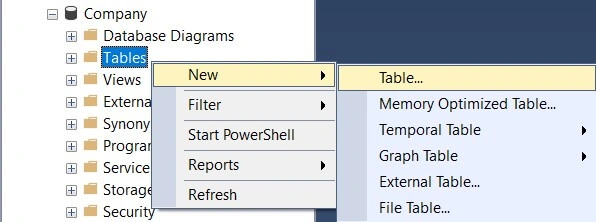
Figure 4
Enter these values and save table as Employee. Press f5 you can see table after expanding Tables -> dbo.Employee.
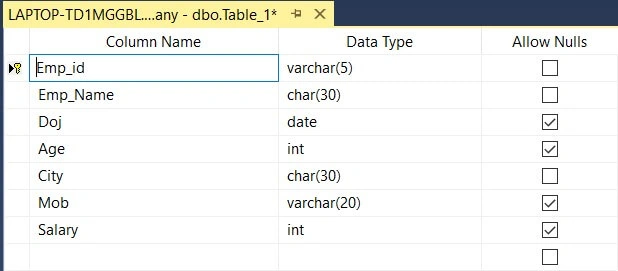
Figure 5
Step 4
Right Click on dbo.Employee -> Click on "Edit Top 200 Rows". Now Create some records and save them.
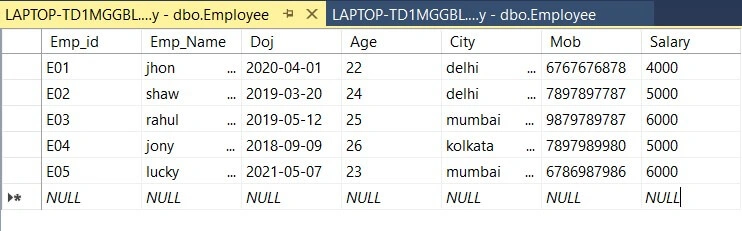
Figure 6
Now you have created a Database - Company with Table - Employee.
Let’s Start Creating Application for Disconnected Dataset
Step 1
Open Visual Studio and Create a Project (Windows Forms App .NET Framework).
Project Name – Employee
Add Controls and change some Properties.
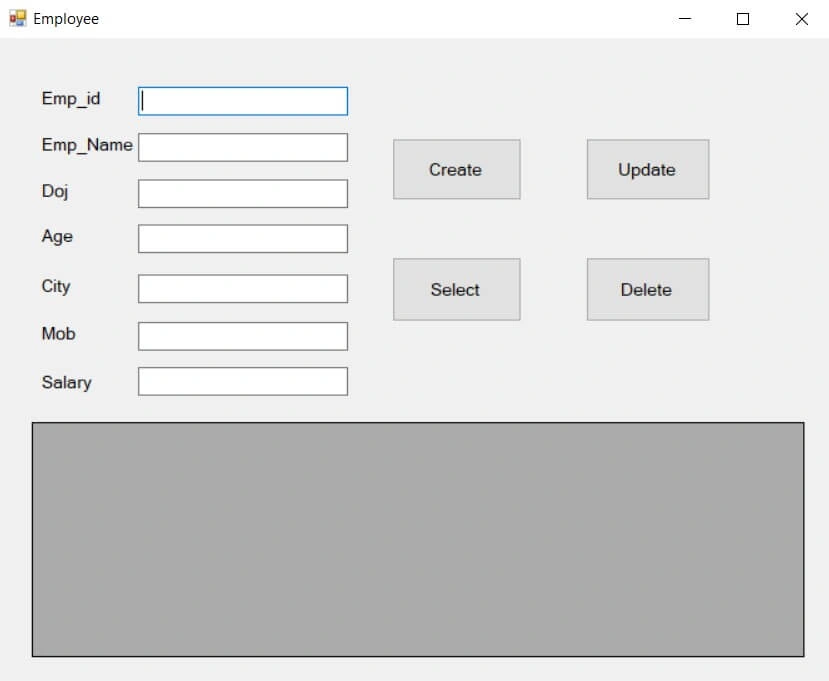
Figure 7
Let’s Start Adding CRUD Functionality
Form1.cs
using System;
using System.Data;
using System.Windows.Forms;
using System.Data.SqlClient;

namespace Employee {
  public partial class Form1: Form {
    public Form1() {
      InitializeComponent();
      Sqlda = new SqlDataAdapter("Select * from Employee", ConnectionString);
      dataSet = new DataSet();
      Sqlda.Fill(dataSet, "Emp");
    }
    public string ConnectionString {
      get;
      set;
    } = @ "Data Source = LAPTOP-TD1MGGBL; Initial Catalog = Company; Integrated Security = true;";
    SqlDataAdapter Sqlda;
    DataSet dataSet;
  }
}
Code Description
- First we need to add "System.Data.SqlClient" namespace for using SqlDataAdapter class and "System.Data" namespace for using DataSet class.
- Now we create a Property named "ConnectionString" in which we get 3 values -
- Data Source - it will be your server name, see figure 1 Server Name here "LAPTOP-TD1MGGBL" is My server name it could be different for you.
- Initial Catalog - it will be our Database Name, like here we use "Company" database.
- Integrated Security - write it as true.
- Then we declare Two objects of SqlDataAdapter and DataSet class, Initialize them inside Form1() {...}.
- Here we use one of DataSet Fill() Method to get Employee table Data. you can write simply Sqlda.Fill(dataSet) in case of single table. "Emp" is user defined name because we can have Multiple tables in DataSet, So Giving Name of each Table or access by index like [0] or [1] is good practice.
Create
Double Click on Create Button and add this code –
private void button1_Click(object sender, EventArgs e)
{
  DataRow dr = dataSet.Tables["Emp"].NewRow();
  dr[0] = textBox1.Text;
  dr[1] = textBox2.Text;
  dr[2] = textBox3.Text;
  dr[3] = Convert.ToInt16(textBox4.Text);
  dr[4] = textBox5.Text;
  dr[5] = textBox6.Text;
  dr[6] = Convert.ToInt32(textBox7.Text);

  dataSet.Tables["Emp"].Rows.Add(dr);
  MessageBox.Show("Data Successfully Inserted..");
}
code description
- Here we create object of DataRow class for adding NewRow in DataSet Table Employee.
- After creating object "dr" we assign values of TextBox's in each index value.
- Using Add() method we add DataRow "dr" object to "Emp" table.
- We use MessageBox.Show() method for display a Message.
Select
Double Click on Select Button and add this code,
private void button2_Click(object sender, EventArgs e)
{
  dataGridView1.DataSource = dataSet.Tables["Emp"];
}
code description
- Here we assign "Emp" table of DataSet as DataSource of DataGridView to See Table Data.
Update
Double Click on Update Button and add this code –
private void button3_Click(object sender, EventArgs e) {
  foreach(DataRow dr in dataSet.Tables["Emp"].Rows) {
    if (dr[0].ToString() == textBox1.Text) {
      try {
        dr[0] = textBox1.Text;
        dr[1] = textBox2.Text;
        dr[2] = textBox3.Text;
        dr[3] = Convert.ToInt16(textBox4.Text);
        dr[4] = textBox5.Text;
        dr[5] = textBox6.Text;
        dr[6] = Convert.ToInt32(textBox7.Text);
        MessageBox.Show("Data Successfully Updated..");
      } catch (Exception ex) {
        MessageBox.Show(ex.Message);
      }
      break;
    }
  }
}
Code description
- Here we have to use foreach loop to compare Emp_id of employee to Update values inside Employee table.
- when Emp_id is found then we assign TexBox's values to that DataRow object "dr" and Show a MessageBox.
Delete
Double click on Delete Button and add this code,
private void button4_Click(object sender, EventArgs e) {
  foreach(DataRow dr in dataSet.Tables["Emp"].Rows) {
    if (dr[0].ToString() == textBox1.Text) {
      try {
        dataSet.Tables["Emp"].Rows.Remove(dr);
        MessageBox.Show("Data Successfully Deleted..");
      } catch (Exception ex) {
        MessageBox.Show(ex.Message);
      }
      break;
    }
  }
}
Code description
- Here we use foreach loop to compare value of "Emp_id" TextBox with "Emp_id" of Employee table.
- If Emp_id Found then we remove that Row from Employee table of DataSet using Remove() Method.
Summary
A disconnected DataSet is Used to access Data from the Database without continuous Connection and changes on this DataSet only perform Modification at the Client side. In this article, we performed different functionality on DataTable.
Join the conversation! Your thoughts help the community grow.