

As shown in the form below:
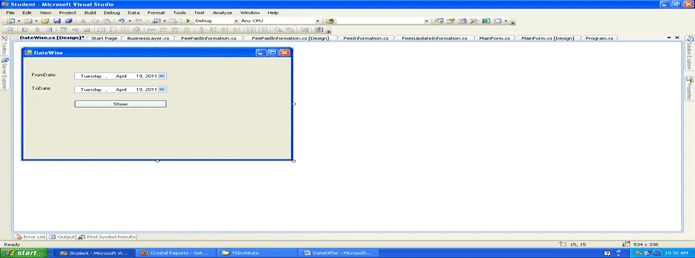
Write this code under a Form.
using System;
using System.Collections.Generic;
using System.ComponentModel;
using System.Data;
using System.Drawing;
using System.Linq;
using System.Text;
using System.Windows.Forms;
using System.Configuration;
using CrystalDecisions.CrystalReports.Engine;
using CrystalDecisions.ReportSource;
using CrystalDecisions.Shared;
using CrystalDecisions.Windows.Forms;
namespace Student
{
public partial class DateWise : Form
{
public DateWise()
{
InitializeComponent();
}
private void DateWise_Load(object sender, EventArgs e)
{
}
private void button1_Click(object sender, EventArgs e)
{
DateReport datereport = new DateReport();
datereport.toDate = Convert.ToDateTime(cbTodate.Value);
datereport.FromDate = Convert.ToDateTime(cbFromDate.Value);
datereport.ShowDialog();
}
}
}
Step 2: Creating a report: go to the Solution Explorer and add a new item in LHS Categories choose Reporting 7 in RHS choose Cryatal Rerport Template & give a name for it then click thge Add Button then open a Galary and choose a Blank Report then open a window and go to Field Explorer, choose Database field then right click and select Database Expert.
Wizard choose Create New Connection, explore it choose OLEDB (ADO) for the Provider and select the provider named Microsoft OLEDB Provider For SQL Server / SQL Native Client (only for SQL Server) then click Next and fill in Connection Information & click Finish.
Then the Report Creation Wizard is opened.
Now in the Report Wizard choose Database; explore it 7 choose the Stored Procedure that your want as shown below.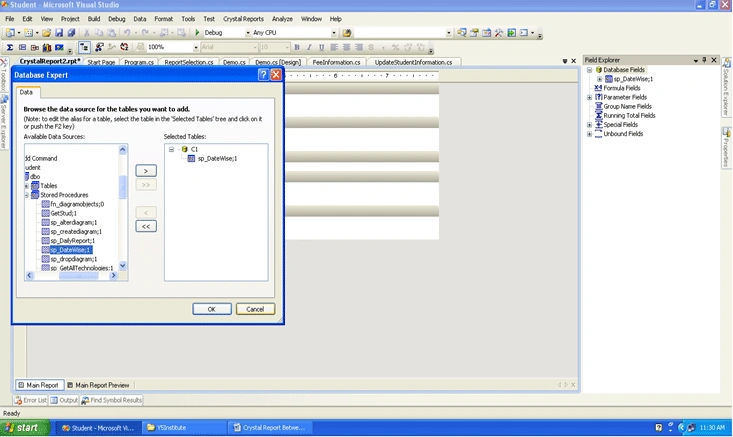
Step 3: Click ok then go to Field Exploorer & choose Stored Procedure; explore it & drag & drop field in Report Sesion (Details) & design it as per your requirements.
Step 4:
If you want to a parameter to a report then right-click on Parameters Field in field Explorer. Then click on New.
For e.g.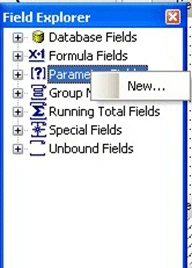
Now Create a parameter called fromdate as the start date. 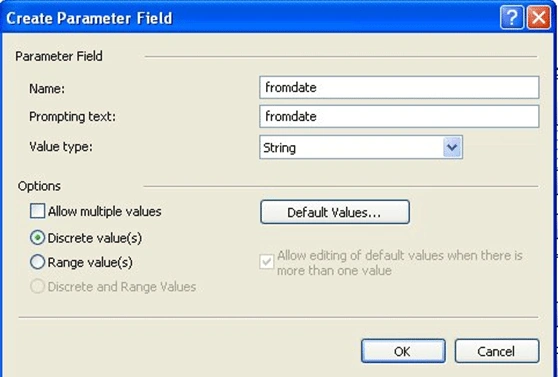
Similarly create a ToDate parameter.
CompanyName,Address,Website Follow the above procedure
Step 5: Design the Report as shown in the screen below. 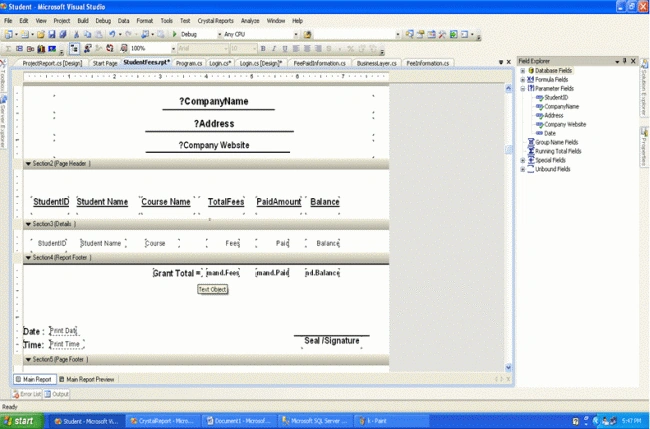
Step 6:
(launching the Report) Add a new form and place a Crystal Report Viewer Control on it; set the Windows state property to Maximized.
Add a reference for System. Configuration assembly also add "Application Configuration File" i.e.app Config & under it write the following:
<?xml version="1.0" encoding="utf-8" ?>
<configuration>
<configSections>
</configSections>
<connectionStrings>
<add name="Student.Properties.Settings.StudentConnectionString"
connectionString="Data Source=.;Initial Catalog=Student;User ID=sa;word=p@ssw0rd"
providerName="System.Data.SqlClient" />
</connectionStrings>
<appSettings >
<add key="CName" value="XYZ Software Solution"/>
<add key="Addr" value=" Address-"/>
<add key="WebSite" value=" Website:"/>
<add key="Y5Institute" value="Data Source=C1;Initial Catalog=Student;User ID=sa;word=p@ssw0rd;"/>
</appSettings>
</configuration>
Akhil PalyalaPosted Nov 30, 2016, 3:58 AM
IF a guest1 is staying in hotel between 11'jan--19'jan..i want the guest1 for all days so that we should know they are "Inhouse"(staying in hotel )..i am taking two parameters... if am searching for 1jan ---30 jan i want to show guest1 details...and if i am searching for 18jan---18jan then also i want to display the guest1 details....please help me with query
Chitresh SumanPosted May 29, 2015, 4:53 AM
How to Create crystal report having date from 1 to 30 column wise
Andri arkhan la yantoPosted Dec 10, 2013, 10:34 PM
how make report using crystal report have date range in Storeprocedure
amit singhPosted Dec 8, 2011, 9:05 PM
SQL REORTING
samala deepakPosted Jul 26, 2011, 9:10 AM
Please Send Crystal Report with Asp.net and this artical is asking all the promts from to loginpromt im getting so irritating to seing of those all prompt i want report just on click of button that set but it asking all prompts why it asking is not possible to show report on only click event of button please send me email id is [email protected]
samala deepakPosted Jul 26, 2011, 9:06 AM
Please Send Crystal Report with Asp.net and this artical is asking all the promts from to loginpromt im getting so irritating to seing of those all prompt i want report just on click of button that set but it asking all prompts why it asking is not possible to show report on only click event of button please send me email id is [email protected]
Karthikeyan AnbarasanPosted Apr 20, 2011, 8:03 AM
Nice article!!!