

Crystal Reports has been excluded In VS2010. Yes, what you just heard is right. That means, if you install VS 2010 then you will not get Crystal Reports built-in.
But don't worry it is available as a separate download from the SAP web site.
To download Crystal Reports, click on the following link:
Introduction
This is my first article. In this article, I will show you a simple Crystal Report creation process with screenshots using Visual Studio 2010. Because a picture is worth more than a thousand words, so I always believed in an article with screenshots is much better.
Let's start by creating a new website in VS 2010.
Open VS 2010, select Visual C# and ASP.NET Web Site, and click OK as shown below.
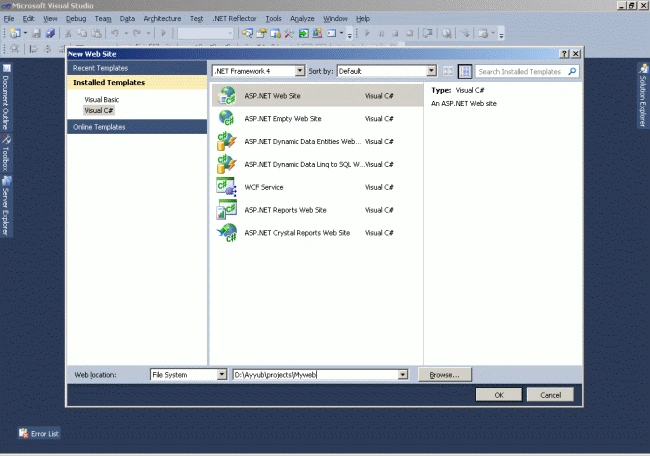
This action will create a new Web site project.
Once we have a Web site project created, the next step is to get database access in the project. That we do use a DataSet from a database.
Creation of Dataset (xsd) File
- The following figure shows you the process to create a DataSet file.
- To add a DataSet file, click on Solution Explorer -> Right Click on Project -> click on Add new Item and then it will show you the following screen:
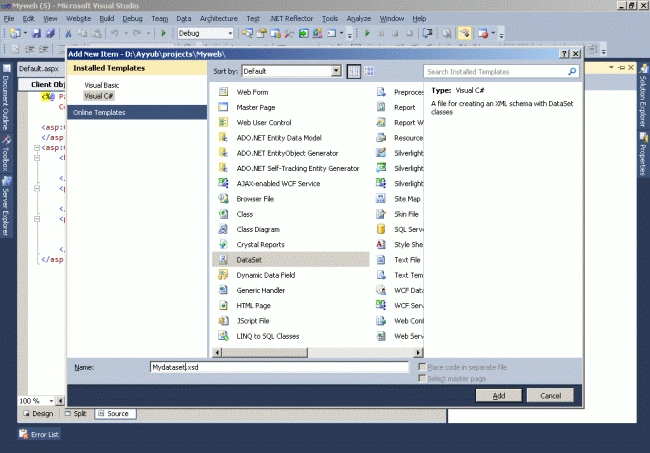
- Enter the Dataset file name. Click on the ok button.
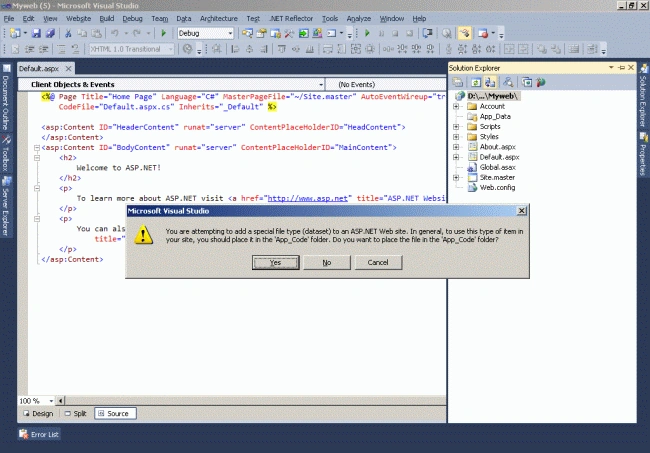
- It will ask for confirmation to put that file in the App_Code folder. Just click yes and that file will be opened in the screen as a blank screen.
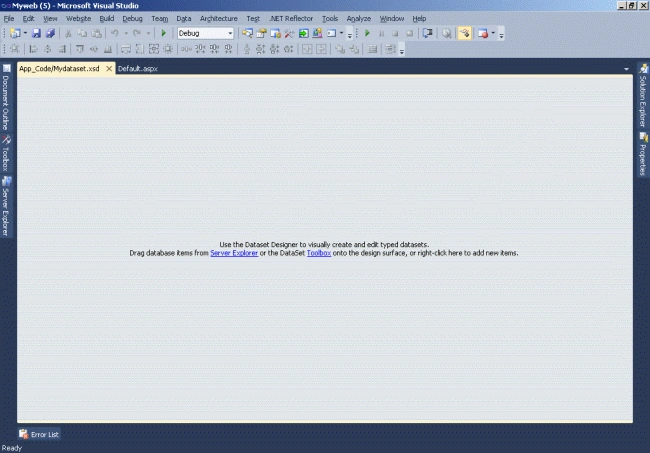
- Now we will add one blank data table to that mydataset.xsd.
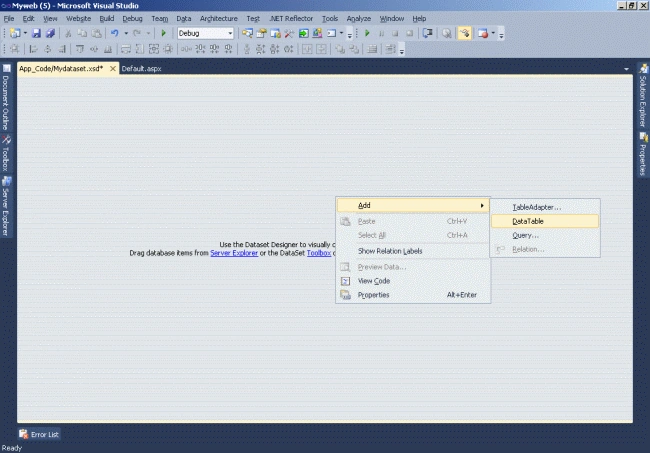
- Right-click in the area of the file and select Add -> Datatable.
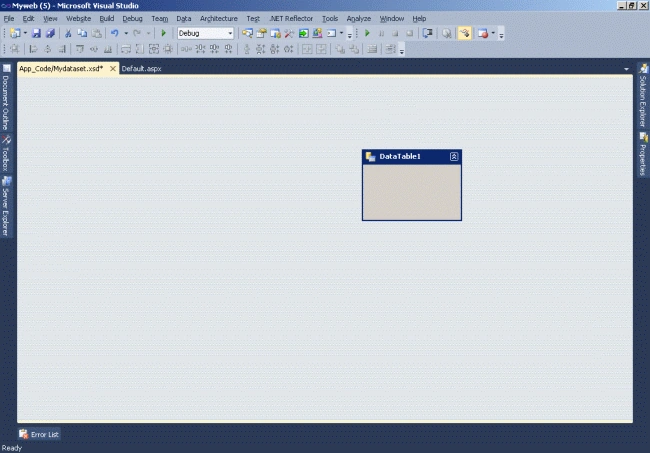
- It will add one DataTable1 to the screen.
- The following Figure 5 shows how to add a data table to the mydataset.XSD file.
- Now, datatable1 is added to XSD file.
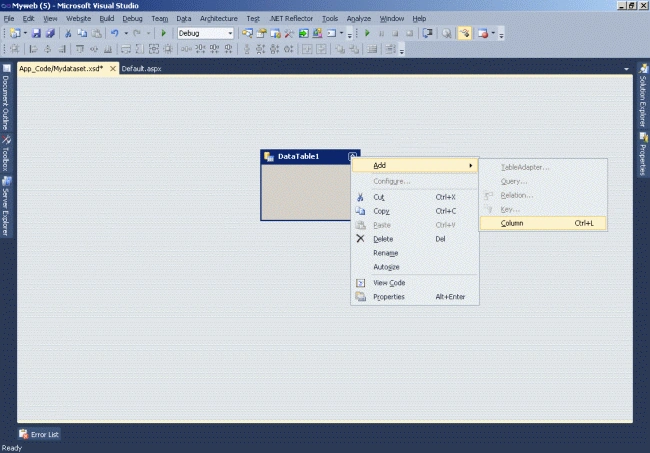
- Now we will add a data column to the datatable1 as per figure 6.
- Remember, whatever columns we add here will be shown in the report.
- So add the columns you want to display in your reports one by one here.
- Always remember to give the same name for the column and data type of column which is the same as the database, otherwise, you will get an error for field and data type mismatch.
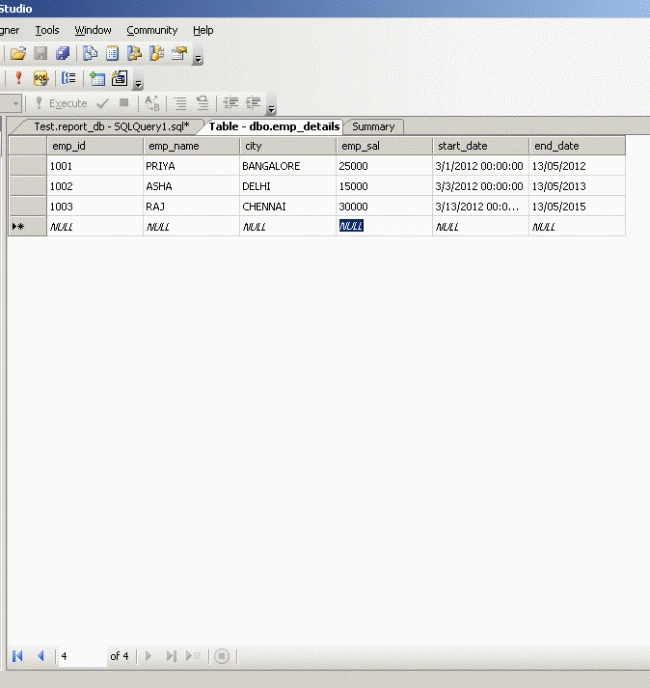
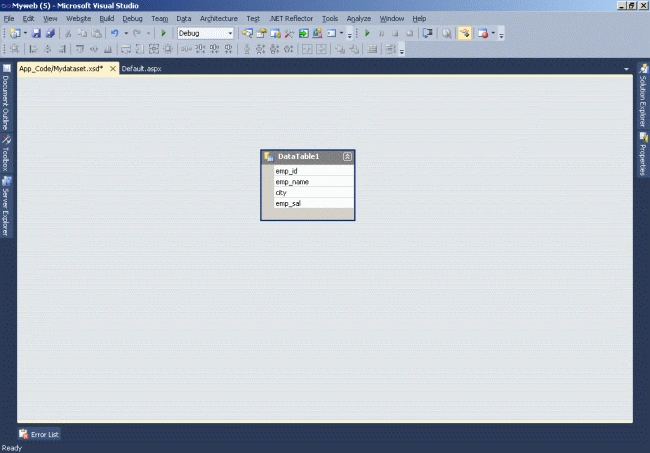
- To set the property for the columns the same as the database.
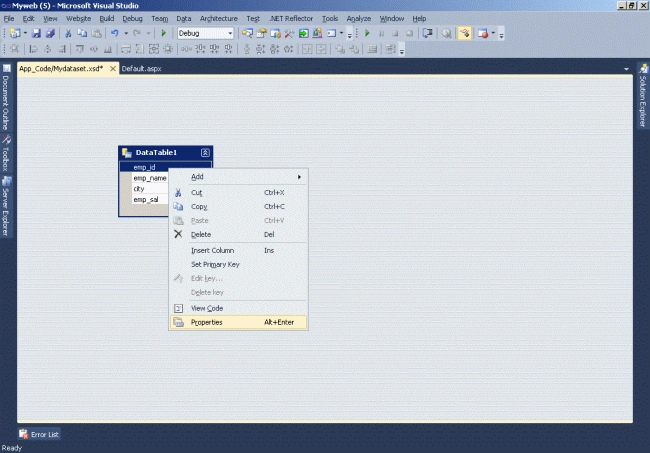
- The following figure will show you how to set the property for the data columns.
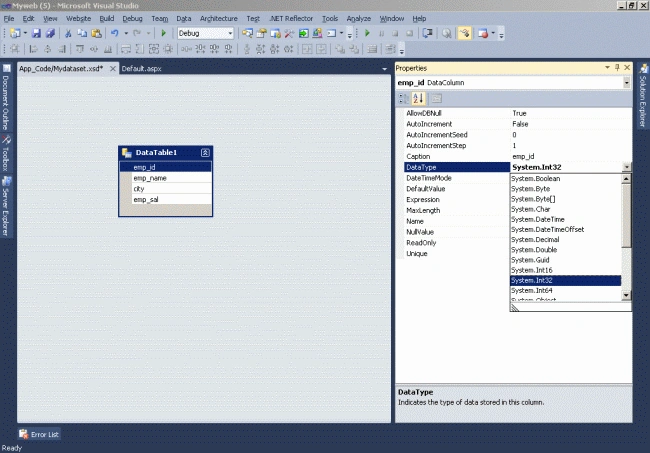
- The default data type for all the columns is a string.
- To change the data type manually right-click on the datacolumn in the datatable and select property.
- From the property window, select the appropriate datatype from the DataType Dropdown for the selected datacolumn.
- XSD file creation has been done.
- Now we will move on to create the Crystal Reports design.
Creation of Crystal report design
- Click on the Solution Explorer -> Right-click on the project name and select Crystal Reports.
- Name it as you choose and click the add button.
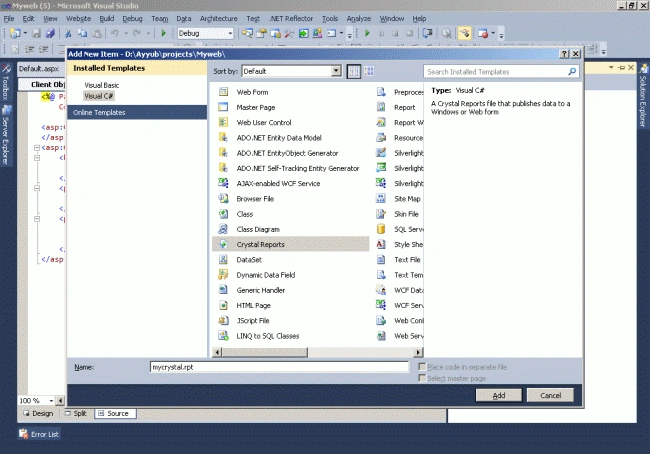
- After clicking on the add button a .rpt file will be added to the solution.
- It will ask for the report creation type of how you want to create the report.
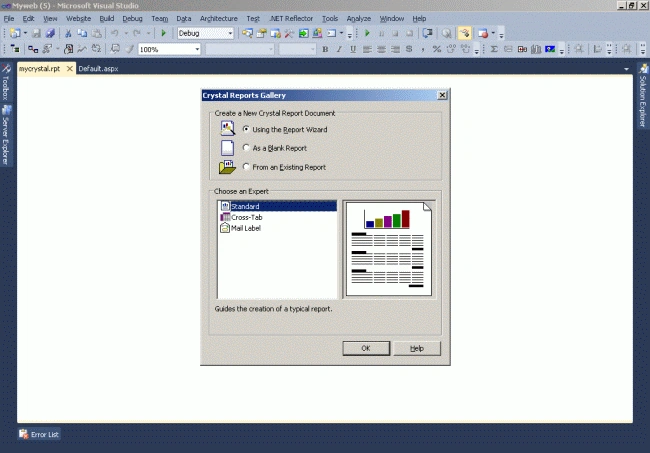
- Click the ok button to proceed.
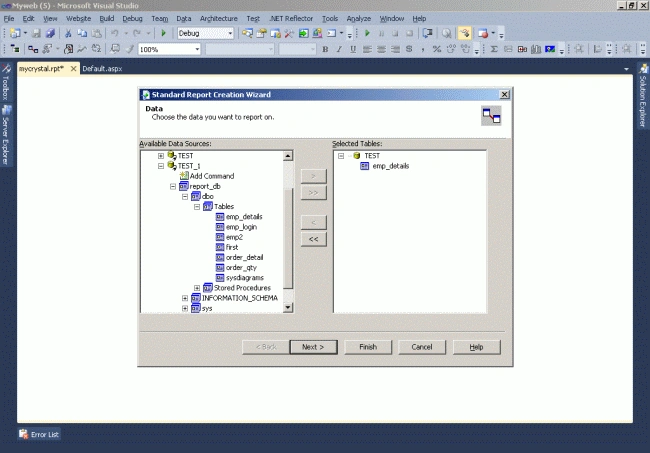
- Under Data Sources, expand ADO.NET Datasets and select Table and add to the selected table portion located at the right side of the window using the > button. Click on Next.
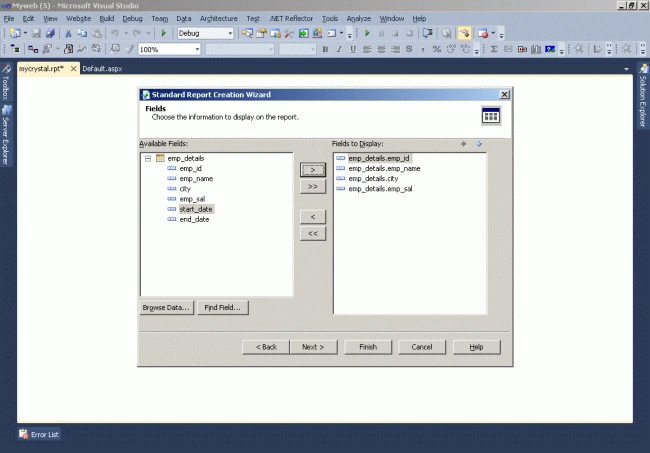
- Select the columns that you want to show in the report.
- Now click on the Finish button and it will show the next screen.
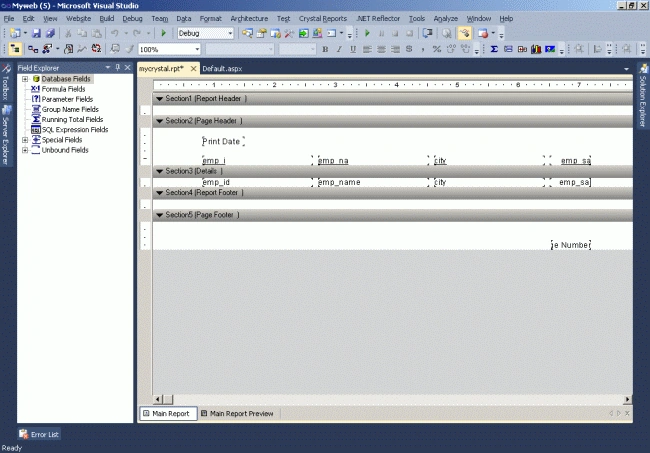
- Once the report file is added, you can see the Field Explorer on the left side of the screen.
- Expand Database Fields, under that you will be able to find the Datatable that we have created earlier.
- Just expand it and drag one by one each field from the Field Explorer to the rpt file in the under detail section.
- Now the report design part is over.
- Now we have to fetch the data from the database and bind it to the dataset and then Show that dataset to the report viewer.
Crystal Report Viewer
- First Drag a CrystalReportViewer control on the aspx page from the Reporting Section of the toolbox.
- Add a command Button.
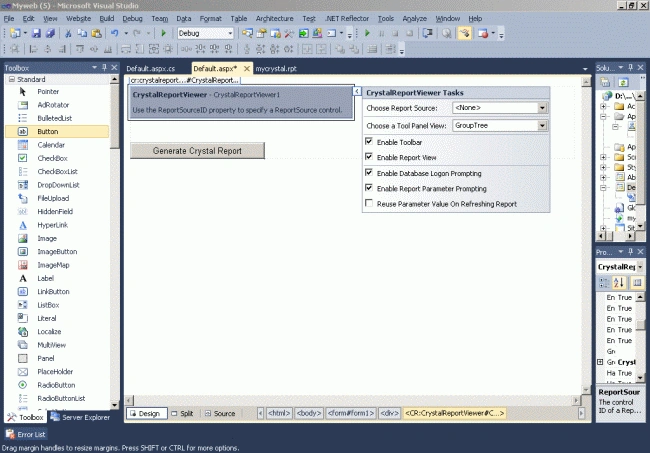
- Configure the CrystalReportViewer and create a link with Crystal Reports.
- Select the Crystal Reports source from the right side of the control.
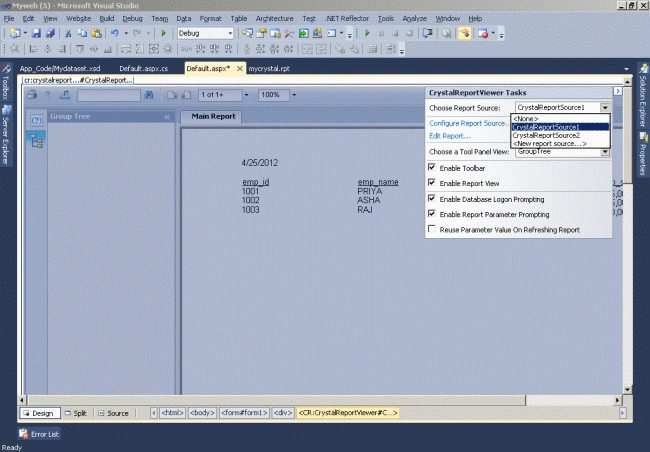
The following is the final code for reports (Default.aspx).
Code
- using System;
- using System.Collections.Generic;
- using System.Linq;
- using System.Web;
- using System.Web.UI;
- using System.Web.UI.WebControls;
- using CrystalDecisions.CrystalReports.Engine;
- using CrystalDecisions.Shared;
- using System.Data;
- using System.Data.SqlClient;
- using System.Configuration;
- public partial class _Default : System.Web.UI.Page
- {
- protected void Page_Load(object sender, EventArgs e)
- {
- CrystalReportViewer1.Visible = false;
- }
- protected void cmdcrystal_Click(object sender, EventArgs e)
- {
- CrystalReportViewer1.Visible = true;
- ReportDocument rDoc = new ReportDocument();
- Mydataset dset = new Mydataset(); // dataset file name
- DataTable dtable = new DataTable(); // data table name
- dtable.TableName = "Crystal Report "; // Crystal Report Name
- rDoc.Load(Server.MapPath("mycrystal.rpt")); // Your .rpt file path
- rDoc.SetDataSource(dset); //set dataset to the report viewer.
- CrystalReportViewer1.ReportSource = rDoc;
- }
- }
Output

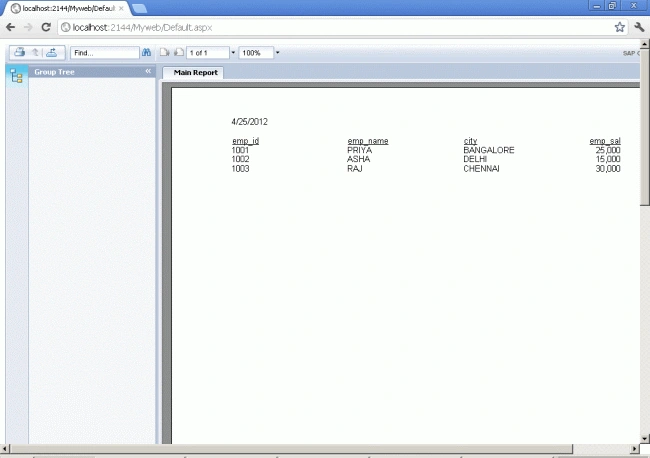
Summary
Crystal Reports template is not a part of Visual Studio 2010 anymore but you can download Crystal Reports support from the SAP website. In this article, I demonstrated step by step procedure of creating a Website project and add a Crystal Report support. After that, I created a DataSet from a database and in the end, built a report displaying data from the database.
Rajkumar KRPosted Sep 8, 2022, 4:56 AM
The type or namespace name 'CrystalDecisions' could not be found (are you missing a using directive or an assembly reference?) It shows the error during the build
Muzaffar MunirPosted Sep 25, 2018, 7:27 AM
I have an issue using Crystal reports when i open its designer in Visual studio 2013 its designer not loaded properly and shows hexadecimal code while its works fine on run time kindly someone helps me to resolve this issue?\
veera muthuPosted Nov 3, 2015, 4:42 PM
Thankyou...It s very useful....
Nikunj TrivediPosted Aug 13, 2015, 7:50 AM
Thank u sir, Its a very useful blog for crystal report. But here i face one problem after viewing data in crystal report viewer. When I press PRINT button then Printer List not available. No one printer display to select to print. Please Help me to solve this.
majedul islamPosted Jul 11, 2015, 1:42 PM
thanks brother
kiran rajPosted Jun 26, 2015, 7:26 AM
i cant create its not working
kiran rajPosted Jun 26, 2015, 2:41 AM
where did u make the connection to database ?
kiran rajPosted Jun 26, 2015, 1:28 AM
i am not able to get the database datas
Nirav DaraniyaPosted Jun 2, 2014, 2:14 PM
To add crystal report in visual studio 2012 download setup from link is herehttp://niravdaraniya.blogspot.in/2014/04/download-crystal-report-setup-for.html
maryar choPosted May 27, 2013, 11:42 AM
When I try to generate the report I get the error -the crystal report dll is not in the path. Here's the error: Could not load file or assembly 'file:///C:\Program Files (x86)\SAP BusinessObjects\Crystal Reports for .NET Framework 4.0\Common\SAP BusinessObjects Enterprise XI 4.0\win32_x86\dotnet1\crdb_adoplus.dll' or one of its dependencies. The system cannot find the file specified. This error occer in Windows Application. Not at web.
Darshan KshirasagarPosted May 24, 2013, 6:32 AM
Data is not fetching from the database only blank showing .
Arup DoluiPosted Mar 16, 2013, 3:48 AM
Hello sir, Crystal Report Viewer control is not showing in the tool box...plz help me out....thank you
Ayyub MohammadPosted Feb 27, 2013, 4:00 AM
Thanks U All.......
Monika ChauhanPosted Feb 24, 2013, 1:32 PM
Thanku a Lot Sir i was facing lots of problem b'coz i m new with crystal report. But after reading this article my all doubt is clear. sir may i know sumthing more on crystal report? Sir this article pick the database value. please tell me if we want to show textbox values which are entered by the user and then show these all value into the crystal report. Please solve my query
suresh bavireddyPosted Feb 22, 2013, 5:33 AM
Really great job.. for the last few days I'm googling for the crystal reports tutorial and while developing i'm facing problems but now i think i Found solution to my problem Thank You.....
ziafat aliPosted Jan 29, 2013, 7:22 AM
Thanks a lot. I am facing a problem that is shows only Header not the underlying data. Please help me in this regard.
mayur patilPosted Nov 21, 2012, 6:44 AM
@kapil try to get crystal report frm reporting templates...
Kapil MotiyaniPosted Jun 19, 2012, 3:00 PM
i hv installed sap crystal reports for vs2010 bt crystal report template is not shown in installed templates when i click on add new item.... so can u plz give soln for dat?
Ayyub MohammadPosted May 14, 2012, 2:45 AM
Thanks U all................
Vaibhav KanasePosted May 11, 2012, 3:56 AM
Nice
Nader AbbasieditedPosted May 6, 2012, 1:56 AMEdited May 6, 2012, 1:57 AM
hi, it's very gooooood and very easy to understand. thanks.
Ritha BPosted Apr 30, 2012, 2:46 AM
Nice..Easy To Understand....
Vipendra VermaPosted Apr 29, 2012, 7:34 AM
Thank you for providing me good knowledge about Working with a Local Database in Windows Phone 7. I want to know how to connect it with other data base.
Vipendra VermaPosted Apr 29, 2012, 7:33 AM
Thank you for providing me good knowledge about Working with a Local Database in Windows Phone 7. I want to know how to connect it with other data base.
Dinesh BeniwalPosted Apr 24, 2012, 2:01 AM
Good Start, Welcome to the C# Corner.
Arjun PanwarPosted Apr 23, 2012, 12:36 AM
Hi,is there any limitation such as number of report can be built per site in visual studio 2010?
Gaurav GuptaPosted Apr 23, 2012, 12:26 AM
Hello.. I want to know that How Many SubReports Added in One Main Report