Today in this article I am going to show you CURD operation with ASP.NET Core 5 MVC. We all know that Microsoft has released the version of core 5 which is now called .NET 5. So I thought why not create an article on ASP.NET core 5 MVC. It is cross platform, and some of its features are mentioned below. For more information about features you can refer to Microsoft msdn documents. Here I am going in to perform CURD with image upload.
Code.
- C# updates.
- F# updates.
- Visual Basic updates.
- System.Text.Json new features.
- Single file apps.
- App trimming.
- Windows ARM64 and ARM64 intrinsics.
- Tooling support for dump debugging
- The runtime libraries are 80% annotated for nullable reference types
- Performance improvements,
- Garbage Collection (GC)
- System.Text.Json
- System.Text.RegularExpressions
- Async ValueTask pooling
- Container size optimizations
- Many more areas
Step 1
Visual Studio 2019 16.8 or later with the ASP.NET and web development workload.
Step 2
Step 3
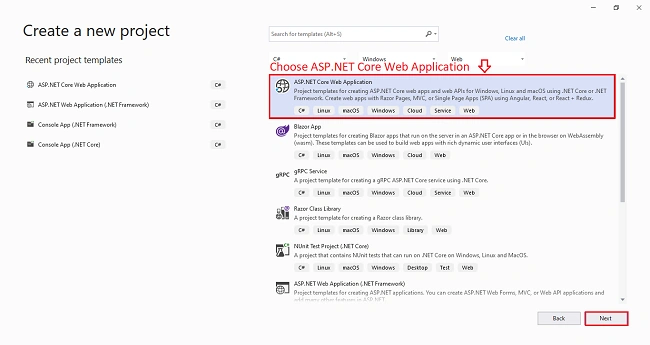
Start Visual Studio and select Create a new project in the Create a new project dialog.
Select ASP.NET Core Web Application > Next.
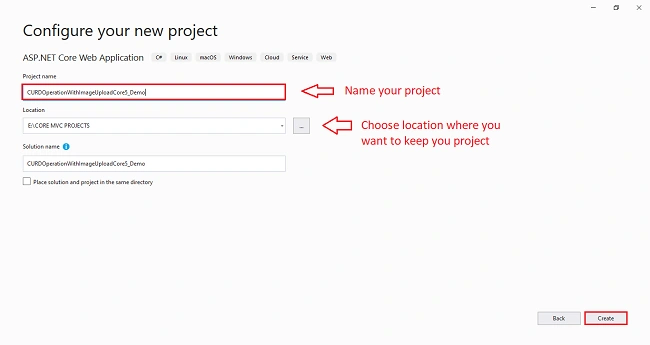
In the Configure your new project dialog, enter CURDOperationWithImageUploadCore5_Demo for Project name. It's important to use this exact name including capitalization, so each namespace matches when the code is copied. Select Create.
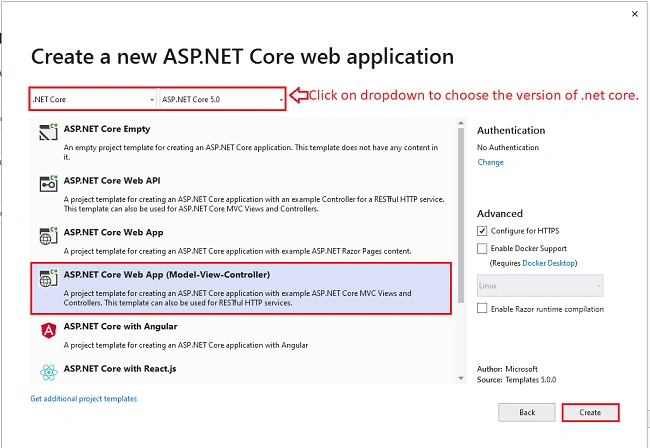
In the Create a new ASP.NET Core web application dialog, select,
- .NET Core and ASP.NET Core 5.0 in the dropdowns.
- ASP.NET Core Web App (Model-View-Controller).
- Create
Step 4
Right-click the Models folder > Add > Class. Name the file Speaker.cs.
- using System;
- using System.ComponentModel.DataAnnotations;
-
- namespace CURDOperationWithImageUploadCore5_Demo.Models
- {
- public class Speaker
- {
- [Key]
- public int Id { get; set; }
-
- [Required]
- [StringLength(100)]
- [Display(Name = "Name")]
- public string SpeakerName { get; set; }
-
- [Required]
- [StringLength(100)]
- public string Qualification { get; set; }
-
- [Required]
- [StringLength(100)]
- public int Experience { get; set; }
-
- [Required]
- [DataType(DataType.Date)]
- [Display(Name = "Date")]
- public DateTime SpeakingDate { get; set; }
-
- [Required]
- [DataType(DataType.Time)]
- [Display(Name = "Time")]
- public DateTime SpeakingTime { get; set; }
-
- [Required]
- [StringLength(255)]
- public string Venue { get; set; }
-
- [Required]
- [Display(Name = "Image")]
- public string ProfilePicture { get; set; }
- }
- }
Step 5
From the Tools menu, select NuGet Package Manager and install the following package.
- Microsoft.EntityFrameworkCore
- Microsoft.EntityFrameworkCore.SqlServer
- Microsoft.EntityFrameworkCore.Tools
Step 6
In the Solution Explorer, Create a Data folder. Create a database context class.
- using CURDOperationWithImageUploadCore5_Demo.Models;
- using Microsoft.EntityFrameworkCore;
-
- namespace CURDOperationWithImageUploadCore5_Demo.Data
- {
- public class ApplicationDbContext : DbContext
- {
- public ApplicationDbContext(DbContextOptions<ApplicationDbContext> options) :
- base(options)
- {
-
- }
- public DbSet<Speaker> Speakers { get; set; }
- }
- }
Step 7
Register the database context. Add the following using statements at the top of Startup.cs
- using Microsoft.EntityFrameworkCore;
- using CURDOperationWithImageUploadCore5_Demo.Data;
Add the following highlighted code in Startup.ConfigureServices
- services.AddDbContext<ApplicationDbContext>(options =>options.UseSqlServer(Configuration.GetConnectionString("DefaultConnection")));
Step 8
Add a database connection string. Add a connection string to the appsettings.json file
- "ConnectionStrings": {
- "DefaultConnection": "Server=(localdb)\\mssqllocaldb;Database=SpeakerDB;Trusted_Connection=True;MultipleActiveResultSets=true"
- }
Step 9
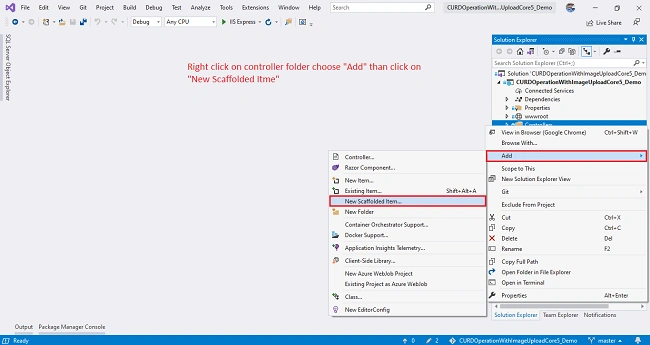
Use the scaffolding tool to produce Create, Read, Update, and Delete (CRUD) pages for the movie model. In Solution Explorer, right-click the Controllers folder > Add > New Scaffolded Item.
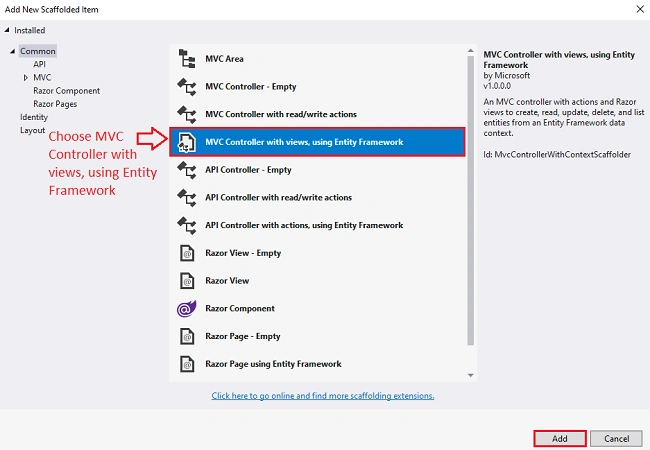
In the Add Scaffold dialog, select MVC Controller with views, using Entity Framework > Add.
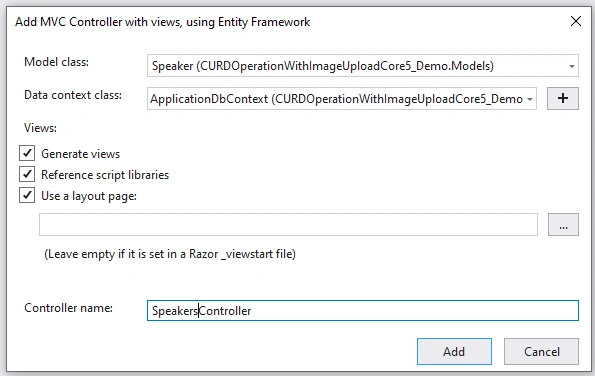
Complete the Add Controller dialog,
- Model class: Speaker (Speaker.Models)
- Data context class: ApplicationDbContext (ApplicationDbContext.Data)
- Views: Keep the default of each option checked
- Controller name: Keep the default SpeakersController
- Select Add
- A movies controller (Controllers/SpeakerController.cs)
- Razor view files for Create, Delete, Details, Edit, and Index pages (Views/Speakers/*.cshtml)
Complete Controller Code
- using CURDOperationWithImageUploadCore5_Demo.Data;
- using CURDOperationWithImageUploadCore5_Demo.Models;
- using CURDOperationWithImageUploadCore5_Demo.ViewModels;
- using Microsoft.AspNetCore.Hosting;
- using Microsoft.AspNetCore.Mvc;
- using Microsoft.EntityFrameworkCore;
- using System;
- using System.IO;
- using System.Linq;
- using System.Threading.Tasks;
-
- namespace CURDOperationWithImageUploadCore5_Demo.Controllers
- {
- public class SpeakersController : Controller
- {
- private readonly ApplicationDbContext db;
- private readonly IWebHostEnvironment webHostEnvironment;
- public SpeakersController(ApplicationDbContext context, IWebHostEnvironment hostEnvironment)
- {
- db = context;
- webHostEnvironment = hostEnvironment;
- }
-
- public async Task<IActionResult> Index()
- {
- return View(await db.Speakers.ToListAsync());
- }
-
- public async Task<IActionResult> Details(int? id)
- {
- if (id == null)
- {
- return NotFound();
- }
-
- var speaker = await db.Speakers
- .FirstOrDefaultAsync(m => m.Id == id);
-
- var speakerViewModel = new SpeakerViewModel()
- {
- Id = speaker.Id,
- SpeakerName = speaker.SpeakerName,
- Qualification = speaker.Qualification,
- Experience = speaker.Experience,
- SpeakingDate = speaker.SpeakingDate,
- SpeakingTime = speaker.SpeakingTime,
- Venue = speaker.Venue,
- ExistingImage = speaker.ProfilePicture
- };
-
- if (speaker == null)
- {
- return NotFound();
- }
-
- return View(speaker);
- }
-
- public IActionResult Create()
- {
- return View();
- }
-
- [HttpPost]
- [ValidateAntiForgeryToken]
- public async Task<IActionResult> Create(SpeakerViewModel model)
- {
- if (ModelState.IsValid)
- {
- string uniqueFileName = ProcessUploadedFile(model);
- Speaker speaker = new Speaker
- {
- SpeakerName = model.SpeakerName,
- Qualification = model.Qualification,
- Experience = model.Experience,
- SpeakingDate = model.SpeakingDate,
- SpeakingTime = model.SpeakingTime,
- Venue = model.Venue,
- ProfilePicture = uniqueFileName
- };
-
- db.Add(speaker);
- await db.SaveChangesAsync();
- return RedirectToAction(nameof(Index));
- }
- return View(model);
- }
-
- public async Task<IActionResult> Edit(int? id)
- {
- if (id == null)
- {
- return NotFound();
- }
-
- var speaker = await db.Speakers.FindAsync(id);
- var speakerViewModel = new SpeakerViewModel()
- {
- Id = speaker.Id,
- SpeakerName = speaker.SpeakerName,
- Qualification = speaker.Qualification,
- Experience = speaker.Experience,
- SpeakingDate = speaker.SpeakingDate,
- SpeakingTime = speaker.SpeakingTime,
- Venue = speaker.Venue,
- ExistingImage = speaker.ProfilePicture
- };
-
- if (speaker == null)
- {
- return NotFound();
- }
- return View(speakerViewModel);
- }
-
- [HttpPost]
- [ValidateAntiForgeryToken]
- public async Task<IActionResult> Edit(int id, SpeakerViewModel model)
- {
- if (ModelState.IsValid)
- {
- var speaker = await db.Speakers.FindAsync(model.Id);
- speaker.SpeakerName = model.SpeakerName;
- speaker.Qualification = model.Qualification;
- speaker.Experience = model.Experience;
- speaker.SpeakingDate = model.SpeakingDate;
- speaker.SpeakingTime = model.SpeakingTime;
- speaker.Venue = model.Venue;
-
- if (model.SpeakerPicture != null)
- {
- if (model.ExistingImage != null)
- {
- string filePath = Path.Combine(webHostEnvironment.WebRootPath, "Uploads", model.ExistingImage);
- System.IO.File.Delete(filePath);
- }
-
- speaker.ProfilePicture = ProcessUploadedFile(model);
- }
- db.Update(speaker);
- await db.SaveChangesAsync();
- return RedirectToAction(nameof(Index));
- }
- return View();
- }
-
- public async Task<IActionResult> Delete(int? id)
- {
- if (id == null)
- {
- return NotFound();
- }
-
- var speaker = await db.Speakers
- .FirstOrDefaultAsync(m => m.Id == id);
-
- var speakerViewModel = new SpeakerViewModel()
- {
- Id = speaker.Id,
- SpeakerName = speaker.SpeakerName,
- Qualification = speaker.Qualification,
- Experience = speaker.Experience,
- SpeakingDate = speaker.SpeakingDate,
- SpeakingTime = speaker.SpeakingTime,
- Venue = speaker.Venue,
- ExistingImage = speaker.ProfilePicture
- };
- if (speaker == null)
- {
- return NotFound();
- }
-
- return View(speakerViewModel);
- }
-
- [HttpPost, ActionName("Delete")]
- [ValidateAntiForgeryToken]
- public async Task<IActionResult> DeleteConfirmed(int id)
- {
- var speaker = await db.Speakers.FindAsync(id);
- var CurrentImage = Path.Combine(Directory.GetCurrentDirectory(), "wwwroot\\images", speaker.ProfilePicture);
- db.Speakers.Remove(speaker);
- if (await db.SaveChangesAsync() > 0)
- {
- if (System.IO.File.Exists(CurrentImage))
- {
- System.IO.File.Delete(CurrentImage);
- }
- }
- return RedirectToAction(nameof(Index));
- }
-
- private bool SpeakerExists(int id)
- {
- return db.Speakers.Any(e => e.Id == id);
- }
-
- private string ProcessUploadedFile(SpeakerViewModel model)
- {
- string uniqueFileName = null;
-
- if (model.SpeakerPicture != null)
- {
- string uploadsFolder = Path.Combine(webHostEnvironment.WebRootPath, "Uploads");
- uniqueFileName = Guid.NewGuid().ToString() + "_" + model.SpeakerPicture.FileName;
- string filePath = Path.Combine(uploadsFolder, uniqueFileName);
- using (var fileStream = new FileStream(filePath, FileMode.Create))
- {
- model.SpeakerPicture.CopyTo(fileStream);
- }
- }
-
- return uniqueFileName;
- }
- }
- }
Step 10
Initial migration. Use the EF Core Migrations feature to create the database. Migrations is a set of tools that let you create and update a database to match your data model.
From the Tools menu, select NuGet Package Manager > Package Manager Console (PMC).
- Add-Migration InitialModel
- Update-Database
Step 11
Create ViewModels folder for UploadImageViewModel,EditImageViewModel and SpeakerViewModel.
UploadImageViewModel
- using Microsoft.AspNetCore.Http;
- using System.ComponentModel.DataAnnotations;
-
- namespace CURDOperationWithImageUploadCore5_Demo.ViewModels
- {
- public class UploadImageViewModel
- {
- [Required]
- [Display(Name = "Image")]
- public IFormFile SpeakerPicture { get; set; }
- }
- }
EditImageViewModel
- namespace CURDOperationWithImageUploadCore5_Demo.ViewModels
- {
- public class EditImageViewModel : UploadImageViewModel
- {
- public int Id { get; set; }
- public string ExistingImage { get; set; }
- }
- }
SpeakerViewModel
- using System;
- using System.ComponentModel.DataAnnotations;
-
- namespace CURDOperationWithImageUploadCore5_Demo.ViewModels
- {
- public class SpeakerViewModel : EditImageViewModel
- {
- [Required]
- [Display(Name = "Name")]
- public string SpeakerName { get; set; }
-
- [Required]
- public string Qualification { get; set; }
-
- [Required]
- public int Experience { get; set; }
-
- [Required]
- [DataType(DataType.Date)]
- [Display(Name = "Date")]
- public DateTime SpeakingDate { get; set; }
-
- [Required]
- [DataType(DataType.Time)]
- [Display(Name = "Time")]
- public DateTime SpeakingTime { get; set; }
-
- [Required]
- public string Venue { get; set; }
- }
- }
Step 12
Create Uploads folder in wwwroot folder to upload images.
Step 13
Built and Run your project Ctrl+F5
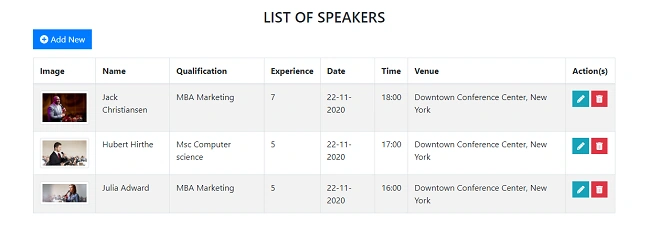
Index List of Speaker
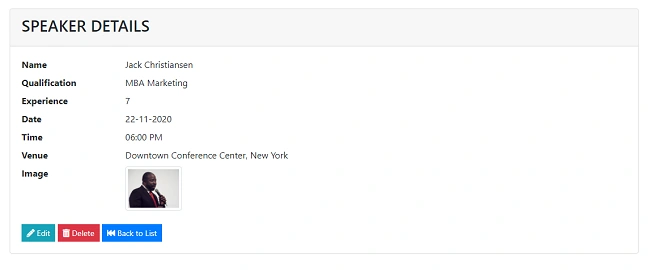
Speaker Details
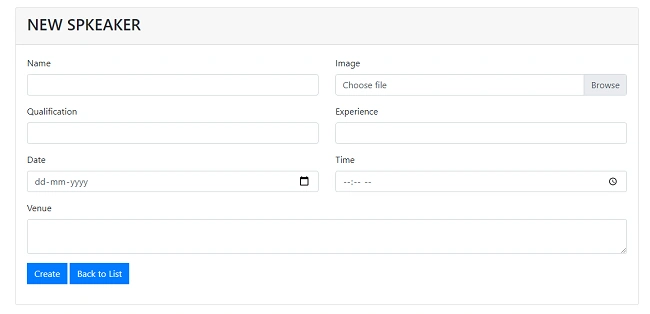
New Speaker
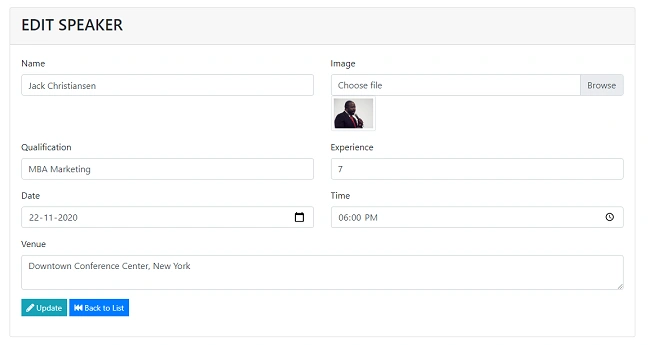
Edit Speaker Details
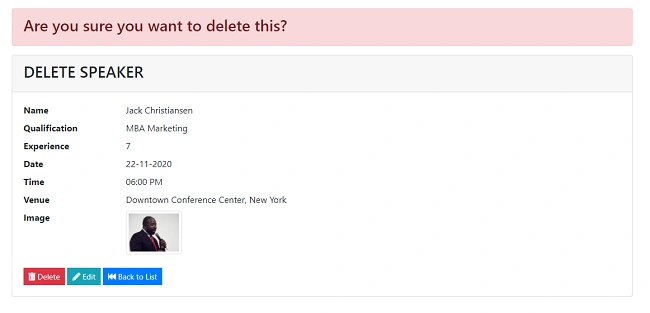
Delete Speaker
Conclusion
This article was about create, details, edit and delete with image file upload. I hope enjoyed the article. Happy coding....




Усам ТахаевPosted Dec 20, 2021, 11:32 AM
Why in step 9 you immediately create a controller with viewModels and the viewModels themselves only in step 11? Do you add the controller manually?
Orushka NaidooPosted Nov 2, 2021, 4:53 PM
My model.SpeakerPicture is redlining, please help
Nurana ZeynalliPosted Oct 29, 2021, 1:37 PM
Hi i can't find the source code can you share with me please or can you send to me the views. Really i need
Adnan YangilicPosted Dec 17, 2020, 12:35 PM
Farhan you are a good teacher, I searched but I could not find dotnet web api 2 crud with file upload with jquery & dropzone with identity token example anywhere can you publish an example? Thank you..
Maria GonzalePosted Dec 14, 2020, 10:49 AM
Thank you for this article.
Asish PandaPosted Dec 10, 2020, 3:57 AM
Thank you for this article. I could able to submit the details to the SQL server. The layout of my pages is not as good as yours. I believe somewhere I missed something or some style script missing.
eric hendersonPosted Dec 6, 2020, 10:33 AM
I get a "Build failed." on step 10, with all of the "SpeakerViewModel" showing with the red line underneath and "CS0246: The type or namespace name 'speakerViewModel' could not be found" I am new to .net, so it is probably a beginner mistake, any help is appreciated
Hamid KhanPosted Dec 1, 2020, 7:33 AM
Very good that you explain step by step. Thanks
Barath Kumar MPosted Nov 19, 2020, 11:02 AM
Thanks for sharing,