

Introduction
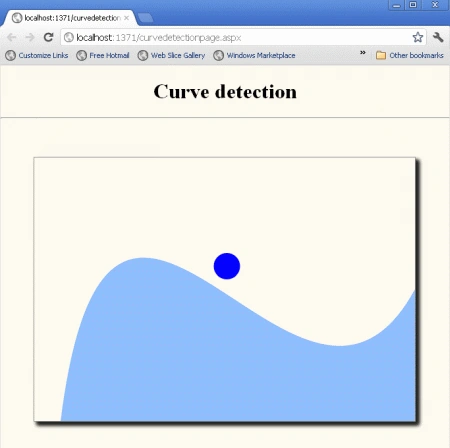
In this article, we are going to understand the concept of Curve detection using HTML 5. In this section, we will see a ball thrown around with your cursor and the ball revolves around a specified path while being displayed in the browser.
Here we will use some JavaScript and some styles along with HTML code. Just go through the steps to see how to create this application.
Let's see how the CurveDetection application can be created. To do so use the following steps.
Step 1 : Open a HTML editor or Visual Studio.
Open File menu ->select new ->Choose Website then.

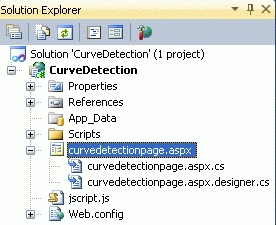
- Go to Solution Explorer
- Right-click on the Application name
- Select Add-->add new item
- Now in the window that opens, select an HTML page or new Web form
- Rename it to curvedetectionpage.aspx
- function handleCurveCollision(ball, curve)
- {
- var curveLayer = curve.getLayer();
- var curveContext = curveLayer.getContext();
- var curveDamper = 0.05; // 5% energy loss
- if (curveContext.isPointInPath(ball.x, ball.y))
- {
- var normal = getNormal(curve, ball);
- if (normal !== null)
- {
- var angleToNormal = angleBetween(normal, invert(ball.velocity));
- var crossProduct = cross(normal, ball.velocity);
- var polarity = crossProduct.z > 0 ? 1 : -1;
- var collisonAngle = polarity * angleToNormal * 2;
- var collisionVector = rotate(ball.velocity, collisonAngle);
- ball.velocity.x = collisionVector.x;
- ball.velocity.y = collisionVector.y;
- ball.velocity.x *= (1 - curveDamper);
- ball.velocity.y *= (1 - curveDamper);
- while (curveContext.isPointInPath(ball.x, ball.y))
- {
- ball.x += normal.x;
- if (ball.velocity.y > 0.1)
- {
- ball.y += normal.y;
- }
- else
- {
- ball.y += normal.y / 10;
- }
- }
- }
- }
- }
JavaScript for window onload
- window.onload = function ()
- {
- var stage = new Kinetic.Stage("container", 578, 400);
- var curveLayer = new Kinetic.Layer();
- var ballLayer = new Kinetic.Layer();
- var radius = 20;
- var curve = new Kinetic.Shape({
- drawFunc: function ()
- {
- var canvas = this.getCanvas();
- var context = this.getContext();
- context.beginPath();
- context.moveTo(40, canvas.height);
- context.bezierCurveTo(canvas.width * 0.2, -1 * canvas.height * 0.5, canvas.width * 0.7, canvas.height * 1.3, canvas.width, canvas.height * 0.5);
- context.lineTo(canvas.width, canvas.height);
- context.lineTo(40, canvas.height);
- context.closePath();
- context.fillStyle = "#8dbdff";
- context.fill();
- }
- });
Join the conversation! Your thoughts help the community grow.