

This article has been
excerpted from book "The Complete Visual C# Programmer's Guide" from the Authors
of C# Corner.
You can provide custom permissions within an application or library. Any custom
permission you create must be added to the security policy on the computers
where the application using the permission runs.
To create custom code access permissions, just create an XML representation of
the configuration you want the custom permission to have and then import the XML
into your security policy. The .NET Framework security system uses XML to
serialize permissions. The XML representations of the permissions that make up
your security policy are stored in the policy configuration files.
To add a custom permission to a security policy, perform the following steps:
- Load the assembly into GAC.
- Trust the assembly.
- Use the CASPOL tool, Notepad, or your favorite editor to generate an XML file that represents the type of permission. This can be a difficult task so, from the start, you should learn the relevant specific XML tags by copying them from existing files. Follow Microsoft's recommendation and use either the CASPOL or mscorcfg.msc tool instead of editing these files manually.
- Apply the XML file to the security policy.
You can see whether all of your callers have
been granted a specific permission by demanding the permissions for them.
Demands can be made either imperatively through code or declaratively through
attributes.
The Assert Method
For code access permissions, the CLR walks through the call stack, checking each
caller in the stack one by one for the proper permissions to the requested
resources. Yet, demanding permissions from each caller every time a call is made
can create considerable overhead in big programs. Depending on how many callers
are in the stack, you may encounter an unexpectedly high number of permission
checks that can degrade performance. For example, if your code accesses a secure
method five times, and five callers are currently above it in the call stack, 25
permission evaluations will be performed. The examples later in this chapter
show how to implement code access security in situations like this, and they
also walk you through a remedy to the tedious stack walk-ups: the Assert method.
Using this method in your code to assert the specific permission can reduce the
number of evaluations to be performed up the call stack. However, you can use
the Assert method only if your code is to have the permission both to perform
the request being made and to make assertions.
The Assert method is evaluated at runtime. All of the code access permission
classes and permission sets may implement the Assert method. Figure 22.7
demonstrates file permissions and how the Assert method affects the call stack.
Assume that assembly 2 is your DLL module and has permission to read all files
on the drive. Assembly 3 can only read files with an XML extension, and assembly
1 has not been granted file I/O permissions. Assembly 1 makes a call to the
library module (assembly 2), which in turn calls assembly 3.
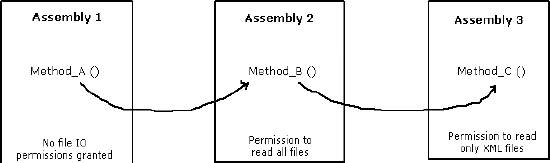
Figure 22.7: Assert Method Illustration
Under normal circumstances, when assembly 3 tries to read an XML file, the
runtime security mechanism checks the permissions of its callers (assembly 2 and
assembly 1). The call fails and throws a security exception because assembly 1,
which originated the call, does not have the proper permissions. Using the
Assert method, you can have assembly 2 assert its permissions to read files.
Then when assembly 3 tries to read an XML file, the security mechanism's stack
walk stops at assembly 2 because that assembly uses assertion on the same
permission type (FileIOPermissions).
In this way, you can reduce the number of permission evaluations performed, but
your performance gain will vary depending on the number of callers and accesses.
In the scenario above, a performance gain can be realized; but a closer look
reveals that assembly number 1, which would not otherwise have file I/O
permissions, gains such permission when the security check stops at assembly 2.
When assembly 2 asserts its file permissions, it passes those permissions along
to the callers above it in the stack. The security checks for this asserted
permission do not proceed beyond the assembly making the assertion.
Using the Assert method allows your code to retain permissions that it normally
has but eventually allows other callers upstream in the call stack to have
access that they would not normally have.
You should use Assert very carefully so as to avoid opening up backdoor security
risks. It is tempting to use assertions to attain performance gains, but you
should provide additional security measures when Assert is used. You should
explicitly trace and evaluate the security holes that could be opened up through
the use of assertion.
Imperative Demand
With imperative demand, developers can write the security code into the logic of
the applications. You place an imperative demand in your method code body to
protect the rest of the code in a method from which the Demand method is called.
If the caller does not satisfy the Demand, an exception will be thrown. Demand
method of CodeAccessPermission class (or any of its derived classes) will throw
a SecurityException during the program execution if the function invoking
assemblies in the assembly stack have not been granted the permission requested
by the class object.
The order of processes required to make an imperative demand is as follows:
- Create a new instance of a permission object and then set the properties you want on the permission object. This can typically be done in a single call to the constructor for most of the security objects.
- Call the object's Demand method. In most instances, the Demand method is called in a try block so that if the demand fails, the resulting exception is caught.
If the demand fails for any reason (possibly
your permission is revoked), a security exception is thrown. If the demand works
as planned, execution continues after the call.
Declarative Demand
Declarative security is implemented by using attributes on assemblies, classes,
or methods. These security attributes, which are stored as metadata in
assemblies and modules, can be either built in or custom defined. Declarative
security allows developers to specify most of the same kinds of security
requirements that imperative security allows. However, as you will see in the
examples, the syntaxes are quite different. You can apply Assert, Demand, and
Deny methods or permit only certain permissions by placing security attributes
in your classes or methods.
As you will see, all built-in permissions have a corresponding attribute. A
declarative security attribute follows the syntax shown:
[<Permission>Attribute(<SecurityAction>,
<PublicProp1> = <Value1>)]
In this pseudocode, <Permission> obviously represents the name of the permission
you want to use, and <SecurityAction> is a member of the SecurityAction
enumeration, such as SecurityAction.Assert. This action describes the type of
security operation to be performed, with the possible actions including
LinkDemand, InheritanceDemand, Demand, Assert, Deny, PermitOnly, RequestMinimum,
RequestOptional, and RequestRefuse.
Permission requests are specified by using attributes for an assembly, stored in
the metadata of an assembly. You have already learned that an assembly's
permission requests are examined when the assembly is loaded, and the CLR
continues based on the kind of permission request the assembly makes.
When you fail to make any permission requests, you are requesting the maximum
amount of permissions the local security policy will allow for your code. On the
other hand, when you request limited permissions to be granted to your code, you
will be testing your code against the known security limitations. Where security
of your code is of concern, you must be careful about requesting full set of
permissions because it can affect the ability of your code to run. For example,
you should consider the case, where the security policy allows your code to do
something (such as read and write a file), and the requested permissions do not.
You can use the RequestMinimum optional assembly attribute when you want to ask
for those permissions that your assembly will probably need as a minimum to
load. You can use the RequestOptional optional assembly attribute when your
assembly provides features that require additional permissions. You can use the
RequestRefuse optional assembly attribute when you want to deny particular
permissions that will not be needed by your code within your assembly even
though your assembly is granted to them by the local policy.
The three kinds of optional attribute permission requests are as follows:
- Minimum permissions (RequestMinimum) - In your programs, you should request only necessary permissions. You can use RequestMinimum to discover minimum-security requirements and output the requirements of a target assembly. So you can fine-tune policy to meet the requirements. An assembly must be granted permission to at least its minimum requirements to be loaded. Once the assembly is loaded, you are certain that it satisfied at least the minimum permissions requested.
- Optional permissions (RequestOptional) - These optional requests for additional permissions are not required for running.
- Refused permissions (RequestRefuse) - This allows you to refuse unnecessary permissions that invite abuse; thus you can effectively defend your programs and classes.
The following example makes a minimum
permission request for permission to call unmanaged code. The assembly will not
load if it is not granted the permission to execute unmanaged code.
[assembly:SecurityPermissionAttribute( SecurityAction.RequestMinimum,
UnmanagedCode = true)]
Permission requests affect the final permission that an assembly receives.
Microsoft offers the following official formula to calculate granted
permissions, where n equals intersection, ? equals union, and the minus sign
equals exclusion:
Granted Permissions = (maximum allowed permission n (minimum permission request?
optional permission request)) - refused permission request
It is assumed that the minimum permission request for an assembly is available
all the time when calculating granted permissions.
Choosing Imperative or Declarative Security
Declarative security is simpler to implement than imperative security.
Declarative security attributes can be viewed with Permview.exe or mscorcfg.msc,
allowing the callers of code to see what permissions the code requires.
Imperative security is not evident to the callers of code. Because the
permissions requirements are embedded inside the code, you cannot see what is
happening unless coding a demand.
In some cases the choice between declarative and imperative security is obvious
because some security actions can be performed in only one of the two ways. For
example, minimum, optional, and refused permission requests are only available
declaratively.

Join the conversation! Your thoughts help the community grow.