

In this article you will learn how to create custom data annotation in MVC. The MVC framework has great extensibility features and because of this we can create our own customized data annotation attributes.
Let's assume we don't want the user to enter /.,!@#$% (we can add more characters anytime so no further changes are needed now) characters or symbols with his name.
To do that we have the following alternatives:
i) We can usee IValidatableObject
ii) We can validate the data in a controller action and so on
Both ways given above has some limitations, they can't let us validate data out-of-box for example. With IValidatableObject there is no value (the data entered by the user in the TextBox) parameter passed to validate. With validating the data in the controller action, we can't reuse it throughout the application and much more.
So, here we will create our custom data annotation attribute, like Required, MaxLength(10) that we frequently use. Please note, with MaxLength(10) annotation we can pass a value as a parameter to validate. And also these annotations can be used anywhere in the application.
Here is the image of what we will create.
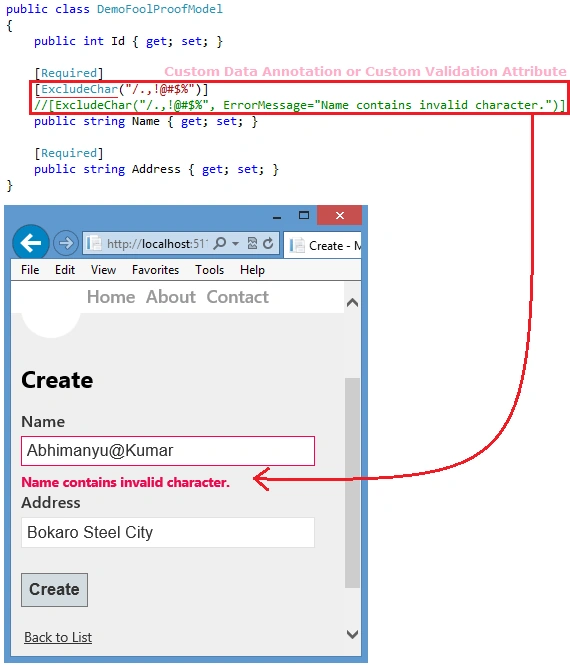
In the preceding image, you can see I have used [ExcludeChar("/.,!@#$%")], that is nothing but a custom data validation attribute used with the Name property. You can also see, when one is entering any character defined with the parameter of ExcludeChar in the TextBox, it displays a model validation error.
Now follow the steps to create this.
Step 1
Add a class ExcludeChar in the project. As you know, all of the validation annotations (like Required, Range, MaxLength) ultimately derive from the ValidationAttributebase class. So we will derive the ExcludeChar class as well.
- public class ExcludeChar : ValidationAttribute
- {
- ....
- }
Step 2
To implement custom validation logic, we need to override one of the IsValid methods provided by the base class. The IsValid method takes two parameters, the first one is a ValidationContext that gives access to the model type, model object instance, and friendly display name of the property you are validating, among other pieces of information. The second is the value of Object type that is nothing but the information or string typed by the user in the TextBox.
- public class ExcludeChar : ValidationAttribute
- {
- protected override ValidationResult IsValid(object value, ValidationContext validationContext)
- {
- ....
- return ValidationResult.Success;
- }
- }
If the value is valid then we can return a successful validation result, but before we can determine if the value is valid, we'll need to know if there a matching character from the set of /.,!@#$%.
Step 3
So far we have the value typed by the user in the IsValid method but we don't have the list of characters (/.,!@#$%). We can do this by adding a constructor to the ExcludeChar class, this constructor will accept a string that is the set of characters (/.,!@#$%), this string will be initialized to a local private variable _chars. Also, the constructor will assign the default error message to the base class.
Mohan MarkandanPosted Feb 26, 2021, 3:03 AM
Thanks for the article. I tried with same but that IsValid method is not triggered.
xuper parkPosted Jun 27, 2019, 5:04 AM
I tried to create it inside App_Start folder, doesn't worked
Tran Cong ThoPosted Nov 11, 2015, 9:55 PM
Gulab Chand you can try jquery validation with remote option
Gulab ChandPosted Nov 1, 2015, 1:27 AM
this is server site custom validation, how we can use the same for client side validation.