

In Windows 10, the default FontFamily is ‘Segoe UI’ which is called ‘Global User Interface’. You can use Blend or Visual Studio to select another Font Family. But if your user doesn’t have this font installed on their device you will get the default font. For that we have to add the font to the application.
Let’s see the steps:
Create new Windows 10 uwp app then download your custom font and add to the project. Here I add the font in my project “Assets” folder like the following screen. For this demo I will use free font download.
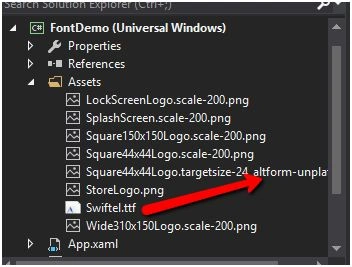
Finally set the font propertiesif required Build Action to Content and copy to output directory to copy never.
To view the custom font in your control set the font properties of your control like the following code. Here I am going to use textblock to show custom fonts:
- <TextBlock Text="Suresh C# Corner MVP"TextAlignment="Center"VerticalAlignment="Center"FontFamily="Assets/Swiftel.ttf#Swiftel Base DEMO"></TextBlock>
- textBlock.FontFamily = newFontFamily("/ Assets / Swiftel.ttf#Swiftel Base DEMO");
By setting FontFamily Resource
Using Blend you can convert the FontFamily by clicking on the white square next to the dropdown.
Open the xaml file using expression blend. Then selected the TextBlock, and use the FontManager in the Font properties to select and embed the font.
Use .TTF Fonts
I notified that windows mobile doesn’t support .OTF fonts try to use .TTF fonts.
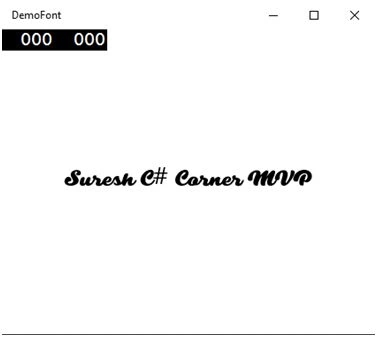
Now run the app and see the output looks like the following screen.
I hope this helps you.
For more information on Windows 10 UWP, refer to my e-book:
Ivan BadhidharmaPosted Jul 1, 2019, 12:41 PM
Check this link - that is my question: https://stackoverflow.com/questions/56819349/cannot-open-my-rtf-file-with-my-custom-fonts
aroosa hashmiPosted Apr 17, 2018, 11:45 AM
I hay for sharing on this site this is the best site in the world
aroosa hashmiPosted Apr 17, 2018, 11:44 AM
Thanks for sharing this outstanding post.
Liêm NguyễnPosted May 28, 2016, 11:54 PM
Can you show me how to show the ListView of Font. When user select a Font it will change the font and don't lost when exit app. THANK YOU
Sonu ChaudharyPosted May 19, 2016, 11:31 AM
good one
Chandra ShekherPosted May 19, 2016, 12:38 AM
Good one
Kuppurasu NagarajPosted May 18, 2016, 1:43 PM
Nice Sharing..
Prasanna MuraliPosted May 18, 2016, 10:41 AM
Nice one...
Bhuvanesh MohankumarPosted May 17, 2016, 2:19 PM
Good one