

HTML helpers are methods that return the HTML content in view. People coming from the ASP.NET web forms background are used to putting the ASP.NET server control on the page from the toolbox. In ASP.NET MVC, we don't have any server controls. In MVC, we have only HTML controls. These HTML Helpers will help you to render html in browser. HTML helpers are similar to server controls of Asp.Net Web forms but Helper doesn’t have ViewState.
The following is the list of html helpers methods present in ASP.NET MVC
- @Html.BeginForm
- @Html.EndForm
- @Html.TextBox
- @Html.TextArea
- @Html.Password
- @Html.Hidden
- @Html.CheckBox
- @Html.RadioButton
- @Html.DropDownList
- @Html.ListBox
Let us take an example of how to utilize these html helpers.
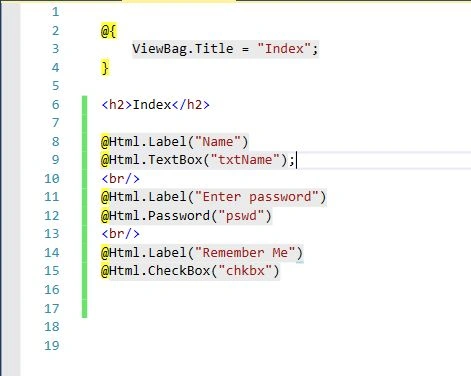
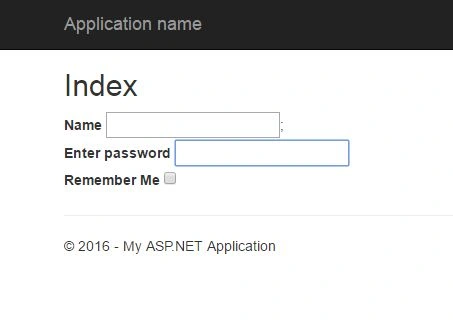
In the above page we created label, textbox, and checkbox using the html helper and the following result is visible when we run this code,
Custom Helper
Sometime inbuilt helpers don’t provide the desire result, but ASP.NET MVC provides the concept of custom helper using what we can create as an html helper according our requirement. ASP.NET MVC providesthree ways to define the custom html helper.
- Using Static Methods
- Using Extension Methods
- Using the @helper.
Using Static Method
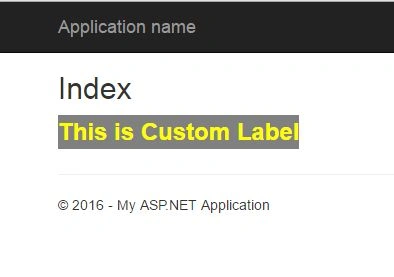
In this method we create a static class with static method, this method will return the HTML string. So, first create a folder with name “Custom_Helpers” in root directory. After that create a static class with “Custom_Helper_Class” name. Now paste the following code in that class.
- namespace MVCProject.Custom_Helpers {
- public static class Custom_Helper_Class {
- public static IHtmlString Create_Lable(string Content) {
- string LableStr = $ "<label style=\"background-color:gray;color:yellow;font-size:24px\">{Content}</label>";
- return new HtmlString(LableStr);
- }
- }
- }
- @ {
- ViewBag.Title = "Index";
- }
- <
- h2 > Index < /h2>
- @using MVCProject.Custom_Helpers
- @Custom_Helper_Class.Create_Lable("This is Custom Label")
Using Extension Method
If we create a custom helper using the extension method then this method will be available in helper method and we can use extension method using @Html .
Firstly, create an extension method like below,
- using System.Web;
- using System.Web.Mvc;
- namespace MVCProject.Custom_Helpers {
- public static class Custom_Helper_Class {
- public static IHtmlString Retrieve_Label(this HtmlHelper helper, string content) {
- string LableStr = $ "<label style=\"background-color:blue;color:red;font-size:24px\">{content}</label>";
- return new HtmlString(LableStr);
- }
- }
- }
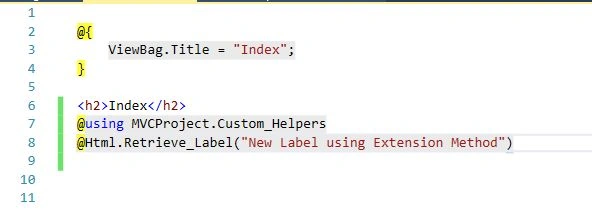
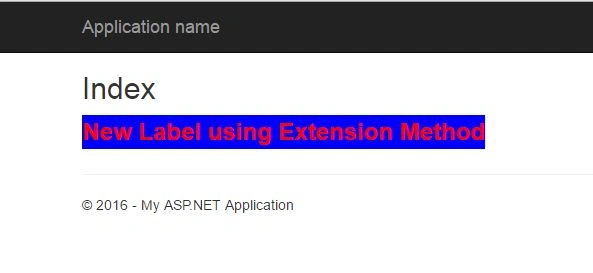
When we run the above code the following result will be visible.
Using the @helper
This method is only available for razor view engine. To create an html helper, define the method using @helper property like below.
- @helper Retrieve_div(string content) { <
- div style = "background-color:burlywood;height:100px;width:200px" >
- <
- mark >
- <
- label style = "font-size:large;font-family:Algerian" >
- @content <
- /label> <
- /mark> <
- /div>
- }
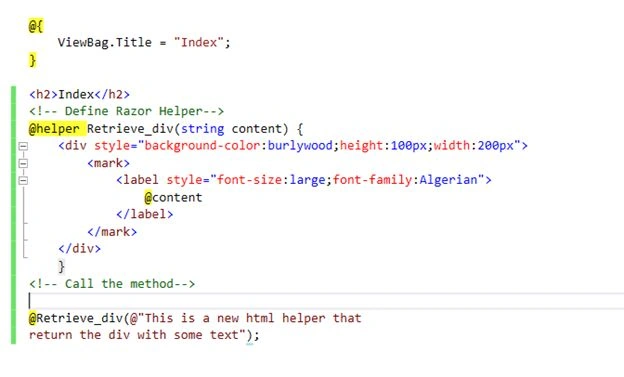
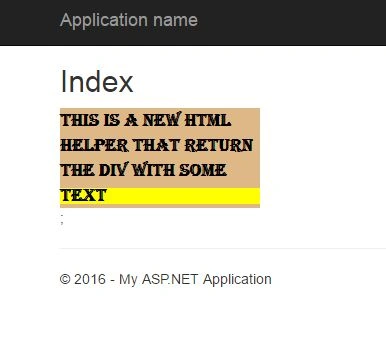
After the execution of above code the following result will be obtained.
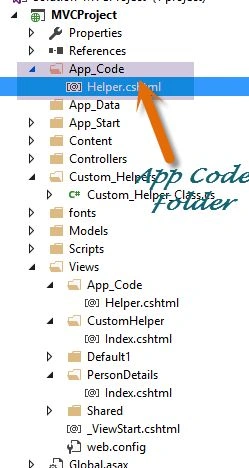
In the above method there is a problem that this razor html helper is only accessible in current view. We can’t access this razor html helper outside the index view. If we want to use the razor created helpers in multiple views, then first create a App_Code directory and create a view in this directory that will contain the custom helper.
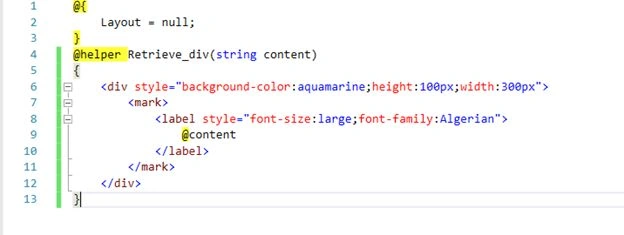
Firstly, create an App_Code folder and create a Helper View.
Now replace the content of view with the following code.
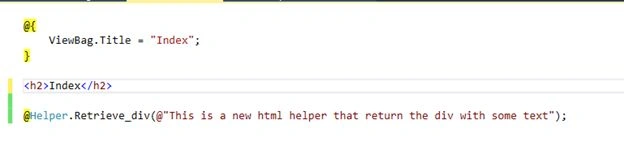
To access this helper in a view, write @Helper with method name.
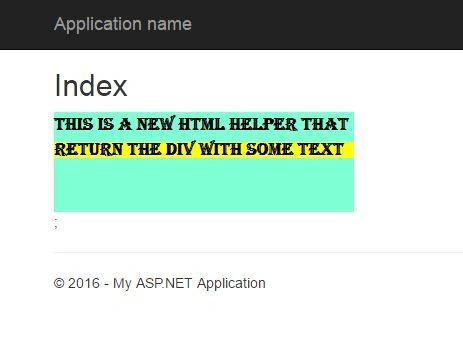
The following result will be generated from the above lines of code.
ASP.NET MVC provides three methods to define the custom HTML helpers. Which one should we use totally depends upon our requirement.
Ramendra kumar vermaPosted Feb 20, 2018, 5:53 AM
Can you please explain insert data with pure html form not html helper in mvc
Susanta DasPosted Jan 30, 2018, 1:01 AM
Where i write helper class. plz tell me where is the path i can write helper class
Asad AliPosted Jun 18, 2016, 10:35 AM
Good one
Pankaj Kumar ChoudharyPosted May 12, 2016, 12:25 PM
Thanks Amit Singh..............
Pankaj Kumar ChoudharyPosted May 12, 2016, 12:24 PM
Thanks Nataraj Gandhi Arunachalam Sir...........
Amit Kumar SinghPosted May 12, 2016, 12:01 PM
Nice
Nataraj Gandhi ArunachalamPosted May 11, 2016, 10:37 PM
Good one!
Pankaj Kumar ChoudharyPosted May 11, 2016, 12:08 PM
Thanks Debasis Saha Sir........
Pankaj Kumar ChoudharyPosted May 11, 2016, 12:08 PM
Thanks Kuppurasu Nagaraj Sir.........
Pankaj Kumar ChoudharyPosted May 11, 2016, 12:07 PM
Thanks Mohammed Ibrahim Sir.......
Pankaj Kumar ChoudharyPosted May 11, 2016, 12:07 PM
Thanks Manas Mohapatra...........
Pankaj Kumar ChoudharyPosted May 11, 2016, 12:07 PM
Thanks Bhuvanesh Mohankumar Sir 4 ur Kind word........
Debasis SahaPosted May 11, 2016, 10:09 AM
Good One..
Kuppurasu NagarajPosted May 11, 2016, 9:12 AM
Nice Sharing..
Mohammed IbrahimPosted May 11, 2016, 8:12 AM
nice
Manas MohapatraPosted May 11, 2016, 2:53 AM
Good one..
Bhuvanesh MohankumarPosted May 11, 2016, 2:00 AM
Very nice article Pankaj, I thought you are strong in SQL only, Good you rock in MVC :)