

Introduction
Model binding in MVC maps HTTP request data to the parameters of the Controller's action method. The parameter may either be of a simple type like integers, strings, double etc. or complex types. MVC binds the request data to the action parameter by parameter name.
Model binder provides mapping between request data and application model. The default model binder provided by ASP.NET Core MVC supports most of the common data types and would meet most of our needs. We can extend the built-in model binding functionality by implementing custom model binders and can transform the input prior to binding it.
To create custom model binder class, it needs to inherit from IModelBinder interface. This interface has async method named "BindModelAsync" and it has parameter of type ModelBindingContext. The ModelBindingContext class provides the context that model binder functions.
- using Microsoft.AspNetCore.Mvc.ModelBinding;
- using System;
- using System.Threading.Tasks;
- namespace ModelBinder.ModelBinder
- {
- public class CustomModelBinder : IModelBinder
- {
- public Task BindModelAsync(ModelBindingContext bindingContext)
- {
- throw new NotImplementedException();
- }
- }
- }
Example
In this example, we will implement a custom model binder that convert incoming request data (that passed as query string) to user define class. The request data contain all model properties with pipe (|) separator and our custom model binder will separate the data and assign them to model property.
The first step is to create custom model binder.
- namespace ModelBinder
- {
- using Microsoft.AspNetCore.Mvc.ModelBinding;
- using ModelBinder.Model;
- using System;
- using System.Threading.Tasks;
- public class CustomModelBinder : IModelBinder
- {
- public Task BindModelAsync(ModelBindingContext bindingContext)
- {
- if (bindingContext == null)
- throw new ArgumentNullException(nameof(bindingContext));
- var values = bindingContext.ValueProvider.GetValue("Value");
- if (values.Length == 0)
- return Task.CompletedTask;
- var splitData = values.FirstValue.Split(new char[] { '|' });
- if (splitData.Length >= 2)
- {
- var result = new User
- {
- Id = Convert.ToInt32(splitData[0]),
- Name = splitData[1]
- };
- bindingContext.Result = ModelBindingResult.Success(result);
- }
- return Task.CompletedTask;
- }
- }
- }
Once the model is created from the request data, we need to assign this model to Result property of binding context using ModelBindingResult.Success method. This method representing a successful model binding operation. Same as Success Method, It has also method name “Failed” it represent a fail model binding operation.
Now, the next step is to register Model binder. We have two ways to register Model binder:
- Using ModelBinder attribute
- By defining model binder provider and register in startup class
Register custom model binder using ModelBinder Attribute
We can apply custom model binder using ModelBinder attribute by defining attributes on action method or model. If we are using this method (applying attribute on action method), we need to define this attribute on every action methods those want use this custom binding. We can also apply this attribute on model it-self.
Applying ModelBinder Attribute on Model
- namespace ModelBinder.Model
- {
- using Microsoft.AspNetCore.Mvc;
- [ModelBinder(BinderType = typeof(CustomModelBinder))]
- public class User
- {
- public int Id { get; set; }
- public string Name { get; set; }
- public string Address { get; set; }
- }
- }
- [HttpGet]
- [Route("test")]
- public IActionResult Index([ModelBinder(BinderType = typeof(CustomModelBinder))]User u)
- {
- return View();
- }
Register custom Model binder in startup class
We can also register our custom model binder in startup class that's available for all s action methods. To register custom model binder, we need to create a binder provider. The model binder provider class implement IModelBinderProvider interface. The all built-in model binders have their own model binder providers. We can also specify the type of argument model binder produces, not the input of our model binder. In following example, provider is only work with "CustomModelBinder".
Custom Model binder provider
- namespace ModelBinder
- {
- using Microsoft.AspNetCore.Mvc.ModelBinding;
- using ModelBinder.Model;
- public class CustomModelBinderProvider : IModelBinderProvider
- {
- public IModelBinder GetBinder(ModelBinderProviderContext context)
- {
- if (context.Metadata.ModelType == typeof(User))
- return new CustomModelBinder();
- return null;
- }
- }
- }
Now, we need to add this provider to MVC model binder provider collection. We can add custom model binder provider to MVC model binder collection in ConfigureServices methods of Startup class.
- public void ConfigureServices(IServiceCollection services)
- {
- // Add framework services.
- services.AddMvc(
- config => config.ModelBinderProviders.Insert(0, new CustomModelBinderProvider())
- );
- }
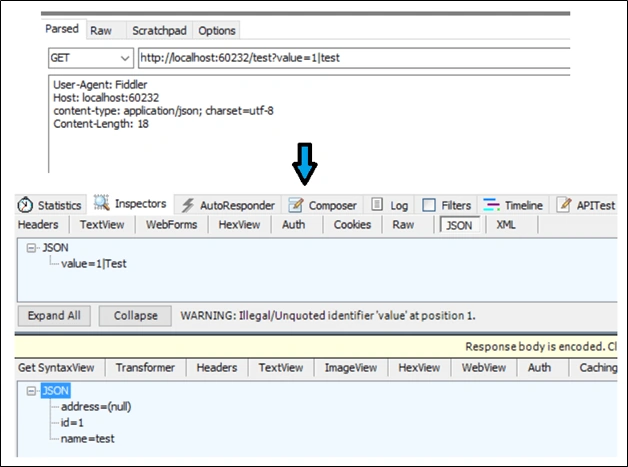
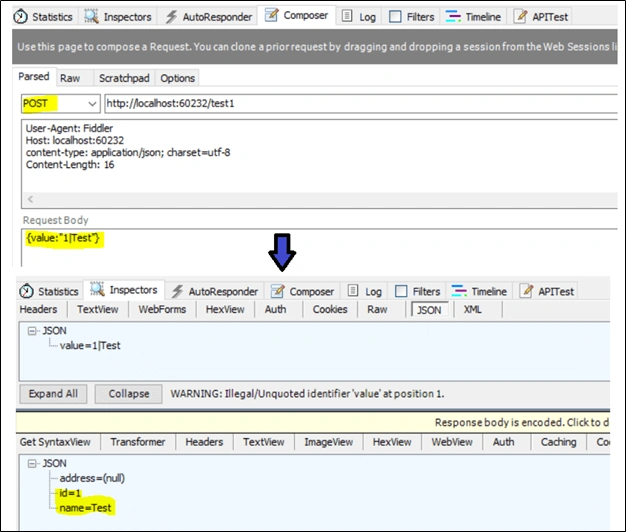
In the above example, we are reading the required data from request (query string). In the same way we can also read the data from request body. With the post method, we need to post the data within request body. In the following example, I have read the request body data and converted it in to required form.
Model Binder
- namespace ModelBinder
- {
- using Microsoft.AspNetCore.Mvc.ModelBinding;
- using ModelBinder.Model;
- using Newtonsoft.Json.Linq;
- using System;
- using System.IO;
- using System.Threading.Tasks;
- public class CustomModelBinder1 : IModelBinder
- {
- public Task BindModelAsync(ModelBindingContext bindingContext)
- {
- if (bindingContext == null)
- throw new ArgumentNullException(nameof(bindingContext));
- string valueFromBody = string.Empty;
- using (var sr = new StreamReader(bindingContext.HttpContext.Request.Body))
- {
- valueFromBody = sr.ReadToEnd();
- }
- if (string.IsNullOrEmpty(valueFromBody))
- {
- return Task.CompletedTask;
- }
- string values = Convert.ToString(((JValue)JObject.Parse(valueFromBody)["value"]).Value);
- var splitData = values.Split(new char[] { '|' });
- if (splitData.Length >= 2)
- {
- var result = new User1
- {
- Id = Convert.ToInt32(splitData[0]),
- Name = splitData[1]
- };
- bindingContext.Result = ModelBindingResult.Success(result);
- }
- return Task.CompletedTask;
- }
- }
- }
Summary
ASP.NET Core has many built-in model binders and their providers that meet our most all needs. But custom model binder provides a way to bind our data which is in specific format to our model classes or action parameter.
ASP.NET Core has many built-in model binders and their providers that meet our most all needs. But custom model binder provides a way to bind our data which is in specific format to our model classes or action parameter.
You can view and download source code from following link
Cedric ArnouldPosted Aug 6, 2019, 9:28 AM
Hi, thanks for your post. I would like to handle issues when I deserialize the json Body to my object. When I do bindingContext.Result = ModelBindingResult.Failed() and then I verifiy that context.ModelState.IsValid, the result is always true where it s supposed to be false. What do you suggest?
Federico CaldasPosted Jan 9, 2019, 11:39 AM
Hi Jignesh, you say that ASP.NET Core has many built-in model binders. Could you post a list of those or reference to a page where they are listed and explained?
milan ravalPosted Jul 10, 2018, 9:43 AM
I have added a model binder to string type to format phone number. I want to call model binder for each of the Properties in Viewmodel. But Model binder is called only if I am passing the string value to controller method, not when view model has any string that need to be formatted.