

Introduction
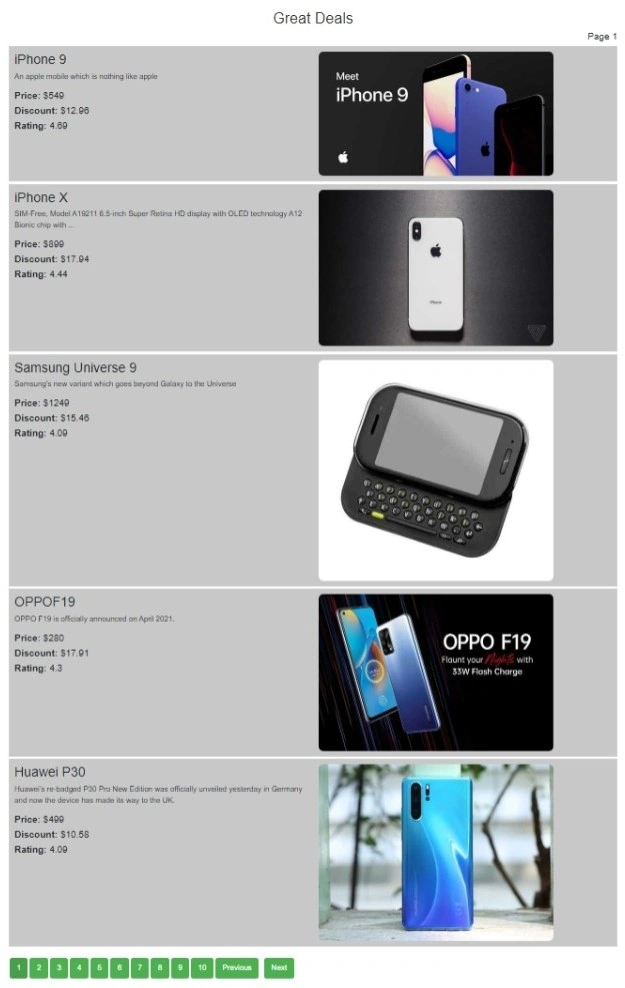
Creating user-friendly ways to convey massive amounts of data is a continuing difficulty in the wide world of web development. This issue can be resolved by using pagination, a method for breaking up text into manageable sections. Pagination is dividing large data sets into smaller portions called pages. A set amount of content usually appears on each page, providing consumers with an organized and easy-to-navigate method to access content. Pagination, which is frequently seen in product listings, blog archives, and search results, makes navigating vast datasets easier for users.
Common use cases of pagination
Following are the common use cases of pagination.
- Search Results: Search engines and e-commerce platforms often return many results for a user's query. Paginating search results allows users to navigate through various pages of search outcomes, making it easier to find relevant information.
- Data tables and grids: Displaying extensive datasets in tables or grids where showing all entries at once is impractical. Paginating data tables enables users to view a limited number of rows per page, improving readability and navigation.
- Blog posts and articles: Blogs and content-heavy websites with a significant number of articles or blog posts. Paginating articles helps in presenting a manageable number of posts on each page, enhancing the reading experience.
- Comments sections: Platforms with user-generated content, such as social media or discussion forums. Dividing user comments into pages ensures a more structured and accessible way for users to engage in discussions.
- Product Listing: E-commerce websites showcase a large inventory of products in a particular category. Paginating product listings allows users to systematically explore different sets of products without overwhelming them with all items on a single page.
- Administrative dashboard: Applications with administrative interfaces displaying logs, analytics, or user statistics. Breaking down extensive data into pages aids administrators in efficiently managing and analyzing information.
Let's create our pagination step-by-step-
Setting up the HTML structure
Let's create an HTML structure for custom pagination by creating elements for the pagination container, page navigation controls, and placeholders for the content to be paginated.
<!DOCTYPE html>
<html lang="en">

<head>
  <meta charset="UTF-8">
  <meta name="viewport" content="width=device-width, initial-scale=1.0">
  <link href="https://cdn.jsdelivr.net/npm/[email protected]/dist/css/bootstrap.min.css" rel="stylesheet" integrity="sha384-T3c6CoIi6uLrA9TneNEoa7RxnatzjcDSCmG1MXxSR1GAsXEV/Dwwykc2MPK8M2HN" crossorigin="anonymous">
  <link rel="stylesheet" href="css/style.css">
  <title>Custom Pagination</title>
</head>

<body>
  <div class="container">
    <div id="content"></div>
    <div id="pagination"></div>
  </div>
  <script src="https://cdn.jsdelivr.net/npm/[email protected]/dist/js/bootstrap.bundle.min.js" integrity="sha384-C6RzsynM9kWDrMNeT87bh95OGNyZPhcTNXj1NW7RuBCsyN/o0jlpcV8Qyq46cDfL" crossorigin="anonymous"></script>
  <script src="index.js"></script>
</body>

</html>
We have now completed our fundamental HTML framework. Let's now add style.
Styling the pagination components
We'll add styles to enhance the appearance of our pagination components. This includes styling for page buttons, current page indicators, and any additional design elements.
body {
    font-family: 'Arial', sans-serif;
    margin: 20px;
  }

  h2 {
    color: #333;
  }

  ul {
    list-style-type: none;
    padding: 0;
  }

  li {
    border: 1px solid #ccc;
    padding: 10px;
    margin: 5px 0;
  }

  #pagination {
    margin-top: 20px;
  }

  button {
    background-color: #4CAF50;
    color: white;
    border: none;
    padding: 10px 15px;
    text-align: center;
    text-decoration: none;
    display: inline-block;
    font-size: 16px;
    margin: 4px 2px;
    cursor: pointer;
    border-radius: 5px;
  }

  button.active {
    background-color: #45a049;
  }

  button:hover {
    background-color: #45a049;
  }

  #prev,
  #next {
    margin-right: 10px;
  }
Join the conversation! Your thoughts help the community grow.