

Introduction
- click
- fadeIn/fadeOut
- preventDefault
- hide
click
- $("#div").click(function () {
- alert("click ");
- });
fadeIn/fadeOut
The .fadeIn()/.fadeOut() methods are used to animate the opacity of the matched elements. For this (PopUp window) I have shown animation with some transaction.
Syntax- .fadeIn([duration][,easing][,complete])
This method helps to prevent all the actions from being revoked, if this method is called, the default action will not be triggered. I have used this method to rollback the animation when we open the PopUp window.
This method helps to hide immediately, with no animation. And make the display none of that element. I have used this method to close the window.
JavaScript code and explanation
.fadeOut([duration][,easing][,complete])
- duration: A number or string value that will determine how long the animation will run.
- easing: A string indicating which easing function to use for the transaction
- complete: This is a function type and it calls the function when the animation is complete.
preventDefault
hide
- $(document).ready(function () {
- $('#myButton').click(function () {
- var id = '#dialog';
- var clgName = $('#cllg').val();
- $("#clg").val(clgName);
- var maskHeight = $(document).height();
- var maskWidth = $(document).width();
- $('#mask').css({ 'width': maskWidth, 'height': maskHeight })
- $('#mask').fadeIn(1000);
- $('#mask').fadeTo("slow", 0.8);
- var winH = $(window).height();
- var winW = $(window).width();
- $(id).css('top', winH / 2 - $(id).height() / 2);
- $(id).css('left', winW / 2 - $(id).width() / 2);
- $(id).fadeIn(2000);
- $('.window .close').click(function (e) {
- e.preventDefault();
- $('#mask').hide();
- $('.window').hide();
- });
- });
- });
This JavaScript code works in the following 3 steps:
- Getting the size of the window for the fade effect
- Set the pop-up window
- Close the pop-up window
CSS Code
- #mask {
- position: absolute;
- padding-left: 60px;
- padding-top: 80px;
- padding-bottom: 80px;
- padding-right: 50px;
- left: 0;
- top: 0;
- z-index: 9999;
- background-color: #808080;
- display: none;
- }
- #boxes .window {
- position: absolute;
- left: 0;
- top: 0;
- width: 580px;
- height: 300px;
- display: none;
- z-index: 9999;
- padding: 20px;
- background-color: white;
- border: 3px solid #79BBFD;
- border-radius: 10px;
- -webkit-border-radius: 10px;
- -moz-border-radius: 10px;
- }
- #boxes #dialog {
- padding: 10px;
- width: 580px;
- height: 300px;
- background-color: #ffffff;
- background-repeat: no-repeat;
- margin-top: 20px;
- }
- #headerBorder{
- height:25px;
- width:100%;
- background-color:#0026ff;
- color:white;
- font-size:18px;
- padding-top:3px;
- margin-bottom:20px;
- }
- #close{
- position:relative;
- float:right;
- text-decoration:none;
- padding-right:5px;
- cursor:pointer;
- }
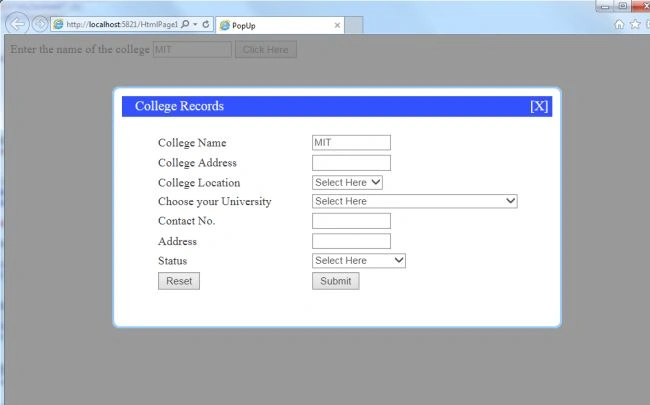
In this CSS code, we are able to design a perfect dialog box and a background color.
HTML Code
- <html>
- <head>
- <title>PopUp</title>
- <script src="Scripts/jquery-2.1.1.js"></script>
- <link href="PopUp.css" rel="stylesheet" />
- <script src="PopUpJquery.js"></script>
- <style type="text/css">
- .auto-style1 {
- width: auto;
- position:relative;
- left:45px;
- width:100%;
- }
- </style>
- </head>
- <body>
- Enter the name of the college <input type="text" size="12" id="cllg" />
- <Button ID="myButton" onclick="myButton_Click()">Click Here</Button>
- <div id="boxes">
- <div id="mask">
- <div id="dialog" class="window">
- <div id="headerBorder"> College Records
- <div id="close" class="close">[X]</div>
- </div>
- <table cellpadding="2" class="auto-style1">
- <tr>
- <td>College Name</td>
- <td>
- <input type="text" size="12" id="clg" />
- </td>
- </tr>
- <tr>
- <td>College Address</td>
- <td>
- <input type="text" size="12" />
- </td>
- </tr>
- <tr>
- <td>College Location</td>
- <td>
- <select>
- <option>Select Here</option>
- <option>New Delhi</option>
- <option>Pune</option>
- <option>Banglore</option>
- <option>Chennai</option>
- <option>Kolkatta</option>
- <option>Odisa</option>
- </select>
- </td>
- </tr>
- <tr>
- <td>Choose your University</td>
- <td>
- <select>
- <option>Select Here</option>
- <option>Acharya Nagarjuna University</option>
- <option>Adikavi Nannaya University</option>
- <option>Andhra University</option>
- <option>Jawaharlal Nehru Technological University</option>
- <option>Magadh University</option>
- <option>Patana University</option>
- <option>Aligarh Muslim University</option>
- <option>Jamia Millia Islamia</option>
- <option>University of Delhi</option>
- <option>University of Pune</option>
- </select>
- </td>
- </tr>
- <tr>
- <td>Contact No.</td>
- <td>
- <input type="text" size="12"/>
- </td>
- </tr>
- <tr>
- <td>Address</td>
- <td>
- <input type="text" size="12" />
- </td>
- </tr>
- <tr>
- <td>Status</td>
- <td>
- <select>
- <option>Select Here</option>
- <option>Reguralar</option>
- <option>Corospaondance</option>
- <option>--</option>
- </select>
- </td>
- </tr>
- <tr>
- <td> <input type="reset" /></td>
- <td>
- <button OnClick="Button1_Click" >Submit</button>
- </td>
- </tr>
- </table>
- </div>
- </div>
- </div>
- </body>
- </html>
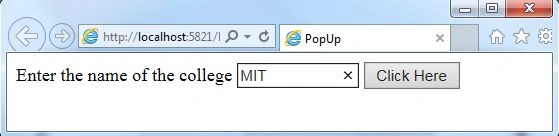
When we enter the name of the college and hit the button, we will see that college name on the PopUp window.
Munesh SharmaPosted Nov 13, 2015, 5:46 AM
good one rajeev
FAROOKH MANSURIPosted May 22, 2015, 7:00 AM
it 's very helpful
Rama KrishnaPosted Jul 4, 2014, 10:54 AM
nice one
Sanjay SinghPosted Jun 24, 2014, 8:57 AM
nice article...