

Introduction
When we want to restrict unauthorized users from accessing data from our application, then we need to apply token-based authentication in our application so that only valid users can access the data. Usually, ASP.NET WebAPI 2 provides Identity based authentication that is implemented in code first approach. But there may be some scenario when we have to go with database first approach and in this aspect, the identity token may have some hassle in implementation. This custom database first approach token authentication will enable you to apply token-based authentication in your application in a simple way with no hassle.
Steps of implementation
You need to go through the following steps to implement custom token-based authentication.
Step 1
Create a database with name Tokenization and add 3 tables there as following.
- CREATE DATABASE Tokenization
- USE [Tokenization]
- GO
- CREATE TABLE Employees
- (
- EmployeeId INT PRIMARY KEY IDENTITY(1,1) NOT NULL,
- EmployeeName VARCHAR(255) NULL,
- EmployeeEmail VARCHAR(255) NULL,
- EmployeeMobileNumber VARCHAR(12) NULL,
- EmployeeAddress VARCHAR(255) NULL
- )
- GO
- CREATE TABLE Users
- (
- UserId INT PRIMARY KEY IDENTITY(1,1) NOT NULL,
- FullName VARCHAR(255) NULL,
- LoginName VARCHAR(255) NOT NULL,
- PasswordNo VARCHAR(255) NOT NULL,
- EmployeeId INT NOT NULL
- )
- GO
- CREATE TABLE TokenManager
- (
- TokenID BIGINT PRIMARY KEY IDENTITY(1,1) NOT NULL,
- TokenKey VARCHAR(255) NULL,
- IssuedOn DATETIME NULL,
- ExpiresOn DATETIME NULL,
- CreatedOn DATETIME NULL,
- UserId INT NULL
- )
- GO
Step 2
Create a Web API 2 Project and name it as CustomTokenizationDatabaseFirst.
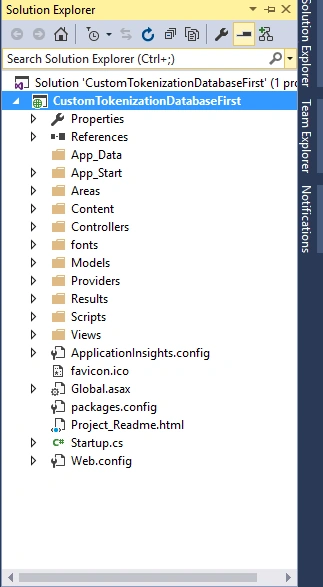
Step 3
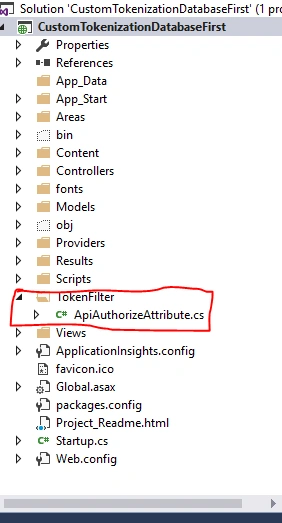
Create a folder by right clicking on CustomTokenizationDatabaseFirst Project and name it as TokenFilter. Under this folder create the following class as ApiAuthorizeAttribute.
Code Snippet for ApiAuthorizeAttribute Class
- public class ApiAuthorizeAttribute : AuthorizeAttribute
- {
- private readonly Entities _entities = new Entities();
- private readonly IUserRepository _userRepository = new UserRepository();
- public override void OnAuthorization(HttpActionContext filterContext)
- {
- if (Authorize(filterContext))
- {
- return;
- }
- HandleUnauthorizedRequest(filterContext);
- }
- protected override void HandleUnauthorizedRequest(HttpActionContext filterContext)
- {
- base.HandleUnauthorizedRequest(filterContext);
- }
- //Here Getting the token from request header and decrypting real information which hidden in token key
- private bool Authorize(HttpActionContext actionContext)
- {
- try
- {
- var encodedString = actionContext.Request.Headers.GetValues("Token").FirstOrDefault();
- bool validFlag = false;
- if (!string.IsNullOrEmpty(encodedString))
- {
- var key = PasswordHash.DecryptText(encodedString);
- string[] parts = key.Split('|');
- Type myType = typeof(WebApiConfig);
- var myNamespace = myType.Namespace;
- string protocol = HttpContext.Current.Request.IsSecureConnection ? "https://" : "http://";
- string myApiUrl = protocol + HttpContext.Current.Request.Url.Authority;
- var userId = Convert.ToInt32(parts[0]); // UserID
- var randomKey = parts[1]; // Random Key
- var nameSpace = parts[2]; // NameSpace
- var apiUrl = parts[3]; // apiUrl
- long ticks = long.Parse(parts[4]); // Ticks
- var issuedOn = new DateTime(ticks);
- var userInfo = _userRepository.GetUserById(userId);
- if (userInfo != null && myNamespace==nameSpace && myApiUrl==apiUrl)
- {
- // Validating Time
- var expiresOn = (from token in _entities.TokenManagers
- where token.UserId == userId && token.TokenKey == encodedString
- select token.ExpiresOn).FirstOrDefault();
- validFlag = (DateTime.Now <= expiresOn);
- }
- }
- return validFlag;
- }
- catch (Exception ex)
- {
- return false;
- }
- }
- }
Step 4
How long will your token be vaild? You have to define it in Web.Config file under the <appSettings></appSettings> XML tag. I have set up 45 minutes as token expiry time. You may customize it as per your requirements.
See the follwing code,
Code Snippet for Token Expiarity
- <appSettings>
- <add key="TokenExpiry" value="45" />
- </appSettings>
Step 5
There will be a Model folder in your newly created project add the following JSON formatter class which will serialize JSON data.This Class will be used in web API controller Class.
Code Snippet for Json formatter
- public static class RequestFormat
- {
- public static JsonMediaTypeFormatter JsonFormaterString()
- {
- var formatter = new JsonMediaTypeFormatter();
- var json = formatter.SerializerSettings;
- json.DateFormatHandling = Newtonsoft.Json.DateFormatHandling.MicrosoftDateFormat;
- json.DateTimeZoneHandling = Newtonsoft.Json.DateTimeZoneHandling.Utc;
- json.NullValueHandling = Newtonsoft.Json.NullValueHandling.Ignore;
- json.ContractResolver = new CamelCasePropertyNamesContractResolver();
- return formatter;
- }
- }
Add another class under Model Folder which will be used for every API response model.
Code Snippet for API Response Model
- // This Class will be used for every API Response It's a response format actually
- public class Confirmation
- {
- public string ResponseStatus { get; set; }
- public string Message { get; set; }
- public object ResponseData { get; set; }
- }
Add three (3) sub folders under Model folder with the following naming convention,
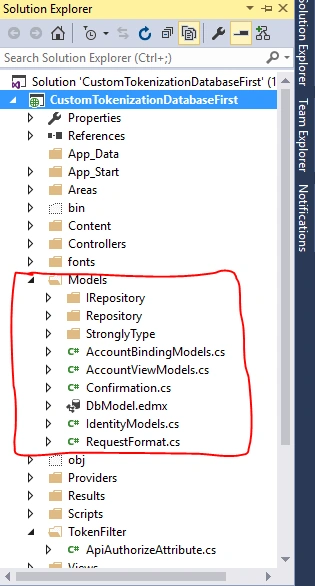
IRepository
Add the following code in IRepository sub folder with separate IInterface file,
- public interface IEmployeeRepository
- {
- object GetAllEmployees();
- }
- public interface IUserRepository
- {
- User GetUserById(int userId);
- User GetUserByLoginName(string userName);
- }
- internal interface ILoginRepository
- {
- object LoginInformation(string userName, string password);
- bool IsTokenAlreadyExists(long userId);
- int DeleteGenerateToken(long userId);
- int InsertToken(TokenManager token);
- string GenerateToken(long userId, System.DateTime issuedOn);
- }
Repository
Add the following code in Repository sub folder. Each implementation should have a separate class file,
- //Implementation of IEmployeeRepository
- public class EmployeeRepository : IEmployeeRepository
- {
- private readonly Entities _entities;
- public EmployeeRepository()
- {
- this._entities = new Entities();
- }
- public object GetAllEmployees()
- {
- try
- {
- var employee = (from emp in _entities.Employees
- select new
- {
- EmployeeId = emp.EmployeeId,
- EmployeeName = emp.EmployeeName,
- EmployeeEmail = emp.EmployeeEmail,
- EmployeeMobileNumber = emp.EmployeeMobileNumber,
- EmployeeAddress = emp.EmployeeAddress
- }).OrderByDescending(e => e.EmployeeId).ToList();
- return employee;
- }
- catch (Exception)
- {
- throw;
- }
- }
- }
- //Implementation of IUserRepository
- public class UserRepository : IUserRepository
- {
- private readonly Entities _entities;
- public UserRepository()
- {
- this._entities = new Entities();
- }
- public User GetUserById(int userId)
- {
- var user = _entities.Users.Find(userId);
- return user;
- }
- public User GetUserByLoginName(string userName)
- {
- try
- {
- var userInfo = _entities.Users.FirstOrDefault(x => x.LoginName == userName);
- return userInfo;
- }
- catch (Exception ex)
- {
- return null;
- }
- }
- }
- //Implementation of ILoginRepository
- public class LoginRepository : ILoginRepository
- {
- private readonly Entities _entities;
- private readonly IUserRepository _userRepository;
- public LoginRepository()
- {
- this._entities = new Entities();
- this._userRepository = new UserRepository();
- }
- public object LoginInformation(string userName, string password)
- {
- try
- {
- var checkIsUserExists =
- _entities.Users.FirstOrDefault(x => x.LoginName == userName && x.PasswordNo == password);
- if (checkIsUserExists != null)
- {
- LoginModel login = new LoginModel();
- login.UserId = checkIsUserExists.UserId;
- login.LoginName = checkIsUserExists.LoginName;
- login.PasswordNo = checkIsUserExists.PasswordNo;
- login.FullName = checkIsUserExists.FullName;
- return login;
- }
- else
- {
- return null;
- }
- }
- catch (Exception)
- {
- return null;
- }
- }
- public bool IsTokenAlreadyExists(long userId)
- {
- try
- {
- var result = (from token in _entities.TokenManagers
- where token.UserId == userId
- select token).Count();
- if (result > 0)
- {
- return true;
- }
- else
- {
- return false;
- }
- }
- catch (Exception ex)
- {
- return false;
- }
- }
- public int DeleteGenerateToken(long userId)
- {
- try
- {
- var token = _entities.TokenManagers.SingleOrDefault(x => x.UserId == userId);
- if (token != null) _entities.TokenManagers.Remove(token);
- return _entities.SaveChanges();
- }
- catch (Exception ex)
- {
- throw;
- }
- }
- public int InsertToken(TokenManager token)
- {
- try
- {
- _entities.TokenManagers.Add(token);
- return _entities.SaveChanges();
- }
- catch (Exception ex)
- {
- throw;
- }
- }
- public string GenerateToken(long userId, DateTime issuedOn)
- {
- try
- {
- Type myType = typeof(WebApiConfig);
- var myNamespace = myType.Namespace;
- string protocol = HttpContext.Current.Request.IsSecureConnection ? "https://" : "http://";
- string apiUrl = protocol + HttpContext.Current.Request.Url.Authority;
- string randomnumber =
- string.Join("|", new string[]{
- Convert.ToString(userId),
- KeyGenerator.GetUniqueKey(),
- myNamespace,
- apiUrl,
- Convert.ToString(issuedOn.Ticks)
- });
- return PasswordHash.EncryptText(randomnumber);
- }
- catch (Exception ex)
- {
- throw;
- }
- }
- }
- // Class Token Algorithm
- public static class KeyGenerator
- {
- //Here the algorith of how token will be generated
- public static string GetUniqueKey(int maxSize = 15)
- {
- var chars = new char[62];
- chars = "abcdefghijklmnopqrstuvwxyzABCDEFGHIJKLMNOPQRSTUVWXYZ1234567890".ToCharArray();
- var data = new byte[1];
- using (var crypto = new RNGCryptoServiceProvider())
- {
- data = new byte[maxSize];
- crypto.GetNonZeroBytes(data);
- }
- var result = new StringBuilder(maxSize);
- foreach (byte b in data)
- {
- result.Append(chars[b % (chars.Length)]);
- }
- return result.ToString();
- }
- }
- // Class Token Hash Algorithm
- public class PasswordHash
- {
- /// <summary>
- /// Functions: This class generates hases for password and verify hashed password with hashed password saved in database,
- /// Verification process purposefully delays to give the hacker a shitfull of pain
- /// </summary>
- static Random rnd = new Random();
- public const int SaltByteSize = 24;
- public const int HashByteSize = 20; // to match the size of the PBKDF2-HMAC-SHA-1 hash
- // public static int Pbkdf2Iterations = rnd.Next(2000, 3000); // Maruf: 21.Jun.2017
- public const int IterationIndex = 0;
- public const int SaltIndex = 1;
- public const int Pbkdf2Index = 2;
- public static string HashPassword(string password)
- {
- try
- {
- int pbkdf2Iterations = rnd.Next(2000, 3000);
- var cryptoProvider = new RNGCryptoServiceProvider();
- var salt = new byte[SaltByteSize];
- cryptoProvider.GetBytes(salt);
- var hash = GetPbkdf2Bytes(password, salt, pbkdf2Iterations, HashByteSize);
- return pbkdf2Iterations + "|" +
- Convert.ToBase64String(salt) + "|" +
- Convert.ToBase64String(hash);
- }
- catch (Exception ex)
- {
- throw;
- }
- }
- public static byte[] AES_Encrypt(byte[] bytesToBeEncrypted, byte[] passwordBytes)
- {
- byte[] encryptedBytes = null;
- // Set your salt here, change it to meet your flavor:
- // The salt bytes must be at least 8 bytes.
- byte[] saltBytes = new byte[] { 1, 2, 3, 4, 5, 6, 7, 8 };
- using (MemoryStream ms = new MemoryStream())
- {
- using (RijndaelManaged AES = new RijndaelManaged())
- {
- AES.KeySize = 256;
- AES.BlockSize = 128;
- var key = new Rfc2898DeriveBytes(passwordBytes, saltBytes, 1000);
- AES.Key = key.GetBytes(AES.KeySize / 8);
- AES.IV = key.GetBytes(AES.BlockSize / 8);
- AES.Mode = CipherMode.CBC;
- using (var cs = new CryptoStream(ms, AES.CreateEncryptor(), CryptoStreamMode.Write))
- {
- cs.Write(bytesToBeEncrypted, 0, bytesToBeEncrypted.Length);
- cs.Close();
- }
- encryptedBytes = ms.ToArray();
- }
- }
- return encryptedBytes;
- }
- public static byte[] AES_Decrypt(byte[] bytesToBeDecrypted, byte[] passwordBytes)
- {
- byte[] decryptedBytes = null;
- // Set your salt here, change it to meet your flavor:
- // The salt bytes must be at least 8 bytes.
- byte[] saltBytes = new byte[] { 1, 2, 3, 4, 5, 6, 7, 8 };
- using (MemoryStream ms = new MemoryStream())
- {
- using (RijndaelManaged AES = new RijndaelManaged())
- {
- AES.KeySize = 256;
- AES.BlockSize = 128;
- var key = new Rfc2898DeriveBytes(passwordBytes, saltBytes, 1000);
- AES.Key = key.GetBytes(AES.KeySize / 8);
- AES.IV = key.GetBytes(AES.BlockSize / 8);
- AES.Mode = CipherMode.CBC;
- using (var cs = new CryptoStream(ms, AES.CreateDecryptor(), CryptoStreamMode.Write))
- {
- cs.Write(bytesToBeDecrypted, 0, bytesToBeDecrypted.Length);
- cs.Close();
- }
- decryptedBytes = ms.ToArray();
- }
- }
- return decryptedBytes;
- }
- public static string EncryptText(string input, string password = "E6t187^D43%F")
- {
- // Get the bytes of the string
- byte[] bytesToBeEncrypted = Encoding.UTF8.GetBytes(input);
- byte[] passwordBytes = Encoding.UTF8.GetBytes(password);
- // Hash the password with SHA256
- passwordBytes = SHA256.Create().ComputeHash(passwordBytes);
- byte[] bytesEncrypted = AES_Encrypt(bytesToBeEncrypted, passwordBytes);
- string result = Convert.ToBase64String(bytesEncrypted);
- return result;
- }
- public static string DecryptText(string input, string password = "E6t187^D43%F")
- {
- // Get the bytes of the string
- byte[] bytesToBeDecrypted = Convert.FromBase64String(input);
- byte[] passwordBytes = Encoding.UTF8.GetBytes(password);
- passwordBytes = SHA256.Create().ComputeHash(passwordBytes);
- byte[] bytesDecrypted = AES_Decrypt(bytesToBeDecrypted, passwordBytes);
- string result = Encoding.UTF8.GetString(bytesDecrypted);
- return result;
- }
- public static bool ValidatePassword(string password, string correctHash)
- {
- try
- {
- char[] delimiter = { '|' };
- var split = correctHash.Split(delimiter);
- var iterations = Int32.Parse(split[IterationIndex]);
- var salt = Convert.FromBase64String(split[SaltIndex]);
- var hash = Convert.FromBase64String(split[Pbkdf2Index]);
- var testHash = GetPbkdf2Bytes(password, salt, iterations, hash.Length);
- return SlowEquals(hash, testHash);
- }
- catch (Exception ex)
- {
- throw;
- }
- }
- private static bool SlowEquals(byte[] a, byte[] b)
- {
- try
- {
- var diff = (uint)a.Length ^ (uint)b.Length;
- for (int i = 0; i < a.Length && i < b.Length; i++)
- {
- diff |= (uint)(a[i] ^ b[i]);
- }
- return diff == 0;
- }
- catch (Exception ex)
- {
- throw;
- }
- }
- private static byte[] GetPbkdf2Bytes(string password, byte[] salt, int iterations, int outputBytes)
- {
- try
- {
- var pbkdf2 = new Rfc2898DeriveBytes(password, salt) { IterationCount = iterations };
- return pbkdf2.GetBytes(outputBytes);
- }
- catch (Exception ex)
- {
- throw;
- }
- }
- }
StronglyTypeModel
Add the following code in StronglyTypeModel sub folder. Each class should have separate class file.
- //For Employee Will be call from Web API controller Class
- public class EmployeeUserModel
- {
- public int EmployeeId { get; set; }
- public string EmployeeName { get; set; }
- public string EmployeeEmail { get; set; }
- public string EmployeeMobileNumber { get; set; }
- public string EmployeeAddress { get; set; }
- public int UserId { get; set; }
- public string FullName { get; set; }
- public string UserName { get; set; }
- public string PasswordNo { get; set; }
- }
- // For Login Will be call from Web API controller Class
- public class LoginModel
- {
- public int UserId { get; set; }
- public string FullName { get; set; }
- public string LoginName { get; set; }
- public string PasswordNo { get; set; }
- public int EmployeeId { get; set; }
- public string EmployeeName { get; set; }
- }
Step 6
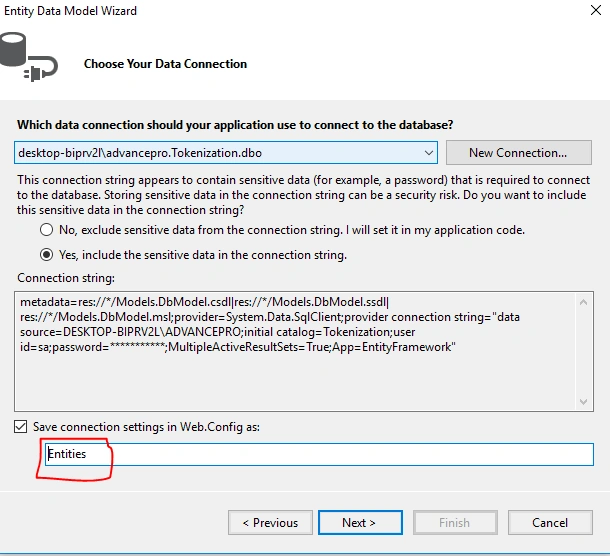
Now create a ADO.NET Entity Data Model by right clicking on Model folder give the model name as "DbModel" after providing all of your server credentials name the entity (connectionString name) as "Entity." It's mandatory to use specifyed naming conventions.
Step 7
Now add Web API Controller Class under the controller folder.
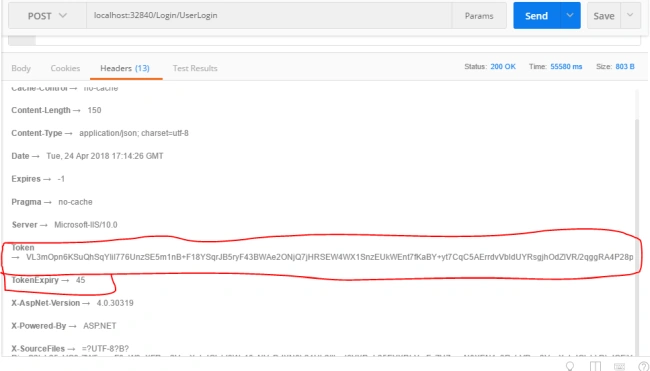
Here note that you will get your token from API Response header portion. I have used POST MAN for this request. You can find your generated token in POST MAN Response header part.
- // For Employee Controller
- public class EmployeeController : ApiController
- {
- private readonly IEmployeeRepository _employeeRepository;
- public EmployeeController()
- {
- this._employeeRepository = new EmployeeRepository();
- }
- public EmployeeController(IEmployeeRepository employeeRepository)
- {
- this._employeeRepository = employeeRepository;
- }
- //Can not access data unknown user without Valid Token
- [ApiAuthorize] // use this annotation for authentication I have used only here
- [HttpGet, ActionName("GetAllEmployeesWithToken")]
- public HttpResponseMessage GetAllEmployeesWithToken()
- {
- var data = _employeeRepository.GetAllEmployees();
- var formatter = RequestFormat.JsonFormaterString();
- return Request.CreateResponse(HttpStatusCode.OK, data, formatter);
- }
- //Can access data unknown user without Valid Token
- [AllowAnonymous]
- [HttpGet, ActionName("GetAllEmployeesWithOutToken")]
- public HttpResponseMessage GetAllEmployeesWithOutToken()
- {
- var data = _employeeRepository.GetAllEmployees();
- var formatter = RequestFormat.JsonFormaterString();
- return Request.CreateResponse(HttpStatusCode.OK, data, formatter);
- }
- }
- // For Login Controller
- public class LoginController : ApiController
- {
- private readonly ILoginRepository _loginRepository;
- private readonly IUserRepository _userRepository;
- public LoginController()
- {
- _userRepository = new UserRepository();
- this._loginRepository = new LoginRepository();
- }
- [HttpPost, ActionName("UserLogin")]
- public HttpResponseMessage UserLogin([FromBody] Models.StronglyType.EmployeeUserModel objEmployeeUserModel)
- {
- try
- {
- var formatter = RequestFormat.JsonFormaterString();
- if (string.IsNullOrEmpty(objEmployeeUserModel.UserName))
- {
- return Request.CreateResponse(HttpStatusCode.NotAcceptable, new Confirmation { ResponseStatus = "error", Message = "User Name can not be empty" }, formatter);
- }
- if (string.IsNullOrEmpty(objEmployeeUserModel.PasswordNo))
- {
- return Request.CreateResponse(HttpStatusCode.NotAcceptable, new Confirmation { ResponseStatus = "error", Message = "password can not be empty" }, formatter);
- }
- var userInfo = _userRepository.GetUserByLoginName(objEmployeeUserModel.UserName);
- if (userInfo != null)
- {
- var login = _loginRepository.LoginInformation(objEmployeeUserModel.UserName, objEmployeeUserModel.PasswordNo);
- if (login != null)
- {
- var oResponse = Request.CreateResponse(HttpStatusCode.OK,
- new Confirmation { ResponseStatus = "success", Message = "Login Successfully", ResponseData = userInfo }, formatter);
- if (_loginRepository.IsTokenAlreadyExists(userInfo.UserId))
- {
- _loginRepository.DeleteGenerateToken(userInfo.UserId);
- return GenerateandSaveToken(userInfo.UserId, oResponse);
- }
- else
- {
- return GenerateandSaveToken(userInfo.UserId, oResponse);
- }
- }
- return Request.CreateResponse(HttpStatusCode.Forbidden,
- new Confirmation { ResponseStatus = "error", Message = "Please enter valid username or password" }, formatter);
- }
- return Request.CreateResponse(HttpStatusCode.Forbidden,
- new Confirmation { ResponseStatus = "error", Message = "Please enter valid username or password" }, formatter);
- }
- catch (Exception ex)
- {
- var formatter = RequestFormat.JsonFormaterString();
- return Request.CreateResponse(HttpStatusCode.OK, new Confirmation { ResponseStatus = "error", Message = "Login is not succesfull" }, formatter);
- }
- }
- [NonAction]
- private HttpResponseMessage GenerateandSaveToken(int userId, HttpResponseMessage response)
- {
- try
- {
- var issuedOn = DateTime.Now;
- var newToken = _loginRepository.GenerateToken(userId, issuedOn);
- var token = new TokenManager();
- token.TokenID = 0;
- token.TokenKey = newToken;
- token.IssuedOn = issuedOn;
- token.ExpiresOn = DateTime.Now.AddMinutes(Convert.ToInt32(ConfigurationManager.AppSettings["TokenExpiry"]));
- token.CreatedOn = DateTime.Now;
- token.UserId = userId;
- var result = _loginRepository.InsertToken(token);
- if (result == 1)
- {
- response.Headers.Add("Token", newToken);
- response.Headers.Add("TokenExpiry", ConfigurationManager.AppSettings["TokenExpiry"]);
- response.Headers.Add("Access-Control-Expose-Headers", "Token,TokenExpiry");
- return response;
- }
- var message = new HttpResponseMessage(HttpStatusCode.NotAcceptable);
- message.Content = new StringContent("Error in Creating Token");
- return message;
- }
- catch (Exception ex)
- {
- var formatter = RequestFormat.JsonFormaterString();
- return Request.CreateResponse(HttpStatusCode.InternalServerError, new Confirmation { ResponseStatus = "error", Message = "Cannot generate and Save Token" }, formatter);
- }
- }
- }
Step 7
As you have seen above I have not used RESTful API here, so you might get 404 error while you attempt to send a request from Post Man. To solve this issue, paste the following code in your WebApiConfig.cs file under App_Start folder. It will allow you to have multipule http verbs in controller class.
Code Snippet for WebApiConfig.cs
- config.Routes.MapHttpRoute(
- name: "ControllersWithAction",
- routeTemplate: "{controller}/{action}/{id}",
- defaults: new { id = RouteParameter.Optional }
- );
Final Step
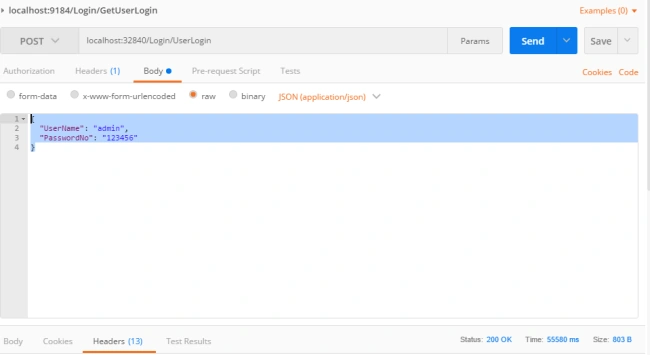
Just build your project and send request from Post Man as json data format.
Post Man request format
Post Man response format with token
Code Snippet for json request format
- {
- "UserName": "admin",
- "PasswordNo": "123456"
- }
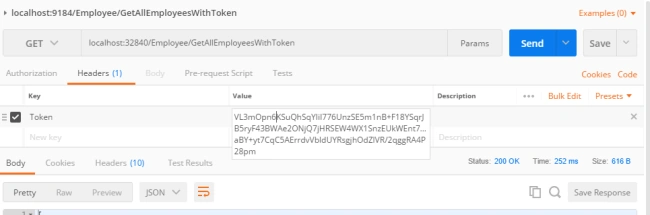
Access your data in json request format through POST MAN
See the following image - add your Token in Post Man request header part when you attempt to hit the controller class:
Points of Interest
When I attempt to write any topic, I feel a wonderful excitement. I have to go through a with range on RND. I wish to spread my knowledge with technology lovers. It really feels good. I always try to describe the technology in a simple and easy way.
Tridip BhattacharjeePosted Apr 30, 2018, 4:00 AM
You use encryption so can we think you approach is solid so hacker will not be able to hack token and send request as valid user?is it secure for which you use encryption?
Tridip BhattacharjeePosted Apr 30, 2018, 3:59 AM
Why you use two different encryotion also....AES_Encrypt and RNGCryptoServiceProviderwhat kind of data will be encryoted by AES_Encrypt ?
Tridip BhattacharjeePosted Apr 30, 2018, 3:57 AM
How to get fresh token when existing token will be expired? refresh token is implemented?
Ano MepaniPosted Apr 28, 2018, 6:59 AM
Your article is very helpful and well written by d way
Ano MepaniPosted Apr 28, 2018, 6:58 AM
In ApiAuthorizeAttribute class For every request it hitting database which is a performance issue. Can't we add an issue or expired date for a token in session so we can read and compare from it instead of hitting to Database.