

Validation is a necessary part of any application. There may be many inbuilt validations in an application. If you want to use a custom validation to ensure useful data in an application then you can do that. There may be many custom validations that can be created in LightSwitch, but here we will discuss some custom validations which are as follows.
Step 1 : Open Visual Studio->Click on create new table.

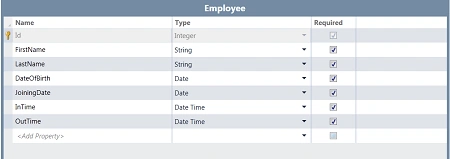
Step 2 : Create a table, such as employees.
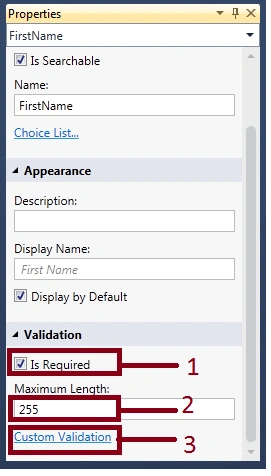
Step 3 : Go to properties of FirstName->Mark IsRequired checkbox and maximum length(255)->Click on custom validation->Write the code.
Code
partial
void FirstName_Validate(EntityValidationResultsBuilder
results)
{
//
results.AddPropertyError("<Error-Message>");
if (this.FirstName
!= null && !System.Text.RegularExpressions.Regex.IsMatch(this.FirstName,
@"^[a-zA-Z]+$"))
{
results.AddPropertyError("Invalid
characters, Only alphabets allowed.");
}
}
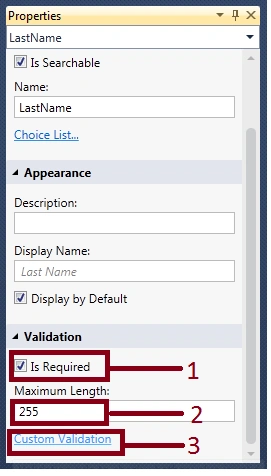
Step 4 : Go to properties of LastName->Mark IsRequired checkbox and maximum length(255)->Click on custom validation->Write the code.
Code
partial
void LastName_Validate(EntityValidationResultsBuilder
results)
{
//
results.AddPropertyError("<Error-Message>");
if (this.LastName
!= null && !System.Text.RegularExpressions.Regex.IsMatch(this.LastName,
@"^[a-zA-Z]+$"))
{
results.AddPropertyError("Invalid
characters, Only alphabets allowed.");
}
}
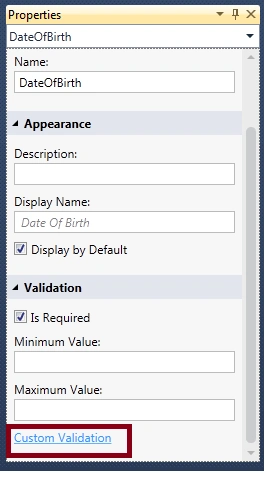
Step 5 : Go to DateOfBirth properties->Click on custom validation.
Code
partial
void DateOfBirth_Validate(EntityValidationResultsBuilder
results)
{
//
results.AddPropertyError("<Error-Message>");
if (this.DateOfBirth.CompareTo(this.JoiningDate)
> 0)
{
results.AddPropertyError("DateOfBirth
should be earlier than joining date");
}
}
or
partial
void JoiningDate_Validate(EntityValidationResultsBuilder
results)
{
//
results.AddPropertyError("<Error-Message>");
if (this.DateOfBirth.CompareTo(this.JoiningDate)
> 0)
{
results.AddPropertyError("Joining date
should be after DateOfBirth");
}
}
Step 6 : Now go to InTime properties->Write maximum and minimum value->Click on custom validation->Write the code.
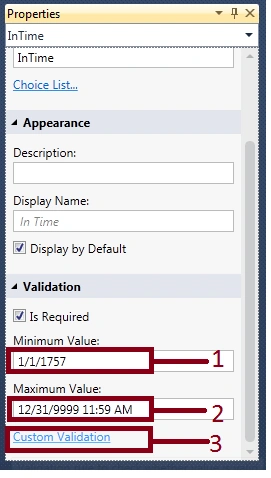
Code
partial
void InTime_Validate(EntityValidationResultsBuilder
results)
{
//
results.AddPropertyError("<Error-Message>");
if (InTime > OutTime)
{
results.AddPropertyError("InTime
must be before OutTime");
}
}
or
partial
void OutTime_Validate(EntityValidationResultsBuilder
results)
{
//
results.AddPropertyError("<Error-Message>");
if (OutTime < InTime)
{
results.AddPropertyError("OutTime must be
after InTime");
}
}
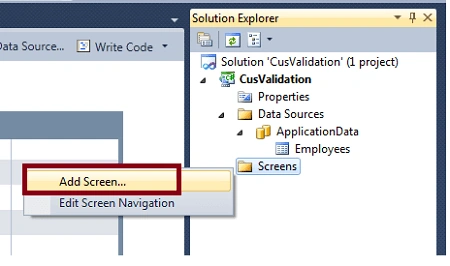
Step 7 : Now we will add a screen. Right click on screens->Add screen.
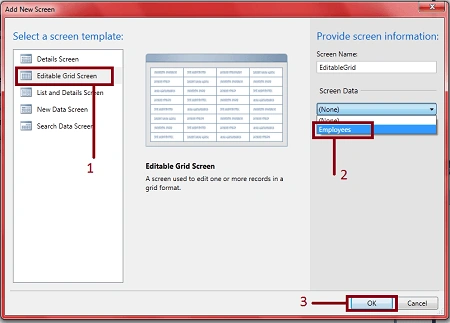
Step 8 : Select editable grid screen->Select screen data (employees)->Ok.
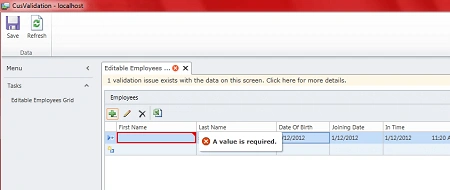
Step 9 : Run theapplication (F5). If you clear the FirstName column then an error will occur; it will be "A value is required".
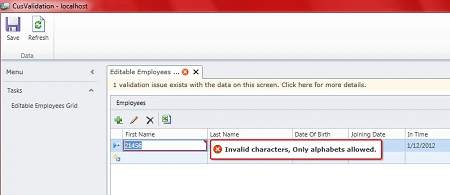
Step 10 : If you entered an integer value in the FirstName column then an error will occur; it will be "Invalid character, Only alphabet allowed".
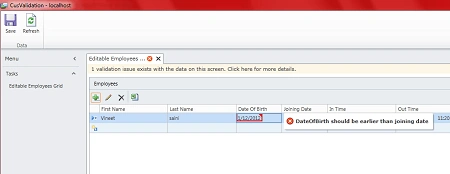
Step 11 : If you enter a DateOfBirth that is after the joining date then an error will occur; it will be "DateOfBirth should be earlier than joining date".
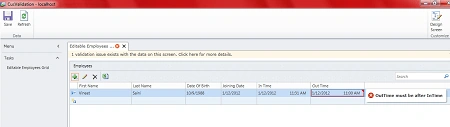
Step 12 : If you enter an InTime that is after the OutTime then an error will occur; it will be "InTime must be before OutTime".
Conclusion
So custom validation is a validation which is created manually. Validation is required to prevent invalid data and ensure useful data in the application.. So validation is very necessary for an application.
Some helpful resources
Join the conversation! Your thoughts help the community grow.