

Here I am going to show, how to create Site Action Menu Customize in Sharepoint site.
For that we have to know that what is custom action ?
Custom Actions
Custom actions are links, toolbar buttons and menu items that you can add to or hide from the SharePoint's user interface. Each custom action exists in a specific location, and depending on that location, can be a part of a group of actions.
With a custom action feature, you can:
- Add a new Custom Action Group which can be used to group custom actions in a specific options screen;
- Add a new Custom Action which can be a new option in a settings screen, a new menu item, or a new toolbar button;
- Hide an existing Custom Action whether that action is the result of custom action feature or it belongs to SharePoint's out-of-the-box features.
Now we start Customize SiteAction Menu For that we have make two XML file Like Feature.xml and Element.xml.
Feature Manifest
I will only present a simple feature manifest; you can put your xml file on C:\Program Files\Common Files\Microsoft Shared\web server extensions\12\TEMPLATE\FEATURES path within New Folder. Like: UserInterfaceCustomActions folder pastes that feature.xml file.
<? xml version="1.0" encoding="utf-8" ?>
<Feature xmlns="http://schemas.microsoft.com/sharepoint/"
Id="5DFD12AF-D0AA-4c63-8FB8-C49DB1191083"
Title="My Custom Action Feature"
Description="Adds Custom Actions to the Web Site."
Scope="Web"
Version="1.0.0.0">
<ElementManifests>
<ElementManifest Location="CustomActions.xml"/>
</ElementManifests>
</Feature>
Notes about this feature manifest:
- The title of the feature is My Custom Actions Feature.
- It will be deployed as a Web Site feature, since its Scope value is Web.
- It references a single element manifest file: CustomActions.xml.
Element Manifest
The element manifest file can have any name you wish (in this example it's called CustomActions.xml), but it's root element must be <Elements>. Inside this root element, you can place any number of feature element descriptions. In this example I will present the use of three feature elements:
- <CustomActionGroup> used to create new custom action groups;
- <CustomAction> used to create new custom actions;
- <HideCustomAction> used to hide existing actions.
<?xml version="1.0" encoding="utf-8" ?>
<Elements xmlns="http://schemas.microsoft.com/sharepoint/">
<!-- Custom Action Group -->
<CustomActionGroup
Id="MyActionGroup"
Description="This group contains all my custom actions."
Title="My Action Group"
Location="Microsoft.SharePoint.SiteSettings"
Sequence="30" />
<!-- Custom Action in Custom Action Group -->
<CustomAction
Id="MyCustomAction"
Description="This link is a custom action."
Title="My Custom Action"
GroupId="MyActionGroup"
Location="Microsoft.SharePoint.SiteSettings"
Rights="ManageWeb"
RequireSiteAdministrator="FALSE"
Sequence="20">
<UrlAction Url="~sitecollection/_layouts/MyCustomPage1.aspx" />
</CustomAction>
<!-- Custom Action in Site Actions Menu -->
<CustomAction
Id="MyNewCustomAction"
Description="This menu item is a new custom action."
Title="My New Custom Action"
GroupId="SiteActions"
Location="Microsoft.SharePoint.StandardMenu"
ImageUrl="/_layouts/MyActionIcon.jpg"
Sequence="10">
<UrlAction Url="~sitecollection/_layouts/MyCustomPage2.aspx" />
</CustomAction>
<!-- Hide Custom Action -->
<HideCustomAction
Id="HideDeleteWeb"
GroupId="SiteAdministration"
Location="Microsoft.SharePoint.SiteSettings"
HideActionId="DeleteWeb" />
</Elements>
In command prompt, type the following commands to install the Feature in the deployment, activate the feature on a specified sub site, and then reset Microsoft Internet Information Services (IIS) so that the changes can take effect
- stsadm -o installfeature -filename UserInterfaceCustomActions\feature.xml
- stsadm -o activatefeature -filename UserInterfaceCustomActions\feature.xml -url http://Server/Site/Subsite
- Iisreset.
Now you can open the site which gave URL in above command no. b and then go to site Action menu on left hand side on site and show your custom site action menu like My New Custom Action.
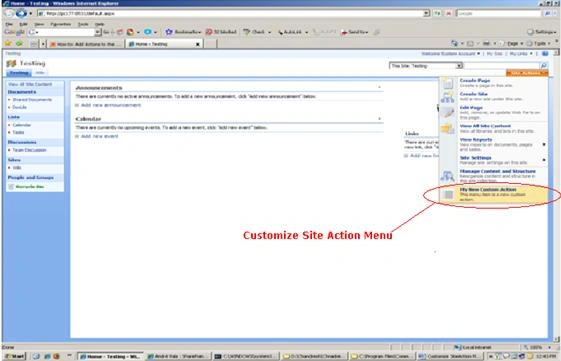
Now Enjoy with the Customize Site Action Menu.
Raddhu SajinPosted May 20, 2010, 8:14 AM
Hi Chandresh very good article, expecting more in MOSS 2007
eliza sahooPosted May 6, 2010, 9:09 AM
1. Create a folder named TestCustomAction under C:\Program Files\Common Files\Microsoft Shared\web server extensions\12\TEMPLATE\FEATURES directory. 2. Next, create a file named Feature.xml in the same folder with the following codes. <?xml version="1.0" encoding="utf-8" ?> <Feature Id="0BFF73A7-01ED-41e0-A810-3C764AC5201C"Title="Create new link in action Menu" Description="Add a new link to the action menu of a Custom List." Version="1.0.0.0"Scope="Site"xmlns="http://schemas.microsoft.com/sharepoint/"> <ElementManifests> <ElementManifest Location="TestCustomActions.xml" /> </ElementManifests> </Feature> 3. Next, create another file, TestCustomActions.xml in the same folder with the following codes. <?xml version="1.0" encoding="utf-8" ?> <Elements xmlns="http://schemas.microsoft.com/sharepoint/"> <CustomAction Id="UserInterfaceCustomActions.DocLibActionsToolbar"RegistrationType="List" RegistrationId="100"GroupId="ActionsMenu"Location="Microsoft.SharePoint.StandardMenu" Sequence="1000"Title="Generate CSV file for the Custom List"> <UrlActionUrl="/_layouts/TestCustomActions.aspx?List={ListId}" /> </CustomAction> </Elements> 4. Create a page named TestCustomActions.aspx under layouts folder and add your own Business Logic. 5. Finally, deploy this feature by running the command in the command prompt. To activate this feature: stsadm -o installfeature -filename TestCustomAction\feature.xml -url http://TestServer/Site. Finally to see the changes in the site do an iisreset. For more information refer
surya narayanaPosted Apr 15, 2010, 12:03 PM
Hi Chandresh, Thanks for the great article .it helped me a lot. I have some quick questions regarding this article . Please take some time and try to answer my questions 1) Is there anyway i can arrange the menu the way i want ? example Can i Move my Custom Item to the top of the Menu Items .. I mean in your example Can i move Custom Item to the top of Create New Page?? 2) how to handle secuirty for this? I mean i want to create 2 custom Items to the menu and Site Admin can see both 2 Custom Items and the Site Designer or Site Contribute can see only 1 Custom Items .?and Not only the custom items is there anyway we can restrict the secuitry of Action Items? Thanks in advance Surya
eliza sahooPosted Feb 10, 2010, 5:22 AM
This was very helpful. thanks Eliza
anniePosted Jun 9, 2009, 11:48 AM
Hi, I would like to know how I can move this feature to a new server? can I do it via WSP file? Thanks AK
kjoshiPosted Jun 5, 2009, 5:08 PM
Hi Chandresh, Great article and it works. Thanks a lot. Kavita
anniePosted May 12, 2009, 10:00 AM
I am created a new feature.xml file and added to the new folder mentioned above but it is giving me erros on the file regarding the name in first line. Can you help please. thanks AK