

Introduction
To customize the "Start Menu" of Windows 10 Operating System we will follow some important steps and rules.
Step 1
Firstly, press the "Windows" key from the keyboard to open "Start Menu". By default "Start Menu" have some limited options and services in views panel as in the following screenshot,
 Another way is to click on the "Start Menu" button for the same process.
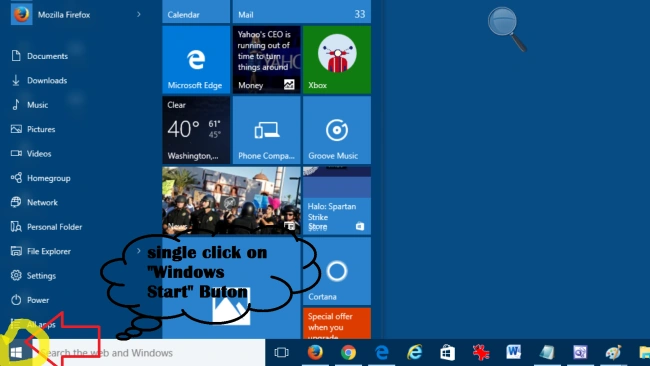 In this screenshot, we can see some "online" app tab & "offline" application icons. But I want to create my own start menu.
Step 2
In this screenshot, we can see some "online" app tab & "offline" application icons. But I want to create my own start menu.
Step 2
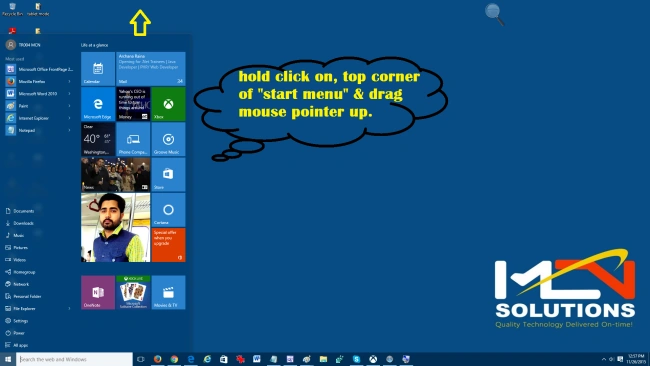
Now move the mouse pointer on the top corner of the "Start Menu" panel and hold down mouse pointer and drag to the top of the window as in the following screenshot.
 Step 3
Similarly, go for step 2 and move the pointer on the right side corner of "Start Menu" and drag the mouse on the right side direction of the window as in the following screenshot.
 Step 4
In step 4 we can resize the app tab as in the following screenshot.
 Step 5
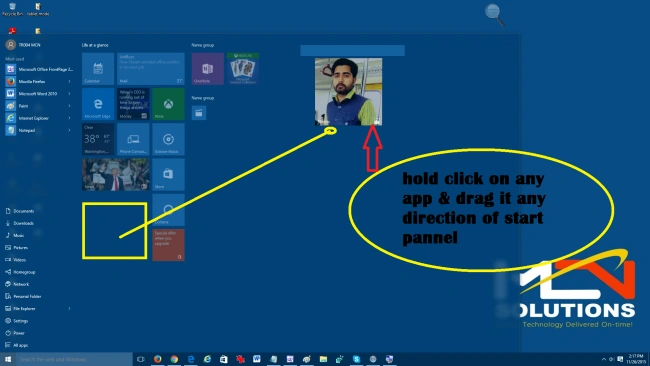
In this, we are changing the position of the app tab or application icon. Here's the screenshot,
Before

 After
After
 Step 6
Again press the "Windows" key from the keyboard to open the new "Start Menu". Right-click on paint and select "Pin to Start" option as in the following screenshot,
Before
 After
After
 Step 7
Click on the "Notification" icon to open the "Notification" pop-up window and select the "All settings" app tab as in the following screenshot.

 Step 8
Again press the "Windows" key to open "Start Menu", After pressing the "Windows" key we can see the new look and feel. The "Start Menu" panel is changed to full-screen mode and also hide the navigational startup programs and apps icons. Here's the screenshot.

NASEEM AHAMADPosted Dec 1, 2015, 6:04 AM
Nice
Sonu KumarPosted Dec 1, 2015, 5:09 AM
thnkss dear for comments & join me.. if you have any query then contact me.or post me.
Rupali ShindePosted Dec 1, 2015, 4:36 AM
just awesome
Sonu KumarPosted Dec 1, 2015, 2:15 AM
if you have new idea on windows article plz post me...?
Sonu KumarPosted Dec 1, 2015, 2:14 AM
thnks for comments
Santhakumar MunuswamyPosted Dec 1, 2015, 1:25 AM
Good One
Ankur MistryPosted Dec 1, 2015, 12:13 AM
good one
Mohammed IbrahimPosted Nov 30, 2015, 1:37 PM
nice
Banketeshvar NarayanPosted Nov 30, 2015, 1:34 PM
Good One