

Introduction
Direct memory access (DMA) is a system that can control the memory system without using the CPU. Basically it is a technique that is used for transferring data from main memory to a device without passing it through the CPU. Computers that have DMA channels can transfer data to and from devices with much less CPU overhead than computers without a DMA channel. With DMA, the CPU initiates the transfer, does other operations while the transfer is in progress, then receives an interrupt from the DMA controller when the operation is done. There are some steps for enabling the DMA.
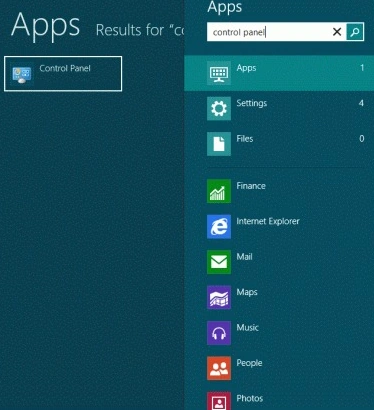
Step 1. Open Control Panel.
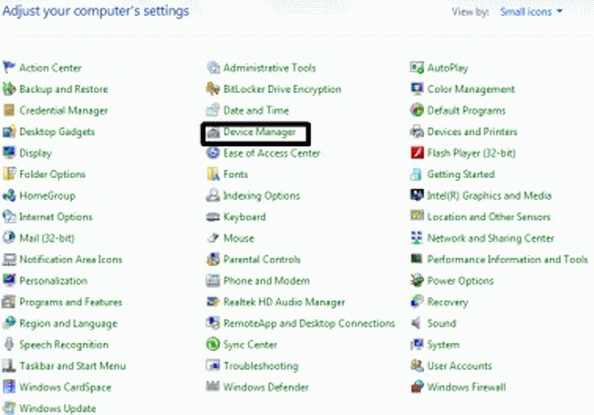
Step 2. Go to the Device Manager. If you are prompted for an administrator password or confirmation, type the password or provide confirmation otherwise open Device manager.
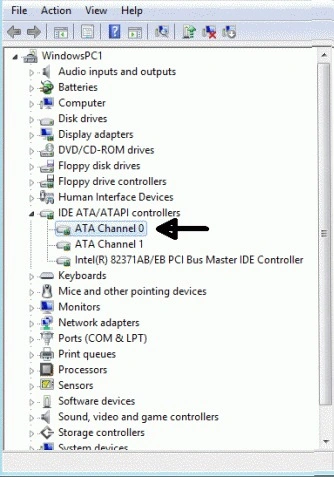
Step 3. In the left pane, expand IDE ATA/ATAPI controllers as shown below.
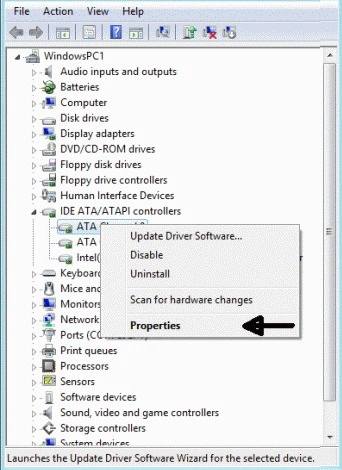
Step 4. Right-click on any label where "Channel" is present, right-click to the icon and then click Properties.
Step 5. Navigate to the Advanced Setting tab, under Device Properties, select or clear the Enable DMA checkbox.
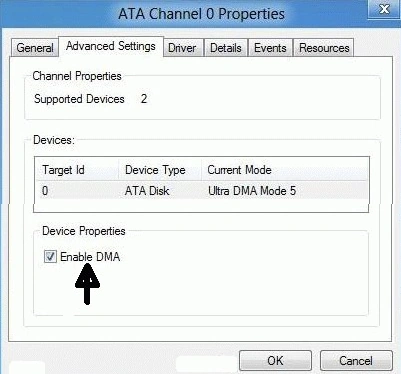
Step 6. Click OK
Summary
In this article, we learned about What is DMA and How to Enable DMA in Windows 8.
Mahesh ChandPosted May 3, 2012, 8:36 AM
Nice. I didn't know about DMA.
Gaurav GuptaPosted May 2, 2012, 11:37 PM
Good one.
Sam HobbseditedPosted May 2, 2012, 8:03 PMEdited May 2, 2012, 8:03 PM
Interesting article. Note that DMA is old technology; it existed in the originl IBM PC systems and older systems. Although it is old, it is still very useful. Usualy the alternatice to DMA is Programmed I/O (PIO). Usually Windows will use DMA as the default when it is available so if it is not being used for a device then we should determine why. There are many reasons why Windows would use PIO instead of DMA; generally it will use PIO if there is a problem preventing use of DMA. So Windows might revert to PIO even if you turn on DMA. Finally, note that ATAPI and IDE are the Parrallel ATA (PATA) and new systems use Serial ATA (SATA) so most people will not find ATAPI or IDE in their Device Manager.