

Introduction
In this article, we will explore how to create measures in Power BI for data analysis.
Measures in Power BI
- With a click of a button, we can create measures in Power BI. But sometimes, data doesn't contain everything to generate visualization and report the way we want to do. In this scenario, we can use measures to create custom data transformations and generate reports in Power BI.
- We use measures to perform data analysis activities like sum, average, minimum, maximum, and count of records.

- In the Power BI desktop, measures are created and displayed in the fields tab on the right side of the power bi desktop.
DAX Queries
- We can create a custom measure in Power BI using the Data Analysis Expression (DAX) language.
- DAX language has in-built 2000+ functions, operators, and constructs.
- DAX queries provide the flexibility to create measures as per the data transformation and the data we want to consume to create reports.
- The advantage of DAX queries is that they are very similar to excel-like functions.
Example of DAX Queries
Revenue = SUM('Sales'[Total])*5/234
- We can also choose the data categories while creating the measures.
- We can create dynamic URLs while creating the data categories.
Store Measures
When we create measures in Power BI, by default it will be stored in the home section as below. We can organize multiple measures or also store/organize them somewhere.

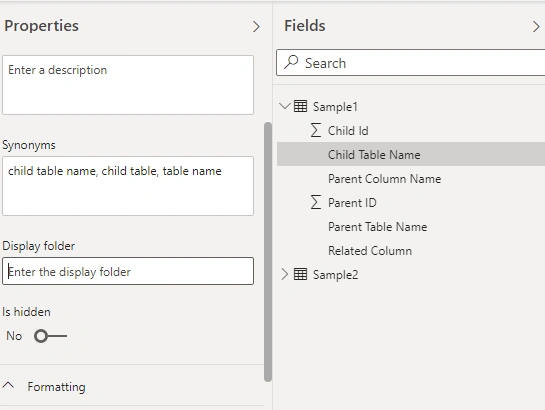
- We can also organize the fields in a table from the model section of power bi and store them in a specific folder as shown below.
Create Custom Measures in Power BI
- It is also possible to create custom measures in Power BI to create advanced models and create data transformation and data visualizations.
- When we create measures in Power BI, Power BI desktop creates the measures automatically.
- We can create custom measures in Power BI using the DAX query language.
- DAX formula has many functions and operators with excel like formulas. We can work with the relational data using DAX queries.
- When we create a custom measure, it is known as a model measure which is added to the fields.
- We can give any name to the model measure while creating a custom measure in Power BI.
Quick Measures
- Apart from creating custom measures in Power BI, we can also create quick measures in the Power BI.
- Many generic quick measures are available in Power BI,
- We can create quick measures with below steps as below :

Conclusion
In this article, we explored the measures in Power BI to create data transformation. We also explored how to create custom measures, automatic measures, and quick measures using DAX query language.
Join the conversation! Your thoughts help the community grow.