

This article explains how to use data annotations for validation in ASP.Net 4.5. So, let's proceed with the following procedure:
- Create a Registration Page.
- Create DataAnnotationsValidation.Models (Validation.cs).
- The effect of a custom validation message: Required, String Length, Data Type, Range, Compare and Regular Expression.
Creating a Registration Page
Create a new project using "File" -> "New" -> "Project..." then select web "ASP.NET Web Forms Application". Name it "DataAnnotationsValidation". 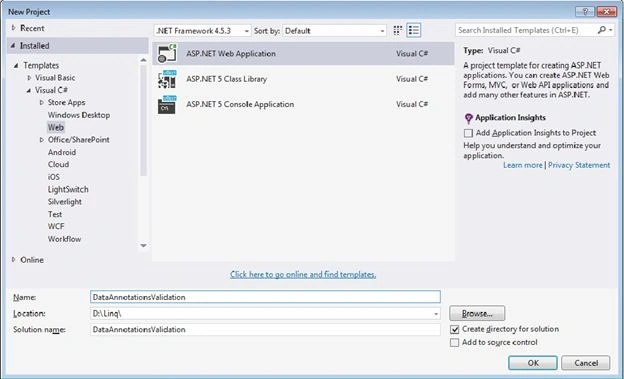
Now, seelct New ASP.NET Project then select the template Empty and select Web Forms then click OK.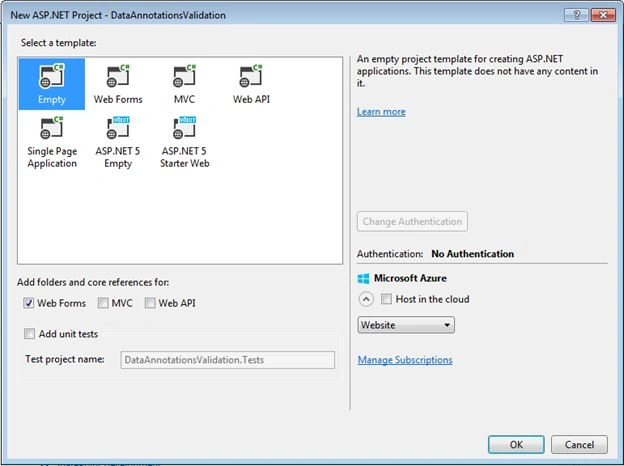
Next, create the code-behind as follows, displaying the validation errors to the users in the Registration.aspx.
Registration.aspx
- <%@ Page Language="C#" AutoEventWireup="true" CodeBehind="Registration.aspx.cs" Inherits="DataAnnotationsValidation.Registration" %>
- <!DOCTYPE html>
- <html xmlns="http://www.w3.org/1999/xhtml">
- <head runat="server">
- <title>Employees Registration</title>
- <link href="Content/bootstrap.min.css" rel="stylesheet" />
- </head>
- <body>
- <form id="form1" runat="server">
- <div class="container">
- <div class="well">
- <h1>Data Annotations Validation in ASP .NET 4.5 </h1>
- </div>
- <div class=" panel panel-default">
- <div class="panel-heading">
- <h3 class="panel-title">Employees Registration</h3>
- </div>
- <div class="panel-body">
- <div class="text-center">
- <asp:ValidationSummary ID="validationSummary" runat="server" ShowModelStateErrors="true" DisplayMode="List" ForeColor="Red" />
- </div>
- <div class="col-md-8">
- <div class="form-group col-lg-12">
- <label>First Name</label>
- <asp:TextBox ID="FirstName" runat="server" class="form-control"></asp:TextBox>
- </div>
- <div class="form-group col-lg-12">
- <label>Last Name</label>
- <asp:TextBox ID="LastName" runat="server" class="form-control"></asp:TextBox>
- </div>
- <div class="form-group col-lg-12">
- <label>User ID</label>
- <asp:TextBox ID="UserID" runat="server" class="form-control"></asp:TextBox>
- </div>
- <div class="form-group col-lg-6">
- <label>Password </label>
- <asp:TextBox ID="Password" runat="server" class="form-control"></asp:TextBox>
- </div>
- <div class="form-group col-lg-6">
- <label>Password Confirm </label>
- <asp:TextBox ID="PasswordConfirm" runat="server" class="form-control"></asp:TextBox>
- </div>
- <div class="form-group col-lg-6">
- <label>Mobile </label>
- <asp:TextBox ID="Mobile" runat="server" class="form-control"></asp:TextBox>
- </div>
- <div class="form-group col-lg-6">
- <label>Age </label>
- <asp:TextBox ID="Age" runat="server" class="form-control"></asp:TextBox>
- </div>
- <div class="form-group col-lg-6">
- <label>Email </label>
- <asp:TextBox ID="Email" runat="server" class="form-control"></asp:TextBox>
- </div>
- <div class="form-group col-lg-6">
- <label>Email Confirm </label>
- <asp:TextBox ID="EmailConfirm" runat="server" class="form-control"></asp:TextBox>
- </div>
- <div class="form-group col-lg-6">
- <label>DOB </label>
- <asp:TextBox ID="Date" runat="server" class="form-control"></asp:TextBox>
- </div>
- <div class="form-group col-lg-6">
- <label>Salary </label>
- <asp:TextBox ID="Total" runat="server" class="form-control"></asp:TextBox>
- </div>
- <div class="form-group col-lg-6">
- <label>City </label>
- <asp:TextBox ID="HomeCity" runat="server" class="form-control"></asp:TextBox>
- </div>
- <div class="form-group col-lg-6">
- <label>Department </label>
- <asp:DropDownList ID="Department" runat="server" class="form-control">
- <asp:ListItem Value="">Choose an Option</asp:ListItem>
- <asp:ListItem Value="HR">HR</asp:ListItem>
- <asp:ListItem Value="Account">Account</asp:ListItem>
- </asp:DropDownList>
- </div>
- <div class="form-group col-lg-6">
- <asp:Button ID="btnsubmit" runat="server" Text="submit" />
- </div>
- </div>
- </div>
- </div>
- </div>
- </form>
- </body>
- </html>
Now, do something with Models then click Add -> Class.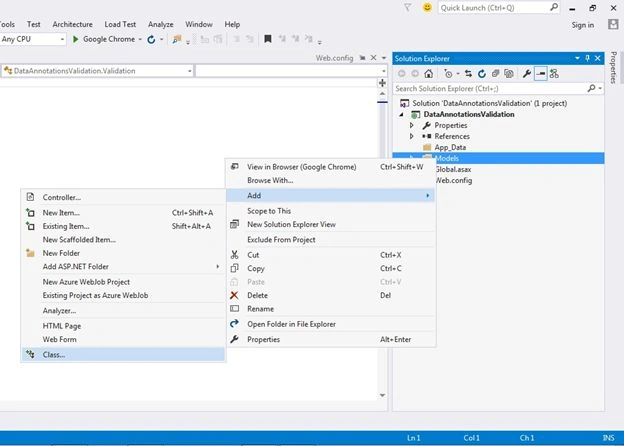
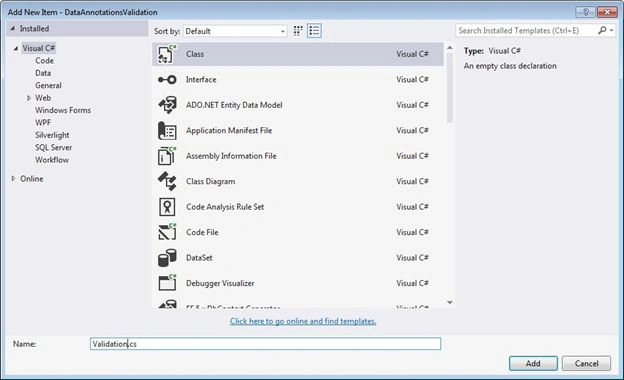
Now, do something with Add New Item then select Class then provide Validation.cs for the name then click on Add.
Applying validation attributes to the Validation class
Validation.cs
- using System;
- using System.Collections.Generic;
- using System.Linq;
- using System.Web;
- //using Namespace
- using System.ComponentModel.DataAnnotations;
- namespace DataAnnotationsValidation.Models
- {
- public class Validation
- {
- [Required]
- [StringLength(120, MinimumLength = 3)]
- public string FirstName { get; set; }
- [Required]
- [StringLength(120, MinimumLength = 3)]
- public string LastName { get; set; }
- [Required]
- [StringLength(25, MinimumLength = 3)]
- public string UserID { get; set; }
- [Required]
- [DataType(DataType.Password)]
- public string Password { get; set; }
- [Required]
- [Compare("Password")]
- public string PasswordConfirm { get; set; }
- [Required]
- [Range(18, 100, ErrorMessage = "Please enter an age between 18 and 50")]
- public int Age { get; set; }
- [Required]
- [StringLength(10)]
- public int Mobile { get; set; }
- [RegularExpression(@"[A-Za-z0-9._%+-]+@[A-Za-z0-9.-]+\.[A-Za-z]{2,4}", ErrorMessage = "Email doesn't look like a valid email address.")]
- public string Email { get; set; }
- [Compare("Email")]
- public string EmailConfirm { get; set; }
- [Range(typeof(decimal), "0.00", "15000.00")]
- public decimal Total { get; set; }
- [Required]
- [DataType(DataType.Date)]
- public DateTime Date { get; set; }
- [Required]
- public string HomeCity { get; set; }
- [Required]
- public string Department { get; set; }
- }
- }
Next, create the code-behind as follows.
Registration.aspx.cs
- using System;
- using System.Collections.Generic;
- using System.Linq;
- using System.Web;
- using System.Web.UI;
- using System.Web.UI.WebControls;
- //using Namespace Models
- using System.Web.ModelBinding;
- using DataAnnotationsValidation.Models;
- namespace DataAnnotationsValidation
- {
- public partial class Registration : System.Web.UI.Page
- {
- protected void Page_Load(object sender, EventArgs e)
- {
- if (IsPostBack)
- {
- Validation v = new Validation();
- if (TryUpdateModel(v, new FormValueProvider(ModelBindingExecutionContext)))
- {
- ShowMessage(v.ToString());
- }
- }
- }
- /// <summary>
- /// This function is used for show message.
- /// </summary>
- /// <param name="msg"></param>
- void ShowMessage(string msg)
- {
- ClientScript.RegisterStartupScript(Page.GetType(), "validation", "<script language='javascript'>alert('" + msg + "');</script>");
- }
- }
- }
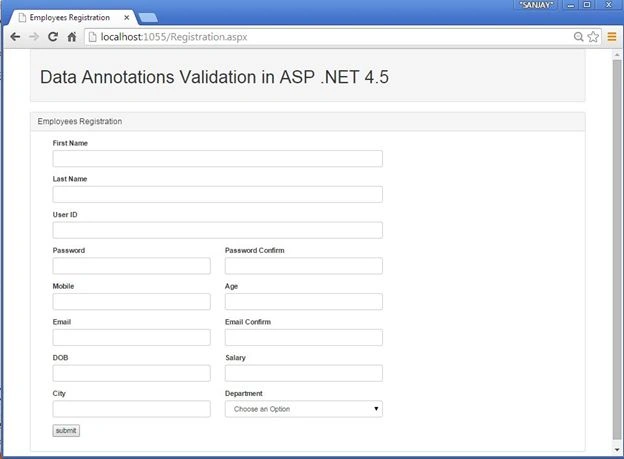
Now run the page, it will display validation error messages.
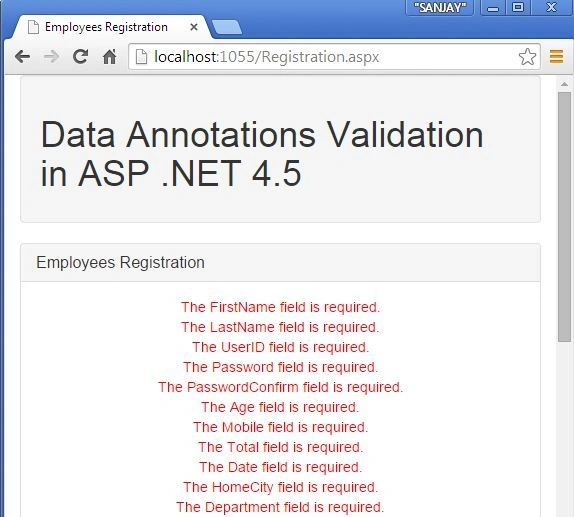
Now, the error messages are shown in the validation summary.
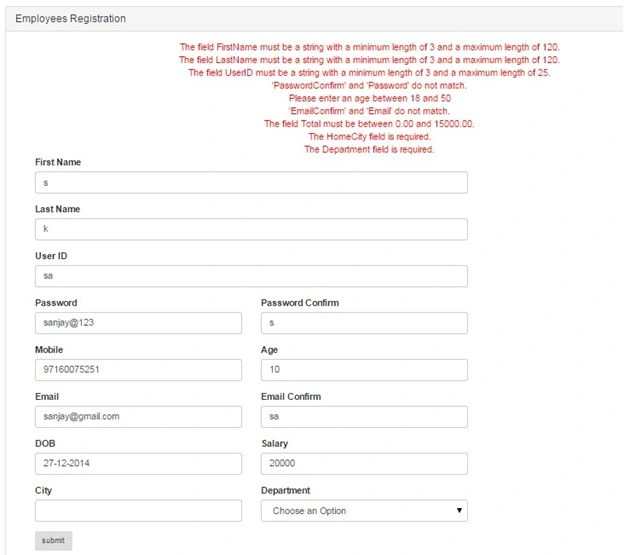
Now, a custom validation message is displaying the validation error messages.
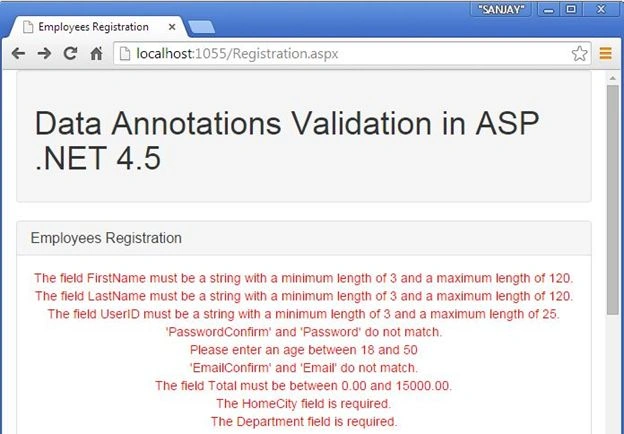
I hope this article is useful. If you have any other questions then please provide your comments.
Tayyab Fayyaz JanjuaPosted Dec 16, 2016, 1:57 AM
Really nice... but its not working with Master Page or Custom Control
Jonathan APosted Jul 30, 2015, 3:01 AM
Hello Sanjay. Is it possible to use with unobstrusive validation to avoid button postback?
Bruno PétersonPosted Apr 25, 2015, 9:05 AM
Interesting. Thanks for share it.
Gowtham RajamanickamPosted Mar 14, 2015, 4:42 AM
nice one..
David VissessePosted Mar 11, 2015, 5:37 PM
Hello Sanjay Kumar. I'm David and I intend to have a confidential chat with you. My Skype account and facebook: dsaquevo
Manish Kumar ChoudharyPosted Mar 11, 2015, 1:40 AM
Nice one.
Shaili DashoraPosted Mar 10, 2015, 3:17 PM
Nice one..
NitinPosted Mar 10, 2015, 3:19 AM
good one
Abhishek JaiswalPosted Mar 9, 2015, 12:15 PM
Good work Sanjay! :)
Tom MohanPosted Mar 9, 2015, 6:07 AM
good one.