

This article shows how to bind data in data controls without using any database and also shows paging on controls. We will learn here how to bind controls with data without a database and how to handle paging on controls.
Initial Chamber
Step 1
Open your Visual Studio and create an empty website then provide a suitable name such as DataControlExp.
Step 2
In Solution Explorer you will get your empty website, then add some web forms.
DataControlExp (your empty website). Right-click and select Add New Item Web Form. Name it DataControlExp.aspx.
Design Chamber
Step 3
Open the DataControlExp.aspx file and write some code for the design of the application.
This is the ListView design phase.
Here I've designed the ListView Control and used some property as in the following:
- <div>
- <h3>ListView</h3>
- <asp:ListView ID="lvCustomers" runat="server" GroupPlaceholderID="groupPlaceHolder1"
- ItemPlaceholderID="itemPlaceHolder1" OnPagePropertiesChanging="OnPagePropertiesChanging">
- <LayoutTemplate>
- <table border="1">
- <tr>
- <th>Product </th>
- <th>Quantity </th>
- <th>Price </th>
- </tr>
- <asp:PlaceHolder runat="server" ID="groupPlaceHolder1"></asp:PlaceHolder>
- <tr>
- <td colspan="3">
- <asp:DataPager ID="DataPager1" runat="server" PagedControlID="lvCustomers" PageSize="2">
- <Fields>
- <asp:NextPreviousPagerField ButtonType="Link" ShowFirstPageButton="false" ShowPreviousPageButton="true"
- ShowNextPageButton="false" />
- <asp:NumericPagerField ButtonType="Link" />
- <asp:NextPreviousPagerField ButtonType="Link" ShowNextPageButton="true" ShowLastPageButton="false" ShowPreviousPageButton="false" />
- </Fields>
- </asp:DataPager>
- </td>
- </tr>
- </table>
- </LayoutTemplate>
- <GroupTemplate>
- <tr>
- <asp:PlaceHolder runat="server" ID="itemPlaceHolder1"></asp:PlaceHolder>
- </tr>
- </GroupTemplate>
- <ItemTemplate>
- <td><%# Eval("Product_Name") %>
- </td>
- <td><%# Eval("Quantity") %>
- </td>
- <td><%# Eval("Price") %>
- </td>
- </ItemTemplate>
- </asp:ListView>
- </div>
FormView control
I've designed a FormView control as in the following:
- <h3>FormView</h3>
- <div>
- <asp:FormView ID="FormView1" runat="server"
- AllowPaging="True" EnableViewState="False" OnPageIndexChanging="FormView1_PageIndexChanging" BackColor="Green">
- <ItemTemplate>
- <hr />
- <h3><%# Eval("Product_Name") %>
- </h3>
- <table border="0">
- <tr>
- <td class="ProductPropertyLabel">Quantity:</td>
- <td class="ProductPropertyValue"><%# Eval("Quantity") %>
- </td>
- <td class="ProductPropertyLabel">Price:</td>
- <td class="ProductPropertyValue"><%# Eval("Price")%>
- </td>
- </tr>
- </table>
- <hr />
- </ItemTemplate>
- </asp:FormView>
- </div>
- Here design DetailsView-
- <h3>DetailsView</h3>
- <div>
- <div>
- <asp:DetailsView ID="DetailsView1" OnPageIndexChanging="DetailsView1_PageIndexChanging" BackColor="Wheat"
- AllowPaging="true" runat="server" />
- </div>
- </div>
- Here design GridView-
- <h3>GridView</h3>
- <div>
- <asp:GridView ID="gvExample" runat="server" AllowPaging="true" PageSize="2" AutoGenerateColumns="False" BackColor="PINK" BorderColor="#E7E7FF"
- BorderWidth="1px" CellPadding="3" OnPageIndexChanging="gvExample_PageIndexChanging">
- <Columns>
- <asp:TemplateField HeaderText="Product_Name">
- <ItemTemplate>
- <asp:Label ID="lblProduct" runat="server" Text='<%#Eval("Product_Name")%>'>
- </asp:Label>
- </ItemTemplate>
- </asp:TemplateField>
- <asp:TemplateField HeaderText="Quantity">
- <ItemTemplate>
- <asp:Label ID="lblQuantity" runat="server" Text='<%#Eval("Quantity")%>'>
- </asp:Label>
- </ItemTemplate>
- </asp:TemplateField>
- <asp:TemplateField HeaderText="Price">
- <ItemTemplate>
- <asp:Label ID="lblPrice" runat="server" Text='<%#Eval("Price")%>'>
- </asp:Label>
- </ItemTemplate>
- </asp:TemplateField>
- </Columns>
- </asp:GridView>
- </div>
DataControlExp.aspx
- <%@ Page Language="C#" AutoEventWireup="true" CodeFile="DataControlExp.aspx.cs" Inherits="DataControlExp" %>
- <!DOCTYPE html>
- <html
- xmlns="http://www.w3.org/1999/xhtml">
- <head runat="server">
- <title></title>
- </head>
- <body>
- <form id="form1" runat="server">
- <div>
- <div style="width: 50%">
- <div>
- <h3>ListView</h3>
- <asp:ListView ID="lvCustomers" runat="server" GroupPlaceholderID="groupPlaceHolder1"
- ItemPlaceholderID="itemPlaceHolder1" OnPagePropertiesChanging="OnPagePropertiesChanging">
- <LayoutTemplate>
- <table border="1">
- <tr>
- <th>Product
- </th>
- <th>Quantity
- </th>
- <th>Price
- </th>
- </tr>
- <asp:PlaceHolder runat="server" ID="groupPlaceHolder1"></asp:PlaceHolder>
- <tr>
- <td colspan="3">
- <asp:DataPager ID="DataPager1" runat="server" PagedControlID="lvCustomers" PageSize="2">
- <Fields>
- <asp:NextPreviousPagerField ButtonType="Link" ShowFirstPageButton="false" ShowPreviousPageButton="true"
- ShowNextPageButton="false" />
- <asp:NumericPagerField ButtonType="Link" />
- <asp:NextPreviousPagerField ButtonType="Link" ShowNextPageButton="true" ShowLastPageButton="false" ShowPreviousPageButton="false" />
- </Fields>
- </asp:DataPager>
- </td>
- </tr>
- </table>
- </LayoutTemplate>
- <GroupTemplate>
- <tr>
- <asp:PlaceHolder runat="server" ID="itemPlaceHolder1"></asp:PlaceHolder>
- </tr>
- </GroupTemplate>
- <ItemTemplate>
- <td><%# Eval("Product_Name") %>
- </td>
- <td><%# Eval("Quantity") %>
- </td>
- <td><%# Eval("Price") %>
- </td>
- </ItemTemplate>
- </asp:ListView>
- </div>
- <br />
- <h3>FormView</h3>
- <div>
- <asp:FormView ID="FormView1" runat="server"
- AllowPaging="True" EnableViewState="False" OnPageIndexChanging="FormView1_PageIndexChanging" BackColor="Green">
- <ItemTemplate>
- <hr />
- <h3><%# Eval("Product_Name") %>
- </h3>
- <table border="0">
- <tr>
- <td class="ProductPropertyLabel">Quantity:</td>
- <td class="ProductPropertyValue"><%# Eval("Quantity") %>
- </td>
- <td class="ProductPropertyLabel">Price:</td>
- <td class="ProductPropertyValue"><%# Eval("Price")%>
- </td>
- </tr>
- </table>
- <hr />
- </ItemTemplate>
- </asp:FormView>
- </div>
- </div>
- <div style="width: 50%">
- <h3>DetailsView</h3>
- <div>
- <div>
- <asp:DetailsView ID="DetailsView1" OnPageIndexChanging="DetailsView1_PageIndexChanging" BackColor="Wheat"
- AllowPaging="true" runat="server" />
- </div>
- </div>
- <h3>GridView</h3>
- <div>
- <asp:GridView ID="gvExample" runat="server" AllowPaging="true" PageSize="2" AutoGenerateColumns="False" BackColor="PINK" BorderColor="#E7E7FF"
- BorderWidth="1px" CellPadding="3" OnPageIndexChanging="gvExample_PageIndexChanging">
- <Columns>
- <asp:TemplateField HeaderText="Product_Name">
- <ItemTemplate>
- <asp:Label ID="lblProduct" runat="server" Text='<%#Eval("Product_Name")%>'>
- </asp:Label>
- </ItemTemplate>
- </asp:TemplateField>
- <asp:TemplateField HeaderText="Quantity">
- <ItemTemplate>
- <asp:Label ID="lblQuantity" runat="server" Text='<%#Eval("Quantity")%>'>
- </asp:Label>
- </ItemTemplate>
- </asp:TemplateField>
- <asp:TemplateField HeaderText="Price">
- <ItemTemplate>
- <asp:Label ID="lblPrice" runat="server" Text='<%#Eval("Price")%>'>
- </asp:Label>
- </ItemTemplate>
- </asp:TemplateField>
- </Columns>
- </asp:GridView>
- </div>
- </div>
- </div>
- </form>
- </body>
- </html>
Step 4
In the code chamber we will write some code so that our application works.
DataControlExp.aspx.cs
- using System;
- using System.Collections.Generic;
- using System.Data;
- using System.Data.SqlClient;
- using System.Linq;
- using System.Web;
- using System.Web.UI;
- using System.Web.UI.WebControls;
- public partial class DataControlExp: System.Web.UI.Page
- {
- protected void Page_Load(object sender, EventArgs e)
- {
- if (!IsPostBack) {
- BindListView();
- BindFormView();
- BindDetailsView();
- BindGridView();
- }
- }
- protected void BindListView()
- {
- //Creating a dataset
- DataSet ds = new DataSet();
- DataTable dt;
- DataRow dr;
- DataColumn pName;
- DataColumn pQty;
- DataColumn pPrice;
- //create an object of datatable
- dt = new DataTable();
- //creating column of datatable with datatype
- pName = new DataColumn("Product_Name", Type.GetType("System.String"));
- pQty = new DataColumn("Quantity", Type.GetType("System.Int32"));
- pPrice = new DataColumn("Price", Type.GetType("System.Int32"));
- //bind data table columns in datatable
- dt.Columns.Add(pName);
- dt.Columns.Add(pQty);
- dt.Columns.Add(pPrice);
- //creating data row and assiging the value to columns of datatable
- dr = dt.NewRow();
- dr["Product_Name"] = "Product 1";
- dr["Quantity"] = 2;
- dr["Price"] = 200;
- dt.Rows.Add(dr);
- dr = dt.NewRow();
- dr["Product_Name"] = "Product 2";
- dr["Quantity"] = 5;
- dr["Price"] = 480;
- dt.Rows.Add(dr);
- dr = dt.NewRow();
- dr["Product_Name"] = "Product 3";
- dr["Quantity"] = 8;
- dr["Price"] = 100;
- dt.Rows.Add(dr);
- dr = dt.NewRow();
- dr["Product_Name"] = "Product 4";
- dr["Quantity"] = 2;
- dr["Price"] = 500;
- dt.Rows.Add(dr);
- //Add datatable to the dataset
- ds.Tables.Add(dt);
- //bind data to data controls
- lvCustomers.DataSource = ds.Tables[0];
- lvCustomers.DataBind();
- }
- //paging code
- protected void OnPagePropertiesChanging(object sender, PagePropertiesChangingEventArgs e)
- {
- (lvCustomers.FindControl("DataPager1") as DataPager).SetPageProperties(e.StartRowIndex, e.MaximumRows, false);
- this.BindListView();
- }
- protected void BindFormView()
- {
- //Creating a dataset
- DataSet ds = new DataSet();
- DataTable dt;
- DataRow dr;
- DataColumn pName;
- DataColumn pQty;
- DataColumn pPrice;
- //create an object of datatable
- dt = new DataTable();
- //creating column of datatable with datatype
- pName = new DataColumn("Product_Name", Type.GetType("System.String"));
- pQty = new DataColumn("Quantity", Type.GetType("System.Int32"));
- pPrice = new DataColumn("Price", Type.GetType("System.Int32"));
- //bind data table columns in datatable
- dt.Columns.Add(pName);
- dt.Columns.Add(pQty);
- dt.Columns.Add(pPrice);
- //creating data row and assiging the value to columns of datatable
- dr = dt.NewRow();
- dr["Product_Name"] = "Product 1";
- dr["Quantity"] = 2;
- dr["Price"] = 200;
- dt.Rows.Add(dr);
- dr = dt.NewRow();
- dr["Product_Name"] = "Product 2";
- dr["Quantity"] = 5;
- dr["Price"] = 480;
- dt.Rows.Add(dr);
- dr = dt.NewRow();
- dr["Product_Name"] = "Product 3";
- dr["Quantity"] = 8;
- dr["Price"] = 100;
- dt.Rows.Add(dr);
- dr = dt.NewRow();
- dr["Product_Name"] = "Product 4";
- dr["Quantity"] = 2;
- dr["Price"] = 500;
- dt.Rows.Add(dr);
- //Add datatable to the dataset
- ds.Tables.Add(dt);
- //bind data to data controls
- FormView1.DataSource = ds.Tables[0];
- FormView1.DataBind();
- }
- //paging code
- protected void FormView1_PageIndexChanging(object sender, FormViewPageEventArgs e)
- {
- FormView1.PageIndex = e.NewPageIndex;
- BindFormView();
- }
- protected void BindDetailsView()
- {
- //Creating a dataset
- DataSet ds = new DataSet();
- DataTable dt;
- DataRow dr;
- DataColumn pName;
- DataColumn pQty;
- DataColumn pPrice;
- //create an object of datatable
- dt = new DataTable();
- //creating column of datatable with datatype
- pName = new DataColumn("Product_Name", Type.GetType("System.String"));
- pQty = new DataColumn("Quantity", Type.GetType("System.Int32"));
- pPrice = new DataColumn("Price", Type.GetType("System.Int32"));
- //bind data table columns in datatable
- dt.Columns.Add(pName);
- dt.Columns.Add(pQty);
- dt.Columns.Add(pPrice);
- //creating data row and assiging the value to columns of datatable
- dr = dt.NewRow();
- dr["Product_Name"] = "Product 1";
- dr["Quantity"] = 2;
- dr["Price"] = 200;
- dt.Rows.Add(dr);
- dr = dt.NewRow();
- dr["Product_Name"] = "Product 2";
- dr["Quantity"] = 5;
- dr["Price"] = 480;
- dt.Rows.Add(dr);
- dr = dt.NewRow();
- dr["Product_Name"] = "Product 3";
- dr["Quantity"] = 8;
- dr["Price"] = 100;
- dt.Rows.Add(dr);
- dr = dt.NewRow();
- dr["Product_Name"] = "Product 4";
- dr["Quantity"] = 2;
- dr["Price"] = 500;
- dt.Rows.Add(dr);
- //Add datatable to the dataset
- ds.Tables.Add(dt);
- //bind data to data controls
- DetailsView1.DataSource = ds.Tables[0];
- DetailsView1.DataBind();
- }
- //paging code
- protected void DetailsView1_PageIndexChanging(object sender, DetailsViewPageEventArgs e)
- {
- DetailsView1.PageIndex = e.NewPageIndex;
- BindDetailsView();
- }
- protected void BindGridView()
- {
- //Creating a dataset
- DataSet ds = new DataSet();
- DataTable dt;
- DataRow dr;
- DataColumn pName;
- DataColumn pQty;
- DataColumn pPrice;
- //create an object of datatable
- dt = new DataTable();
- //creating column of datatable with datatype
- pName = new DataColumn("Product_Name", Type.GetType("System.String"));
- pQty = new DataColumn("Quantity", Type.GetType("System.Int32"));
- pPrice = new DataColumn("Price", Type.GetType("System.Int32"));
- //bind data table columns in datatable
- dt.Columns.Add(pName);
- dt.Columns.Add(pQty);
- dt.Columns.Add(pPrice);
- //creating data row and assiging the value to columns of datatable
- dr = dt.NewRow();
- dr["Product_Name"] = "Product 1";
- dr["Quantity"] = 2;
- dr["Price"] = 200;
- dt.Rows.Add(dr);
- dr = dt.NewRow();
- dr["Product_Name"] = "Product 2";
- dr["Quantity"] = 5;
- dr["Price"] = 480;
- dt.Rows.Add(dr);
- dr = dt.NewRow();
- dr["Product_Name"] = "Product 3";
- dr["Quantity"] = 8;
- dr["Price"] = 100;
- dt.Rows.Add(dr);
- dr = dt.NewRow();
- dr["Product_Name"] = "Product 4";
- dr["Quantity"] = 2;
- dr["Price"] = 500;
- dt.Rows.Add(dr);
- //Add datatable to the dataset
- ds.Tables.Add(dt);
- //bind data to data controls
- gvExample.DataSource = ds.Tables[0];
- gvExample.DataBind();
- }
- //paging code
- protected void gvExample_PageIndexChanging(object sender, GridViewPageEventArgs e)
- {
- gvExample.PageIndex = e.NewPageIndex;
- BindGridView();
- }
- }
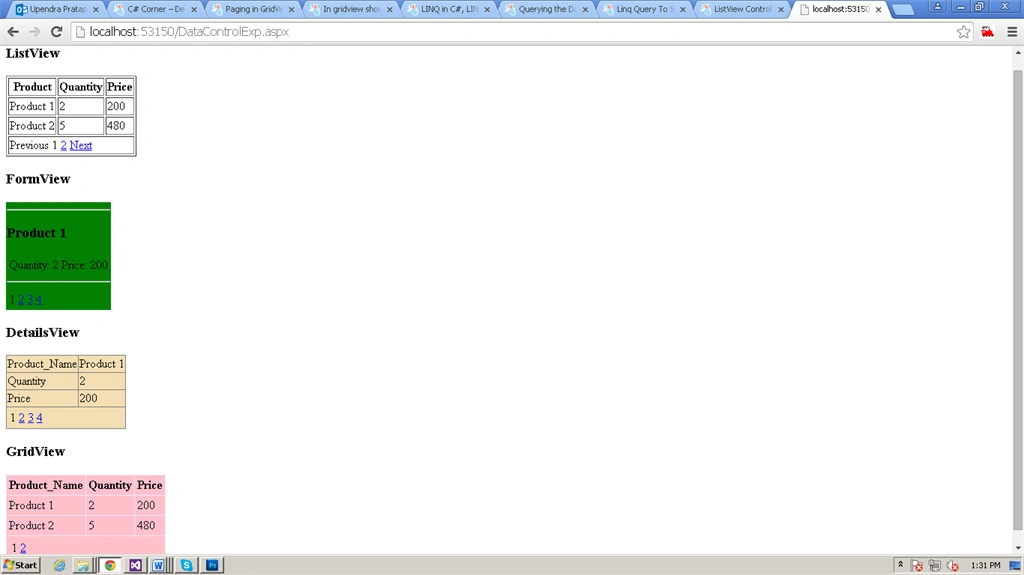
Figure 1:Output
I hope you liked this. Have a good day. Thank you for reading.
kalu singh raoPosted Jul 11, 2016, 2:37 AM
Nice...
ShiwKumar GuptaPosted Jan 28, 2016, 6:03 AM
nice
Govinda Rajulu YemineniPosted Jul 17, 2015, 2:47 AM
Nice Article
Sujeet SumanPosted Jul 15, 2015, 8:51 AM
Nice explanation.
Debasis SahaPosted Jul 14, 2015, 10:40 AM
Nice work..
Jacob RobinsonPosted Jul 14, 2015, 7:23 AM
Nice Share..
RakeshPosted Jul 11, 2015, 1:21 PM
Good one sir
Sibeesh VenuPosted Jul 11, 2015, 8:21 AM
Nice share.
Santhakumar MunuswamyPosted Jul 11, 2015, 2:46 AM
Welcome ! Started to writing an article!!! Keep it up
Santhakumar MunuswamyPosted Jul 11, 2015, 2:45 AM
Nice article! Thanks for sharing
RakeshPosted Jul 10, 2015, 4:13 PM
Nice ones
Narasimha Reddy ChennupalliPosted Jul 10, 2015, 9:52 AM
Good one...
Pankaj Kumar ChoudharyPosted Jul 10, 2015, 9:31 AM
Nice explain Sir........
Nilesh JadavPosted Jul 10, 2015, 7:48 AM
Nice one sir !
Upendra Pratap ShahiPosted Jul 10, 2015, 7:33 AM
Thanks for consideration C#Corner Team...