

Introduction:
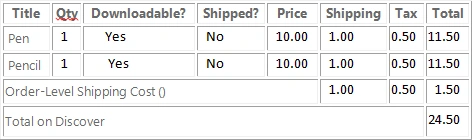
In this article we are going to discuss Databinding from a Dataset to a HTML table during RUNTIME, if the table contains more than one detail for an order.
Below I have explained the things.
Create any table (I have mentioned my table below) in SQL database and bind the values into the new dataset. From the DataSet we need to bind the values into the table.
Table: Sample
- Title Varchar
- Qty int
- Downloadable Varchar
- Shipped Varchar
- Price int
- Shipping int
- Tax int
- Total int
Below code(Written in CodeBehind) is used to Bind the values in to the HTML table during RUNTIME:
public void BindData(int iOrderId)
{
DataSet ds = new DataSet();
ds = objorders.GetOrderStatus(iOrderId);
if (ds.Tables.Count > 0)
{
Response.Write("<table border='1' cellpadding='2' WIDTH='75%' ");
Response.Write("<tr><th>Title</th><th>Qty</th><th>Downloadable?</th><th>Shipped?</th><th>Price</th><th>Shipping</th><th>Tax</th><th>Total</th>");
Response.Write("</tr>");
if (ds.Tables.Count > 0)
{
for (int i = 0; i < ds.Tables[0].Rows.Count; i++)
{
Response.Write("<tr>");
Response.Write("<td> " + ds.Tables[0].Rows[i]["product_name"].ToString() + " </td>");
Response.Write("<td> " + ds.Tables[0].Rows[i]["Product_Qty"].ToString() + " </td>");
Response.Write("<td> " + "NO" + " </td>");
Response.Write("<td> " + "YES" + " </td>");
Gaurav GoyalPosted May 7, 2015, 6:25 AM
How to fetch data from DataSet to HTML
Farooque AliPosted Oct 20, 2014, 12:11 AM
by Passing orderId as argument, it will fetch order status of orderid.
mohammadPosted Oct 19, 2014, 5:47 AM
objorders.Get Order Status (OrderId) What?
Yogesh VaghelaPosted Sep 23, 2014, 9:44 AM
Very Helpful...This article save my time..thx..all..
mohamed eltiganiPosted Sep 28, 2012, 11:04 AM
nice,good
mangesh pagarePosted Jun 16, 2012, 7:57 AM
gud
mangesh pagarePosted Jun 16, 2012, 7:57 AM
gud