

Data Binding means that we can set multiple lines of data into Toolbox elements. You can't write multiple lines in an XAML file as a string of the Element property, it looks bad. Therefore we always use binding in Windows Phones, like for a Button the property is “Content={Binding btntxt}” and in a TextView the property is “Text={Binding txt}”.
So “btntxt” and “txt” binds data from C# code and puts that data into a property as a string value. I'm telling you how to do that.
First create a Windows Phone Blank App.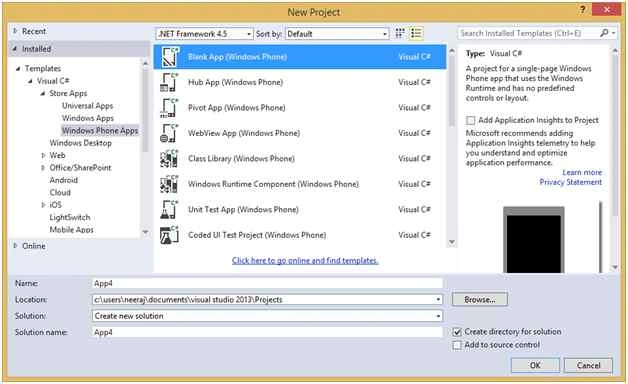
Now open a MainPage.xaml file.
- <Grid>
- <Button x:Name="btn" Content="{Binding btntxt}" HorizontalAlignment="Left" Margin="36,164,0,0" VerticalAlignment="Top" Height="115" Width="309" Click="btn_Click" />
- </Grid>
- using System;
- using System.Collections.Generic;
- using System.IO;
- using System.Linq;
- using System.Runtime.InteropServices.WindowsRuntime;
- using Windows.Foundation;
- using Windows.Foundation.Collections;
- using Windows.UI.Xaml;
- using Windows.UI.Xaml.Controls;
- using Windows.UI.Xaml.Controls.Primitives;
- using Windows.UI.Xaml.Data;
- using Windows.UI.Xaml.Input;
- using Windows.UI.Xaml.Media;
- using Windows.UI.Xaml.Navigation;
- // The Blank Page item template is documented at http://go.microsoft.com/fwlink/?LinkId=391641
- namespace App3 {
- /// <summary>
- /// An empty page that can be used on its own or navigated to within a Frame.
- /// </summary>
- public sealed partial class MainPage: Page {
- public MainPage() {
- this.InitializeComponent();
- }
- public class txt {
- public string btntxt {
- get;
- set;
- }
- }
- private void btn_Click(object sender, RoutedEventArgs e) {
- txt t = new txt();
- t.btntxt = "You've Clicked on Button";
- btn.DataContext = t;
- }
- }
- }
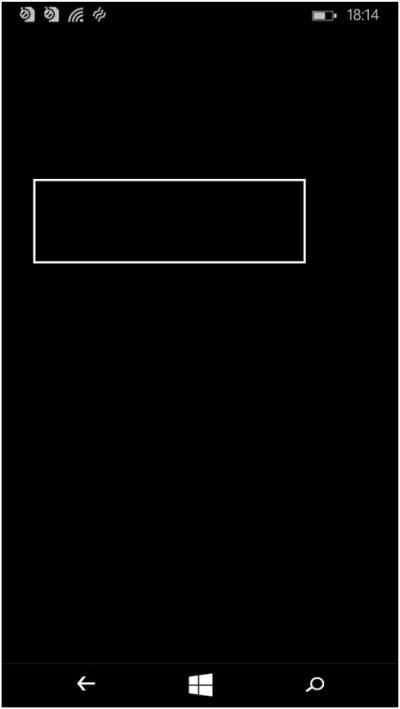
Before click on the button.
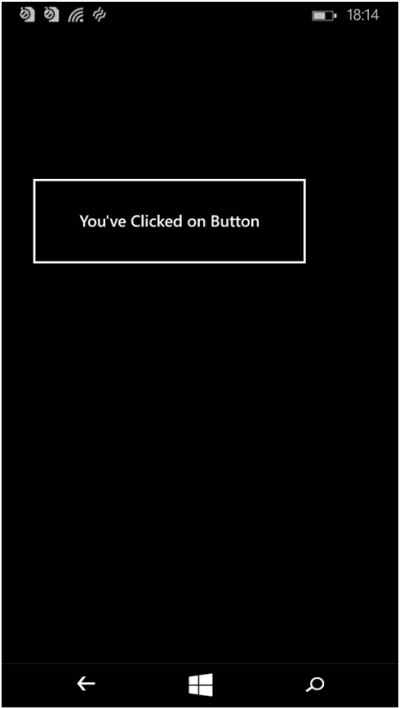
The click on the button.
Again for the TextBlock and TextBox.
Now open the MainPage.xaml file and drag and drop one TextBox and one TextBlock onto the Grid Layout so it looks as in the following:
- <Grid>
- <TextBlock x:Name="txtb" HorizontalAlignment="Left" Margin="106,240,0,0" TextWrapping="Wrap" FontSize="30" Text="{Binding txtblock}" VerticalAlignment="Top"/>
- <TextBox x:Name="txtbo" HorizontalAlignment="Left" Margin="148,127,0,0" TextWrapping="Wrap" Text="{Binding txtBox}" VerticalAlignment="Top" Width="183" Loaded="txtbo_Loaded"/>
- <Button x:Name="btn" Content="Submit" Margin="106,271,0,312" Click="btn_Click" />
- </Grid>
Open the MainPage.xaml.cs file and create again a new class in the MainPage class.
- using System;
- using System.Collections.Generic;
- using System.IO;
- using System.Linq;
- using System.Runtime.InteropServices.WindowsRuntime;
- using Windows.Foundation;
- using Windows.Foundation.Collections;
- using Windows.UI.Xaml;
- using Windows.UI.Xaml.Controls;
- using Windows.UI.Xaml.Controls.Primitives;
- using Windows.UI.Xaml.Data;
- using Windows.UI.Xaml.Input;
- using Windows.UI.Xaml.Media;
- using Windows.UI.Xaml.Navigation;
- // The Blank Page item template is documented at http://go.microsoft.com/fwlink/?LinkId=391641
- namespace App3 {
- /// <summary>
- /// An empty page that can be used on its own or navigated to within a Frame.
- /// </summary>
- public sealed partial class MainPage: Page {
- public MainPage() {
- this.InitializeComponent();
- }
- public class textdemo {
- public string txtblock {
- get;
- set;
- }
- public string txtBox {
- get;
- set;
- }
- }
- private void btn_Click(object sender, RoutedEventArgs e) {
- textdemo t = new textdemo();
- t.txtblock = "Your Name is :" + txtbo.Text;
- txtb.DataContext = t;
- }
- private void txtbo_Loaded(object sender, RoutedEventArgs e) {
- textdemo t = new textdemo();
- t.txtBox = "Enter Your Name";
- txtbo.DataContext = t;
- }
- }
- }
Before click on the button.

Then click on the button and write your name in the TextBox as in the following:

Thank you.
RakeshPosted Jul 30, 2015, 12:27 PM
Good one
Neeraj KumarPosted Jul 30, 2015, 7:59 AM
Thank you Nilesh Jadav
Neeraj KumarPosted Jul 30, 2015, 7:59 AM
Thank you Rajeesh Menoth
Neeraj KumarPosted Jul 30, 2015, 7:58 AM
Thank you Sibeesh Venu
Sibeesh VenuPosted Jul 30, 2015, 5:00 AM
Nice Share
Santhakumar MunuswamyPosted Jul 30, 2015, 2:59 AM
Good. Thanks for sharing
Vu Hong TrieuPosted Jul 30, 2015, 12:21 AM
Nice tut.
Nilesh JadavPosted Jul 30, 2015, 12:03 AM
Nice one sir
Rajeesh MenothPosted Jul 29, 2015, 11:42 PM
Good One..
Pankaj Kumar ChoudharyPosted Jul 29, 2015, 11:03 PM
Nice Show Neeraj........
Gopi ChandPosted Jul 29, 2015, 10:33 PM
Good