

Snapshot of WPF Data Validations.
Snapshot of invalid inputs: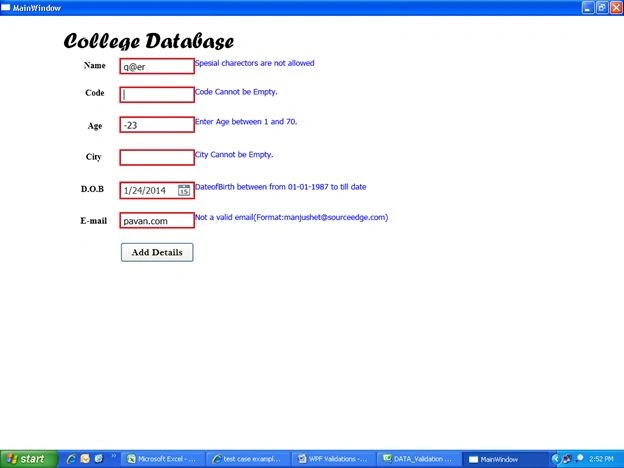
Snapshot of output for correct details (valid input):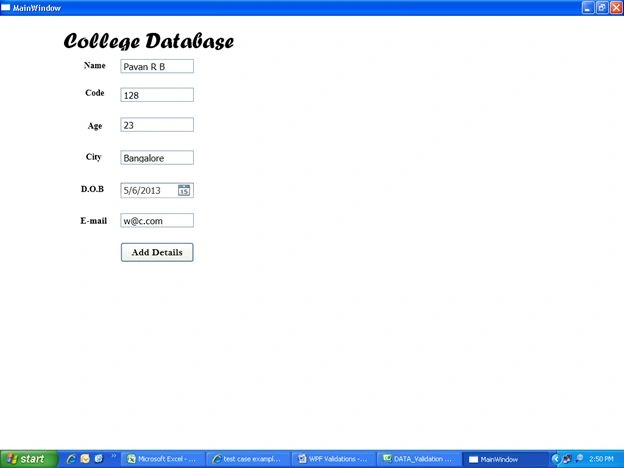
XAML code for NAME field
<TextBox Height="23" Validation.ErrorTemplate="{StaticResource ResourceKey=eTemplate}" HorizontalAlignment="Left" Margin="198,71,0,0" Name="Name" VerticalAlignment="Top" Width="120" FontSize="15">
<TextBox.Text>
<Binding Path="Name" ValidatesOnDataErrors="True" UpdateSourceTrigger="PropertyChanged"/>
</TextBox.Text>
</TextBox>
CS code for Name
get
{
string result = null;
if (cuurectname == "Name")
{
if (string.IsNullOrEmpty(Name))
{
result = "Name Cannot be Empty.";
return result;
}
String st = @"!|@|#|\$|%|\?|\>|\<|\*";
if (Regex.IsMatch(Name,st))
{
result = "Spesial charectors are not allowed";
return result;
}
}
Input
XYZ valid
Xyz valid
X@yz invalid
XAML code for CODE
<TextBox Height="23" Validation.ErrorTemplate="{StaticResource ResourceKey=eTemplate}" HorizontalAlignment="Left" Margin="198,118,0,0" Name="Code" VerticalAlignment="Top" Width="120" FontSize="15">
<TextBox.Text>
<Binding Path="Code" ValidatesOnDataErrors="True" UpdateSourceTrigger="PropertyChanged"/>
</TextBox.Text>
</TextBox>
CS code for CODE
if (cuurectname == "Code")
{
if (string.IsNullOrEmpty(Code))
{
result = "Code Cannot be Empty.";
return result;
}
}
Input
The code field accepts integer, string, special chars and so on.
123 : valid
Abc : valid
Qwe#asd : valid
Invalid : Empty string
CS code for AGE
if (cuurectname == "Age")
{
if (Age < 1 || Age > 70)
{
result = "Enter Age between 1 and 70.";
return result;
}
}
XAML code
<TextBox Height="23" HorizontalAlignment="Left" Validation.ErrorTemplate="{StaticResource ResourceKey=eTemplate}" Margin="198,167,0,0" Name="Age" VerticalAlignment="Top" Width="120" FontSize="15">
<TextBox.Text>
<Binding Path="Age" ValidatesOnDataErrors="True" UpdateSourceTrigger="PropertyChanged"/>
</TextBox.Text>
</TextBox>
Inputs
Range 1 - 70
-12 : invalid
25 : valid
69 : valid
71 : invalid
Enter all the valid details in respective fields. Then click "ADD". The data will be saved in the database.
CS CODE
using System;
using System.Collections.Generic;
using System.Linq;
using System.Text;
using System.ComponentModel;
using System.Text.RegularExpressions;
namespace DATA_Validation
{
public class student : IDataErrorInfo
{
public int id { get; set; }
public string Name { get; set; }
public string Code { get; set; }
public int Age { get; set; }
public string City { get; set; }
public DateTime? DateofBirth { get; set; }
public string Email { get; set; }
public string Error
{
get
{
return this[string.Empty];
}
}
public string this[string cuurectname]
{
get
{
string result = null;
if (cuurectname == "Name")
{
if (string.IsNullOrEmpty(Name))
{
result = "Name Cannot be Empty.";
return result;
}
String st = @"!|@|#|\$|%|\?|\>|\<|\*";
if (Regex.IsMatch(Name, st))
{
result = "Spesial charectors are not allowed";
return result;
}
}
if (cuurectname == "Code")
{
if (string.IsNullOrEmpty(Code))
{
result = "Code Cannot be Empty.";
return result;
}
}
if (cuurectname == "Age")
{
if (Age < 1 || Age > 70)
{
result = "Enter Age between 1 and 70.";
return result;
}
}
if (cuurectname == "City")
{
if (string.IsNullOrEmpty(City))
{
result = "City Cannot be Empty.";
return result;
}
}
if (cuurectname == "DateofBirth")
{
if (DateofBirth < DateTime.Parse("01-01-1987") || DateofBirth > DateTime.Now)
{
result = "DateofBirth between from 01-01-1987 to till date";
return result;
}
}
if (cuurectname == "Email")
{
string s1 = @"^([\w]+\.+[\w]+@[\w]+\.[a-zA-Z]{3})$";
string s2 = @"^[\w]+@+[\w]+\.[a-zA-Z]{3}$";
if (Email == null)
{
result = "Email cannot be empty";
return result;
}
if (Regex.IsMatch(Email, s1) || Regex.IsMatch(Email, s2))
{
return null;
}
else
{
result = "Not a valid email(Format:[email protected])";
return result;
}
}
return null;
}
}
}
}
XAML CODE:
<window x:class="DATA_Validation.MainWindow" xmlns="http://schemas.microsoft.com/winfx/2006/xaml/presentation"
xmlns:x="http://schemas.microsoft.com/winfx/2006/xaml" title="MainWindow" height="500"
width="525">
<Window.Resources>
<ControlTemplate x:Key="eTemplate">
<DockPanel LastChildFill="True">
<TextBlock DockPanel.Dock="Right" Foreground="Blue" FontSize="13" Text="{Binding ElementName=adorned,Path=AdornedElement.(Validation.Errors)[0].ErrorContent}" >
</TextBlock>
<Border BorderBrush="Red" BorderThickness="2">
<AdornedElementPlaceholder x:Name="adorned"/>
</Border>
</DockPanel>
</ControlTemplate>
</Window.Resources>
<Grid>
<TextBox Height="23" Validation.ErrorTemplate="{StaticResource ResourceKey=eTemplate}" HorizontalAlignment="Left" Margin="198,71,0,0" Name="Name" VerticalAlignment="Top" Width="120" FontSize="15">
<TextBox.Text>
<Binding Path="Name" ValidatesOnDataErrors="True" UpdateSourceTrigger="PropertyChanged"/>
</TextBox.Text>
</TextBox>
<TextBox Height="23" Validation.ErrorTemplate="{StaticResource ResourceKey=eTemplate}" HorizontalAlignment="Left" Margin="198,118,0,0" Name="Code" VerticalAlignment="Top" Width="120" FontSize="15">
<TextBox.Text>
<Binding Path="Code" ValidatesOnDataErrors="True" UpdateSourceTrigger="PropertyChanged"/>
</TextBox.Text>
</TextBox>
<TextBox Height="23" HorizontalAlignment="Left" Validation.ErrorTemplate="{StaticResource ResourceKey=eTemplate}" Margin="198,167,0,0" Name="Age" VerticalAlignment="Top" Width="120" FontSize="15">
<TextBox.Text>
<Binding Path="Age" ValidatesOnDataErrors="True" UpdateSourceTrigger="PropertyChanged"/>
</TextBox.Text>
</TextBox>
<TextBox Height="23" HorizontalAlignment="Left" Validation.ErrorTemplate="{StaticResource ResourceKey=eTemplate}" Margin="198,221,0,0" Name="City" VerticalAlignment="Top" Width="120" FontSize="15">
<TextBox.Text>
<Binding Path="City" ValidatesOnDataErrors="True" UpdateSourceTrigger="PropertyChanged"/>
</TextBox.Text>
</TextBox>
<Label Content="College Database" FontFamily="Forte" FontSize="36" Height="50" HorizontalAlignment="Left" Margin="99,12,0,0" Name="label1" VerticalAlignment="Top" Width="298" />
<Label Content="Name" FontSize="14" Height="28" HorizontalAlignment="Left" Margin="133,68,0,0" Name="label2" VerticalAlignment="Top" FontFamily="Times New Roman" FontWeight="Bold" />
<Label Content="Code" FontSize="14" Height="28" HorizontalAlignment="Left" Margin="135,113,0,0" Name="label3" VerticalAlignment="Top" FontFamily="Times New Roman" FontWeight="Bold" />
<Label Content="Age" FontSize="14" Height="38" HorizontalAlignment="Left" Margin="139,167,0,0" Name="label4" VerticalAlignment="Top" FontFamily="Times New Roman" FontWeight="Bold" />
<Label Content="City" FontSize="14" Height="37" HorizontalAlignment="Left" Margin="136,218,0,0" Name="label5" VerticalAlignment="Top" FontFamily="Times New Roman" FontWeight="Bold" />
<Label Content="D.O.B" Height="28" HorizontalAlignment="Left" Margin="128,271,0,0" Name="label6" VerticalAlignment="Top" FontFamily="Times New Roman" FontSize="14" FontWeight="Bold" />
<DatePicker Height="25" Validation.ErrorTemplate="{StaticResource eTemplate}" HorizontalAlignment="Left" Margin="198,274,0,0" Name="DateofBirth" VerticalAlignment="Top" Width="120" FontSize="15">
<DatePicker.DisplayDate>
<Binding Path="DateofBirth" ValidatesOnDataErrors="True" UpdateSourceTrigger="PropertyChanged"/>
</DatePicker.DisplayDate>
</DatePicker>
<Button Content="Add Details" FontSize="16" FontFamily="Bell MT" FontWeight="Bold" Height="32" HorizontalAlignment="Left" Margin="198,372,0,0" Name="button1" VerticalAlignment="Top" Width="120" Click="button1_Click" />
<TextBox Height="23" Validation.ErrorTemplate="{StaticResource eTemplate}" HorizontalAlignment="Left" Margin="198,324,0,0" Name="textBox1" VerticalAlignment="Top" Width="120" FontSize="15">
<TextBox.Text>
<Binding Path="Email" ValidatesOnDataErrors="True" UpdateSourceTrigger="PropertyChanged"/>
</TextBox.Text>
</TextBox>
<Label Content="E-mail" Height="28" HorizontalAlignment="Left" Margin="127,322,0,0" Name="label7" VerticalAlignment="Top" FontFamily="Times New Roman" FontSize="15" FontWeight="Bold" />
</Grid>
</window>
anil sharmaPosted Aug 16, 2018, 3:45 AM
Not working
Vishal PatilPosted Jan 13, 2018, 1:00 PM
Hello Pavan, Could you please share the code on Mainwindow.xmal.cs file code because you share the wrong one zip in this thread. thanks in advance