
This article has been excerpted from the book "A Programmer's Guide to ADO.NET in C#".
DataAdapter: Adapting to Your Environment
As you're seen in figure 5-1, a DataAdapter plays a vital role in ADO.NET architecture. It sits between a data source and a dataset and passes data from the data source to the dataset, and vice versa, with or without using commands. Now is the time you'll be using disconnected classes such as DataSet, DataTable, DataView, and DataViewManager to write Windows Forms and Web Forms-based interactive database GUI applications.
The DataAdapter class for all data providers comes from the DbDataAdapter class, which in turn comes from the DataAdapter class.
An application doesn't create an instance of the DbDataAdapter interface directly, but instead, it creates an instance of a class that inherits IdbDataAdapter and DBDataAdapter. As you can see from Figure 5-39, many data provider-specific classes implement IDbDataAdapter.
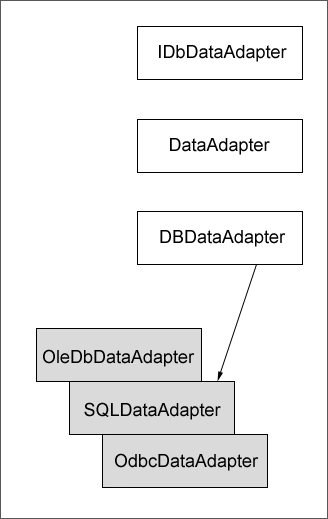 Figure 5-39. Data Provider-specific classes implement IDbDataAdapter
The DataAdapter enables you to connect to a dataset and specify SQL strings for retrieving data from or writing data to a DataSet. As you've seen at the beginning of this article, a dataset represents in-memory cached data. An in-memory object frees you from the confines of the specifics of the database and allows you to deal with the data in memory. The DataAdapter serves as an intermediary between the database and the DataSet.
Constructing a DataAdapter Object
The DataAdapter constructor has many overloaded forms. You can create a constructor with no arguments, pass a Command object, pass a Command object with Connection object as arguments, or any combination of these. You can also specify a SQL statement as a string for querying a particular table or more than one table. You can also specify the connection string or a Connection object to connect to the database.
Listing 5-41 creates a connection, builds a SQL statement using the SELECT query, and passes the SQL string and the connection objects as SqlDataAdapter constructor arguments. I've been using in the previous examples.
Listing 5-41. Executing a SELECT statement using SqlDataAdapter
- string ConnectionString = "Integrated Security = SSPI;" + "Initial catalog = Northwind; " + " Data Source = localhost; ";
- string SQL = "SELECT CustomerID, CompanyName FROM Customers";
- SqlConenction conn = new SqlConnection(ConnectionString);
- // open the connection
- conn.Open();
- // Create a SqlDataAdapter object
- SqlDataAdapter adapter = new SqlDataAdapter(SQL, conn);

Join the conversation! Your thoughts help the community grow.