

Database Connectivity
- Helps in Session mechanism
- Helps in solving puzzles of user registration pages
- In database binding
- Accessing files/data/information that is already stored in the database
- Basic operation of SQL
Coding | Web Configuration
For creating database connectivity (I am giving you guidelines on the basis of the tools in Visual Studio):
- Open Visual Studio
- Access your desired website
- Access the main page of your website; the main page will be like this:
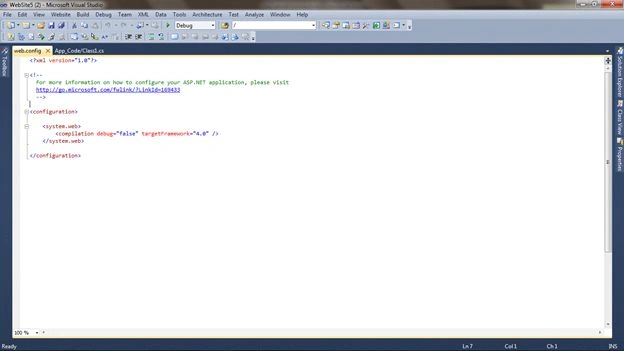
- Now click on Solution Explorer at the very right corner; a box like this will be opened:
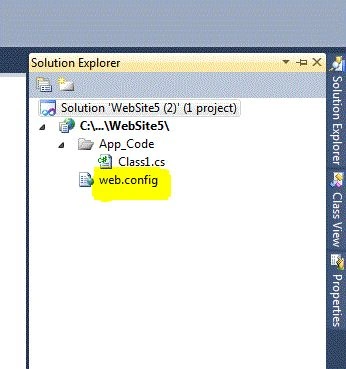
- Now click on the web.config link
- A web.config page will be opened
- Create a connection string on this page
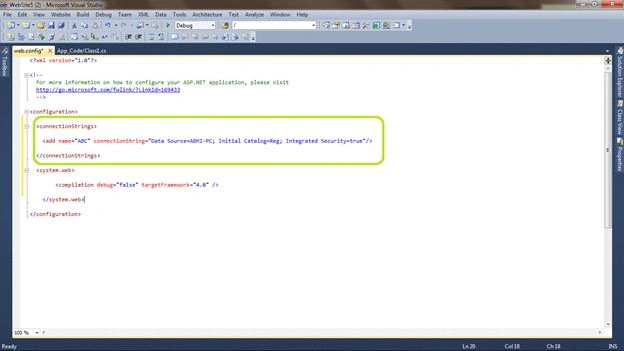
[connection string]
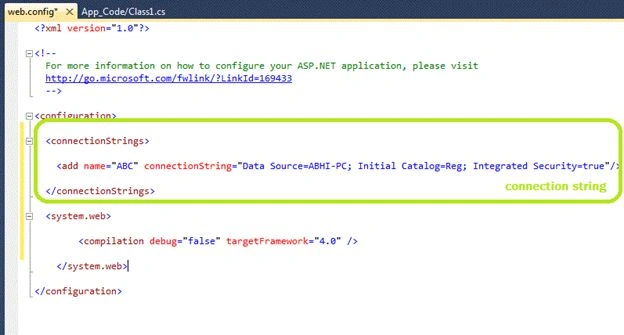 The following shows how to establish a connection string.
Web configuration Page
(Code like this)
The following shows how to establish a connection string.
Web configuration Page
(Code like this)
- <?xml version="1.0"?>
- <!--
- For more information on how to configure your ASP.NET application, please visit http://go.microsoft.com/fwlink/?LinkId=169433
- -->
- <configuration>
- <connectionStrings>
- <add name="ABC" connectionString="Data Source=ABHI-PC; Initial Catalog=Reg; Integrated Security=true" />
- </connectionStrings>
- <system.web>
- <compilation debug="false" targetFramework="4.0" />
- </system.web>
- </configuration>
Join the conversation! Your thoughts help the community grow.