

Index
- Introduction
- Tables
Book_Details
Binding_Details
Category_Details
Borrower_Details
Student_Details
Staff_Details
Student_Details
Shelf_Details
- Normalization
- ER-Diagram
- SQL Command (select, update, insert, delete)
Creating table “Book_Details”:
Inserting Some Data in “Book_Details”
Creating table “Binding_Details”:
Creating Relationship Between Book and Binding Table:
Creating Category Table:
Building Relationship between Book & Category Table:
Creating Borrower Table:
Building Relation Between Book & Borrower Table
Creating Staff Table
Building Relationship between student and Borrower table:
Checking Full Relationship
Adding Shelf Table
Adding Relationship Between Shelf and Book Table
Combined All Relationship
Library Management System
Introduction
The Database Library System is intended to Automate the library activities such as creating a new borrower, giving books to the borrowers, maintaining the details of all the item that were available in the books . This also helps the librarians by providing information such as total copies available each book, list of books that belong to a particular category (Short, Long Loan, Reference items, etc).
Tables
Book_Details:
This is the master table for all the books that are available in the Library. This table contains the complete list of books that are available in the library. Each Book id provided with a unique ISBN which serves as a primary key. The book details include the ISBN, Book Title, the year in which that particular book was published, the type of binding either soft cover or hard cover and the category.
Columns
ISBN: This is unique ID given to every book .Since there may be a large no. of books with same TITLE, this ISBN no. will help us to distinguish between books of same title.
Book_Title: Provides the name of the book.
Publication_year: Contains the year of publication in ‘YY’ format (eg:2009à09)
Language: Contains the language in which this book was published.
Category_Type
Binding _Id
No_Of_Copies_Actual: This column contains the total no. of copies of each book that were initially present.
No_Of_Copies_Current: This column contains the total no. of copies of each book that were currently available .
Binding_Details:
This table is the Master table for the binding types.This includes the binding ID and Binding Name. The Binding ID serves as a primary key.
Columns:
Binding_ID: This column contains the Unique number that was given to each type of binding.
Binding_Name: This column give the names of different types of binding.
Category_Details:
This includes the Category ID and Category Name. The Category ID servers as a primary key.
Columns:
Category _ID: This column contains the Unique number that was given to each type of Category.
Category _Name: This column give the names of different types of categories.
Borrower_Details:
This table contains the details of all the persons who lent a book from the library. Each Student will be given a Unique borrower ID. All the library related activity for a particular person will be captured based on the Borrower ID. This table will be used to track the borrowing records. The borrower ID will serve as a primary key here.
Columns:
Borrower_ID: Unique ID given to each Student.
Book_ID: This column contains the book ID which was give to the borrower.
Borrowed_From_Date: The date on which the book was given a particular borrower.
Borrowed_To_Date: The date on which that book was supposed to be returned back or should be renewed.
Actual_Return_date: The date on which the borrower returned the book to the library.
Issued_by: The ID of the Librarian who issued book to the borrower.
staff_Details:
This table contains the details of the staff in the Library. Each Staff member will be given a unique User ID which serves as a Primary Key.
Columns
User_ID: The unique ID given to each staff member present in the Library.
User_Name: The Name of the staff member.
Is_Admin: Just checking user is admin or not.
Designation: The role of the staff member in the library such as librarian, assistant, etc.
Student_Details:
This table contains the details of all the students they are eligible for availing Library facilities. Each student will be provided with a unique Student ID and Borrower ID. The student ID will be Primary Key, whereas Borrower_ID and Phone_no will be Unique.
Columns:
Student_id: Unique ID given to Each Student.
Student_Name: The Name of the Student.
Sex : Gender of the Student either Male or Female.
Date_Of_Birth: The Date of Birth of the student.
Borrower_ID: The borrower ID assigned to each student.
Department: This is contains student department.
Contact_Number: Contact number of the student.
Shelf_Details:
This table contain the position of the book…That means which floor and shelf the book is situated.
Shelf_Id: Contains the shelf number.
Floor: Which floor the shelf is situated.
Library Management System (SQL Commands)
Creating table “Book_Details”:
- CREATE TABLE Book_Details
- (
- ISBN_Codeint PRIMARY KEY,
- Book_Titlevarchar(100),
- Language varchar(10),
- Binding_Idint,
- No_Copies_Actualint,
- No_Copies_Currentint,
- Category_idint,
- Publication_yearint
- )
- INSERT INTO Book_details
- VALUES('0006','Programming Concept','English',2,20,15,2,2006);
- CREATE TABLE Binding_details
- (
- Binding_idint PRIMARY KEY,
- Binding_Namevarchar(50)
- )
Describe binding_details
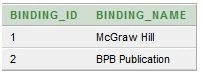
Inserting Some data in Binding Table:
- INSERT INTO Binding_DetailsVALUES(1,'McGraw Hill);
- INSERT INTO Binding_DetailsVALUES(2,'BPB Publication');
- select *from binding_Details
Creating Relationship Between Book and Binding Table:
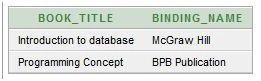
- ALTER TABLE Book_details
- ADD CONSTRAINT Binding_ID_FK FOREIGN KEY(Binding_Id) REFERENCES Binding_Details(Binding_Id);
- selectb.Book_Title, e.binding_name
- fromBook_Detailsb, Binding_Details e
- whereb.binding_id = e.binding_id;
Creating Category Table:
- CREATE TABLE Category_Details
- (
- Category_Idint PRIMARY KEY,
- Category_Namevarchar(50)
- )
- INSERT INTO CATEGORY_DETAILS VALUES(1,'Database');
- INSERT INTO CATEGORY_DETAILS VALUES(2,'Programming Language');
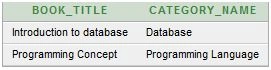
- ALTER TABLE Book_details
- ADD CONSTRAINT Category_Id_FK FOREIGN KEY(Category_Id) REFERENCES Category_Details(Category_Id);
- selectb.Book_Title,e.Category_Name
- fromBook_Detailsb,Category_Details e
- whereb.binding_id = e.Category_id;
Creating Borrower Table:
- CREATE TABLE Borrower_Details
- (
- Borrower_Idint PRIMARY KEY,
- Book_Idint,
- Borrowed_From date,
- Borrowed_TO date,
- Actual_Return_Date date,
- Issued_byint
- )
- Insert into BORROWER_DETAILS VALUES(1,0004,'01-Aug-2014','7-Aug-2014','7-Aug-2014',1)
- Insert into BORROWER_DETAILS VALUES(2,6,'02-Aug-2014','8-Aug-2014',NULL,1)
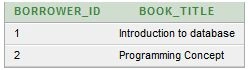
- ALTER TABLE Borrower_details ADD CONSTRAINT Book_Id_FK FOREIGN KEY(Book_Id) REFERENCES Book_Details(ISBN_Code);
- selectBorrower_Details.Borrower_id,Book_Details.Book_title
- fromBorrower_Details,Book_Details
- whereBorrower_Details.book_id=Book_Details.ISBN_Code
- ALTER TABLE Borrower_Details
- ADD CONSTRAINT Issued_by_FK FOREIGN KEY(Issued_by) REFERENCES Staff_Details(Staff_Id);
- CREATE TABLE Staff_Details
- (
- Staff_Idint PRIMARY KEY,
- Staff_Namevarchar(50),
- Password varchar(16),
- Is_Adminbinary_float,
- Designation varchar(20)
- )
- Insert into STAFF_DETAILS values (1,'Tarek Hossain','1234asd',0,'Lib_mgr');
- Insert into STAFF_DETAILS values (2,'Md.Kishor Morol','iloveyou',0,'Lib_clr');
- select * from staff_details

Creating Student Table:
- Create TABLE Student_Details
- (
- Student_Idvarchar(10) PRIMARY KEY,
- Student_Namevarchar(50),
- Sex Varchar(20),
- Date_Of_Birth date,
- Borrower_Idint,
- Department varchar(10),
- contact_Numbervarchar(11)
- )
- Insert into STUDENT_DETAILS values ('13-23059-1','Ahmed,Ali','Male','05-Oct-1995',1,'CSSE','01681849871');
- Insert into STUDENT_DETAILS values ('13-23301-1','MOrol MD.Kishor','Male','03-Jan-1994',2,'CSE','01723476554');
- select *from student_details

Building Relationship between student and Borrower table:
- ALTER TABLE student_details
- ADD CONSTRAINT borrower_id_FK FOREIGN KEY(Borrower_Id) REFERENCES Borrower_Details(Borrower_Id);
- select student.student_id, student.student_name, book.Book_Title, staff.staff_name, b.Borrowed_To
- fromstudent_Detailsstudent, Staff_Detailsstaff, Borrower_Detailsb, book_details book
- wherestudent.Borrower_id = b.Borrower_id and book.ISBN_Code = b.book_id and b.Issued_by = staff.Staff_id;

Adding Shelf Table:
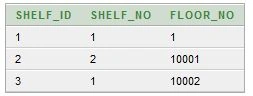
- Create Table Shelf_Details
- (
- Shelf_idint PRIMARY KEY,
- Shelf_Noint,
- Floor_Noint
- );
- Insert into Shelf_DetailsValues(1, 1, 1);
- Insert into Shelf_DetailsValues(2, 2, 10001);
- Insert into Shelf_DetailsValues(3, 1, 10002);
- select*from Shelf_Details;
Adding Relationship Between Shelf and Book Table:
- ALTER TABLE Book_Details
- ADD(Shelf_Idint);
- UPDATE Book_Details set Shelf_Id = 1
- where ISBN_CODE = 4;
- UPDATE Book_Details set Shelf_Id = 2
- where ISBN_CODE = 6;
- ALTER TABLE Book_Details
- ADD CONSTRAINT Shelf_Id_FK FOREIGN KEY(Shelf_Id) REFERENCES Shelf_Details(Shelf_Id);
- select student.student_id, student.student_name, book.Book_Title, staff.staff_name, b.Borrowed_To, shelf.shelf_No
- fromstudent_Detailsstudent, Staff_Detailsstaff, Borrower_Detailsb, book_detailsbook, Shelf_Details shelf
- wherestudent.Borrower_id = b.Borrower_id and book.ISBN_Code = b.book_id and b.Issued_by = staff.Staff_id and book.Shelf_Id = shelf.Shelf_Id;

Neusa MagalhaesPosted Dec 8, 2022, 3:03 AM
Goodnight!I'm a beginner in this branch, please, if you can, send me the diagram and a complete script in the email: [email protected] Thank you very much!!!
Lakshay SharmaPosted Mar 19, 2022, 6:30 PM
Please send me ER Diagram and normalisation for the same at my mail id [email protected]
phoo htooPosted Mar 3, 2022, 3:33 AM
I think Author Name need to add ?
Tejasvita PandeyPosted Oct 6, 2021, 10:06 PM
How have you defined the relationship between Book_Details and Borrower_Details as One to many? What if A borrower wants to issue multiple books?
Jahnavi ValisettyPosted Jul 10, 2021, 10:04 PM
Can you send me the ER diagram for this one on [email protected]
Ahmed ElSheikhPosted Jan 28, 2021, 2:05 PM
Please send me the ER diagram on [email protected]
bita azariPosted Dec 22, 2020, 8:04 AM
Relation between borrower table and book detail has error
LEPAKSHI JAGUNUPosted Jul 2, 2020, 3:14 AM
Sir plzz share me the ER diagram and relational schema table plzzzzzzz sir i have TO submit this Project right now plzzzz sir plzzzzz sir share TO my id [email protected]
Isha AgarwalPosted Sep 5, 2018, 9:39 AM
Can I please get an ER diagram for the same example. It will be of great help. My email id is [email protected]. Thankyou
hafz umerPosted Feb 4, 2018, 3:34 PM
Plz snd er diagram on my id plz my id is [email protected]
Vamsi PPosted Oct 5, 2017, 9:21 AM
Send er diagrams plz [email protected]
John LirioPosted Mar 11, 2017, 10:50 PM
Can i send me E-R diagram on this account [email protected] thank you :)
Rupali RastogiPosted Aug 21, 2016, 5:40 PM
Can u send me E-R diagram of this database of library management. as soon as possible.?? my id is [email protected] thanku
Bannu RohithPosted Apr 26, 2016, 11:13 AM
ER DIAGRAM??
Kamlesh BhorPosted Dec 28, 2015, 12:58 AM
Nice
Humayun Kabir MamunPosted Dec 27, 2015, 11:13 PM
Nice...
Banketeshvar NarayanPosted Dec 27, 2015, 1:28 PM
Good One