
This article was written based upon Visual Studio 2008. Some of the features are new for Visual Studio 2008 and might be different in Visual Studio 2010.
This article will describe creation of a DataGridView bound to a table. The table is a Data Source. When a table is bound to a control, code is generated for you automatically by Visual Studio that uses the .Net classes to manage the data going into and coming out of the control. There is abundant opportunity to customize this, but most of the basics are done for us.
First decide what database table you want to do this for. If the database is not in the list of databases in the Server Explorer, then create a connection to the database in the Server Explorer. Use "View | Server Explorer" to use the Server Explorer. You will need to use a database; either a SQL Server or an Access database will work. You can install SQL Server Express or SQL Server Compact Edition for free if you don't have SQL Server installed. Create a table if you don't already have one you want to use.
Then create a C# Windows Forms application.
Show the Data Sources window if it is not showing; use "Data | Show Data Sources" to show the Data Sources window. There will be a link in the Data Sources window for "Add New Data Source…"; click it (or click on the "Add New Data Source" icon), and a "Data Source Configuration Wizard" will open.
Select Database and then click on Next. The next page "Choose Your Data Connection" will allow you to specify the database and will create a connection string for it. A connection string provides the information that a database system needs to connect to a database. If the database already appears in the Combo Box that lists databases, then you can use that and you need not do more on this page. If the database is not yet there, then click on the New Connection button and create a connection.
When the connection has been created, click Next. A dialog box might then be shown that asks if you want to copy the database to your project; the dialog box looks like: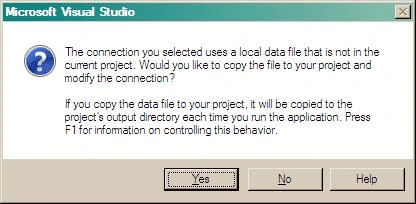
If you have a database you want to use for development purposes, but you don't want to modify the database, you can click Yes and Visual Studio will copy the database to your project, so the original is not modified. I don't; I click No so my project uses the database in it's current location. It depends on what you are doing whether you answer Yes or No.
The next dialog box will ask if you want to save the connection string to the application configuration file; just use the defaults on that page.
Click Next and a page will be shown for selecting the table to use and selecting the fields in the table to use. Select (check the checkbox for) the table you want to use; you can instead choose just specific fields, and then (by default) only those fields will show in the DataGridView.
Click Next. The Data Sources window will show a TreeView with the database as the root, the table under that and the fields from the table under that. With the project's form showing in Design view, drag the table node from the Data Sources window and drop on the form. This action will create many things, including a DataSet, a DataGridView, a BindingNavigator, a BindingSource, a TableAdapter and a TableAdapterManager (see below for a description of them).
Note that the table node and the field nodes in the table node, in the Data Sources window have drop-down boxes that allows customization of what is bound to the form. We will use the defaults for now, but there are significant customizations that can easily be done using the drop-down box.
Build the project. If all goes well, the project will build successfully. Then execute the application. You can edit, insert and delete records; all without writing any code, except read the next section about saving the data.
Saving Data
When editing the table, the data is not automatically saved. You can save the data by clicking the Save icon in the navigation toolbar, but the data won't be saved automatically. You can add a little bit of code that, if the data has been changed, will prompt to save the data.
First create a method to save the data. I will call the method DoSave() but you can use whatever name you want to. Then move the code from the BindingNavigator's SaveItem button click handler (probably called tableBindingNavigatorSaveItem_Click, where table is the name of the table) to the DoSave() method and replace the code in the click event handler with a call to DoSave(). So the same code will be executed when the SaveItem button is clicked as before, except the code is now in the DoSave() method. Note that the code you put in the DoSave() is exactly the same code that is in the generated code. The code you use can be exactly as it exists in the generated code; it can be moved as-is. There is just three lines in the generated code that is to be moved to the DoSave().
Then add an event handler for the form's FormClosing event and add code to the event handler as indicated below. If you don't know how to add event handlers for a form, then look at the Properties for the form. Along the top is a lightning bolt icon; click it. You can view, edit, insert and delete event handlers there.
private void ViewForm_FormClosing(object sender, FormClosingEventArgs e)
{
if (!tableDataSet.HasChanges())
return;
DialogResult dr = MessageBox.Show("Wanna save?", " DatabaseUpdateWithoutCode Sample", MessageBoxButtons.YesNo);
if (dr == System.Windows.Forms.DialogResult.Yes)
DoSave();
}
Generated Components
When the data source is created, the connection string is saved in the project property settings. You can view the property settings by going to the Solution Explorer, expanding the Properties node if it is not yet expanded, then double-clicking on "Settings.Settings". The connection string is used by the database system to determine what database to use and how to use it. The code needed to connect to the database is generated, including code to automatically connect when needed.
The following six components are generated for the form. They are listed under the form in Design View.
BindingSource
The BindingSource object binds the data source table to the control (the DataGridView) and the BindingNavigator. The DataGridView.DataSource property is set to the BindingSource generated for the data source. The BindingSource object has many members for manipulating the table bound to the control. The BindingSource object also manages updates to the database table from the control.
DataGridView
The DataGridView shows a database table in rows and columns, similar to a spreadsheet and similar to the rows and columns that Microsoft Access uses. For the purposes of this article, the columns are automatically generated based on the fields selected for the data source. The rows are created from the table rows. By default, an empty row exists at the bottom that allows adding new rows to the database table.
BindingNavigator
The BindingNavigator control manages navigation of the data source for the control (the DataGridView). The BindingNavigator control is a toolbar that is usually at the top of the form that allows the user to easily move around in the data.
DataSet
The DataSet class provides an in-memory copy of the database. It does not contain the entire database; it contains DataTable members for each database table used in the program as determined by the data source and the DataTable objects contain only the fields that the program uses as determined by the data source.
TableAdapter
The TableAdapter and TableAdapterManager (see below) classes are not .Net classes; they exist in generated code only. The generated TableAdapter connects to the database when needed, then either fills a DataTable or creates a DataTable with the data. The DataTable is actually an object derived from DataTable that is generated with methods and properties specific to the data source. The generated DataTable-derived object has properties for each field in the data source.
TableAdapterManager
The TableAdapterManager contains the TableAdapters. It is most useful in programs that have multiple TableAdapters.
References
How to: Manage Local Data Files in Your Project

Database Table Update in a DataGridView without Writing Code
Join the conversation! Your thoughts help the community grow.
Sign in to leave a comment
It is the same account you read, post and publish with — and you will come straight back to this page.
Gordon FreemanPosted May 28, 2017, 3:43 AM
Please, show us the content of the DoSave() method
Hashim ShafiqPosted Aug 21, 2015, 10:17 PM
Nice
edelawit mekonenPosted Feb 18, 2011, 2:45 AM
i tried to delete a row and then save the change to the database after following your steps and creating all the things but i keep on getting this error .... "Update requires a valid DeleteCommand when passed DataRow collection with deleted rows." Is there anything i've missed? cuz i've tried it in a different way but the delete function doesn't work either way... please help
Becky FinleyeditedPosted May 18, 2010, 5:39 PMEdited May 18, 2010, 5:40 PM
Hello! I've read your very helpful article and followed it step by step just as I've been doing for days now, but still my datagrid will not allow editing when it is deployed on my device. I'm using Merge Replication from the SQL Server 2008 to SQL CE 3.5 SP1 running on my Visual Studio C# coded app on the Emulator. I get the Server data displayed in the datagrid on the Device successfully, that is not a problem. But there is no way to edit it, and no empty row to add new data. Oddly enough, I'm missing the BindingNavigator and TableManager, however I do get the Datagrid on the form and underneath it there is "mainMenu", "sQL_CE_DATABASEDataSet", BindingSource, TableAdapter, and sQLCEDATABASEDataSetBindingSource. Why do you think I'm missing the BindingNavigator, and what could I be doing incorrectly? Thanks!
ahmed aliPosted Apr 1, 2010, 11:41 AM
Oh ! dear, thank you very much.