

Introduction
The Date Format Specifier can be used to represent a date in various ways. Representation of a date can be; done by one of two Date Format Specifiers, that is, a Short Date Format Specifier or a Long Date Format Specifier.
The Short Date Format Specifier
The Format Specifier for a short date is "d," which is used to display the date as a short pattern; we can use various cultures so that the; format of dates displayed will vary for each culture value. The default culture is "en-US," which is used to display the date in the format "mm/dd/yyyy"; the "fr-FR" culture is used to display the date in the format of "dd/mm/yyyy," and the "ja-JP" culture is used to display the date in the "yyyy/mm/dd" format. Now we can better understand this concept by implementing this in a console application and see the output. In this example, I; use a system current date using the DateTime.Now method and display this date; in various format strings; see.
namespace DateTimeFormatString
{
    class Program
    {
        static void Main(string[] args)
        {
            // Get the system current date
            DateTime dt = DateTime.Now;
            // Display the date with the default culture
            Console.WriteLine("The date default pattern (en-US) denotes date in the format of mm/dd/yyyy : \n " + dt.ToString("d") + "\n\n");
            // Display date when applying the culture fr-FR
            CultureInfo cultureInfo = new CultureInfo("fr-FR");
            Console.WriteLine("The date pattern (fr-FR) denotes date in the format of dd/mm/yyyy : \n " + dt.ToString("d", cultureInfo) + "\n\n");
            // Display date when applying the culture ja-JP
            CultureInfo cultureInfo1 = new CultureInfo("ja-JP");
            Console.WriteLine("The date pattern (ja-JP) denotes date in the format of yyyy/mm/dd : \n " + dt.ToString("d", cultureInfo1) + "\n\n");
            // Display date when applying the Specific Culture de-DE
            Console.WriteLine("The date pattern (de-DE) denotes date in the format of mm.dd.yyyy : \n " + dt.ToString("d", CultureInfo.CreateSpecificCulture("de-DE")));
        }
    }
}
Output
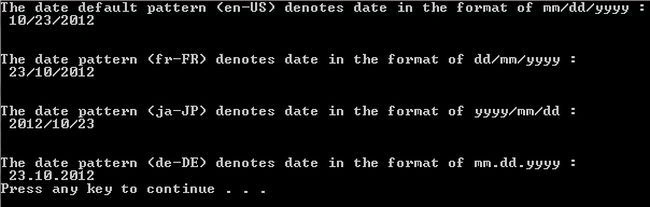
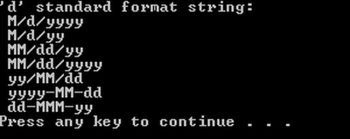
Now if we want to display a particular date or some other date, not the current date, in various formats, so for we specify that date and display it with a different Format Specifier.
namespace DateTimeFormatString
{
    class Program
    {
        static void Main(string[] args)
        {
            // Get any date
            DateTime dt = new DateTime(2008, 4, 10);
            // Display the date with the default culture
            Console.WriteLine("The date default pattern (en-US) denotes date in the format of mm/dd/yyyy : \n " + dt.ToString("d") + "\n\n");

            // Display date when applying the culture fr-FR
            CultureInfo cultureInfo = new CultureInfo("fr-FR");
            Console.WriteLine("The date pattern (fr-FR) denotes date in the format of dd/mm/yyyy : \n " + dt.ToString("d", cultureInfo) + "\n\n");
            // Display date when applying the culture ja-JP
            CultureInfo cultureInfo1 = new CultureInfo("ja-JP");
            Console.WriteLine("The date pattern (ja-JP) denotes date in the format of yyyy/mm/dd : \n " + dt.ToString("d", cultureInfo1) + "\n\n");
            // Display date when applying the Specific Culture de-DE
            Console.WriteLine("The date pattern (de-DE) denotes date in the format of mm.dd.yyyy : \n " + dt.ToString("d", CultureInfo.CreateSpecificCulture("de-DE")));
        }
    }
}

yash jamraPosted Feb 4, 2014, 11:24 AM
very good explained..