

Introduction
When I started working more deeply with Microsoft Copilot and Copilot Studio, one of the first areas I wanted to understand clearly was licensing.
The confusing part is that we often hear terms such as Microsoft 365 Copilot, Copilot Studio, user license, tenant capacity, Copilot Credits, trial, and pay-as-you-go.
They are related, but they are not the same thing.
So, as part of my Daily Copilot Learning Series, I wanted to start with the basics.
Day 1: How does Copilot licensing actually work?
The easiest way to understand it is to separate two things:
Who is using Copilot?
and
Who is building and running agents?
Microsoft 365 Copilot
Microsoft 365 Copilot is mainly designed for users who want Copilot capabilities inside Microsoft 365 applications such as:
Word
Excel
PowerPoint
Outlook
Teams
In this model, licensing is mainly user-based.
For example, if an employee needs Microsoft 365 Copilot features inside Word, Outlook, or Teams, that user normally needs the appropriate Microsoft 365 Copilot license along with an eligible Microsoft 365 subscription.
A simple way to remember this is:
Microsoft 365 Copilot = Copilot experience for an individual user.
What About Copilot Studio?
Copilot Studio is different.
Copilot Studio is used when we want to build custom agents for a business requirement.
For example, we might build an agent that:
Answers HR questions
Searches SharePoint documents
Retrieves information from Dataverse
Calls Power Automate flows
Connects to APIs
Creates support tickets
Checks order status
Performs business actions
Here we have to think about both the maker and the agent usage.
A developer or maker needs access to Copilot Studio so they can create and manage agents.
The organization also needs the appropriate capacity or usage-based billing for the agents when they are running.
User License vs Tenant Capacity
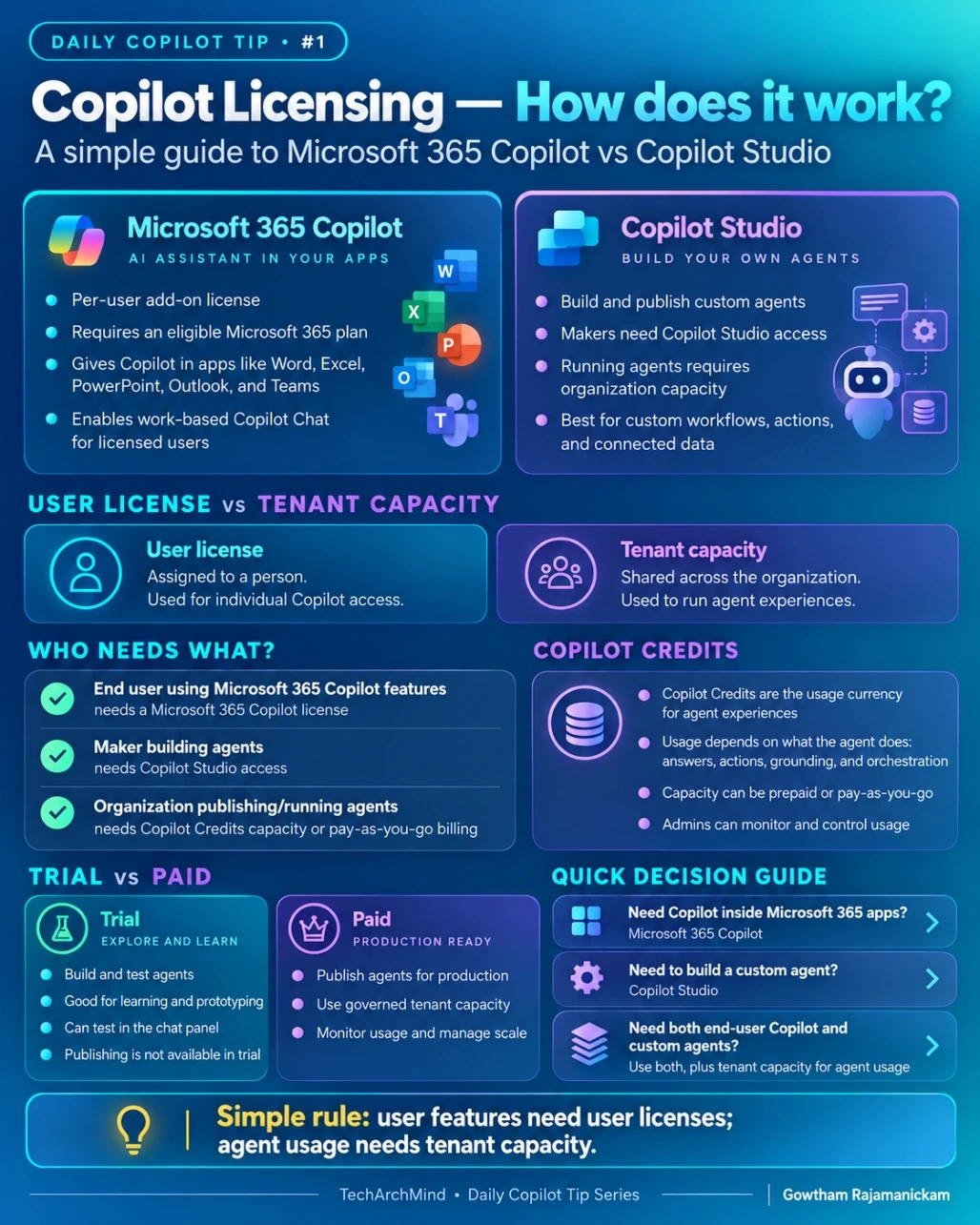
This is probably the simplest way to understand Copilot licensing.
User License
A user license is assigned to a person.
For example:
John → Microsoft 365 Copilot license
John can then use the Copilot capabilities available to him based on that license.
Tenant Capacity
Tenant capacity belongs to the organization.
Instead of assigning it to one person, the capacity is consumed when agents perform work.
For example:
Company → Copilot Studio capacity → Agent usage
This is important when we start publishing custom agents for many users.
What Are Copilot Credits?
Copilot Credits are used to measure Copilot Studio agent consumption.
An agent does not always perform the same amount of work.
One interaction might simply provide an answer.
Another interaction might:
Search organizational knowledge
Call a connector
Trigger an action
Execute a workflow
Generate a response
Because of this, consumption depends on what the agent is actually doing.
Organizations can manage this capacity through supported licensing and billing models such as prepaid capacity or pay-as-you-go.
From an architecture perspective, this means we should think about usage and cost while designing the agent, not only after development is completed.
Trial vs Production
If someone is learning Copilot Studio, the trial experience is a good starting point.
A trial can be useful for:
Learning the Copilot Studio interface
Creating agents
Testing topics and instructions
Connecting basic knowledge
Testing conversations
But production implementation is different.
When an agent needs to be published and used across an organization, licensing, environment configuration, security, governance, connections, and capacity all become important.
That is why I normally separate the environments like this:
Development → Test/UAT → Production
This also makes it easier to control who can build, test, and publish agents.
Which One Do I Need?
Here is the quick way I think about it.
If the requirement is:
“I want Copilot inside Word, Excel, Outlook, PowerPoint, and Teams.”
Think:
Microsoft 365 Copilot
If the requirement is:
“I want to build my own business agent.”
Think:
Copilot Studio
If the requirement is:
“I want Microsoft 365 Copilot and I also want custom agents.”
Then both technologies may be part of the solution.
A Simple Example
Imagine an investment company has 500 employees.
Employees want Copilot inside Outlook, Teams, Word, and Excel.
That is primarily a Microsoft 365 Copilot licensing scenario.
Now imagine the same company wants to create a custom agent that allows employees to ask:
“What is the latest status of Fund ABC?”
The agent might retrieve information from SharePoint, Dataverse, an API, or another internal system.
That becomes a Copilot Studio scenario.
The makers need access to build the agent, while the organization needs the appropriate capacity for the agent to run.
This is why understanding the difference between user licensing and agent capacity is important before starting the solution architecture.
My Simple Rule
The easiest way I remember it is:
User features need user licenses.
Agent usage needs organizational capacity.
It is not the complete licensing story, but it is a very useful starting point when discussing Copilot architecture with developers, administrators, and business teams.
Conclusion
Microsoft Copilot licensing can initially look complicated because several products and licensing models are involved.
Instead of trying to memorize every licensing option, start by asking three questions:
Who is going to use Copilot?
Who is going to build the agent?
Where and how will the agent run?
Once those questions are clear, the licensing conversation becomes much easier.
This is Day 1 of my Copilot learning series.
Join the conversation! Your thoughts help the community grow.