

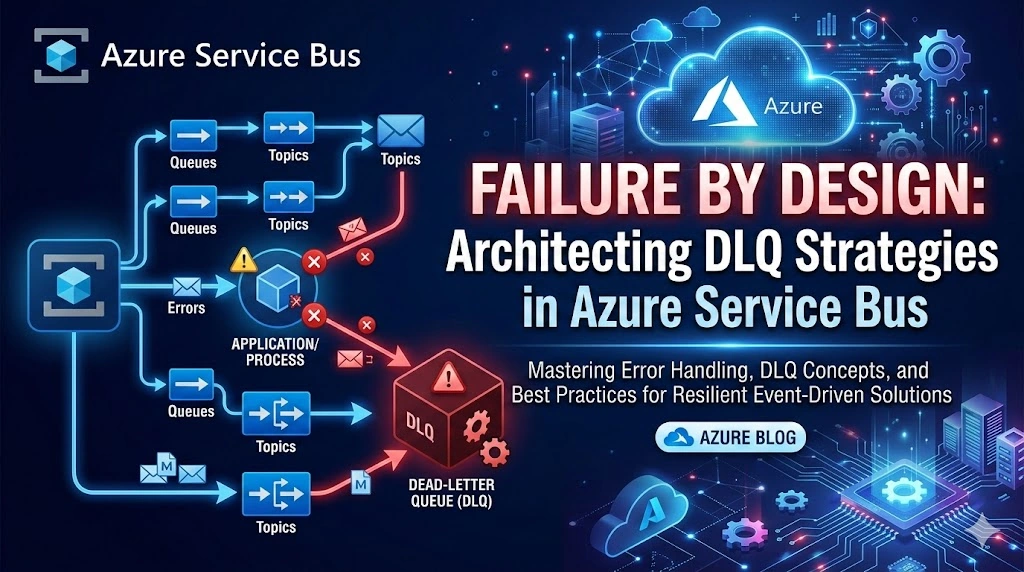
Background
In distributed systems, failure is not an exception — it’s a certainty.
When building cloud-native solutions on Azure—especially event-driven or message-based systems—we rely heavily on asynchronous communication. Services publish messages, downstream services consume them, and the system scales independently.
But what happens when:
A message is malformed?
A downstream API is unavailable?
Business validation fails?
A consumer crashes repeatedly for the same message?
Without a safety mechanism, you risk:
Infinite retry loops
Data loss
System congestion
Invisible failures
This is where Dead Letter Queues (DLQ) come in.
Introduction – What is a DLQ?
A Dead Letter Queue (DLQ) is a special sub-queue used to store messages that cannot be successfully processed after maximum retry attempts or validation failures.
In Azure messaging services like:
Azure Service Bus
Azure Storage Queues
Azure Event Grid
Azure Event Hubs
DLQ acts as a quarantine zone for problematic messages.
Think of DLQ as:
“The ICU ward of your messaging architecture.”
Messages are not discarded — they are isolated for diagnosis and recovery.
Why DLQ is Needed (Architectural Justification)
From a Senior Architect perspective, DLQ is not optional in enterprise systems.
Prevents System Blocking
Without DLQ:
Poison messages block the queue.
Throughput collapses.
Scaling doesn’t help.
With DLQ:
Problematic messages are isolated.
Healthy traffic continues.
Supports Reliability Patterns
DLQ supports:
Retry pattern
Circuit breaker pattern
Compensating transaction
Saga orchestration
Idempotency strategies
Enables Observability & Governance
DLQ helps answer:
Which messages are failing?
Is it a code issue or data issue?
Is a partner API causing failures?
Is there fraud or malformed payload injection?
Regulatory & Enterprise Audit Needs
In finance, healthcare, and government:
You cannot lose transactions.
You must prove why a message failed.
You must support replay.
DLQ provides that safety net.
How DLQ Works in Azure Service Bus
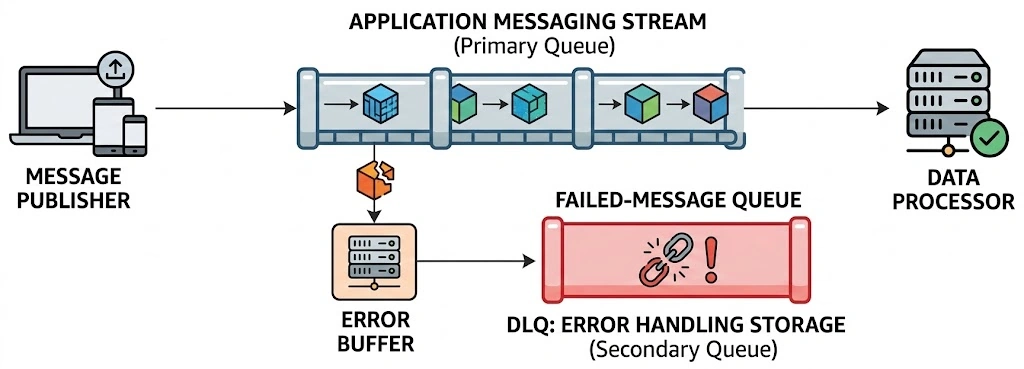
In Azure Service Bus :
Each Queue and Subscription automatically has a DLQ.
It’s a sub-path: <queue-name>/$DeadLetterQueue
Messages are dead-lettered when:
MaxDeliveryCount exceeded
TTL expired
Explicitly dead-lettered by code
Filter rule exception
Header size limit exceeded
Connected Azure Services
DLQ typically integrates with:
| Service | Role |
|---|---|
| Azure Service Bus | Messaging backbone |
| Azure Functions | DLQ processor |
| Azure Monitor | Alerting |
| Application Insights | Failure telemetry |
| Azure Logic Apps | Manual remediation |
| Azure Storage | Archive |
| Azure SQL / Cosmos DB | Audit store |
Real Enterprise Use Cases
Financial Payment Processing
Scenario:
Payment event published.
Downstream fraud service fails validation.
Message dead-lettered.
Architectural flow:
DLQ processor flags for manual review.
Business team validates.
Message replayed.
Healthcare Data Integration
Considering your experience with US healthcare CSV and XML transformations:
Malformed healthcare record
Schema validation failure
Regulatory rule violation
DLQ stores:
Original payload
Validation reason
Timestamp
Correlation ID
Prevents data loss and compliance violations.
E-Commerce Order Orchestration
Order event triggers inventory + payment + shipping.
Payment service timeout.
After retry exhaustion → DLQ.
Compensating action triggered.
Enterprise Solution Architecture Design
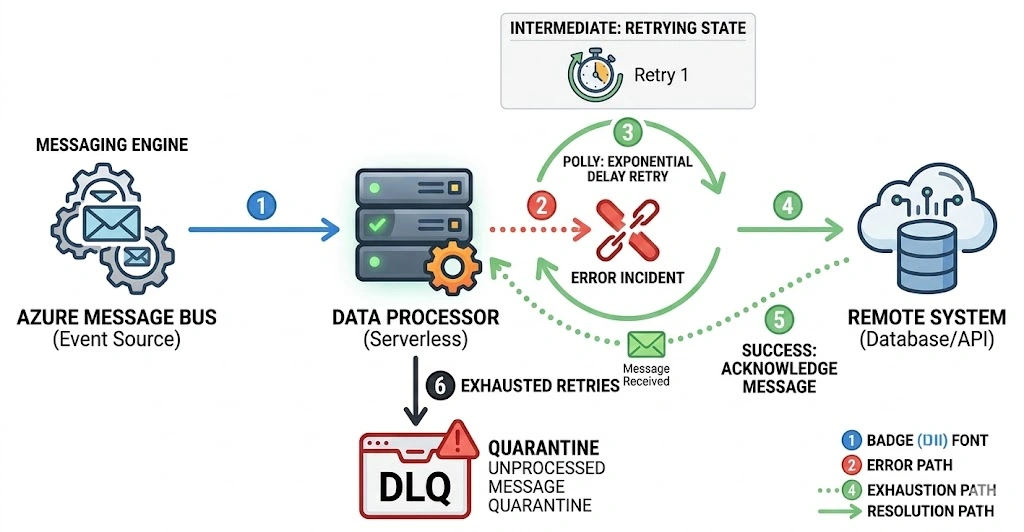
High-Level Architecture
Producer Service
        ↓
Azure Service Bus Queue/Topic
        ↓
Consumer Service
        ↓
Dead Letter Queue
        ↓
DLQ Processor Service
        ↓
Audit + Monitoring + Replay
Recommended Architecture Sections (Senior Perspective)
When designing DLQ, include:
Failure Categorization
Transient
Business validation
Schema error
Dependency failure
Not all DLQ messages should be replayed automatically.
Retry Strategy
Immediate retries (3–5)
Exponential backoff
MaxDeliveryCount aligned with SLA
Monitoring Strategy
Alert when DLQ count > threshold
Alert on DLQ growth rate
Monitor replay attempts
Replay Strategy
Options:
Manual replay
Automated replay
Fix and requeue
Move to archive
Governance & Security
RBAC access to DLQ
Mask PII in logs
Encrypt sensitive payload
How to Implement DLQ in .NET 10
Using:
.NET 10
Azure.Messaging.ServiceBus SDK
Step 1 – Install Package
dotnet add package Azure.Messaging.ServiceBus
Step 2 – Send Message
var client = new ServiceBusClient(connectionString);var sender = client.CreateSender("orders-queue");await sender.SendMessageAsync(new ServiceBusMessage(orderJson));
Step 3 – Process with MaxDeliveryCount Configured
In Azure Portal:
Set Max Delivery Count (e.g., 5)
Consumer:
 var processor = client.CreateProcessor("orders-queue");

processor.ProcessMessageAsync += async args =>{
    try
    {
        var body = args.Message.Body.ToString();

        // Simulate business validation failure
        if(body.Contains("Invalid"))
        {
            await args.DeadLetterMessageAsync(
                args.Message,
                "BusinessValidationFailed",
                "Order contains invalid data");
            return;
        }

        await args.CompleteMessageAsync(args.Message);
    }
    catch (Exception)
    {
        throw; // automatic retry
    }};
Step 4 – Read from DLQ
    var receiver = client.CreateReceiver(
    "orders-queue",
    new ServiceBusReceiverOptions
    {
        SubQueue = SubQueue.DeadLetter
    });

var messages = await receiver.ReceiveMessagesAsync(10);

foreach (var message in messages){
    Console.WriteLine($"DeadLetter Reason: {message.DeadLetterReason}");
    Console.WriteLine($"Description: {message.DeadLetterErrorDescription}");}
Advanced Enterprise Pattern – DLQ Processing Microservice
Recommended:
Dedicated DLQ Processor
Idempotent replay logic
Observability integration
Circuit breaker before replay
Example:
DLQ → Validate → Transform → Requeue → Log → Monitor
Operational Best Practices
Never ignore DLQ
Monitor growth trend
Don’t auto-replay blindly
Store correlation IDs
Track failure metrics
Include DLQ in DR strategy
Common Anti-Patterns
No DLQ monitoring
Infinite retry loops
Auto-replay without root cause
No audit trail
Sharing DLQ access with all developers
Final Thoughts
DLQ is not just a technical feature.
It is:
A resilience strategy
A compliance enabler
A diagnostics tool
A governance checkpoint
A business continuity mechanism
In enterprise Azure architectures — especially financial, healthcare, and mission-critical workloads — DLQ is mandatory.
When designing event-driven systems:
“If you don’t design for failure, failure will design your outage.”
Join the conversation! Your thoughts help the community grow.