

Background
My previous article is Debug ASP.Net Applications Using ELMAH: Part 1. Now in this article I will be explaining the integration of ELMAH with SQL Server (SSMS). This is currently an essential part in any application. That is, when errors and exceptions arise in the application they are logged into the database tables that are related to ELMAH. These table scripts are provided by ELMAH itself. Don't believe it? I also did not. But that is the truth. Let's see and discuss now.
ELMAH Configuration
Here I am specifying all the requirements for setting up ELMAH in the web.config settings. Since the installation and also the settings have been explained in Part-1, still I am specifying the blocks required in the Web.Config. Inside the System.webServer block:
- <modules runAllManagedModulesForAllRequests="true">
- <add name="ErrorLog" type="Elmah.ErrorLogModule, Elmah" preCondition="managedHandler" />
- <add name="ErrorMail" type="Elmah.ErrorMailModule, Elmah" preCondition="managedHandler" />
- </modules>Snippet
- <handlers>
- <add name="Elmah" verb="POST,GET,HEAD" path="elmah.axd" type="Elmah.ErrorLogPageFactory, Elmah" />
- </handlers>
- <httpModules>
- <add name="ErrorLog" type="Elmah.ErrorLogModule, Elmah" />
- <add name="ErrorMail" type="Elmah.ErrorMailModule, Elmah" />
- </httpModules>
- <httpHandlers>
- <add verb="POST,GET,HEAD" path="elmah.axd" type="Elmah.ErrorLogPageFactory, Elmah" />
- </httpHandlers>
Since we all have an access and look at the connection strings. Still let's have a quick look:
- <connectionStrings>
- <add name="DefaultConnection" connectionString="Data Source=(LocalDb)\v11.0;AttachDbFilename=|DataDirectory|\aspnet-DemoStart-20141014045047.mdf;Initial Catalog=aspnet-DemoStart-20141014045047;Integrated Security=True" providerName="System.Data.SqlClient" />
- </connectionStrings>
- <elmah>
- <security allowRemoteAccess="yes" />
- <errorMail from="[email protected]" to="[email protected]" subject="DEMO Error" async="false" useSsl="true" />
- <errorLog type="Elmah.SqlErrorLog, Elmah" connectionStringName="DefaultConnection" applicationName="DemoStart"/>
- </elmah>
Queries for ELMAH
Now, let me reveal the magic to you as I said earlier. Yes guys, we don't need to write queries. Ready-made queries are provided by the ELMAH team. The download link for the ELMAH Queries is :Queries for ELMAH.
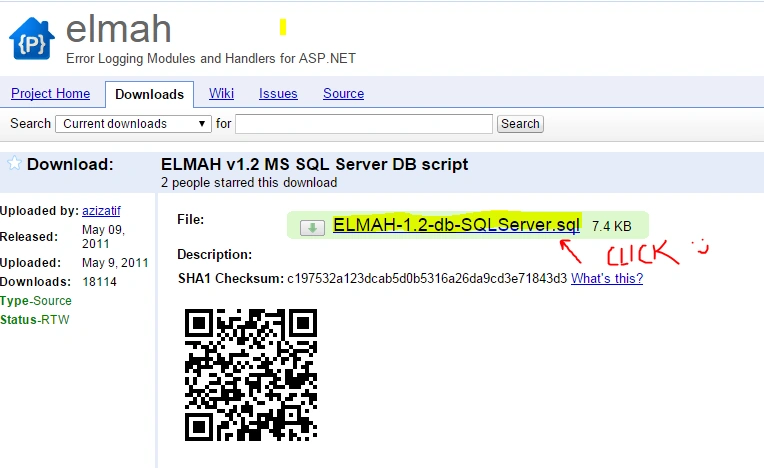
Just simply download the ".sql" file and run in the SSMS. After execution the tables are created for the ELMAH as well as the Stored Procedures shown below:
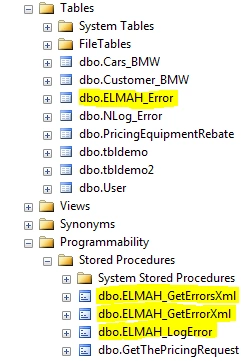
As you can see above, the tables and Stored Procedures are added into the database. This is so simple and as simple it can be. Isn't this great?
Let's see the number of columns and what columns are being created in the table.
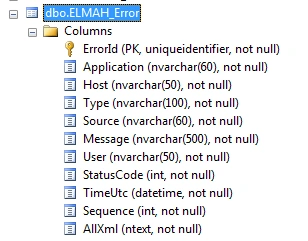
dbo.ELMAH_Error
Then every exception that occurs will be added into the table and can be easily used by developers for future reference.
I hope this helps developers anyway. This article covers all the setting configurations required. Thus the setup is as simple as it can be. Thanks to Andy Frenchh.
Ruchir SaxenaPosted May 14, 2015, 7:21 AM
hello suraj sir , I am using Elmah in my MVC5 project and for error logging I am using XML and not Sql , but the problem i every time Elmah create new file for single Exception , so there are 2 many file if there are 2 many exceptions , I need to know how can we maintain a single log file for all the exceptions occured in our application......... Thanks.....
Gowtham RajamanickamPosted Mar 14, 2015, 4:49 AM
good one..