

Introduction
For debugging and diagnostic information for ASP.NET apps, Glimpse is a NuGet package that provides detailed performance. It is fast, super-light and serve the developer with the best visual display for all performance matrices. It helps the developer to debug the performance of ASP.Net applications through the data access layer to the presentation layer, debugging your Ajax call is an additional feature of this extension. You don't need to read several manual pages to use this extension compared to Fiddler :). The best part of Glimpse is to debug and analyze the performance of all the server-side functionality as we do for the client side where we have the Firebug, Fiddler and F-12 development tools.
Using the code
For this tutorial I will use a sample Contoso University Project available at MSDN.
1. Open ContosoUniversity.sln in Visual Studio, it is implemented using ASP.Net MVC5 and Entity Framework 6.

2. Click on Manage NuGet Packages in the Project Tab.

3 (a). NuGet will look for your project configuration and will recommend available Glimpse extensions, type Glimpse in the search box.

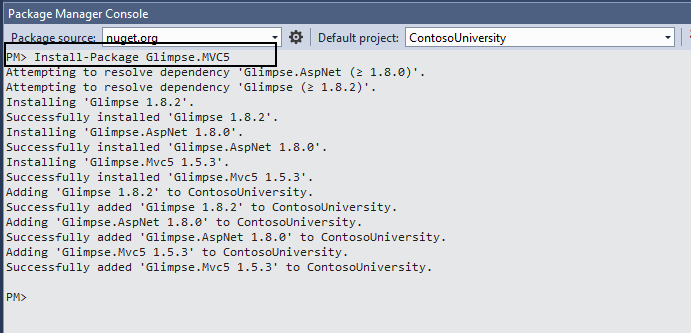
3(b). You may perform the same function using the NuGet Package Manager Console:
- Console Command For MVC5: Install-Package Glimpse.MVC5
- Console Command For MVC4: Install-Package Glimpse.MVC4
- Console Command For MVC3: Install-Package Glimpse.MVC3
- Console Command For WebForms: Install-Package Glimpse.Webforms
- Console Command For ADO.NET: Install-Package Glimpse.Ado
- Console Command For Entity Framework 6: Install-Package Glimpse.EF6
- Console Command For Entity Framework 5: Install-Package Glimpse.EF5
- Console Command For Entity Framework 4 or 3: Install-Package Glimpse.EF43

If you are installing the first time then it will automatically include Glimpse.AspNet and Glimspe.Core to resolve the dependency.
4. The following glimpse references will be added to the project:

And web.config will be updated as below:
- <configuration>
- <configSections>
- <section name="glimpse" type="Glimpse.Core.Configuration.Section, Glimpse.Core" />
- </configSections>
- <system.web>
- <httpModules>
- <add name="Glimpse" type="Glimpse.AspNet.HttpModule, Glimpse.AspNet" />
- </httpModules>
- <httpHandlers>
- <add path="glimpse.axd" verb="GET" type="Glimpse.AspNet.HttpHandler, Glimpse.AspNet" />
- </httpHandlers>
- </system.web>
- <system.webServer>
- <modules>
- <add name="Glimpse" type="Glimpse.AspNet.HttpModule, Glimpse.AspNet" preCondition="integratedMode" />
- </modules><handlers>
- <add name="Glimpse" path="glimpse.axd" verb="GET" type="Glimpse.AspNet.HttpHandler, Glimpse.AspNet" preCondition="integratedMode" />
- </handlers>
- </system.webServer>
- <glimpse defaultRuntimePolicy="On" endpointBaseUri="~/Glimpse.axd">
- </glimpse>
- </configuration>


Manish Kumar ChoudharyPosted Jan 12, 2015, 10:09 AM
Nice one..
Manish Kumar ChoudharyPosted Jan 12, 2015, 10:09 AM
Nice one..
Pankaj BajajPosted Jan 12, 2015, 8:15 AM
Good one.. Thanks for sharing