

The compiled executable file that a service application project creates must be installed on the server before the project can function in a meaningful way. You cannot debug or run a service application by pressing F5 or F11; you cannot immediately run a service or step into its code. Instead, you must install and start your service, and then attach a debugger to the service's process.
Here we are going to see how to debug our own windows services.
Steps for debugging windows services:
- Install your service. In my case it is the service which I created and installed as mentioned in my previous article i.e. Birthday Wish Scheduler in C#.
- Start the service.
- Open your project in Visual Studio.NET.
- Then choose processes from the Debug menu. The following windows will appear.
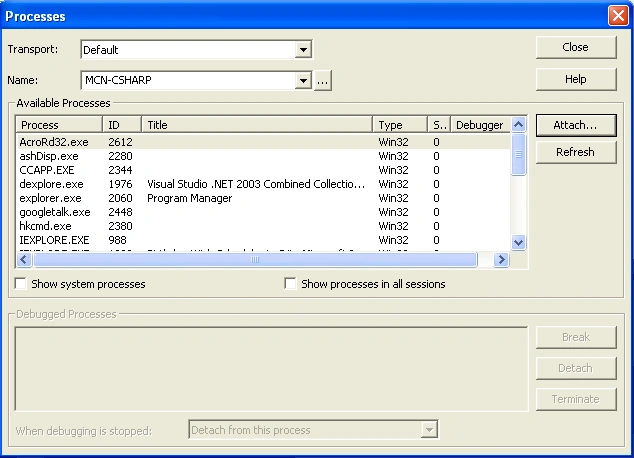
- Click on "Show system processes".
- From the available processes, look for the process created by your service. The process name will be same as the executable file of the service.
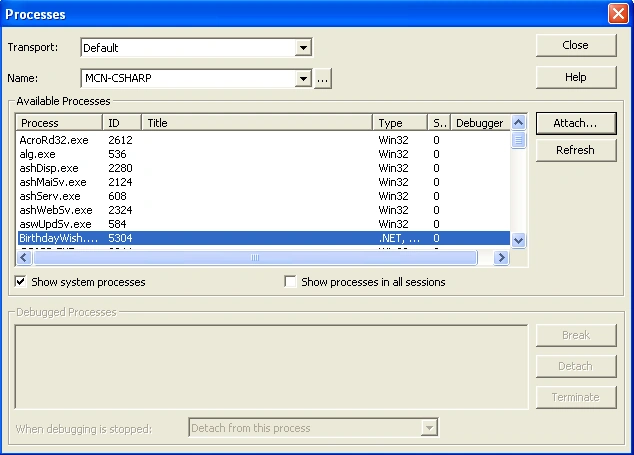
- Clicking Attach will show "Attach to Process" dialog box.
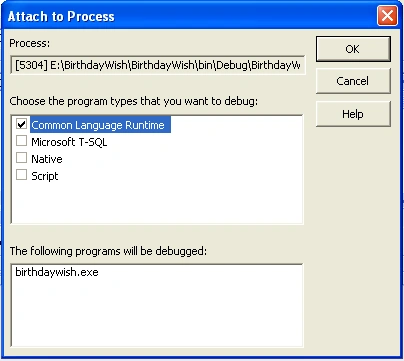
- Choosing the appropriate option will bring the application in debug mode.
- Insert breakpoints to debug the service.
- From the service control manager, use different options like start, stop etc. to debug it.
Until next time.....Happy .NETing!
Anil Kumar MurmuPosted Jan 13, 2016, 7:39 AM
Good article. It is a nice to know, we can have several debug option. I usually, commented the code inside Main() in Program.cs and create the object to specific class to debug the code inside it.
Mahesh ChandPosted Jul 29, 2012, 11:58 PM
Good point Rob. What I usually do is, create an application and put all service code in a DLL and call from exe and debug it. Once I am satisfied then I migrate my code to the service and build it. For debugging, I use my exe code. May be VS 2012 solves this problem. I have not looked at it yet.
Upendra RajpurohitPosted May 11, 2012, 2:23 AM
But for this the process should be in debug mode. What if my process is build in release mode / Code optimization enabled?
psPosted Apr 9, 2010, 8:17 AM
Unable to attach to the process. A debugger is already attached.
Rob RichardsonPosted Mar 11, 2010, 3:43 PM
This does not address what is to me the most common situation: a service fails during startup. In the procedure you describe, the service must be running successfully before you can debug it. My service is beginning to start up, but then fails on a null reference exception. The service doesn't stick around long enough for me to attach a debugger to it. How do I find out why my reference is null? RobR
Haseeb SaeedPosted May 4, 2009, 10:07 PM
thanx for this beautiful article. i was able to attach a debugger using ur article but i want to do live debugging ie remove errors and continue running the process, is this possible. coz removing a bug, then uninstalling and reinstalling the service becomes too much repeated work... please provide help
PoojaPosted Jul 6, 2007, 3:14 AM
hi Praveen, Great article in simple steps. I always feel that snapshots are the best way to explain things and this is perfect. Thanks a lot
Anderson ImesPosted Dec 28, 2006, 10:23 AM
Great article on the basics! I've come up with a way to fake up an interface that allows you to control the service component as though it were running in the windows services manager. Check it out at: http://theimes.com/archive/2006/12/28/Debugging-Windows-Services-is-a-Pain.aspx