

Introduction
System.Object is base class of all classes, structures, enumeration and delegates. We can say it is the root of the type hierarchy. System.Object has a method called MemberwiseClone that helps to create a clone of the current object instance.
Problem Statement
The MemberwiseClone method of System.Object creates a shallow copy of a new object and it copys the non-static fields of the current object instance to a new object. Copy Object is performed property by property, if property is a value type then it copies data bit by bit and if a property is a reference type then it copies the reference of the original object, in other words the clone object refers to the same object. This means that the MemberwiseClone method does not create a deep copy of the object.
Solution
There are numerous ways to implement a deep copy class object. Two of them I have described here with examples.
- Implement Deep Cloning using Serializing Deserializing objects
- Implement Deep Cloning using Reflection
1. Implement Deep Cloning using Serializing Deserializing objects
The ICloneable interface enables us to provide customized implementation to create a copy of the existing object using the "Clone" method. Generally the "Object.MemberwiseClone" method helps us to create a copy of an existing object, but it creates a shallow copy of the object.
Serialization is the process of storing the state of an object to the stream of bytes. Deserialization is the process of converting from a byte stream to an original object. In .NET there are many ways to perform serialization and deserialization like Binary serialization, XML serialization, data contract serialization and so on. Binary serialization is much faster than XML serialization and binary serialization uses private and public fields to serialize so binary serialization is a good option to perform serialization and deserialization.
Using serialization and deserialization, we can create a deep copy of any object. Note that to perform serialization and deserialization all types must be marked as "serializable".
Example
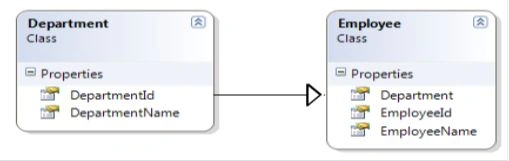
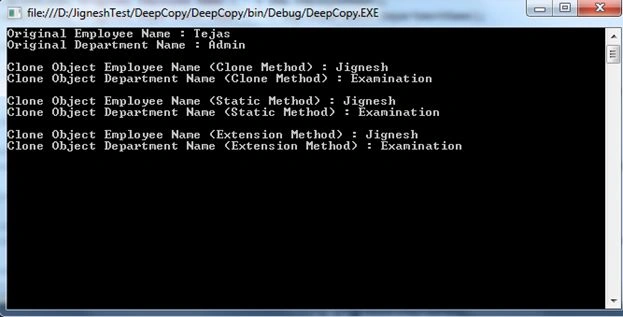
Suppose I have an Employee class and it contains the Department class type as a property. Now I implemented the Employee class with the ICloneable interface and I have implemented the "Clone" method of the ICloneable interface. Using a binary formatter, I just serialized the current object and deserialized it into a new object.
[Serializable]
public class Department
{
    public int DepartmentId { get; set; }
    public string DepartmentName { get; set; }
}
[Serializable]
public class Employee : ICloneable
{
    public int EmployeeId { get; set; }
    public string EmployeeName { get; set; }
    public Department Department { get; set; }
    public object Clone()
    {
        using (MemoryStream stream = new MemoryStream())
        {
            if (this.GetType().IsSerializable)
            {
                BinaryFormatter formatter = new BinaryFormatter();
                formatter.Serialize(stream, this);
                stream.Position = 0;
                return formatter.Deserialize(stream);
            }
            return null;
        }
    }
}
We can also implement this using an Extension method.
public static class ObjectExtension
{
    public static T CopyObject<T>(this object objSource)
    {
        using (MemoryStream stream = new MemoryStream())
        {
            BinaryFormatter formatter = new BinaryFormatter();
            formatter.Serialize(stream, objSource);
            stream.Position = 0;
            return (T)formatter.Deserialize(stream);
        }
    }
}
2. Implement Deep Cloning using Reflection
Reflection is used for obtaining Meta information of an object at runtime. The System.Reflection namespace has classes that allow us to obtain object information at runtime as well as we can create an instance of a type of object from the existing object and also accessing its properties and invoke its methods. To do a deep copy of an object, we can use reflection. Consider the following code. Here I have created one static method that accepts any object and it returns the same type of object with a new reference.
Massimiliano PesolaPosted Aug 7, 2025, 3:09 PM
I've tried you method CloneObject with a list but return the error "System.Reflection.TargetParameterCountException: 'Mismatch in parameter count.'" , the list has a sublist of another custom type
matej staglPosted Jan 8, 2025, 5:15 PM
Correctly deep cloning objects is hard. I'm maintaining a library that does this (in as many cases as possible) here: https://github.com/lofcz/FastCloner. Some cases, such as unmanaged memory can't be always solved, but it works way better out of the box than prior art.
Arulvel KumarasamyPosted Nov 26, 2022, 7:38 PM
Good one! But usage of Binary formatter is deprecated as of oct 28 2022 due to deserialization security issues.
GamberoPosted May 10, 2022, 2:35 PM
Hi, using reflection code to clone an object who has a Dictionary<Guid, Guid> property raise an exception of "Parameter count mismatch". it's a bug?
Sanjay ShekhawatPosted Jan 30, 2020, 2:59 AM
Thanks a lot :)
Artoo GarinPosted Feb 28, 2019, 8:55 AM
Does this work on same object properties but different namespace?
Manthan VyasPosted Jul 12, 2018, 1:21 AM
I had the similar problem and used the first approach you have mentioned in 'Implement Deep Cloning using Serializing Deserializing objects'. Thanks :)
mewansPosted Jun 20, 2018, 6:10 AM
Superb !!!
yogaa kapadiaPosted Jul 28, 2015, 6:15 AM
hi jignesh.. i wish to copy a type of object into another .. wherein both are similar.. dont wish to use automapper .. wish to do it manually .. so we have the hold of it.. ne help wud be good.. thnks :)
Raymond BrackPosted May 22, 2014, 6:14 PM
Found the code very useful but was wondering how I would modify it to cater for a collection in the class.
Raymond BrackPosted May 22, 2014, 6:13 PM
Hi Jignesh,
Sourav KayalPosted Jul 15, 2013, 1:21 PM
nice article.