

Introduction
In this article, I will explain how to delete a record from a database using a TextBox in TypeScript.
Note: This program will work only on Internet Explorer.
First I created a database "EmpDetail". Then I created a table in this database.
Query Code
- CREATE TABLE [dbo].[EmpSalary_Info](
- [id] [int] NULL,
- [name] [varchar](50) NULL,
- [salary] [int] NULL
- ) ON [PRIMARY]
Now insert some data into the "EmpSalary_Info" table. Then use the following procedure.
Complete Program
Show_Record_With_TextBox_Value.htm
- <!DOCTYPE html PUBLIC "-//W3C//DTD XHTML 1.0 Transitional//EN" "http://www.w3.org/TR/xhtml1/DTD/xhtml1-transitional.dtd">
- <html xmlns="http://www.w3.org/1999/xhtml">
- <head>
- <title></title>
- <script type="text/javascript" >
- function ShowAll()
- {
- var connection = new ActiveXObject("ADODB.Connection");
- var connectionstring = "Data Source=.;Initial Catalog=EmpDetail;Persist Security Info=True;User ID=sa;Password=password@123;Provider=SQLOLEDB";
- connection.Open(connectionstring);
- var rs = new ActiveXObject("ADODB.Recordset");
- rs.Open("select * from EmpSalary_Info ", connection);
- rs.MoveFirst();
- var span = document.createElement("span");
- span.style.color = "Blue";
- span.innerText = " ID " + " Name " + " Salary";
- document.body.appendChild(span);
- while (!rs.eof)
- {
- var span = document.createElement("span");
- span.style.color = "green";
- span.innerText = "\n " + rs.fields(0) + " | " + rs.fields(1) + " | " + rs.fields(2);
- document.body.appendChild(span);
- rs.MoveNext();
- }
- rs.close();
- connection.close();
- }
- function DeleteRecord()
- {
- var txtid = document.getElementById('txtid').value;
- if (txtid.length != 0) {
- var connection = new ActiveXObject("ADODB.Connection");
- var connectionstring = "Data Source=.;Initial Catalog=EmpDetail;Persist Security Info=True;User ID=sa;Password=password@123;Provider=SQLOLEDB";
- connection.Open(connectionstring);
- var rs = new ActiveXObject("ADODB.Recordset");
- rs.Open("delete from EmpSalary_Info where EmpId=" + txtid, connection);
- alert("Delete Record Successfuly");
- txtid.value = " ";
- connection.close();
- }
- else
- {
- alert("Please Enter Employee Id in TextBox");
- }
- }
- </script>
- <style type="text/css">
- #main
- {
- height: 264px;
- }
- #ShowRecord
- {
- width: 67px;
- z-index: 1;
- left: 53px;
- top: 119px;
- position: absolute;
- }
- #showall
- {
- z-index: 1;
- left: 146px;
- top: 118px;
- position: absolute;
- }
- </style>
- </head>
- <body style="height: 186px">
- <div id="show"
- style="font-size: x-large; font-weight: bold; height: 185px; color: #009999;">
- Delete Employee Record<p style="font-size: medium; color: #000000;">
- Enter Employee Id
- <input id="txtid" type="text" /></p>
- <p>
- <input id="ShowRecord" type="button" value="Delete" onclick="DeleteRecord()" /> <input id="showall" type="button" value="Show All Record" onclick="ShowAll()" /></p>
- </div>
- </body>
- </html>
Output 1
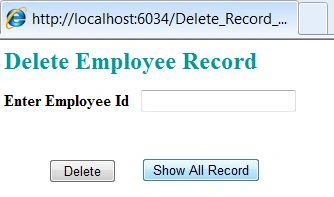
Click on the "Show All Record" button.
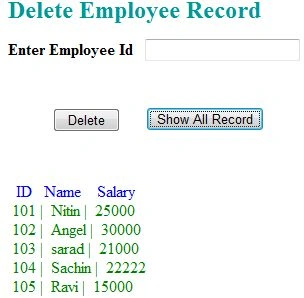
Output 2
Enter the employee id into the TextBox that you want to delete from the database. Then click on the "Delete" button.
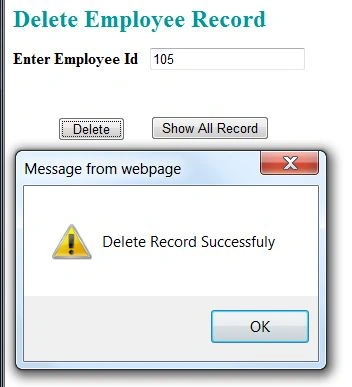
Output 3
After deleting the record, click on the "Show All Record" button. You will see that the record was deleted successfully.
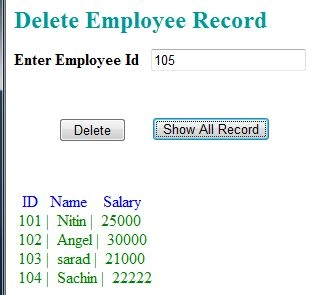
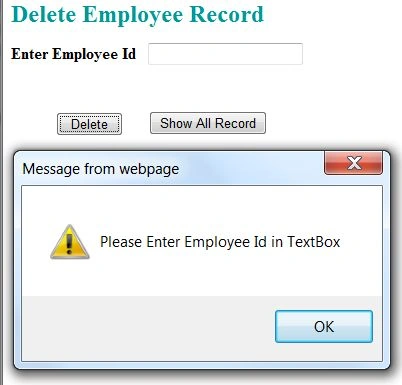
Output 4
If you will click on the Delete button without entering any value into the TextBox then it will show the error.
For more information, download the attached sample application.
Ravi ShekharPosted Apr 14, 2013, 7:00 AM
Wow !! I was wondering only through jquery we can do this but... Javascript !!! thanks 4 the article