

As Microsoft Dataverse environments grow, storage consumption becomes a significant concern. Large volumes of obsolete, test, duplicate, or imported records can impact performance, increase storage costs, and complicate data management.
Microsoft Dataverse provides a powerful Bulk Delete capability that allows administrators and developers to remove large sets of records asynchronously without blocking ongoing business operations. The bulk deletion process runs as a background job and supports scheduled execution, recurring jobs, email notifications, and failure tracking.
In this article, we'll explore:
What is Bulk Delete in Dataverse?
Real-world business scenario
C# implementation
Web API implementation
Advantages
Challenges
Best practices
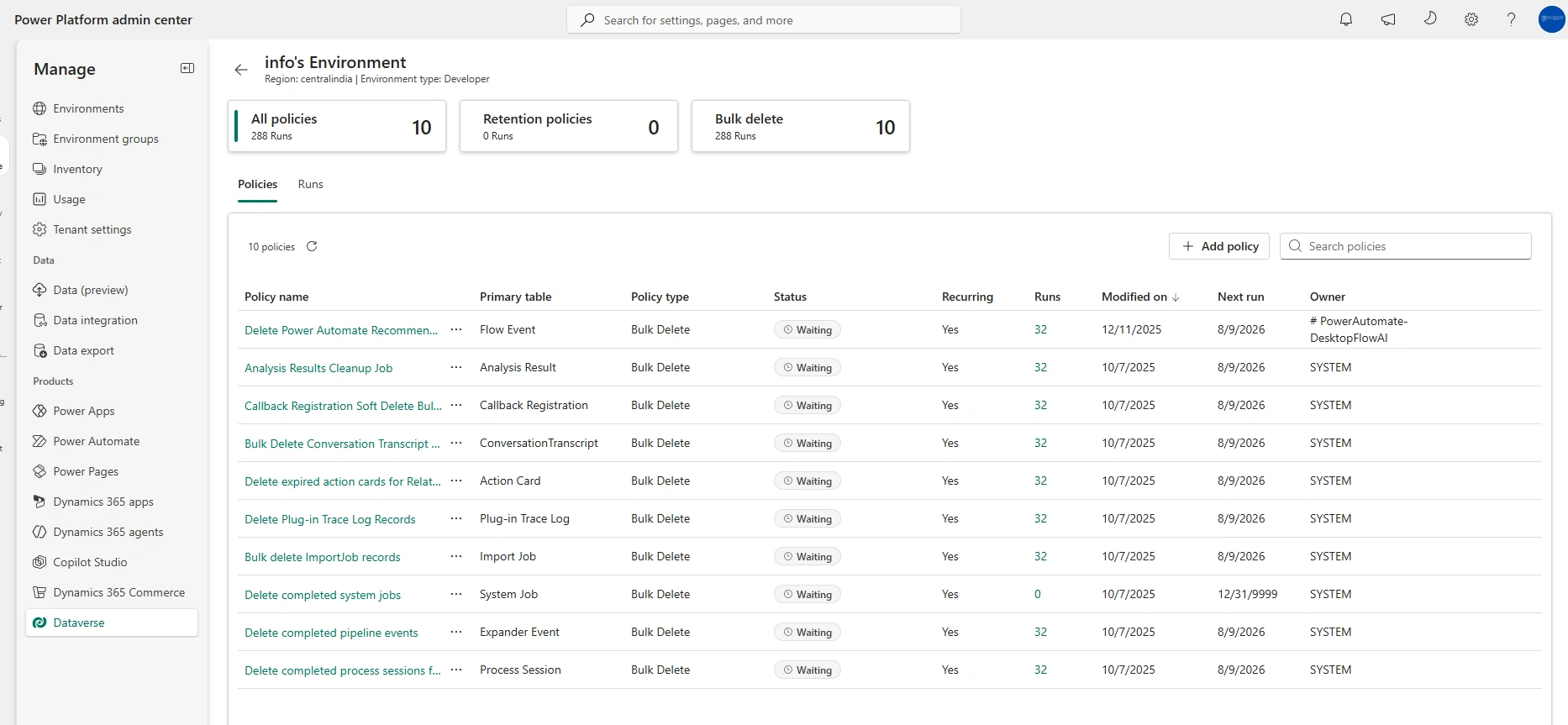
Suggested screenshots
Why Bulk Delete?
According to Microsoft Learn, Bulk Delete helps organizations manage storage consumption and maintain data quality by removing:
Stale records
Invalid imported data
Test records
Data no longer relevant to business operations
Real-World Scenario
Imagine an insurance company maintaining customer interaction records in Dataverse.
Every day:
Thousands of temporary records are created.
Failed integration logs are stored.
Test records are generated by QA teams.
After six months:
Dataverse storage crosses 80%.
Environment performance starts degrading.
Storage costs increase.
The organization decides to automatically delete:
Test Accounts older than 90 days
Integration Logs older than 180 days
Temporary records older than 30 days
Instead of manually deleting records, a scheduled Bulk Delete Job performs cleanup automatically.
How Bulk Delete Works
A Bulk Delete operation creates a background job represented by the BulkDeleteOperation table in Dataverse. Microsoft records:
Total deleted records
Failed deletions
Schedule information
Recurrence details
If failures occur, details are stored in the BulkDeleteFailure table for troubleshooting.
Prerequisites
To execute Bulk Delete:
BulkDelete privilege
Delete privilege on target table
Read privilege on records being queried
System Administrators receive these permissions by default.
C# Example Using Dataverse SDK
Delete Inactive Accounts Older Than 1 Year
using Microsoft.Crm.Sdk.Messages;
using Microsoft.Xrm.Sdk.Query;

QueryExpression query = new QueryExpression("account");

query.Criteria.AddCondition(
    "modifiedon",
    ConditionOperator.OlderThanXMonths,
    12);

query.Criteria.AddCondition(
    "statecode",
    ConditionOperator.Equal,
    1);

BulkDeleteRequest request = new BulkDeleteRequest
{
    JobName = "Delete Old Inactive Accounts",
    QuerySet = new QueryExpression[]
    {
        query
    },
    StartDateTime = DateTime.UtcNow,
    RecurrencePattern = "",
    SendEmailNotification = false
};

BulkDeleteResponse response =
(BulkDeleteResponse)service.Execute(request);

Console.WriteLine($"Bulk Delete Job Created: {response.JobId}");
What Happens?
The system:
Creates a background delete job.
Runs asynchronously.
Deletes matching records.
Logs failures separately.
Allows monitoring through system jobs.
Web API Example
Dataverse also supports a BulkDelete action via Web API.
POST https://yourorg.api.crm.dynamics.com/api/data/v9.2/BulkDelete
Content-Type: application/json

{
  "JobName": "Delete Old Accounts",
  "SendEmailNotification": false,
  "RecurrencePattern": "",
  "QuerySet": [
    {
      "@odata.type": "Microsoft.Dynamics.CRM.QueryExpression",
      "EntityName": "account"
    }
  ]
}
This creates a background deletion job that processes matching records asynchronously.
New Bulk Delete Options
Microsoft introduced additional controls for Bulk Delete processing.
Disable Recycle Bin
"Options": {
  "CanRecoverDeletedRecords": false
}
Benefit:
Faster deletion performance
Reduced recovery overhead
Trade-off:
Deleted records cannot be recovered.
Sandbox Fast Delete Mode
"Options": {
  "RunJobForSandbox": true
}
Benefit:
Much higher deletion throughput
Behavior:
Bypasses plugins
Bypasses workflows
Bypasses recycle bin
Supported only in Sandbox environments.
Monitoring Bulk Delete Jobs
Administrators can monitor:
Job status
Success count
Failure count
Execution time
from:
Advanced Settings → System Jobs → Bulk Delete Jobs
If records fail to delete, error information is captured in BulkDeleteFailure records.
Advantages of Bulk Delete
1. Reduces Dataverse Storage Cost
Removing obsolete records helps control database growth.
2. Improves Performance
Smaller datasets typically result in:
Faster searches
Faster views
Better reporting experience
3. Runs Asynchronously
Users can continue working while deletion occurs in the background.
4. Supports Scheduling
Jobs can run:
Daily
Weekly
Monthly
On-demand
5. Failure Tracking
Failed deletions are logged for troubleshooting.
Challenges and Considerations
Challenge 1: Cascading Deletes
Deleting parent records may remove related child records depending on Dataverse relationship settings.
Recommendation
Always review relationship behavior before execution.
Challenge 2: Plugin Execution
Bulk Delete triggers registered plugins and workflows during record deletion.
Recommendation
Assess business impact before deleting millions of records.
Challenge 3: No Rollback
If a Bulk Delete job partially succeeds and then fails, deleted records are not restored automatically.
Recommendation
Export critical data before running large jobs.
Challenge 4: Production Risks
Accidental query mistakes can delete critical business data.
Recommendation
Test query conditions in Sandbox first.
Join the conversation! Your thoughts help the community grow.