

Introduction
Today, in this article let's play around with one of the interesting and most useful concepts in SharePoint 2010.
Question: What is delete list data with WCF service?
In simple terms "It deletes data from a SharePoint custom list using a client side environment via a WCF service".
Step 1: Open SharePoint 2010 Central Administration and navigate to a specific site.
Step 2: Open up Visual Studio 2012 and try to create a webforms project:
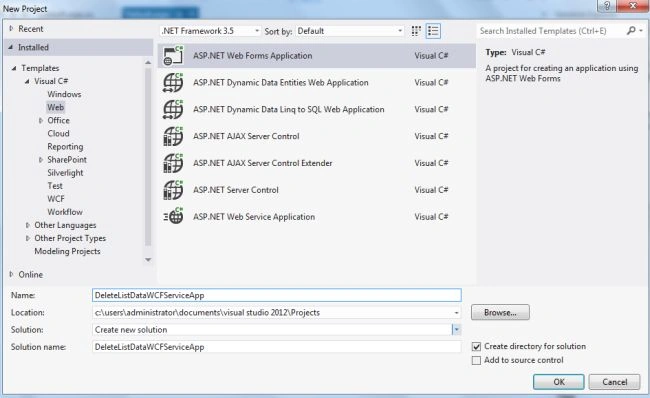
Step 3: Remove the following reference for the project:
System.Data.Services.Client
Step 4: Add a new reference to the project. (For this you need to install ADO.NET Data Services.exe file from here.)
After installation, browse to the specific location at:
C:\Program Files (x86)\ADO.NET Data Services V1.5 CTP2\bin
Add this reference to project: Microsoft.Data.Services.Client.dll
Step 5: Add the service reference to the project, which should come up from the following link. (So here the site URL is http://win-5c3g1lanj3k:29782/ . This might be different based on your custom site URL. The other part is _vti_bin/ListData.svc which should be common to access of the service reference for any site.)
http://win-5c3g1lanj3k:29782/_vti_bin/ListData.svc
Step 6: The complete code of WebForm1.aspx looks like this:
<%@ Page Language="C#" AutoEventWireup="true" CodeBehind="Default.aspx.cs" Inherits="DeleteListDataWCFServiceApp._Default" %>
<!DOCTYPE html PUBLIC "-//W3C//DTD XHTML 1.0 Transitional//EN" "http://www.w3.org/TR/xhtml1/DTD/xhtml1-transitional.dtd">
<html xmlns="http://www.w3.org/1999/xhtml">
<head id="Head1" runat="server">
<title></title>
</head>
<body>
<form id="form1" runat="server">
<div>
<center>
<div>
<table>
<tr>
<td colspan="2">
<asp:Label ID="Label1" runat="server" Text="Delete List Data - WCF Data in SharePoint 2010 using VS 2012 "
Font-Bold="true" Font-Size="Large" Font-Names="Verdana" ForeColor="Maroon"></asp:Label>
</td>
</tr>
<tr>
<td>
<asp:Label ID="Label2" runat="server" Text="Please Enter StudentId" Font-Size="Large"
Font-Names="Verdana" Font-Italic="true"></asp:Label>
</td>
<td>
<asp:TextBox ID="TextBox1" runat="server"></asp:TextBox>
</td>




Join the conversation! Your thoughts help the community grow.