

Welcome to an article on how to use the action "Office 365 Delete Site" on SharePoint Online and Office 365, using Nintex Workflows. This article will be display the action “Office 365 Delete Site”. Here, we will see how to configure this action and use it for our work.
Using this action, you can delete a site from Office 365 portal as an automation.
Let’s see the implementation of this functionality.
- Go to the site contents of the site.
- Open Nintex Workflows.
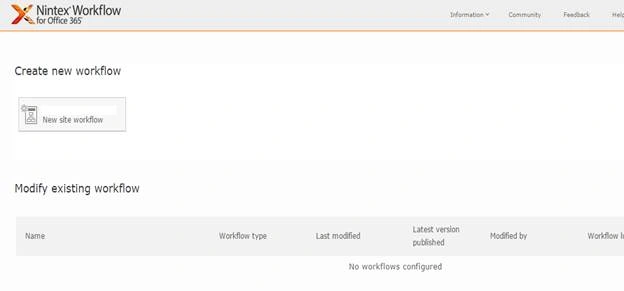
- Click create new Workflow
- You will come to the design phase of the Nintex Workflows.
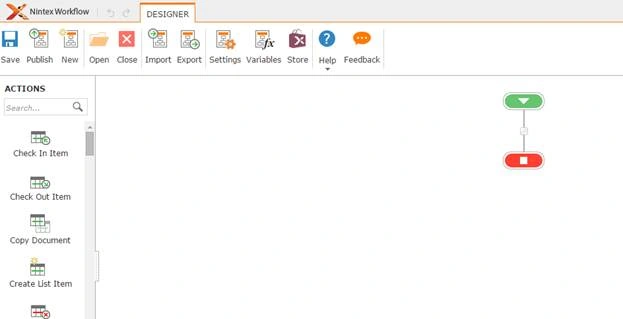
- Add the action, “Office 365 delete site” action by right clicking on the Workflow or by dragging and dropping from the left toolbox.
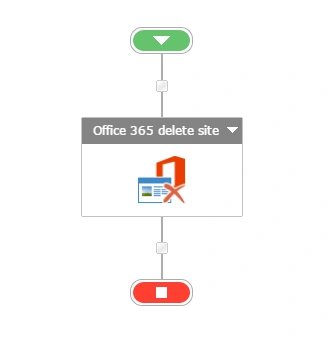
- Now, let’s configure it.
- When you double click on the action, the following screen opens up:
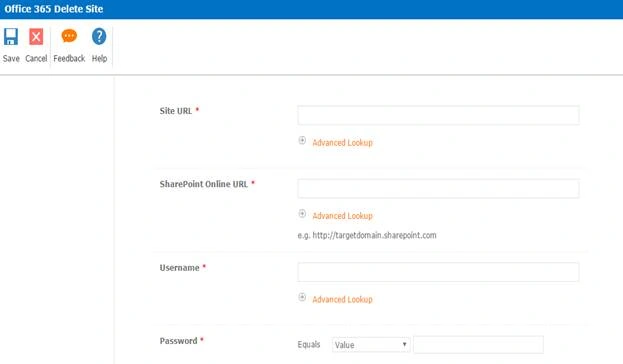

Configuration
- Site URL: Provide the site URL which will be deleted.
- SharePoint Online URL: Provide the online site URL.
- Username: Provide the site user name.
- Password: Specify the password.
- Site deletion successful: Here, you can add a variable to store the value ‘Yes’, if the site is deleted.
- Now, we have configured our Workflow. Let’s go and publish it to use it.
- Click Publish on the left corner of the ribbon of Nintex Designer.

- You will see the screen below:
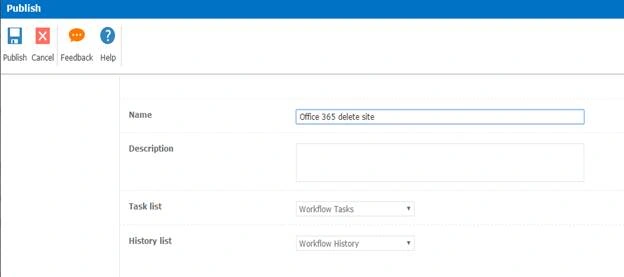
- Give your Workflow a name
- Description
- Choose your task list where it should store the tasks; it will be Workflow Tasks by default.
- Choose your history list where it should store the history logs; it will be Workflow hiistory by default.
- Click Publish
- Your Workflow will get published.
Once you configure, the Workflow will automate the process of deleting the sites as per your conditions.
Hence, in this article, we saw how to delete sites on SharePoint Office 365 sites, using the action Office 365 delete sites in SharePoint Online and Office 365, using Nintex Workflows. We will see more new articles on the actions of Nintex Workflows.
Vignesh ManiPosted Jul 2, 2016, 11:58 AM
Nice
Vignesh ManiPosted Jul 2, 2016, 11:58 AM
Nice
kalu singh raoPosted Jul 1, 2016, 2:25 PM
Nice...