

On your Developer Site, open the "Napa" Office 365 Development Tools and then choose Add New Project.
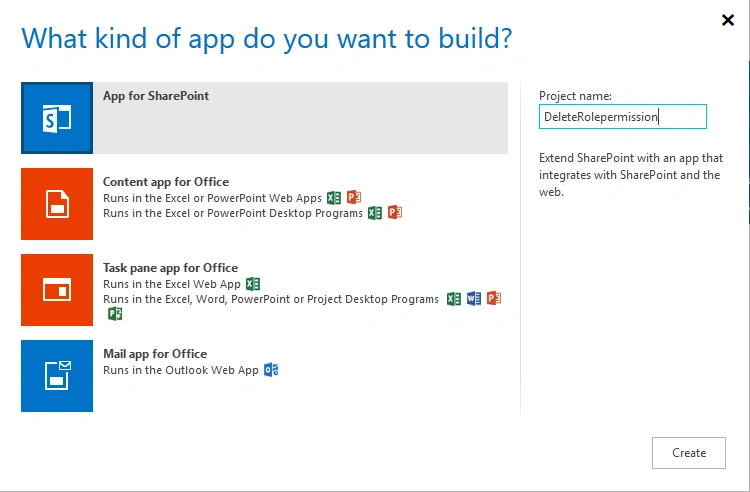
- Choose the App for SharePoint template, name the project Create Site and then choose the Create button
- Replace APP.js with the following source code below.
- Publish Your App
Prerequisites
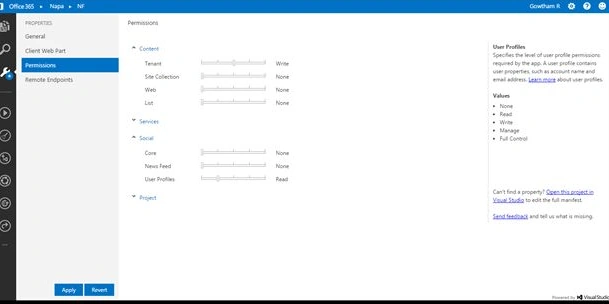
- In the Properties window, choose Permissions.
- In the Content category, set the Write permissions for the Tenant scope.
- In the Social category, set the Read permissions for the User Profiles scope.
- Close the Properties window.
The code example in this article sets the custom permissions on a list and then changes a group's permissions to it. The example uses the REST interface to:
- Get the ID of the target group. The example uses the group ID to get the current role bindings for the group on the list and to add the new role to the list.
- Get the ID of the role definition that defines the new permissions for the group. The ID is used to add the new role to the list. This example uses an existing role definition for the new role, but you can optionally create a new role definition.
- Break role inheritance on the list using the BreakRoleInheritance method. The example breaks the role inheritance but keeps the current set of roles. (Alternatively, you can choose not to copy any role assignments and to add the current user to the Manage permission level.)
- Remove the group's current role assignment on the list by sending a DELETE request to the role assignment endpoint. (If you choose not to copy any role assignments, you would skip this step.)
- Add a role assignment for the group to the list using the AddRoleAssignment method that binds the group to the role definition and adds the role to the list.
Source Code
- 'use strict';
- // Change placeholder values before you run this code.
- var listTitle = 'List 1';
- var groupName = 'Group A';
- var targetRoleDefinitionName = 'Contribute';
- var appweburl;
- var hostweburl;
- var executor;
- var groupId;
- var targetRoleDefinitionId;
- $(document).ready( function() {
- //Get the URI decoded URLs.
- hostweburl = decodeURIComponent(getQueryStringParameter("SPHostUrl"));
- appweburl = decodeURIComponent(getQueryStringParameter("SPAppWebUrl"));
- // Load the cross-domain library file and continue to the custom code.
- var scriptbase = hostweburl + "/_layouts/15/";
- $.getScript(scriptbase + "SP.RequestExecutor.js", getTargetGroupId);
- });
- // Get the ID of the target group.
- function getTargetGroupId() {
- executor = new SP.RequestExecutor(appweburl);
- var endpointUri = appweburl + "/_api/SP.AppContextSite(@target)/web/sitegroups/getbyname('";
- endpointUri += groupName + "')/id" + "?@target='" + hostweburl + "'";
- executor.executeAsync({
- url: endpointUri,
- method: 'GET',
- headers: { 'accept':'application/json;odata=verbose' },
- success: function(responseData) {
- var jsonObject = JSON.parse(responseData.body);
- groupId = jsonObject.d.Id;
- getTargetRoleDefinitionId();
- },
- error: errorHandler
- });
- }
- // Get the ID of the role definition that defines the permissions
- // you want to assign to the group.
- function getTargetRoleDefinitionId() {
- var endpointUri = appweburl + "/_api/SP.AppContextSite(@target)/web/roledefinitions/getbyname('";
- endpointUri += targetRoleDefinitionName + "')/id" + "?@target='" + hostweburl + "'";
- executor.executeAsync({
- url: endpointUri,
- method: 'GET',
- headers: { 'accept':'application/json;odata=verbose' },
- success: function(responseData) {
- var jsonObject = JSON.parse(responseData.body)
- targetRoleDefinitionId = jsonObject.d.Id;
- breakRoleInheritanceOfList();
- },
- error: errorHandler
- });
- }
- // Break role inheritance on the list.
- function breakRoleInheritanceOfList() {
- var endpointUri = appweburl + "/_api/SP.AppContextSite(@target)/web/lists/getbytitle('";
- endpointUri += listTitle + "')/breakroleinheritance(true)?@target='" + hostweburl + "'";
- executor.executeAsync({
- url: endpointUri,
- method: 'POST',
- headers: { 'X-RequestDigest':$('#__REQUESTDIGEST').val() },
- success: deleteCurrentRoleForGroup,
- error: errorHandler
- });
- }
- // Remove the current role assignment for the group on the list.
- function deleteCurrentRoleForGroup() {
- var endpointUri = appweburl + "/_api/SP.AppContextSite(@target)/web/lists/getbytitle('";
- endpointUri += listTitle + "')/roleassignments/getbyprincipalid('" + groupId + "')?@target='" + hostweburl + "'";
- executor.executeAsync({
- url: endpointUri,
- method: 'POST',
- headers: {
- 'X-RequestDigest':$('#__REQUESTDIGEST').val(),
- 'X-HTTP-Method':'DELETE'
- },
- success: successHandler,
- error: errorHandler
- });
- }
- // Get parameters from the query string.
- // For production purposes you may want to use a library to handle the query string.
- function getQueryStringParameter(paramToRetrieve) {
- var params = document.URL.split("?")[1].split("&");
- for (var i = 0; i < params.length; i = i + 1) {
- var singleParam = params[i].split("=");
- if (singleParam[0] == paramToRetrieve) return singleParam[1];
- }
- }
- function successHandler() {
- alert('Request succeeded.');
- }
- function errorHandler(xhr, ajaxOptions, thrownError) {
- alert('Request failed: ' + xhr.status + '\n' + thrownError + '\n' + xhr.responseText);
- }
Publish
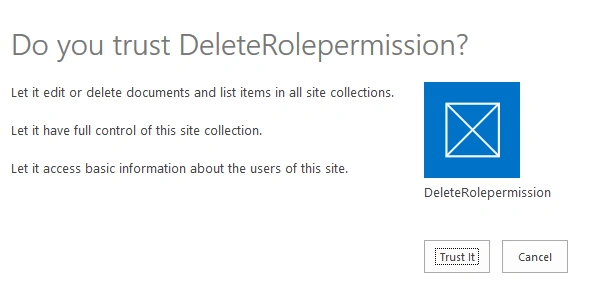
Publish the app and click the Trust it Button.
Output
Request succeeded.
Request succeeded.
Vijay SPosted Apr 8, 2015, 9:11 AM
Nice
Gowtham RajamanickamPosted Apr 6, 2015, 11:00 AM
thank u so much
Santhakumar MunuswamyPosted Apr 6, 2015, 10:39 AM
Thanks for nice one
Gowtham RajamanickamPosted Apr 6, 2015, 4:48 AM
thank u so much
NitinPosted Apr 6, 2015, 4:47 AM
nice one