

This article gives a simple tutorial of deleting duplicate records from a table in Microsoft SQL Server. Here we will just see a simple way to get a count of duplicate records and delete them from the table.
This article is intended to cover the basic approach for the following questions:
- How many unique records are there with their duplicate count?
- How to delete all duplicate records by applying record uniqueness on other columns?
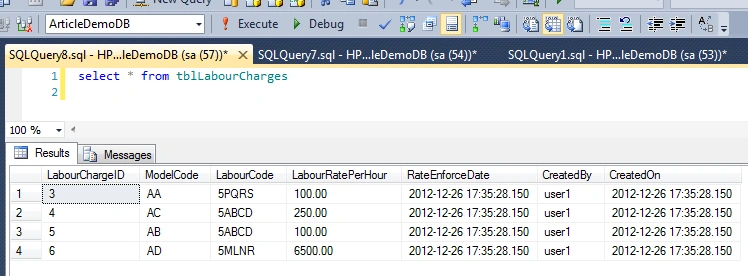
Deletion of duplicate records from a table is tricky and can be done in various ways. One simple approach can be applied as in the following using Group By and a sub-query. The usage syntax can be:
DELETE FROM myTableName
WHERE AutoGeneratedUniqueID NOT IN
(
SELECT max( AutoGeneratedUniqueID )
FROM myTableName
GROUP BY col_1_considering_duplicate, col_2_considering_duplicate
[,other considering cols]
)
Setting the environment to understand it with an example
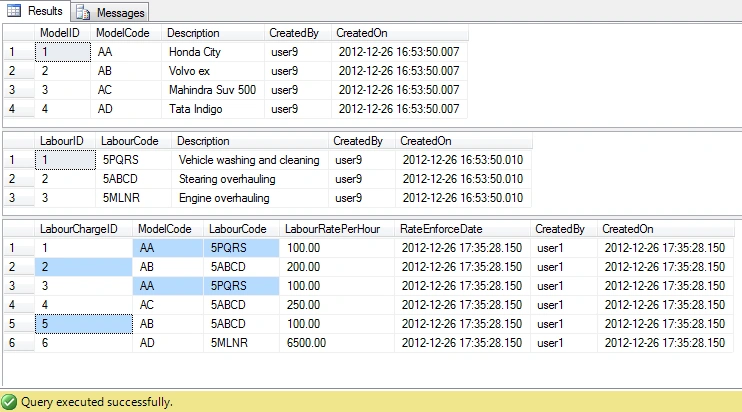
We will understand it by an example. We will create a table and fill it with some duplicate records. Considering an Automobile Garage application where somehow duplicate labour charges are coming for a particular vehicle model and labour. Automobile application's user/executive is in very big dilemma about how to charge his customers.
But the technical person guesses that the culprit is the table tblLabourCharge that stores the charges of labour by model and has some duplicate records. This table is intended to have one record for each labour of a particular model. Example: model "AA" with a labour code "5PQRS" should exist only once in the table.
To help uunderstand, we will first create two additional tables tblModel and tblLabour.
Creating the Model table and inserting records into it as:
CREATE TABLE [dbo].[tblModel](
[ModelID] [int] IDENTITY(1,1) NOT NULL primary key,
[ModelCode] [nchar](2) NULL,
[Description] [varchar](200) NULL,
[CreatedBy] [varchar](10) NULL,
[CreatedOn] [datetime] NULL,
)
Insert INTO tblModel
VALUES
('AA','Honda City','user9',getdate())
,('AB','Volvo ex','user9',getdate())
,('AC','Mahindra Suv 500','user9',getdate())
,('AD','Tata Indigo','user9',getdate())
Creating the Labour table and inserting records into it as:
CREATE TABLE [dbo].[tblLabour](
[LabourID] [int] IDENTITY(1,1) NOT NULL primary key,
[LabourCode] [nchar](5) NULL,
[Description] [varchar](200) NULL,
[CreatedBy] [varchar](10) NULL,
[CreatedOn] [datetime] NULL,

Lalit RaghavPosted Oct 31, 2015, 4:35 AM
Great Sir jee