

How Partitions Enable Parallelism, Fault Tolerance, and Strict Message Ordering in Enterprise Systems
In distributed system architecture, handling millions of real-time events per second requires a platform that can scale horizontally without sacrificing durability or order. Apache Kafka achieves this balance through a fundamental building block: the Partition.
While high-level discussions often focus on Topics and Brokers, the Partition is where Kafka’s performance and reliability guarantees are actually executed. This article dives deep into how Kafka partitions work, how messages are routed, and how enterprise applications leverage them for maximum throughput.
What Is a Kafka Partition?
At a logical level, microservices publish and subscribe to Topics. However, a Topic in Kafka is merely a virtual category. Physically, every Topic is subdivided into one or more Partitions.
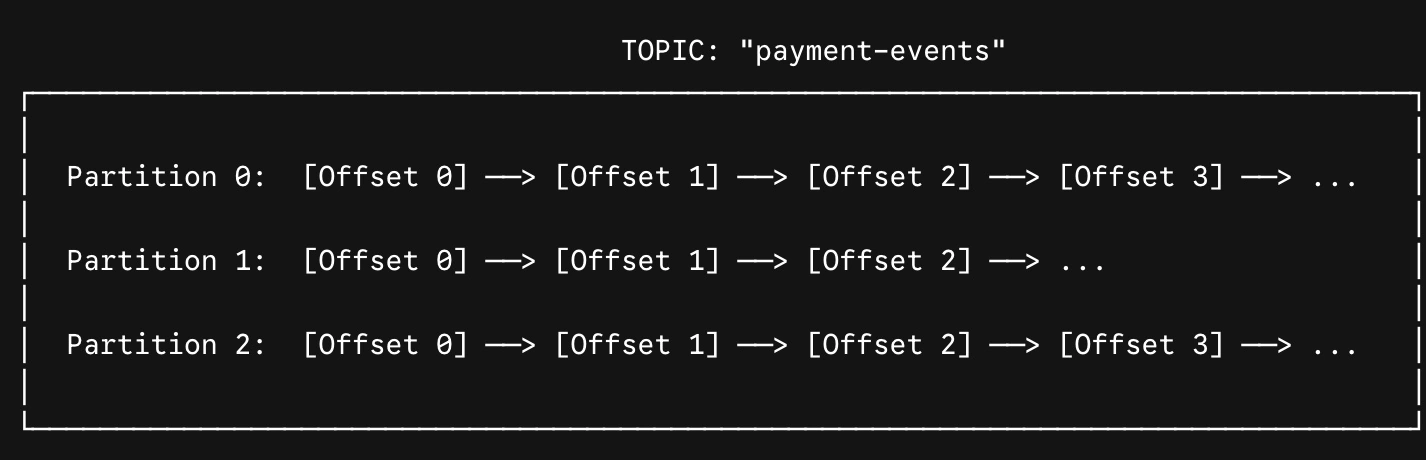
A partition is an ordered, immutable, append-only log file stored on disk across Kafka brokers.
Three Core Characteristics of Partitions
Offsets: Every record written to a partition is assigned a sequential integer called an Offset (e.g.,
0, 1, 2, ...). Offsets uniquely identify a message within that specific partition.Local Ordering: Kafka only guarantees strict message ordering within a single partition. It does not guarantee ordering across different partitions in the same topic.
Immutability: Once an event is written to a partition log, it cannot be modified or deleted in-place. It remains until the topic's retention policy (time- or size-based) cleans it up.
Why Partitions Matter: The Three Pillars
1. Horizontal Scalability
A single server has hardware limits regarding disk space, network bandwidth, and memory. If a topic receives petabytes of data, it cannot fit on a single node. By splitting a topic into multiple partitions, Kafka spreads those log files across different brokers in a cluster, effectively bypassing individual hardware constraints.
2. Consumer Parallelism
Partitions define the upper limit of read parallelism for a Consumer Group:
1 Partition ---->1 Active Consumer: A single partition can only be read by one consumer thread within a given consumer group at any time.
N Partitions ------>Up to N Active Consumers: If a topic has 8 partitions, you can run up to 8 consumer instances in parallel within a single consumer group, scaling your event-processing throughput 8x.
Excess Consumers: If you attach 10 consumers to a 8-partition topic, 2 consumers will remain idle as standby replicas.

3. Fault Tolerance & Replication
Every partition can be replicated across multiple brokers according to a topic’s Replication Factor.
Leader Partition: One replica is designated as the Leader. All writes (produces) and reads (consumes) go to the leader by default.
Follower Partitions: The remaining replicas act as Followers, continuously fetching data from the leader to stay in sync. If the leader broker crashes, an In-Sync Replica (ISR) follower is automatically promoted to leader.
How Messages Are Routed to Partitions
When a Producer sends a message to Kafka, the producer client library determines which partition gets the message based on the record's Key.
Scenario A: Partitioning With a Key
When a message includes a key (e.g., CustomerId, AccountId, or DeviceId), Kafka hashes the key using the MurmurHash2 algorithm to select the destination partition:
Partition Index= MurmurHash2(Key) (mod Total Partitions)
The Enterprise Benefit: Every message with the exact same key will always route to the same partition. This guarantees that all state updates for a specific entity (e.g., Customer-1049) are processed in exact chronological order.
The Enterprise Benefit: Every message with the exact same key will always route to the same partition. This guarantees that all state updates for a specific entity (e.g., Customer-1049) are processed in exact chronological order.
Scenario B: Partitioning Without a Key (Null Key)
If no key is supplied, modern Kafka producers use the Sticky Partitioner strategy. The producer fills a batch of messages bound for a single partition before moving on to the next partition, balancing throughput and resource utilization evenly across the cluster.
Real-World Example: Banking Event Stream
Consider a financial microservices platform processing account transactions:
Topic:
account-transactionsPartitions:
4Partition Key:
AccountId
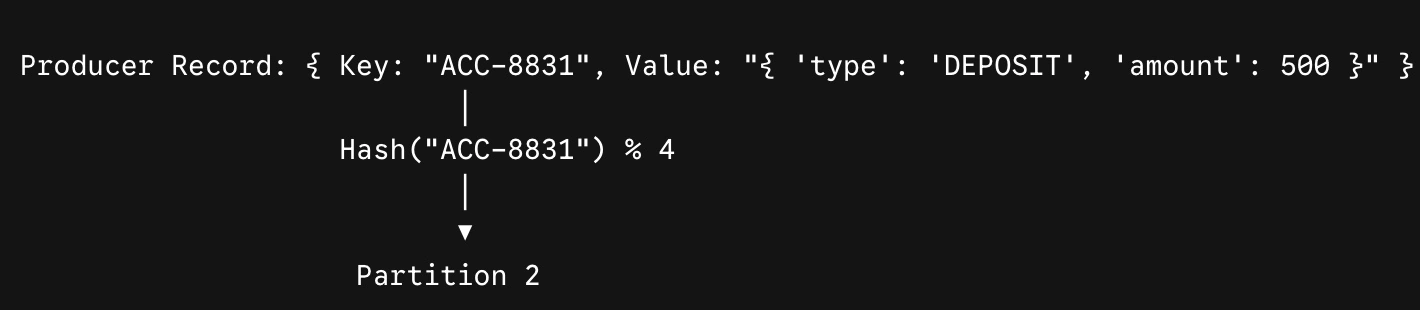
Because AccountId is used as the key:
ACC-8831deposits, withdrawals, and balance checks always go to Partition 2.Consumer Thread 3 handles Partition 2 and processes
ACC-8831sequentially, preventing race conditions (e.g., deducting funds before a deposit arrives).Meanwhile, transactions for
ACC-1002route to Partition 0 and process simultaneously without blockingACC-8831.
Summary
Partitions are the underlying mechanism that transforms Apache Kafka from a simple message queue into a high-performance distributed event log. By understanding how partitions handle parallelism, key-based routing, and ordering guarantees, teams can design microservice architectures that scale seamlessly while preserving data integrity.
Join the conversation! Your thoughts help the community grow.