

In the vast world of data, JSON (JavaScript Object Notation) reigns supreme for its lightweight and human-readable format. But what if you want to control how specific data gets represented in your JSON string? That's where the customStringify function comes in.
Introduction
In this post, we delve into the world of customStringify, a function that empowers you to tailor how your JavaScript objects get converted to JSON strings. We'll explore its functionalities and how it provides more control over the stringification process.
- What's the Problem? ( Briefly explain the limitations of standard JSON.stringify )
- Introducing customStringify ( Explain the function, its arguments, and purpose )
- The Core: Custom Replacer Function ( Breakdown of the logic with clear explanations )
- Benefits of Customization ( Give examples of use cases where this function would be useful )
- Hiding sensitive data (e.g., replacing API keys with placeholders)
- Omitting unnecessary data (e.g., excluding functions for a cleaner representation)
- Example Breakdown ( Explain the example code step-by-step )
- Conclusion ( Recap the key takeaways and benefits of using customStringify )
Call to Action
Encourage your readers to experiment with customStringify and explore its potential in their projects. Invite them to share their use cases and experiences in the comments section.
By providing a clear explanation and practical examples, you can turn this blog post into a valuable resource for developers seeking to refine their JSON manipulation skills.
function customStringify(obj, replacer, space) {
    const customReplacer = (key, value) => {
        if (replacer && typeof replacer === 'function') {
            const result = replacer(key, value);
            if (result !== undefined) {
                return result;
            }
        }

        if (typeof value === 'function') {
            return '__FUNCTION__'; // Replace functions with a placeholder
        }

        return value;
    };

    const stringifyWithReplacer = (object, currentSpace) => {
        return JSON.stringify(object, customReplacer, currentSpace);
    };

    return stringifyWithReplacer(obj, space);
}

// Example usage:
const obj = [{
    name: 'John',
    age: 30,
    age:18
}];

const replacer = (key, value) => {
    if (typeof value === 'function') {
        return '__FUNCTION__'; // Replace functions with a placeholder
    }
    return value;
};

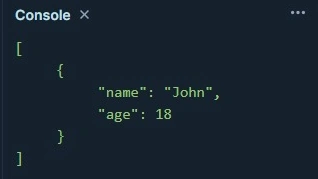
const customJSONString = customStringify(obj, replacer, 5);
console.log(customJSONString);
Result
Join the conversation! Your thoughts help the community grow.