

Azure App Service is a platform and acts as a Service solution to host your Web app. You can host your WebApps, APIs, Mobile App and Logic App under this umbrella and it gives you all the flexibility of scaling up and down very rapidly. In this post, we are going to understand how Azure deploy these apps to the actual Server and how they are able to scale so quickly.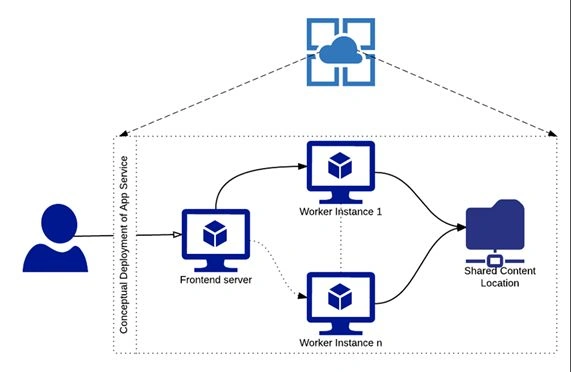
An average user may predict that for each instance, one virtual machine will be associated with it. For example, if we scale up to 1 instance, there will be one VM associated with it and similarly if there are 5 instances, there will be 5 virtual machines associated with it. This is true but not the whole picture of how they deploy it to the Servers. This deployment consists of three main Servers, which are given below.
- Frontend Servers
All the Web requests are passed to this Server and its going to pass on the worker role instances, based on the availability of the worker instances. It’s also going to check for the HTTPS certificate validity for the security purpose.
- Worker Instances
This is the Server, which actually hosts the Web Application and its job is to execute and serve all the Web requests. It is like the brain of the system, which is there to take all the requests, process them and subsequently serving it back to the client.
- Shared Content Location
As the name suggests, this is a common shared Server, which is going to host all the content associated with your Websites. For example, the app_data, images or any other files in this location and this is accessible via KUDU. Now, if you see the above diagram, all the instances of the worker role are connected to the shared content Server and access the data from it.
Scalability
Now, when you deploy the Application; Azure hosts the Application in the worker role instances, which has IIS( or any other Server) depends on the type of the Application, which you are hosting, so basically when we increase the no of instances, what Azure does behind the scenes it replicates the worker role node and point it to same shared location Server and frontend Server. The worker role node is going to be the same, which we selected in our app Service plan. This process is simple and is useful after redeploying the same Application to the multiple Servers and maintain data consistency. Due to replication of the worker role, it gives you high availability as if one node fails, so the other will take over and serve the requests.
Drawback of this architecture
This architecture stores the files in a separate node, which can lead to latency while accessing the files from the worker role. Apart from latency, if you are developing an Application, which uses the disk and does some sort of disk computation, the performance is going to take a bit of hit as compared to the one VM deployment. Although the performance is going to be good only in the above scenario but you can add caching into your Application, which can increase your performance by multiple folds.
Summary
Azure deploys your Websites, mobile and API app in 3 nodes, which are frontend, worker role and shared Content node. Worker role is responsible for the scaling of the Application and when we increase the instance; the number of worker roles increases accordingly. Also, this architecture has some latency issues, which results in the performance hit but it can be overcome by using caching.
Join the conversation! Your thoughts help the community grow.