

Introduction
In my previous article, we covered the basics of Terraform—what it is, why it is useful, and how to define infrastructure as code. In this article, we will move beyond the basics and examine a real‑world use case in which we deploy cloud resources using Terraform on Microsoft Azure.
The goal of this article is not to deep‑dive into business logic or financial calculations, but to demonstrate how Terraform can be used to provision and manage infrastructure for a microservices‑based financial application.
Link of previous article: https://www.c-sharpcorner.com/article/infrstructure-as-code-using-terraforms/
Full Source code: https://github.com/iamuttamchaturvedi9/IaCWithTerraform
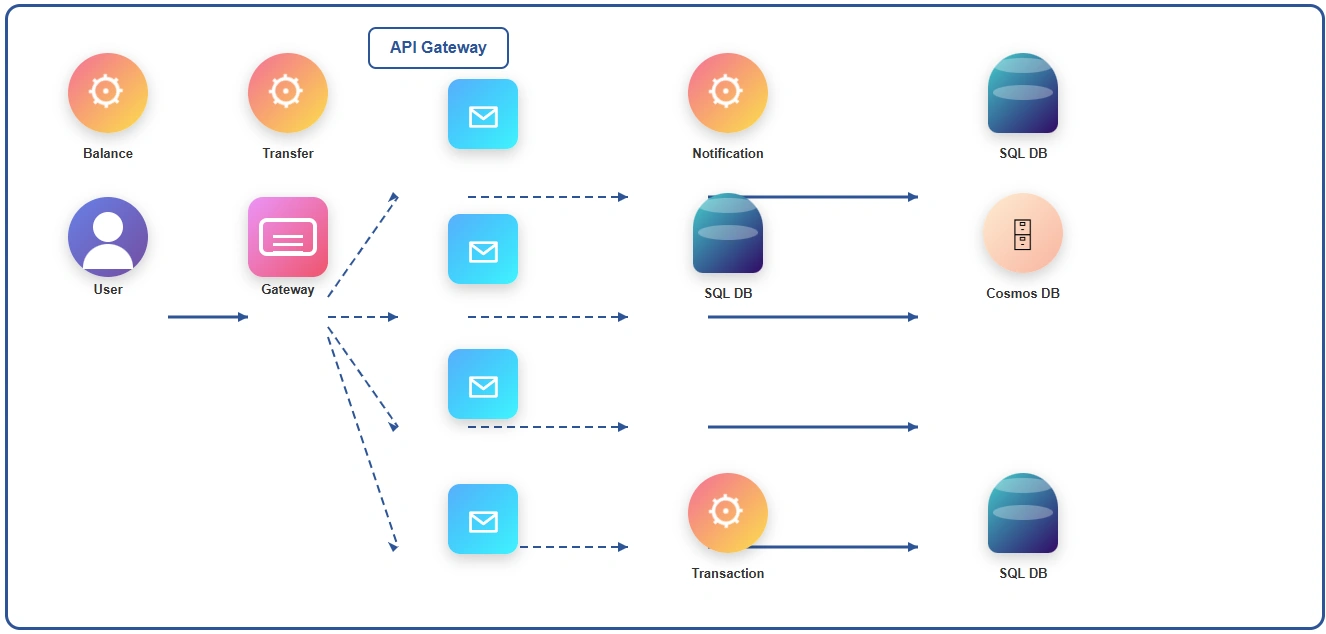
We will consider a simplified balance transfer system, similar to what is commonly used in financial institutions.
At a high level:
A user interacts with the system through an API Gateway.
The API Gateway forwards requests to different microservices.
Each microservice is responsible for a specific function, such as transactions, balance checks, transfers, and notifications.
Based on the available balance, a transaction is either completed or rejected.
The user is notified about the outcome of the transaction.
This architecture is intentionally kept simple so that we can focus on infrastructure deployment using Terraform, rather than application‑level implementation details.
Architecture Flow
The following steps describe the request flow in the system:
The user sends a request (for example, a balance transfer) to the system.
The request reaches the API Gateway, which acts as a single entry point.
The API Gateway forwards the request to the appropriate transaction microservice.
The transaction service communicates asynchronously with other services:
Balance Service – checks the available balance
Transfer Service – performs the fund transfer
Notification Service – sends success or failure notifications
Each service stores or retrieves data from its respective database:
SQL databases for transaction‑related data
Cosmos DB for notifications
Scope of This Article
In this article, we will:
Focus on deploying Azure resources using Terraform
Define infrastructure using Terraform configuration files
Understand how real‑world microservices map to cloud resources
We will not:
Implement application code
Discuss transaction logic in detail
Cover CI/CD pipelines (this can be explored in a future article)
Setting Up Azure Environment Variables
To allow Terraform to authenticate with Azure, we need to set the required environment variables.
After logging in using Azure CLI:
az login --tenant <tenant-id>Replace with your own tenant-id
Set the following environment variables:
export ARM_SUBSCRIPTION_ID="<your-subscription-id>"
 export ARM_TENANT_ID="<your-tenant-id>"
 export ARM_CLIENT_ID="<your-client-id>"
 export ARM_CLIENT_SECRET="<your-client-secret>"
Use below command to create service principle
az ad sp create-for-rbac --name financeapp --role Contributor --scopes "subscriptions/<subscription-id>"Output would be shown as respective values

Replace with your own subscription-id and tenant id in azure subscription
Client Id is equal to App Id created as shown above
Client Secret is password created as shown above
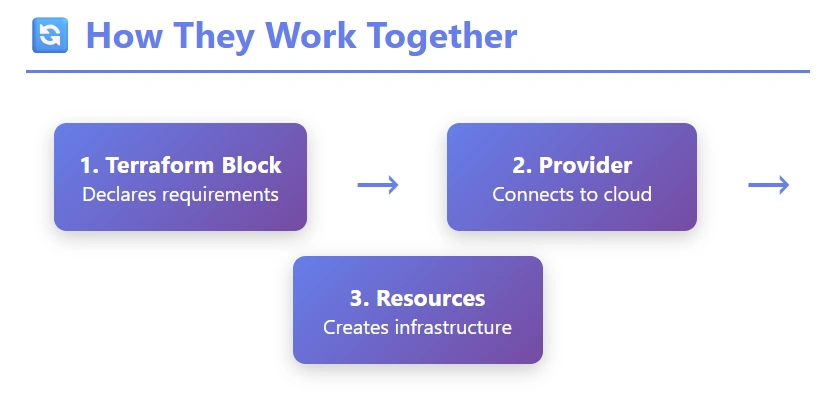
Terraform Providers have 3 main componenets which work together.
Terraform Block - Configures Terraform settings and declares which providers you need
Provider - Authenticates and configures your connection to cloud platforms (AWS, Azure, GCP, etc.). In our case we will use azure resurce manager
Resources - The actual infrastructure components you want to create (servers, storage, networks, etc.)
Now lets dive into real implementation:
Add following files named as data.txt and main.tf

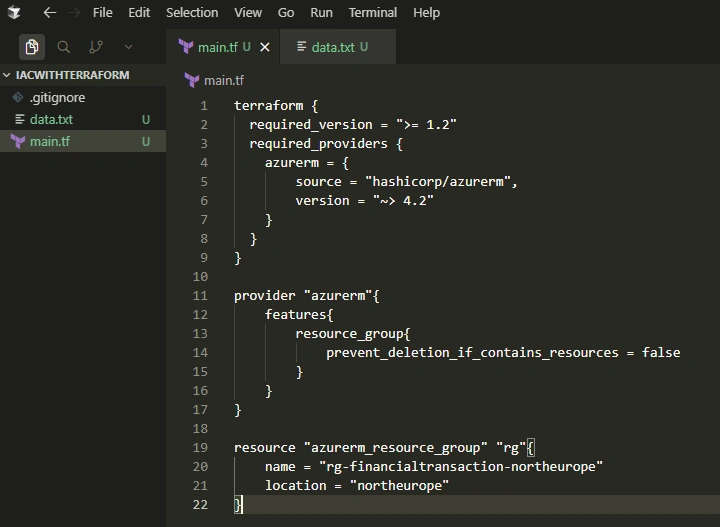
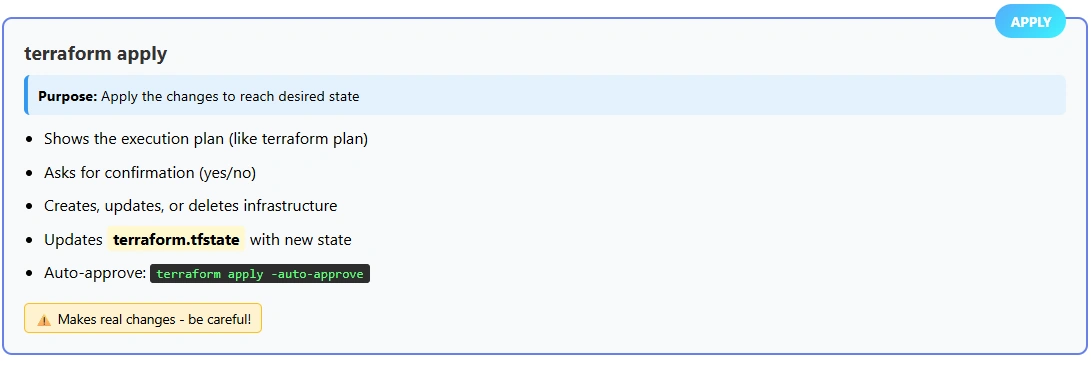
Now we can run following command to deploy our resources using terraform like terraform init ,terraform plan,terraform apply to deploy our resources. Files and details are described below.


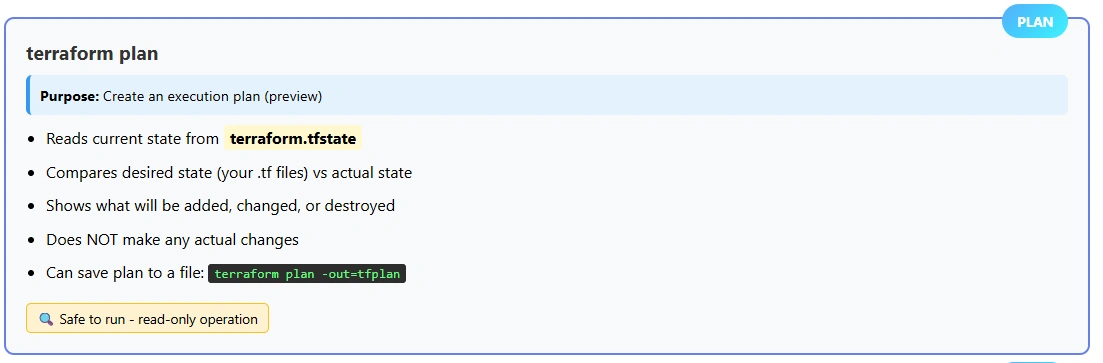
After running final command. Output would look like this:

Till now we have created resource group and appservice plan . Now lets create other services .
# API Gateway

resource "azurerm_service_plan" "plan_apigateway" {
    name = "plan_apigateway-northeurope"
    location = "northeurope"
    resource_group_name = azurerm_resource_group.rg.name
    os_type = "Linux"
    sku_name = "F1"
}
This resource creates an Azure App Service Plan, which defines the compute resources used by one or more web applications.
Linux-based plan: The
os_type = "Linux"enables containerized workloads and modern application stacks.Free tier (F1): Using the
F1SKU keeps costs at zero, making it ideal for development, testing, or proof-of-concept environments.Regional deployment: The plan is deployed to the North Europe region, ensuring consistency with other resources.
The App Service Plan acts as the underlying infrastructure that hosts our API Gateway application.
resource  "azurerm_linux_web_app" "appservice-apigateway" {
    name = "appserv-apigateway-northeurope"
    location = "northeurope"
    resource_group_name = azurerm_resource_group.rg.name
    service_plan_id = azurerm_service_plan.plan_apigateway.id
    site_config {
        always_on = false
        application_stack {
            docker_image_name = "nginx:latest"
        }
    }
}
This resource provisions an Azure Linux Web App that acts as the API Gateway.
Key points:
Hosted on the App Service Plan: The
service_plan_idlinks the web app to the previously defined App Service Plan.Container-based deployment: The application runs the
nginx:latestDocker image, demonstrating how Azure App Service can host containerized workloads without managing servers.Lightweight configuration:
always_onis disabled, which is appropriate for free-tier or non-production environments.
Using NGINX as the container image makes this setup ideal for:
API routing and reverse proxy scenarios
Acting as a lightweight API Gateway
Future expansion with custom NGINX configurations or additional containers
Similarly, we need to create additional App Services for Transaction, Balance, Transfer, and Notification. Each App Service must be deployed under its own dedicated App Service Plan. All required source code is available in the repository for reference.
https://github.com/iamuttamchaturvedi9/IaCWithTerraform
Now let's jump into creating DB server and databases
# Database transaction
resource  "azurerm_mssql_server" "sql_server_transaction" {
    name = "sqlserver-transaction"
    resource_group_name = azurerm_resource_group.rg.name
    location = "northeurope"
    version = "12.0"
    administrator_login = "adminuser"
    administrator_login_password = "admin.12345"
}
resource  "azurerm_mssql_database" "sql_database_transaction" {
    name = "sqlserver-transaction-northeurope"
    server_id =  azurerm_mssql_server.sql_server_transaction.id
    sku_name = "Basic"
}

# Database balance
resource  "azurerm_mssql_server" "sql_server_balance" {
    name = "sqlserver-balance"
    resource_group_name = azurerm_resource_group.rg.name
    location = "northeurope"
    version = "12.0"
    administrator_login = "adminuser"
    administrator_login_password = "admin.12345"
}

resource  "azurerm_mssql_database" "sql_database_balance" {
    name = "sqlserver-balance-northeurope"
    server_id =  azurerm_mssql_server.sql_server_transaction.id
    sku_name = "Basic"
}
Similarly add above code fro transaction,balance and transfer databases and run terraform plan. Once plan is successful then run apply and say yes while asking for approval. It will create required resources
Ok now we have created all our resources. Its time to delete resources which cost money . Here we 2 ways to delete resources in terraform .
Using "terraform destroy " command
tzerraform destroy -target = azurerm_mssql_database.sql_database_transactionCommenting code and running "terraform plan" and "terraform apply" commands
# resource  "azurerm_mssql_database" "sql_database_transfer" {
#    name = "sqlserver-transfer-northeurope"
#    server_id =  azurerm_mssql_server.sql_server_transaction.id
#    sku_name = "Basic"
# }
Below command will destroy commented code resources
terraform plan
terraform apply
Final Note: pelase add subscrition id and required varibles values in data.txt
main.tf
provider "azurerm"{
    subscription_id = "<subscription_id>"
    features{
        resource_group{
            prevent_deletion_if_contains_resources = false
        }
    }
}
---------------------------------------------------------------------------------------------------------------------
data.txt

export ARM_SUBSCRIPTION_ID="<your-subscription-id>"
export ARM_TENANT_ID="<your-tenant-id>"
export ARM_CLIENT_ID="<your-client-id>"
export ARM_CLIENT_SECRET="<your-client-secret>"
Conclusion
Terraform makes infrastructure provisioning repeatable, predictable, and scalable by turning cloud resources into version-controlled code. By defining Azure components declaratively, you reduce manual effort, minimize configuration drift, and improve consistency across environments. With proper state management and secure authentication (for example, service principals or federated identity instead of user logins), Terraform becomes a reliable foundation for both day-to-day infrastructure changes and automated CI/CD deployments.
Join the conversation! Your thoughts help the community grow.