Azure Web App Deployment Slots are a powerful feature within Azure App Service that allows you to run multiple instances of your web app. These instances, known as slots, function as separate environments with their own hostnames. One slot is always designated as the production slot, representing your live application. You can create additional slots for various purposes, such as staging, testing, or development.
When you deploy your web app, web app on Linux, mobile back end, or API app to Azure App Service, you can use a separate deployment slot instead of the default production slot. This approach is available if you run in the Standard, Premium, or Isolated tier of an App Service plan. Deployment slots are live apps with their own host names. App content and configuration elements can be swapped between two deployment slots, including the production slot.
Deploying your application to a nonproduction slot has the following benefits.
- You can validate app changes before you swap the slot into production.
- You can make sure that all instances of the slot are warmed up before you swap it into production. This approach eliminates downtime when you deploy your app. The traffic redirection is seamless. No requests are dropped because of swap operations.
- You can automate this entire workflow by configuring auto-swap when pre-swap validation isn't needed.
- After a swap, the slot with the previously staged app now has the previous production app. If the changes swapped into the production slot aren't as you expect, you can perform the same swap immediately to get your last known good site back.
There's no extra charge for using deployment slots. Each App Service plan tier supports a different number of deployment slots. To find out the number of slots that your app's tier supports, see App Service limits.
In to previous article Introduction of Azure Web App Service, we are elaborating on the use of deployment slots while deploying our application and its benefits.
Let's consider the same example, where we have an application to deploy using Web App Service. In here,at start we will be creating a Web App resource in Azure Cloud.
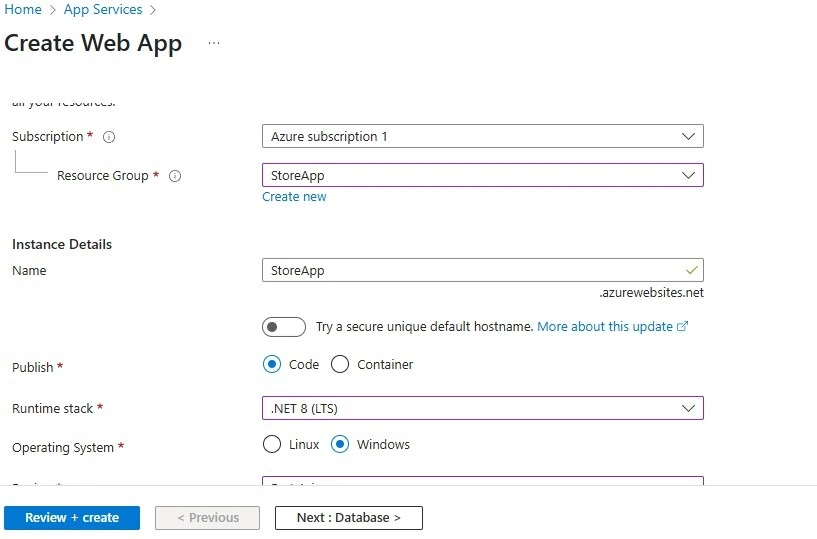
Go to resource once it’s created to check its overview. We have created that resource using a Standard Service Plan in which more than 1 Deployment slots are available.

To the left side panel, we have the “Deployment” section. Click on the Deployment Slot menu to add a new slot for your application to deploy.
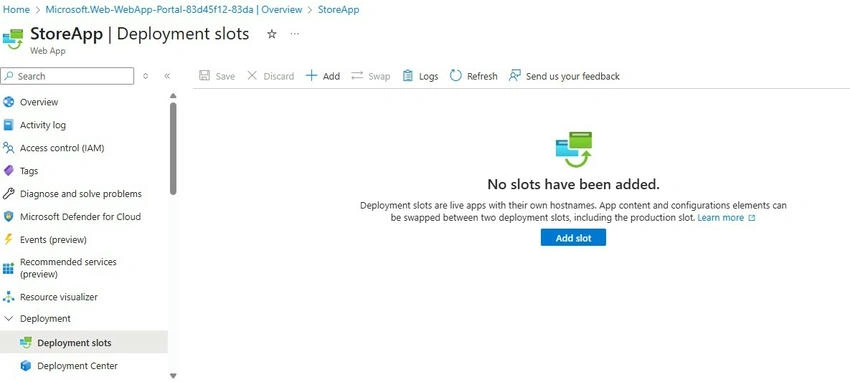
Click on the Add Slot button or a “+ Add” on the menu up of the section.

A dialog will open in which we can name our slot and select whether to clone an app configuration from another deployment slot. You can clone a configuration from any existing slot. Settings that can be cloned include app settings, connection strings, language framework versions, web sockets, HTTP version, and platform bitness.

The new slot now appears on the Deployment slots page. By default, Traffic % is set to 0 for the new slot, with all customer traffic routed to the production slot.
The new deployment slot has no content, even if you clone the settings from a different slot. For example, you can publish to this slot with Git. You can deploy to the slot from a different repository branch or a different repository. The article Get a publish profile from Azure App Service can provide the required information for deploying to the slot. Visual Studio can import the profile to deploy contents to the slot.
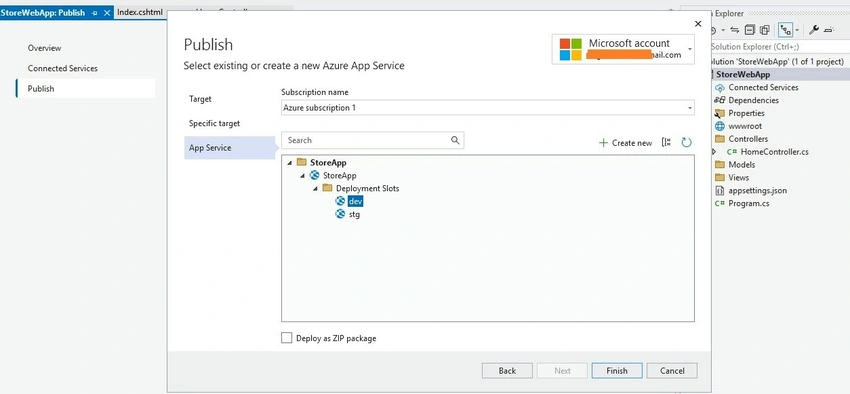
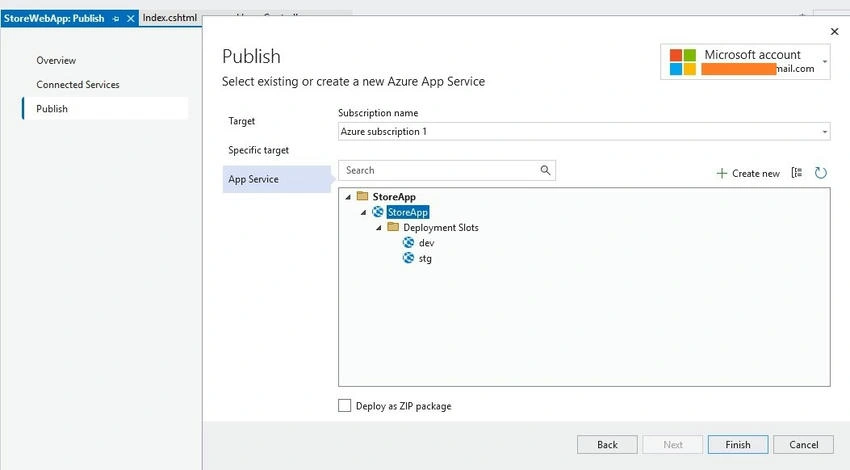
As we have seen in our earlier article where we have deployed our application to the web app directly but here we are going to be specific and select a particular slot to deploy that version of code to that slot. Once you have created a publish profile, you can check the target URL for that selected slot in the below snapshot.

On successfully publishing, an application will be deployed on that slot [i.e. dev].

Follow the same steps for another slot.
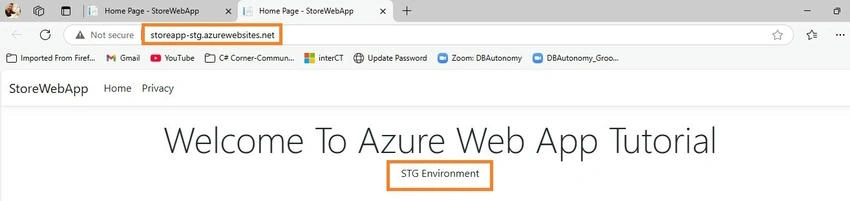
To deploy prod or actual application to the web app, we need to select the web app resource as explained in the last article.
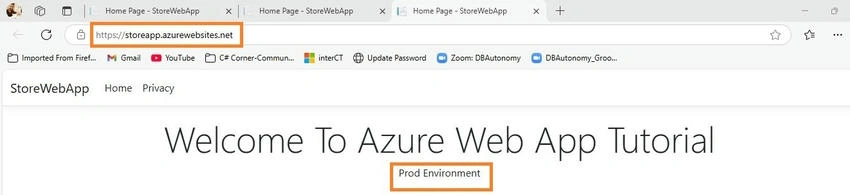
Prod deployed applications use real defined URLs, unlike other slots in which we have suffixes of the slot's name in their respective URLs.
We can also swap slot applications with each other in some scenarios where we need to replace the content of one slot with another without publishing again.
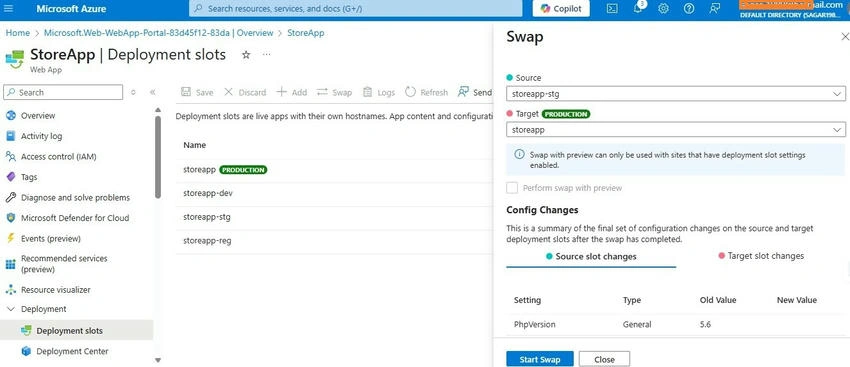
At any point in the swap operation, all work of initializing the swapped apps happens on the source slot. The target slot remains online while the source slot is being prepared and warmed up, regardless of whether the swap succeeds or fails. To swap a staging slot with the production slot, make sure that the production slot is always the target slot. This way, the swap operation doesn't affect your production app.
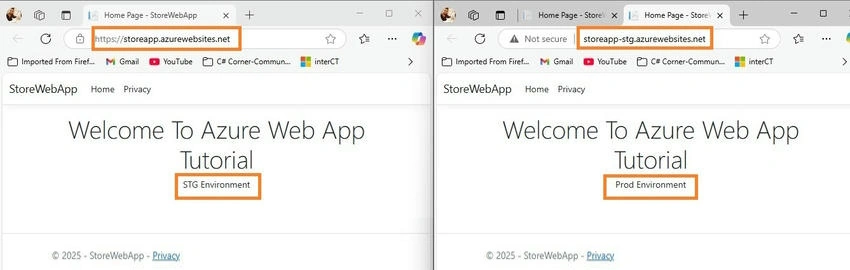
Checking URL and content of each browser it’s been switched with each other as Swap operation functionality.
Before you swap into production as the target slot, validate that the app runs with the swapped settings. The source slot is also warmed up before the swap completion, which is desirable for mission-critical applications. When you perform a swap with a preview, App Service performs the same swap operation but pauses after the first step. You can then verify the result on the staging slot before completing the swap.
If you cancel the swap, App Service reapplies configuration elements to the source slot.
If any errors occur in the target slot (for example, the production slot) after a slot swap, restore the slots to their pre-swap states by swapping the same two slots immediately.
Key Benefits of Using Deployment Slots
- Zero-Downtime Deployments: Deploy new versions of your application to a staging slot and test them in an environment that mirrors production. Once you're confident, you can swap the staging slot with the production slot with minimal to no downtime. This swap operation is quick as it primarily involves virtual IP address changes.
- Simplified Rollbacks: If any issues arise after a deployment, you can instantly revert to the previous version by simply swapping the production slot back to the staging slot. This eliminates the need for complex and time-consuming rollback procedures.
- Isolated Environments: Each deployment slot is a fully functional app with its own configuration settings, such as app settings and connection strings. This isolation allows you to test new features or changes without affecting your production environment.
- Prewarming: When you deploy to a non-production slot, Azure warms up the instances in that slot before swapping it into production. This ensures that the new version of your app is ready to handle requests immediately after the swap, avoiding cold-start delays.
- Testing in Production: You can route a percentage of your live user traffic to a non-production slot for testing new features with real users under production load. This "testing in production" capability provides valuable insights before a full rollout.
- Blue/Green Deployments: Deployment slots facilitate blue/green deployment strategies, where you deploy the new version to a "green" slot while the "blue" slot serves production traffic. After thorough testing on the green slot, you switch traffic to it.
By leveraging Azure Web App Deployment Slots effectively, you can significantly improve your deployment process, reduce downtime, and enhance the reliability of your web applications.
Please check the previous article for a heads up on Azure web app Introduction of Azure Web App Service.


Join the conversation! Your thoughts help the community grow.