

Introduction
"Design the video upload system" is one of the most revealing questions in system design, because almost everyone answers the wrong part of it first.
The instinct is to reach for the upload endpoint. Accept the file, write it to storage, return a URL. That instinct is what the question is actually testing, and it fails at the second bullet point of the requirements.
This article walks through the problem in detail, then builds the solution stage by stage — with .NET code where it clarifies the design.
Key takeaways
Where do videos live? Object storage (S3, Azure Blob, GCS, R2) — never a database, never app server disks
Who uploads to storage? The client, directly, using short-lived pre-signed URLs
How do you move a 5 GB file? Multipart upload, 64–256 MB parts, 4–8 parts in flight concurrently
How do you avoid an API bottleneck? Keep the API as a control plane: it issues credentials and tracks state, nothing else
How do you stop bad files going public? Separate private and public buckets, plus an explicit status state machine
How do you transcode at scale? Split the source at keyframes and fan out one job per segment per rendition
How do you serve globally? HLS/DASH with CMAF segments behind a CDN, immutable cache headers
---
The Problem
Problem 1: The proxy design collapses under arithmetic
The design almost everyone draws first looks like this:
Client → Your API → Your Server → Storage
Let us cost it out. Take a conservative average file size of 500 MB across a million uploads a day. That is 500 TB flowing through your application tier every day, or roughly 46 Gbps sustained — and it is not 46 Gbps, it is 92 Gbps, because every byte arrives on the ingress leg and departs on the egress leg. You pay for bandwidth twice and you provision for it twice.
Bandwidth is only the visible cost. The structural problems are worse:
Connection lifetime. A 50 GB upload over a 20 Mbps residential link takes about six hours. That is a six-hour HTTP connection held open on your web tier, against typical load balancer idle timeouts measured in minutes.
Deployments become destructive. Every rolling restart kills in-flight uploads. With enough concurrency, you can reach a state where you can never deploy without dropping thousands of transfers.
Memory and disk pressure. Buffering multi-gigabyte request bodies means either large memory allocations or spooling to local disk, which reintroduces the disk you were trying to avoid.
Scaling is coupled to the wrong signal. Your API tier now scales on bytes transferred rather than on requests served, so a handful of very large uploads can starve thousands of cheap metadata calls.
Problem 2: A single file is not a single unit of work
The second reflex is to hand the finished file to ffmpeg and encode the rendition ladder in one process.
For a two-hour 4K source, that is a job measured in hours, pinned to a single machine, with no parallelism available and no partial progress. If the machine is preempted at ninety percent, you start again from zero. If you have a million such jobs queued, you cannot buy your way out with bigger machines, because the critical path is the length of one video, not the size of your fleet.
Problem 3: "Upload succeeded" is not the same as "file is good"
A file can arrive with every byte intact and still be unusable. Common cases:
The client crashed mid-write and produced a truncated MP4 with a valid header
The container declares a duration that does not match the actual stream
The upload is not a video at all, just something renamed to
.mp4The file contains malware in an ancillary stream or attachment
The content violates policy or infringes copyright
If your publish step is "mark the row as public when the write completes," every one of these becomes a live URL. The fix is architectural, not procedural — it is not enough to intend to validate, because the intention lives in code that can be bypassed or fail.
Problem 4: Naïve progress tracking becomes a second traffic problem
Showing a progress bar sounds trivial until you consider that a million concurrent uploads polling your API once per second is a million requests per second of pure telemetry — larger than your actual application traffic, and carrying no business value at all.
The Solution
The architecture separates two things that the naïve design conflates: the data plane (video bytes) and the control plane (who is allowed to upload, what state is this video in, what work needs doing). Bytes go client-to-storage and never pass through your servers. Your servers hold metadata, issue credentials, and orchestrate work.
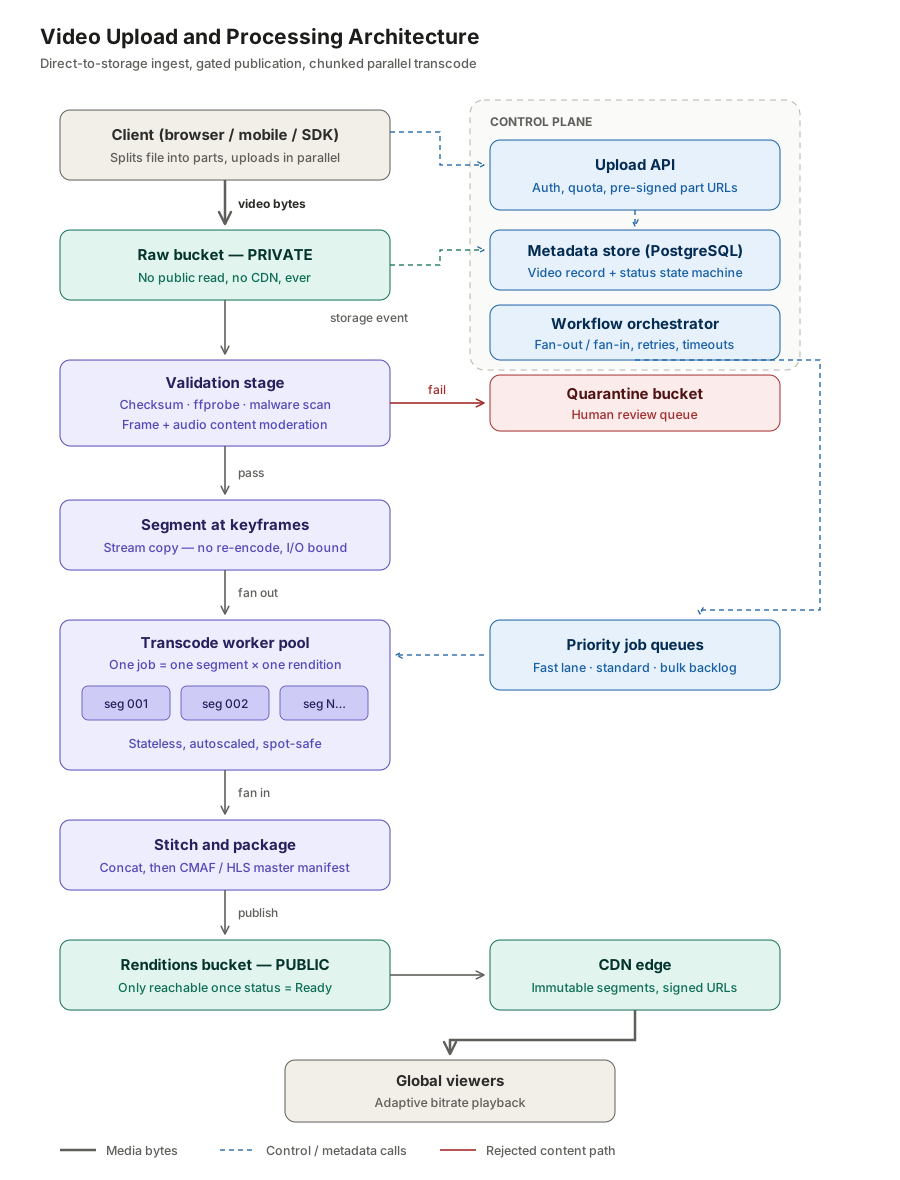
Step 1: Choose object storage, and use three buckets
Videos belong in object storage — Amazon S3, Azure Blob Storage, Google Cloud Storage, or Cloudflare R2. Not in a relational database (BLOB columns destroy your backup and replication story), and not on application server disks (no durability, no shared access, no elastic scale).
Use three buckets, because they have genuinely different security postures and lifecycles:
Bucket Access Purpose Lifecycle
videos-raw Private, no CDN Landing zone for originals Abort incomplete multipart uploads after 7 days; transition to archive after 30 days
videos-renditions Public via CDN only Transcoded output and manifests Infrequent-access tier after 90 days of no reads
videos-quarantine Private, restricted IAM Files that failed validation Retain for review, then purge
That first lifecycle rule deserves emphasis, because it is one of the most commonly missed cost leaks in production video systems. Incomplete multipart uploads bill you for storage indefinitely and do not appear in a normal bucket listing. With millions of uploads a day and a realistic abandonment rate, orphaned parts accumulate into a bill that nobody can explain because nobody can see the objects.
json

{
  "Rules": [{
    "ID": "abort-incomplete-multipart",
    "Status": "Enabled",
    "Filter": { "Prefix": "" },
    "AbortIncompleteMultipartUpload": { "DaysAfterInitiation": 7 }
  }]
}
Step 2: Upload client-to-storage, with the API as control plane only
The answer to the "Client → API → Storage or Client → Storage" question is emphatically the second, using pre-signed URLs.
A pre-signed URL is a storage URL carrying a time-limited, operation-scoped signature derived from your credentials. The client can PUT to exactly that object key, for exactly that duration, and nothing else. Your API never sees the payload; it only decides who gets a signature.
The exchange looks like this:
Client calls POST /api/videos with filename, size, and content type
API authenticates the user, checks quota, creates the database record in status Created, initiates a multipart upload against the raw bucket, and returns the upload ID plus a batch of pre-signed part URLs
Client uploads parts directly to storage
Client calls POST /api/videos/{id}/complete with the part ETags
API completes the multipart upload and advances status to Uploaded
Here is the initiation, using the AWS SDK for .NET:
```csharp

public sealed class UploadInitiationService
{
    private readonly IAmazonS3 _s3;
    private readonly VideoDbContext _db;
    private const string RawBucket = "videos-raw";
    public UploadInitiationService(IAmazonS3 s3, VideoDbContext db)
        => (_s3, _db) = (s3, db);
    public async Task<UploadTicket> CreateAsync(
        Guid userId, string fileName, long fileSize, CancellationToken ct)
    {
        if (fileSize > 50L  1024  1024 * 1024)
            throw new InvalidOperationException("File exceeds the 50 GB limit.");
        var videoId  = Guid.NewGuid();
        var objectKey = $"raw/{userId:N}/{videoId:N}/source";
        var initiate = await _s3.InitiateMultipartUploadAsync(
            new InitiateMultipartUploadRequest
            {
                BucketName        = RawBucket,
                Key               = objectKey,
                ChecksumAlgorithm = ChecksumAlgorithm.CRC32C
            }, ct);
        var chunkSize = ChunkSizing.Calculate(fileSize);
        var partCount = (int)Math.Ceiling((double)fileSize / chunkSize);
        var partUrls = new List<PartUrl>(partCount);
        for (var partNumber = 1; partNumber <= partCount; partNumber++)
        {
            var url = await _s3.GetPreSignedURLAsync(new GetPreSignedUrlRequest
            {
                BucketName = RawBucket,
                Key        = objectKey,
                UploadId   = initiate.UploadId,
                PartNumber = partNumber,
                Verb       = HttpVerb.PUT,
                Expires    = DateTime.UtcNow.AddHours(12)
            });
            partUrls.Add(new PartUrl(partNumber, url));
        }
        _db.Videos.Add(new Video
        {
            Id        = videoId,
            OwnerId   = userId,
            FileName  = fileName,
            SizeBytes = fileSize,
            ObjectKey = objectKey,
            UploadId  = initiate.UploadId,
            Status    = VideoStatus.Created,
            CreatedAt = DateTime.UtcNow
        });
        await _db.SaveChangesAsync(ct);
        return new UploadTicket(videoId, initiate.UploadId, chunkSize, partUrls);
    }
}

```
Notice what this endpoint does not do: it does not read a stream, allocate a buffer, or write a file. It is a database insert and a signature computation. It returns in single-digit milliseconds and scales on CPU, not bandwidth.
Step 3: Move a 5 GB file with multipart upload
Two constraints shape the chunking strategy. S3 requires a minimum of 5 MB per part (the final part is exempt) and permits a maximum of 10,000 parts per upload.
Those bounds interact awkwardly at the top of the range. A 50 GB file divided into 10,000 parts gives 5.24 MB per part — only just above the floor, with no headroom. So a fixed chunk size cannot serve a range from 10 MB to 50 GB. Size the chunk relative to the file:
```csharp

public static class ChunkSizing
{
    private const long MinChunk    = 8L   1024  1024;   //   8 MB
    private const long MaxChunk    = 256L  1024  1024;  // 256 MB
    private const int  TargetParts = 9_000;               // headroom under the 10k cap
    public static long Calculate(long fileSizeBytes)
        => Math.Clamp(fileSizeBytes / TargetParts, MinChunk, MaxChunk);
}
```
This gives sensible results across the whole range:
File size Chunk size Part count
10 MB 8 MB 2
500 MB 8 MB 63
5 GB ~64 MB 80
50 GB 256 MB 200
The client uploads 4 to 8 parts concurrently. Concurrency is what turns a long transfer into a fast one — a single TCP stream rarely saturates a modern connection, and parallel parts recover throughput lost to per-stream congestion control. Each successful PUT returns an ETag, and CompleteMultipartUpload assembles the object server-side from those ETags. The final assembly happens inside the storage service, not on your infrastructure.
Step 4: Track progress on the client, not the server
Upload progress is already known to the client — it is bytes sent divided by total bytes. No server round-trip is required or useful.
```javascript

async function uploadPart(part, blob, onBytes) {
  return new Promise((resolve, reject) => {
    const xhr = new XMLHttpRequest();
    let lastLoaded = 0;
    xhr.upload.onprogress = (e) => {
      onBytes(e.loaded - lastLoaded);   // report the delta
      lastLoaded = e.loaded;
    };

    xhr.onload  = () => xhr.status === 200
      ? resolve(xhr.getResponseHeader('ETag'))
      : reject(new ErrorPart ${part.partNumber} failed: ${xhr.status}));
    xhr.onerror = () => reject(new Error('Network error'));
    xhr.open('PUT', part.url);
    xhr.send(blob);
  });
}

```
Reporting deltas rather than absolute values lets you maintain one accurate aggregate counter across all concurrent parts.
Post-upload processing progress is a different question, and there a server round-trip is unavoidable — but it is cheap. Poll GET /api/videos/{id} every few seconds and read the status field. At this scale, polling a small JSON document is dramatically simpler to operate than maintaining millions of persistent WebSocket connections, and the user-visible difference is negligible.
Step 5: Gate publication behind an explicit state machine
This is the requirement that must be enforced structurally, not by convention.
```csharp

public enum VideoStatus
{
    Created,      // record exists, no bytes yet
    Uploading,    // parts in flight
    Uploaded,     // object assembled in the raw bucket
    Validating,   // checksum, probe, malware scan, moderation
    Processing,   // segmenting and transcoding
    Ready,        // renditions live behind the CDN
    Failed,       // unrecoverable technical failure
    Quarantined   // failed a policy or safety check
}

```
The protection is not the enum. The protection is that the public bucket contains no object for this video until the pipeline puts one there. There is no flag to accidentally flip, no cache to accidentally warm, no URL that could leak. Publication is an action the pipeline performs at the end of a successful run, not a property you set at the beginning of an optimistic one.
Step 6: Trust the storage event, not the client
Your pipeline needs a reliable signal that an upload finished. Use two triggers, and know which one is authoritative.
The client's complete call is a latency optimisation — it lets you start work a second or two sooner. The storage event notification (S3 Event → EventBridge → SQS, or Azure Event Grid) is the source of truth, because clients close laptops, lose connectivity, and crash. Design the handler to be idempotent so that both triggers firing produces one pipeline run:
```csharp

public async Task HandleUploadCompletedAsync(Guid videoId, CancellationToken ct)
{
    // Conditional update: only Uploaded → Validating succeeds.
    // Whichever trigger arrives second updates zero rows and exits.
    var rows = await _db.Videos
        .Where(v => v.Id == videoId && v.Status == VideoStatus.Uploaded)
        .ExecuteUpdateAsync(s => s.SetProperty(v => v.Status, VideoStatus.Validating), ct);
    if (rows == 0) return;
    await _workflowClient.StartWorkflowAsync("VideoProcessing", videoId, ct);
}

```
Step 7: Validate in cost order
Run the cheap checks first so that a bad file is rejected before you spend money on it.
Integrity. Compare the CRC32C checksums that storage computed per part, and the whole-object SHA-256, against a hash the client computed before uploading. This catches corruption on the wire and truncation at the source.
Decodability. Checksums prove the bytes match; they do not prove the file is a working video. Run ffprobe and confirm the container parses, the streams exist, and the reported duration is plausible:
```csharp

public async Task<ProbeResult> ProbeAsync(string localPath, CancellationToken ct)
{
    var psi = new ProcessStartInfo("ffprobe")
    {
        ArgumentList = { "-v", "error", "-print_format", "json",
                         "-show_format", "-show_streams", localPath },
        RedirectStandardOutput = true,
        RedirectStandardError  = true
    };
    using var proc = Process.Start(psi)!;
    var json = await proc.StandardOutput.ReadToEndAsync(ct);
    await proc.WaitForExitAsync(ct);
    if (proc.ExitCode != 0)
        return ProbeResult.Invalid("Container failed to parse.");
    var probe = JsonSerializer.Deserialize<FfprobeOutput>(json)!;
    var video = probe.Streams.FirstOrDefault(s => s.CodecType == "video");
    if (video is null)
        return ProbeResult.Invalid("No video stream present.");
    return ProbeResult.Valid(
        durationSeconds: double.Parse(probe.Format.Duration),
        width:  video.Width,
        height: video.Height,
        codec:  video.CodecName);
}

```
Malware. Scan the raw object with ClamAV in a sandboxed worker with no network access and no credentials beyond read access to the single object. The scan is inexpensive relative to transcoding, so it belongs early.
Content moderation. Sample frames at a fixed interval and pass them through a vision classifier. Transcribe the audio track and run text classification over the transcript. Compute a perceptual hash and an audio fingerprint and match them against your copyright database.
Anything that fails moves to the quarantine bucket and enters a human review queue. It is not deleted — false positives are certain at scale, and an appeal process needs the artefact.
Step 8: Split the video before you transcode it
This is the single most important idea in the processing half of the design.
Do not treat a video as one transcode job. Split it into short segments at keyframe boundaries, then treat every (segment × rendition) pair as an independent unit of work.
The split itself is nearly free, because it is a stream copy rather than a re-encode — I/O bound, not CPU bound:
```bash
ffmpeg -i source.mp4 \
  -c copy -f segment -segment_time 30 \
  -reset_timestamps 1 -segment_format mp4 \
  segments/chunk_%05d.mp4
```
The arithmetic changes completely. A one-hour source becomes roughly 120 segments. Across four renditions, that is 480 independent jobs. Wall-clock time is now bounded by the slowest thirty-second segment plus queueing, rather than by the length of the video. A two-hour 4K film that would take six hours as a monolithic job finishes in minutes, given workers.
Three further benefits follow from the same decision:
Preemptible compute becomes safe. Losing a thirty-second job costs thirty seconds. This is what makes spot and preemptible instances practical, and that is where the majority of transcode cost savings actually come from.
Failures are isolated. One bad segment fails one job, not the whole video.
Concatenation is lossless. Because you split on keyframes, reassembly is another stream copy:
```bash
ffmpeg -f concat -safe 0 -i segments.txt -c copy rendition-720p.mp4
```
Step 9: Build the rendition ladder intelligently
Two rules save a great deal of money.
Never upscale. A 480p source has no business producing a 1080p rendition. Read the probe output and generate only the rungs at or below the source resolution.
Prefer per-title encoding to a fixed ladder. A static talking-head recording and a fast-panning sports clip need very different bitrates to reach the same perceived quality. Running a short VMAF-guided analysis and selecting per-title bitrates typically reduces egress by 20 to 30 percent. At this scale, that is the largest single optimisation available anywhere in the system.
A reasonable starting ladder, before per-title adjustment:
Rendition Resolution Video bitrate Codec
360p 640 × 360 800 kbps H.264 baseline
480p 854 × 480 1.4 Mbps H.264 main
720p 1280 × 720 2.8 Mbps H.264 high
1080p 1920 × 1080 5.0 Mbps H.264 high
Step 10: Orchestrate with a workflow engine, not hand-rolled counters
The pattern you need is fan-out followed by fan-in, with per-job retries, timeouts, and partial-failure recovery. The tempting shortcut is a Redis counter that each worker increments on completion, with the last one triggering the stitch step.
That shortcut fails the moment a worker dies between finishing its work and incrementing the counter — the video is stuck forever, in a state no query can distinguish from "still running." Use Temporal, AWS Step Functions, Azure Durable Functions, or Argo Workflows. Durable orchestration is a solved problem and reimplementing it badly is a reliable source of production incidents.
Step 11: Design queues for a backlog of millions
Priority tiers with separate worker pools. A creator with five million subscribers and a first-time uploader's four-hour screen recording should not share a queue, because a long tail of large low-value jobs will starve the hot path. Fast lane, standard, and bulk, each with its own pool and its own scaling policy.
Two-phase publishing. Transcode 360p first, mark the video Ready, and let playback begin. Backfill 720p and 1080p afterwards; the adaptive bitrate player picks them up as the manifest updates. This drops perceived latency from roughly twenty minutes to under two, and it is the highest-leverage change available for user experience.
Idempotency, everywhere. At-least-once delivery is a certainty at this volume. Derive the output key deterministically and check for existence before doing work:
```csharp
var outputKey = $"work/{videoId:N}/{rendition}/{segmentIndex:D5}.mp4";
if (await _storage.ExistsAsync(outputKey, ct))
    return;   // already done by a previous delivery of this message
```
Poison-pill detection. A segment that fails three times on three different workers indicates a bad source, not a bad worker. Route it to a dead-letter queue and fail the video, rather than retrying indefinitely and burning compute.
Backpressure via queue depth. Autoscale worker pools on queue depth. When depth stays above threshold, shed new work into the bulk tier rather than degrading every tier uniformly.
Step 12: Serve globally with HLS behind a CDN
Package output as CMAF segments with both HLS and DASH manifests. CMAF lets one set of media files serve both protocols, halving your storage and your cache footprint.
Cache headers matter more than they appear to:
```
# Media segments — immutable, cache aggressively
Cache-Control: public, max-age=31536000, immutable
# Manifests — short TTL, they change during two-phase publish
Cache-Control: public, max-age=10
```
Segments are content-addressed and never change, so a one-year immutable TTL is correct and drives your origin offload toward 99 percent. Manifests must stay fresh so that newly completed renditions appear.
For access control, use signed URLs or signed cookies with short expiry. For genuinely global scale, put a steering layer in front of two CDNs, single-provider regional degradation is routine, not exotic.
Finally, tier your storage. Most watch time concentrates on recent uploads, so move originals to archive storage after thirty days and cold renditions to infrequent access. Keep the originals permanently: when the next codec generation matures, re-encoding the catalogue becomes valuable, and you cannot re-encode what you deleted.
Where the money actually goes
Worth stating plainly, because it should drive your optimisation priorities:
CDN egress: by a wide margin the largest line item
Transcode compute: second, and the most reducible via spot instances
Storage of originals: third, and it grows forever
Everything else: including your entire API tier, effectively a rounding error
This ordering is why per-title encoding and preemptible workers matter far more than shaving milliseconds off your endpoints. The API tier is not where the cost lives, and once you have moved bytes out of it, it is not where the risk lives either.
Frequently Asked Questions
Should the client upload to my API or directly to storage?
Directly to storage, using pre-signed URLs. Routing video through your API doubles bandwidth cost, holds connections open for hours, and makes every deployment destructive to in-flight uploads.
What is the maximum file size for a single upload?
Direct PUT tops out at 5 GB on S3. Multipart upload supports objects up to 5 TB, using a maximum of 10,000 parts with a 5 MB minimum per part.
How large should each chunk be?
Scale it to the file: clamp(fileSize / 9000, 8 MB, 256 MB). A 5 GB file gets roughly 64 MB parts; a 50 GB file gets 256 MB parts. A fixed size cannot serve a range from 10 MB to 50 GB.
How do I stop unvalidated videos from becoming public?
Keep raw uploads in a private bucket with no CDN attached, and have the pipeline write to the public bucket only after validation and transcoding succeed. The public bucket simply contains no object for that video until then.
Why split a video before transcoding it?
Because a monolithic transcode is bounded by the length of the video and cannot be parallelised. Splitting at keyframes turns one long job into hundreds of short independent ones, which finish in parallel, retry cheaply, and run safely on preemptible compute.
Do I need a workflow engine, or will queues suffice?
Queues alone are sufficient for simple pipelines. Once you need fan-out/fan-in with partial-failure recovery, which chunked transcoding requires — use a durable workflow engine. Hand-rolled completion counters fail when a worker dies between finishing work and recording it.
How do I reduce CDN costs for video?
Per-title encoding is the biggest lever, typically 20 to 30 percent off egress. Immutable cache headers on segments, CMAF to serve HLS and DASH from one set of files, and storage tiering for cold content follow.
Summary
The design turns on a single decision: separate the data plane from the control plane. Video bytes travel client-to-storage over pre-signed URLs and never enter your application tier. Your API issues credentials, records state, and orchestrates work, all of which are small, fast, cheap operations that scale on CPU.
Everything else follows. Multipart upload handles files from 10 MB to 50 GB with a chunk size scaled to the file. A private raw bucket plus an explicit state machine makes it structurally impossible for an unvalidated file to become public. Keyframe segmentation converts one enormous transcode job into hundreds of small parallel ones, which unlocks preemptible compute and cuts wall-clock time by orders of magnitude. Two-phase publishing gets a playable video in front of the user in under two minutes. CMAF behind a CDN with immutable segment caching delivers it globally.
The question is phrased as "design the video upload system," but the answer is really about knowing which parts of your system should never see the data at all.
If you are building on .NET, the same architecture maps cleanly onto Azure: Blob Storage with SAS tokens for the direct upload, Event Grid for the completion signal, Azure Container Apps Jobs or AKS for the transcode workers, Durable Functions for orchestration, and Azure Front Door for delivery.
Join the conversation! Your thoughts help the community grow.