
The design and structure of an application is more important, as the technical details of its implementation. Upon developing any new project, we should settle on the issues such as the Technologies to use, Database Engine to employ, the Physical Architecture of the application etc. This article will provide some idea on the designing issues in a .NET application.
The following are some of the design issues for an enterprise application:
- Which Language to choose?
- Which Database Engine to employ?
- Web or Desktop User Interface, and mainly the
- Physical Architecture
Which Language to choose?
A wide variety of .NET complaint Languages are available. The Language should be selected in a way that it should let us accomplish the tasks needed by the application.
Consider a GUI intense application or standard business application, in both the cases we could go for a language which supports good User Interface features and IDE s for RAD (Rapid Application development) such as Visual Basic or Visual C#.
Similarly, consider a gaming application or an application which requires intense communication with the underlying hardware of the machine. In such a case we will certainly go for a Language such as Visual C++ and not VB. But the fact is C# will suit both the cases.
Which Database Engine to employ?
This factor depends upon the following:
- The Database engine, the Client might already have in-house.
- The amount of Data
- The ease of integration with other Databases or a different server
- The nature of Data to be stored
Web or Desktop User Interface
Some applications such as E-Commerce, Online shopping carts, Corporate Web Sites and essentially enterprise applications for remote users who have Internet access, clearly need a Web Interface and some need a Desktop User Interface; but there are other applications which make us think for a while before selecting the appropriate User Interface required.
Let's see the basic issues that will help to choose the suitable User Interface.
The application needs a Web UI if
- Users are located in remote sites and have access to the Internet
- The application is a Business to Business (B2B) application
- Application to application communication is easier across platforms and devices which could be achieved seamlessly when Web Services are implemented.
- The application is a Business to Consumer (B2C) application
- Web Applications could reach more rather than a desktop application which could cover only a LAN or it should be distributed thru' CD's and must be installed in each and every PCs.
- The amount of data entered and the number of fields on the screen are fairly minimal
- If there are so much of data to be entered by the user, it will in turn require rich set of User controls, Forms and Dialogs which is facilitated by Desktop UI - Win Forms rather than Web Forms.
- Limited User Interface is what required
- The amount of data to be displayed on the screen is minimal
- Performance can be slower in a Web application because the data and the screen design are sent from the server each time an HTML document is requested. In a desktop application, the interface is rendered locally once, and just the data is brought across a fast network connection.
- Each user "own" their data
- In this case, it could be easy to maintain the sessions and cookies
- Users like to scroll through the data, as opposed to tabbing through data
- Need to have a lot of lengthy screens to be scrolled down
- Deployment costs should be minimal
- Upgrade costs should be minimal
- Web UI provides a centralized application deployment and upgrading thus reducing the deployment and upgrading costs.
- Need to be upgraded frequently
The Web UI also allows using standard HTML interface elements. Some applications take a lot of processing power. Instead of having to update each individual workstation, we can increase the power of the central server.
The application needs a Desktop UI if
- Need to be connected to any special hardware
- Need Drag-and-Drop support
- It is a gaming or CAD, CAM application which needs direct communication with the hardware
- Need much richer set of User Controls
- Deployment of the system can be done through a network, by distributing CDs, or using push servers
- Upgrades can be done through a network, by distributing CDs, or using push servers
Physical Architecture
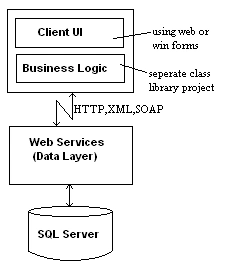
The following are some of the possible architectures for a .NET application
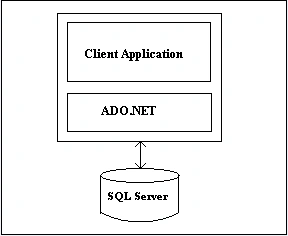
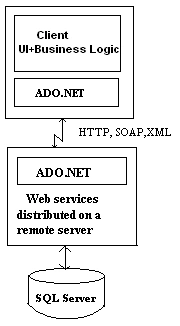
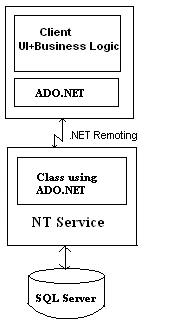
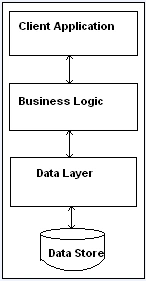
Annie CalverteditedPosted Jul 17, 2012, 3:50 AMEdited Jul 17, 2012, 3:51 AM
This article really gives a way out from a problem which i was facing from a long time.thanks for the much needed help. http://www.dapfor.com/en/net-suite/net-grid/features/performance
Sarabjit SingheditedPosted Feb 3, 2011, 12:42 AMEdited Feb 3, 2011, 12:42 AM
.
knightsPosted Jan 13, 2011, 11:49 AM
Dear Saradha, The write up you provided seems to be the rephrased version of "http://msdn.microsoft.com/en-us/library/ms973829.aspx"; without any references to the origianl writter/msdn(microsoft).Its misleading and doubt creating, for e.g, in MSDN version "Development takes a little longer because you must build separate components." is mentioned as disadvantage in N-Tier and you have listed this as one of the features. Even you if you disagree with the earlier version, i think you should mention the reference of article against which you are proposing new model. To make it different the diagrams you mentioned have taken away the originality of concept from the original article.Thank you.